






Barco
ClickShare Power Supply 100W
Barco ClickShare Power Supply 100W, 100-Watt Video Conferencing Accessory
Logitech Extend
Logitech Extend 952-000199 BYOD Connection Kit, Graphite
Priceon request
QuotationWithin 1 working day
DeliveryConfirmed with your quote, based on stock
Overview
The Logitech Extend 952-000199 is a graphite BYOD connection kit for meeting rooms fitted with Rally Bar, MeetUp or Rally Board 65 systems. One USB-C cable from a laptop or phone lets staff host meetings on their own platform. The display box provides HDMI 2.0 at 4K60, and the table box can power a laptop at up to 100W with a compatible USB-C charger. Suited to Doha offices running mixed Android and BYOD rooms.
What the Logitech Extend kit does in a meeting room
Logitech Extend is a two-box BYOD connector. The display side (RX) box is fitted near the screen, and the table side (TX) box sits at the table where people connect. A host plugs a laptop or mobile device into the table box with the USB-C cable and runs the meeting on their own video platform, rather than relying on the room's built-in computer. The two boxes are linked by an RJ45 cable, and no additional drivers are needed on the connecting device.
Specifications that matter for planning
- Video output: HDMI 2.0 at 4K60 4:4:4 from the display box, for displays with HDMI 1.4 or higher.
- Distance: up to 100 m between boxes with Cat6a cable, or up to 60 m with Cat5e or Cat6, both supplied by the installer.
- Power: auto-sensing supply rated 100-240V, 48V, 0.5A, with up to 100W delivered to a connected laptop through a compatible USB-C charger.
- Ports: two USB 2.0 Type A ports and a micro USB management interface on the display box.
- Environment: operating range 0 to 40 degrees C with 10 to 90% humidity; storage from -25 to 70 degrees C.
- Mounting: 100 x 100 mm VESA pattern and two through-holes for wall or table mounting, with hardware included.
Where it fits across Qatar
In a boardroom in West Bay, visiting officials can bring their own laptops and join the call without asking IT to prepare a room computer. At a university in Education City, lecturers working on personal devices can present in a Rally Bar room with one cable. A school in Al Wakrah that sets up shared meeting rooms for staff and parents can use a MeetUp 2 space so any teacher can start a call from their own platform. Extend is designed for rooms built around the Rally Bar family, Rally Board 65, MeetUp and MeetUp 2.
Planning the installation
Measure the distance between the display and the table before ordering, because the run between the boxes decides which cable grade you need. The 100 m and 60 m limits assume the installer supplies the cable, so agree its specification early. Each box measures 143 mm by 143 mm and is 34.5 mm deep. Keep both boxes within the 0 to 40 degrees C operating range. Summer temperatures in Qatar can exceed 45 degrees C, so run the room's air conditioning and avoid unventilated storage or hot ceiling voids. Check that the laptop has a USB-C port with DisplayPort Alt Mode and runs Windows 10, Windows 11 or one of the two latest macOS versions. SmartRooms Qatar offers a free site survey to confirm cable routes and mounting points before installation.
Security, management and sustainability
- Devices are managed through Logitech Sync device management.
- File-based encryption uses NIST SHA-256, and firmware updates are verified with a digital signature.
- Plastic content is at least 40% post-consumer recycled material, excluding the printed wiring assembly, cables and packaging.
- Packaging is FSC-certified paper.
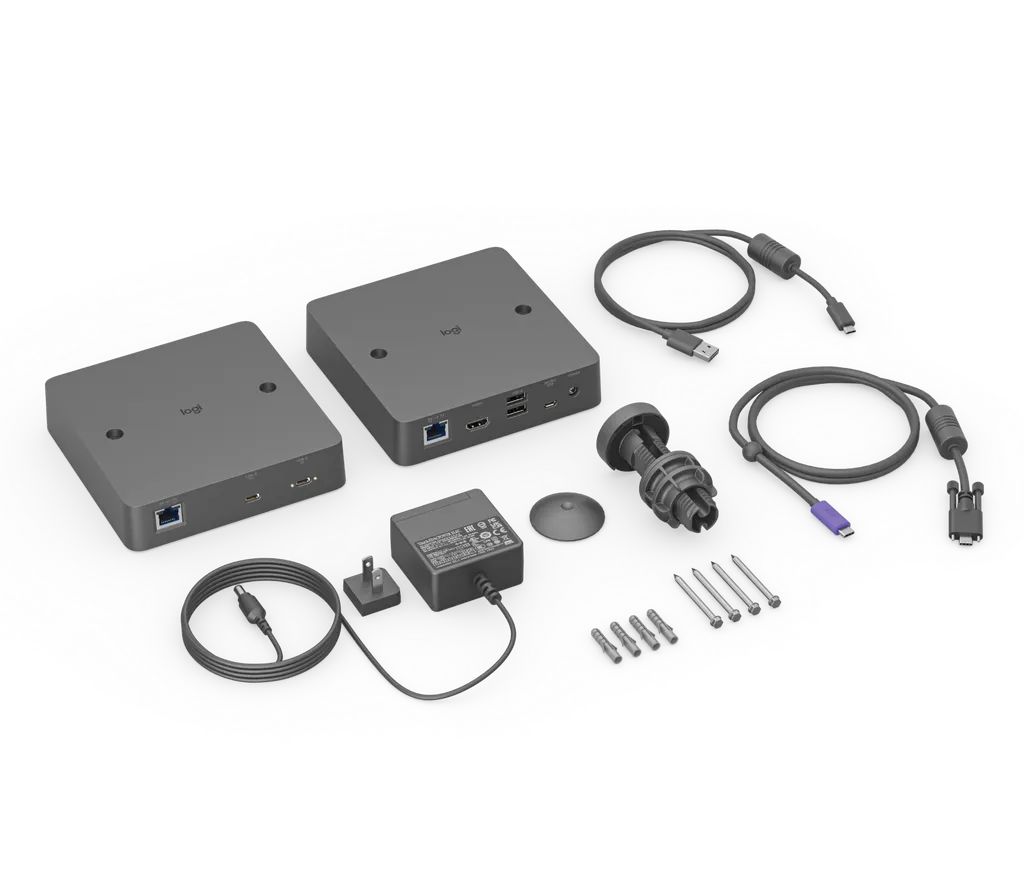
The kit includes both boxes, a USB-C to USB-C cable, a micro USB to USB-A cable, the power supply, mounting hardware, a 25.4 mm grommet adapter, a magnetic dock and user documentation.
Send your room layout and the displays and cameras you already use, and SmartRooms Qatar will prepare a quotation, usually within one working day. Request a quote today and we will cover supply, delivery to all eight municipalities of Qatar and professional installation.
Highlights
- Single USB-C cable from laptop or mobile device to the room
- No additional drivers required on the connecting device
- HDMI 2.0 output at 4K60 4:4:4 from the display box
- Box-to-box run up to 100 m with Cat6a cable
- Up to 100W power delivery with a compatible USB-C charger
- Operating temperature range 0 to 40 degrees C
Room fit
Tell us the room size and platform (Teams, Zoom or BYOD) and we confirm the right combination with your quotation.
Estimated timeline
Quotation within 1 working day · delivery timing depends on stock availability, and we confirm it with your quotation.
Specifications
26 specifications · Source: manufacturer · checked Oct 2026
Part Number1
- Items
- 952-000199
Dimensions - Display Side Box3
- Height
- 143 mm
- Width
- 143 mm
- Depth
- 34.5 mm
Dimensions - Table Side Box3
- Height
- 143 mm
- Width
- 143 mm
- Depth
- 34.5 mm
Technical Specifications - Device Management1
- Items
- Logitech Sync device management
Technical Specifications - Ports and Interfaces2
- Display Side (RX)
- HDMI 2.0 4K60 4:4:4 2x USB 2.0 Type A Micro USB Management Interface Logitech Extend Power RJ45 to Table Side (TX)
- Table Side (TX)
- Secured USB-C (from TX to user laptop) USB-C (optional USB-C power supply connection) RJ45 to Display Side (RX)
Technical Specifications - Mounting2
- VESA
- 100 x 100 mm
- Mounting Holes
- 2 through-holes for mounting directly to the wall or table (mounting hardware included)
Technical Specifications - Power and Cables6
- Power supply
- Auto-sensing
- Operating Voltage/Power
- 100-240V, 48V, 0.5A
- Power Supply Dimensions
- 73.5 mm x 53 mm x 35 mm
- DC Cable
- 1.5 m
- USB-C to USB-C 3.2 Gen 1 Cable
- 1.5 m
- USB A to Micro USB Cable
- 1 m
Technical Specifications - Environmental3
- Operating Temperature
- 0° to 40° C
- Storage Temperature
- -25° to 70° C
- Humidity
- 10% to 90%
Technical Specifications - Security3
- File Based Encryption
- NIST SHA-256 bits
- Data Encryption
- Public Key Hash
- Firmware Update
- Digital Signature
Technical Specifications - Sustainability2
- Made with recycled plastic
- Logitech Extend plastic content: Minimum 40% post-consumer recycled material Excludes plastic in printed wiring assembly (PWA), cables, and packaging
- Responsible Packaging
- FSC™-certified paper packaging
Downloads
2 files from the manufacturerQuestions about Logitech Extend
Would Logitech Extend suit a boardroom in West Bay where visiting officials bring their own laptops?
Yes, if the boardroom uses a Rally Bar family system, Rally Board 65, MeetUp or MeetUp 2. A visitor plugs a laptop into the table side box with the USB-C cable and joins the call from their own platform, so the room does not need a dedicated host computer for guests. Before ordering, confirm the room display accepts HDMI 1.4 or higher and that the laptop has a USB-C port with DisplayPort Alt Mode.
How could a university lecture room in Education City use Extend?
Lecturers working on personal laptops can present in a meeting room without swapping cables or installing extra software. The table side box accepts a USB-C connection, and Logitech states that no additional drivers are required. Pairing it with a Rally Bar or MeetUp system lets the room camera and display carry the session. A site survey helps confirm the cable route between the display and the lectern.
Can a school in Al Wakrah use Extend in shared meeting rooms for staff and parents?
Yes, when the room is built around a compatible system such as Rally Bar Huddle or MeetUp 2. Any teacher can start a call from their own laptop or mobile device, and the table side needs only one USB-C cable. A school equipping several rooms can issue a purchase order (LPO) to SmartRooms Qatar, and the quotation will list each room's kit.
Is Extend suitable for a conference room in a Doha hospital where staff join external video calls?
It suits conference rooms where staff join external video platforms from their own devices, because the host runs the meeting from the platform they prefer. The display box outputs HDMI 2.0 at 4K60 to the room screen. Confirm the room is air conditioned, since the operating range tops out at 40 degrees C, and check the environment with the SmartRooms Qatar team before installation.
Can I install Extend in an unventilated storeroom or an outdoor kiosk?
No. The operating range is 0 to 40 degrees C with 10 to 90% humidity, while summer temperatures in Qatar can exceed 45 degrees C. Place both boxes in air-conditioned indoor spaces, away from direct sunlight and unshaded windows. The storage range is wider, but storage conditions do not mean the kit will run in them. Confirm the environment with SmartRooms Qatar before ordering.
Which Logitech room systems does Extend work with?
The compatibility data lists Rally Bar, Rally Bar Mini, Rally Bar Huddle, Rally Board 65, MeetUp and MeetUp 2, and the model is built for Android- and BYOD-based rooms. Send your current room system model when requesting a quote so the team can confirm the setup matches your room before you order.
Do I need extra drivers or software on the laptop?
No. Logitech states that no additional drivers are required, and the host simply uses the video platform already installed on the device. The laptop needs a USB-C port with DisplayPort Alt Mode and must run Windows 10, Windows 11 or one of the two latest macOS versions. Check these requirements against your device list before ordering.
How far can the display box be from the table box?
The boxes can be up to 100 m apart with Cat6a cable, or up to 60 m with Cat5e or Cat6, and the installer supplies that cable. Measure the full route before ordering, including any vertical run to a ceiling or floor box. Each box measures 143 mm by 143 mm and 34.5 mm deep, which helps when planning where they sit.
How is power delivered to a connected laptop?
The table side box can deliver up to 100W to a connected laptop when a 100W USB-C charger or another standard USB-C power adapter is plugged into it. The supplied power supply is auto-sensing for 100-240V, 48V and 0.5A, with a 1.5 m DC cable, and measures 73.5 mm by 53 mm by 35 mm.
What video output and display requirements apply?
The display box outputs HDMI 2.0 at 4K60 with 4:4:4 colour sampling, and the display must accept HDMI 1.4 or higher according to the compatibility data. Confirm the display input and cable path with the SmartRooms Qatar team during the site survey, so the right cables are ordered before installation.
How should I plan wall or table mounting?
Each box has a 100 x 100 mm VESA pattern and two through-holes for direct mounting to a wall or table, with mounting hardware included. Choose positions that keep the cable run short and away from heat sources. Plan the routing for the box-to-box cable, the power socket and the USB-C access point at the table. SmartRooms Qatar offers a free site survey before mounting.
Can a company ordering several units pay through a purchase order?
Yes. SmartRooms Qatar accepts purchase orders (LPOs), government tenders including Monaqasat, and payment by bank transfer, cheque or purchase order. Send the list of rooms and the number of units for each, and the quotation is usually issued within one working day. Confirm each room's display and cable distance before ordering so every kit is specified correctly.



