





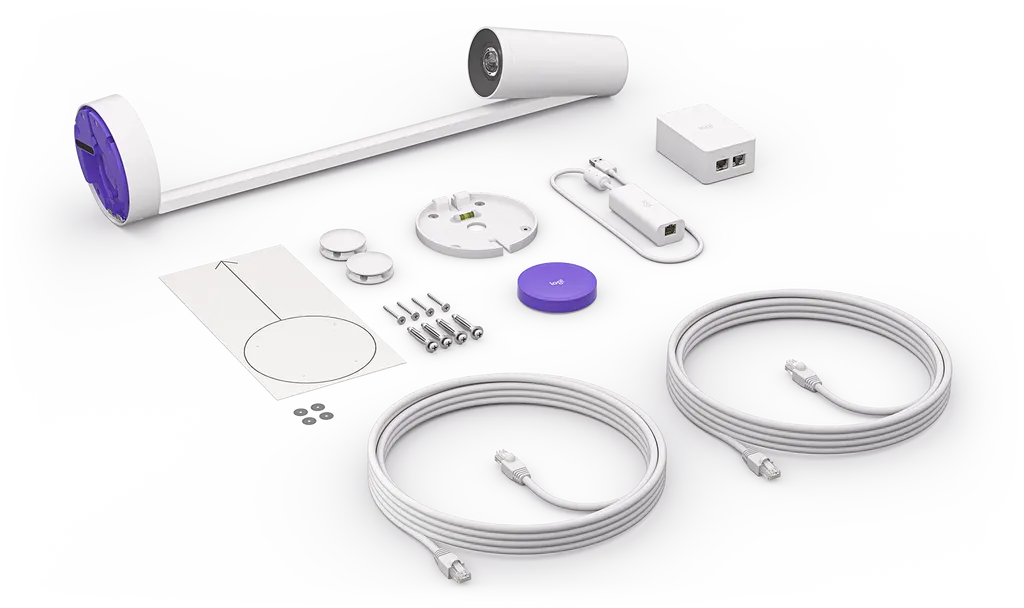
Logitech Scribe
Logitech Scribe Whiteboard Camera for Video Conferencing Rooms
- Field of view
- 148°
The Logitech Scribe is a whiteboard camera that streams your board into Microsoft Teams Rooms, Zoom Rooms and Google Meet Rooms. It captures 1080p at 15 fps with a 148° field of view, and built-in AI lets remote participants see past the presenter's body to the writing. A wireless share button and Logitech Sync management suit boardrooms, lecture theatres and training rooms across Qatar. Request a quote.
What the Logitech Scribe does in a video meeting
The Logitech Scribe is a whiteboard camera built for rooms that run video meetings. It points at your board and streams what is written or drawn on it to colleagues joining remotely, so people elsewhere can follow the diagram, the figures or the action plan as it is created. Scribe is designed to work with Microsoft Teams Rooms on Windows, Google Meet Rooms and Zoom Rooms, and it can also act as a USB camera for almost any other video conferencing application.
Scribe is a practical addition when a room already has a camera for people and you need a separate view of the board. Rather than angling the main camera at a whiteboard and losing detail, a dedicated whiteboard camera gives remote participants a readable image of the writing surface.
Image quality, field of view and the AI transparency effect
The camera outputs 1080p at 15 fps with a 148° field of view. That coverage is rated for whiteboards up to 1.8 m wide and 1.2 m high. The built-in AI produces a transparency effect that lets remote participants see through the presenter, so a person standing in front of the board does not block the content. The result is an AI-enhanced image stream that keeps writing visible while people move around it.
- Resolution: 1080p at 15 fps
- Field of view: 148°
- Maximum whiteboard: 1.8 m wide by 1.2 m high
Where it fits in Qatar
A boardroom in West Bay where directors join from abroad is a typical match. Scribe lets remote members read the strategy slides and diagrams drawn on the wall during discussion without needing a second operator in the room. In Lusail, a training centre running blended courses can mount the camera on a classroom wall so that online trainees follow the instructor's worked examples. At a university in Education City, a lecturer can connect the camera to a laptop over USB and share the board during a hybrid lecture.
Planning the share button, power and cabling
The share button connects over Bluetooth Low Energy and runs on two CR2032 batteries. It is adhesive-backed, so it can be placed on a table or wall close to the presenter. Share button support can vary by video conferencing provider, so confirm your platform before ordering. The power supply is rated 100-240V and auto-switching, and the box includes an international adaptor set. Two 5.0 m Cat5e cables and a 500 mm dongle transceiver cable are also supplied, so measure the distances between the board, the room system and the power socket.
Environment and mounting checks before you order
Scribe is rated for an operating temperature of 0 to 40°C and humidity from 10 to 95 percent. Summer heat in Qatar can exceed 45°C, so install it only in air-conditioned rooms and keep it out of direct sunlight coming through glass. The camera measures 149 mm high, 119 mm wide and 573 mm deep, and weighs 1.1 kg. Its installation kit suits a range of wall surfaces, and a glass mount is available for glass surfaces. A free site survey from SmartRooms Qatar helps confirm the wall or glass, the sightline and any glare before installation.
If the room has very bright lighting, the polarizing filter is listed as an optional accessory that suppresses glare. Include it in your request if reflections are a concern.
Request a quote for your meeting rooms
To request a quote for the Logitech Scribe, tell us how many rooms you need, which video platform you use and the size of each whiteboard. SmartRooms Qatar usually sends a quotation within one working day. We supply and deliver to all eight municipalities of Qatar, arrange professional installation, and accept purchase orders (LPOs), government tenders through Monaqasat, bank transfer and cheque payments.
Highlights
- 1080p output at 15 fps with a 148° field of view
- Built-in AI transparency effect that shows content behind the presenter
- Works with Teams Rooms, Zoom Rooms and Google Meet Rooms
- Wireless share button using Bluetooth Low Energy
- Covers whiteboards up to 1.8 m wide and 1.2 m high
- Operating range 0 to 40°C with 10 to 95% humidity
Room fit
Tell us the room size and platform (Teams, Zoom or BYOD) and we confirm the right combination with your quotation.
Estimated timeline
Quotation within 1 working day · delivery timing depends on stock availability, and we confirm it with your quotation.
Specifications
Part Number1
- Items
- 960-001332
Dimensions - Camera4
- Height
- 149 mm
- Width
- 119 mm
- Depth
- 573 mm
- Weight
- 1.1 kg
Dimensions - Share Button3
- Height
- 12.7 mm
- Diameter
- 71.8 mm
- Weight
- 108 g
Dimensions - Power Injector3
- Height
- 91 mm
- Width
- 60.2 mm
- Depth
- 36.3 mm
Dimensions - Dongle Transceiver4
- Height
- 22.5 mm
- Width
- 31 mm
- Depth
- 83.7 mm
- Cable length
- 500 mm
Dimensions - Included Cabling (x2)1
- Length
- 5 m
Technical Specifications - Certifications & Compatibility1
- Items
- Integrates with Microsoft Teams Rooms on Windows, Google Meet Rooms, and with Zoom Rooms as a whiteboard content camera. · See www.logitech.com/support/scribe-compatibility for pending and granted certifications and compatibility updates. · Compatible with virtually any video conferencing application as a USB-connected camera.
Technical Specifications - Camera3
- Output Resolution
- 1080p at 15 fps
- FoV
- 148°
- Built-In AI
- Broadcasts AI-enhanced image stream into video meetings
Technical Specifications - Share Button2
- Power
- 2 x CR2032 battery
- Items
- Adhesive-backed mounting · Share button support may vary by video conferencing service provider. See www.logitech.com/support/scribe-compatibility for latest information.
Technical Specifications - Whiteboard2
- Maximum Whiteboard Dimensions > Height
- 1.2 m
- Maximum Whiteboard Dimensions > Width
- 1.8 m
Technical Specifications - Interfaces2
- Camera
- Category Cable Port
- Share Button
- Bluetooth® Low Energy
Technical Specifications - Power & Cables1
- Power supply
- 100-240V auto-switching power supply with international adaptor set
Technical Specifications - Environmental3
- Operating Temperature
- 0 to 40°C
- Storage Temperature
- -40-70°C
- Humidity
- 10-95%
Technical Specifications - Security1
- Full Disk Encryption
- AES-128
Technical Specifications - Device Management1
- Items
- Logitech Sync




