






Barco
ClickShare Power Supply 100W
Barco ClickShare Power Supply 100W, 100-Watt Video Conferencing Accessory
Logitech Swytch
Logitech Swytch 952-000010 BYOD Laptop Room Connectivity Kit
- Video
- 4K/30 fps
Priceon request
QuotationWithin 1 working day
DeliveryConfirmed with your quote, based on stock
Overview
The Logitech Swytch 952-000010 lets a laptop take over a meeting room's camera and display through a single cable, so staff can join any video meeting without a room PC. The Swytch Connector plugs into USB 3.0 Type A or Type C ports, the hub drives a 4K/60 fps HDMI 2.0 display and provides 60 W to compatible laptops. It suits Qatari offices and schools with USB conference cameras.
What the Swytch system does in a meeting room
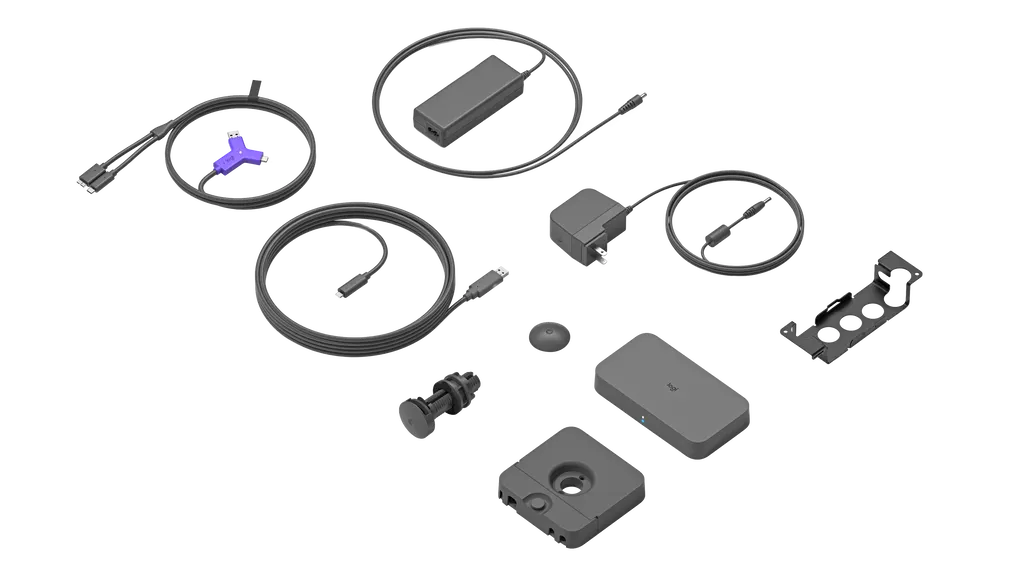
Logitech Swytch 952-000010 turns a visitor's or employee's own laptop into the controller for a meeting room. Instead of relying on a dedicated room computer, the user plugs the Swytch Connector into a laptop, and the room's USB conference camera and HDMI display come online through one link. The system has three parts: the Swytch Hub, which connects to the camera and display; the Swytch Extender, which carries the link between the hub and the Connector; and the Connector itself, which sits within reach on the table and rests in a magnetic dock when not in use.
Facts that matter for buyers
- Display output: up to 4K at 60 fps to one meeting room display over HDMI 2.0.
- Camera support: up to 4K at 30 fps from a USB-connected conference camera.
- Laptop power: up to 60 W delivered to laptops that charge over USB-C.
- Ports: USB 3.0 Type A and Type C connections on the Connector, covering Chromebooks, Windows and Mac laptops with USB 3.0.
- Management: monitoring and remote management through Logitech Sync, which also covers MeetUp and Rally devices.
Because it uses DisplayLink Plug-and-Display technology, a single connection carries both USB devices and the HDMI display. Laptop audio can be shared locally in the room and into online meetings, provided the video service supports content sharing with system audio. For the user, the setup comes down to plugging in one connector.
Where it fits in Qatar
A university in Education City can use Swytch in seminar rooms where visiting lecturers and guest speakers bring their own laptops and need to present to a camera-equipped room without a dedicated PC. A government authority in Msheireb or West Bay can use it in shared boardrooms where several departments take turns presenting, each arriving with a different laptop. An international school in Al Wakrah or Al Sadd can fit it into staff meeting rooms, and a company in Lusail or The Pearl that holds frequent calls with teams abroad can let any employee join any video service from the same table.
Planning the installation
Before ordering, confirm which room equipment you have. Swytch is built for rooms that use USB-connected conference cameras, video bars or modular cameras together with an HDMI display. The hub measures 164 mm wide, 90 mm deep and 27.4 mm high. The extender measures 120 mm by 120 mm, with the same 27.4 mm height. The hub is compatible with the Logitech PC Mount, which is sold separately. The extender can pass through a 25 mm grommet hole or be fixed under the table with the included hardware.
- Included: a 5 m and a 2.2 m USB 3.0 cable, a 2.0 m HDMI 2.0 cable, and power supplies rated 100-240 V for the hub and extender.
- Optional: Logitech Strong USB cables in 10 m and 25 m lengths for longer runs.
Qatar's 240 V supply falls within the 100-240 V power rating. The operating temperature range is not listed in the product data, so confirm the install location with the SmartRooms Qatar team before placing the hub or extender near windows or in spaces that run hot. A free site survey is the right time to check cable routes, table layout and mount points before installation.
Request a quote
Tell the SmartRooms Qatar team how many rooms you are equipping and which cameras and displays they use. We supply Swytch, deliver to all eight municipalities of Qatar, arrange professional installation and issue a quotation usually within one working day. Purchase orders, LPOs and government tenders, including Monaqasat, are accepted, and payment can be made by bank transfer, cheque or purchase order. The product is covered by the manufacturer's warranty. Request a quote today for your meeting rooms.
Highlights
- One-cable laptop link to a room's USB camera and HDMI display
- Display output up to 4K at 60 fps over HDMI 2.0
- USB 3.0 Type A and Type C connectors on the Swytch Connector
- Up to 60 W power for laptops that charge via USB-C
- Works with Chromebooks, Windows and Mac laptops with USB 3.0
- Remote monitoring and management through Logitech Sync
Room fit
Tell us the room size and platform (Teams, Zoom or BYOD) and we confirm the right combination with your quotation.
Estimated timeline
Quotation within 1 working day · delivery timing depends on stock availability, and we confirm it with your quotation.
Specifications
22 specifications · Source: manufacturer · checked Oct 2026
Part Number1
- Items
- 952-000010
Dimensions - Swytch Hub3
- Height
- 27.4 mm
- Width
- 164 mm
- Depth
- 90 mm
Dimensions - Swytch Extender3
- Height
- 27.4 mm
- Width
- 120 mm
- Depth
- 120 mm
Technical Specifications - Swytch Hub1
- Items
- Power · HDMI 2.0 to Display · HDMI 2.0 to Meeting Room Computer · USB 3.0 Type A to Conference Camera · USB 3.0 Type C to Meeting Room Computer · USB 3.0 Type C to Swytch Extender
Technical Specifications - Swytch Extender1
- Items
- Power · USB 3.0 Type A to Swytch Hub · USB 3.0 Type C to Swytch Connector · USB 3.0 Micro B to Swytch Connector
Technical Specifications - Swytch Connector1
- Items
- USB 3.0 Type A to laptops with Type A ports · USB 3.0 Type C to laptops with Type C ports
Technical Specifications - Mounts3
- Swytch Hub
- Compatible with Logitech PC Mount (not included)
- Swytch Extender
- Mount through a 25 mm grommet hole or attach below the table with included hardware
- Swytch Connector
- Magnetic dock included
Technical Specifications - General Specifications6
- Number of Meeting Room Displays
- 1
- Maximum Resolution and Frame Rate, Display
- 4K/60 fps
- Maximum Resolution and Frame Rate, Camera
- 4K/30 fps
- Laptop Audio for Local Sharing
- Yes
- Laptop Audio for Online Meetings
- Yes (with services that support content sharing with system audio)
- Device Management
- Remote monitoring and management via Logitech Sync
Technical Specifications - Compatibility3
- Conference Cameras
- Works with Logitech Rally and Rally Plus, Rally Bar, Rally Bar Mini, MeetUp, GROUP, and other conference cameras that connect via USB
- Room Solutions
- Microsoft Teams Rooms Zoom Rooms Also compatible with other room solutions that use USB-connected conference cameras and an HDMI-connected display.
- Cabling
- Logitech Strong USB 10m Logitech Strong USB 25m
Downloads
1 file from the manufacturerQuestions about Logitech Swytch
What is the Logitech Swytch 952-000010 used for?
It lets a laptop take over a meeting room's USB conference camera and HDMI display through one connection, so people can join or host any video meeting without a dedicated room computer. It suits rooms where staff, guests or lecturers bring their own laptops. It works with Microsoft Teams Rooms and Zoom Rooms setups, and with other room solutions that use a USB camera and an HDMI display.
Which laptops does Swytch work with?
Swytch works with Chromebooks, Windows and Mac laptops that have a USB 3.0 or higher Type A or Type C port. The Swytch Connector has both Type A and Type C connectors, so it can plug into either style of port. Supported operating systems listed are Windows 10, macOS 10.15 and later, and ChromeOS 75 or later, using DisplayLink Plug-and-Display drivers. Ask us to check your laptop models before ordering for a whole school or office.
Will a laptop charge while it is connected to the room?
Yes, for laptops that charge through USB-C. Swytch provides up to 60 watts of power over USB Power Delivery, which helps keep a laptop charged during a long presentation in a boardroom. Laptops that do not charge over USB-C are not covered by this figure. Check your laptop's charging requirement against the 60 W limit before rolling the system out across a fleet of devices.
What does a meeting room need before installing Swytch?
The room needs a display with an HDMI input and a USB-connected conference camera, such as Logitech Rally, Rally Plus, Rally Bar, Rally Bar Mini, MeetUp or GROUP, or another USB camera with a speakerphone. Swytch is built around these USB and HDMI connections, so rooms with cameras that do not connect over USB need a closer check during the free site survey before you commit to an order.
What resolution does Swytch support?
The hub sends up to 4K at 60 frames per second to the meeting room display over its HDMI 2.0 output, and accepts up to 4K at 30 frames per second from the conference camera. These are maximum figures. A 4K display only delivers its full benefit if the camera, the cabling and the rest of the room system support the same resolution, so check each component before ordering.
Our West Bay boardroom has a large display on the far wall. Will the included cables reach?
The package includes a 2.0 m HDMI 2.0 cable, a 2.2 m USB 3.0 cable and a 5 m USB 3.0 cable, so measure the path from the hub to the display and the camera first. Longer USB runs can use Logitech Strong USB cables in 10 m or 25 m lengths, which are listed as compatible options. The data does not give a maximum HDMI cable length, so confirm the route during the free site survey.
Can visiting lecturers at a university in Education City use their own laptops in seminar rooms?
Yes. A lecturer or guest speaker plugs the Swytch Connector into a personal laptop with a USB 3.0 Type A or Type C port, and the room's camera and display become available without a dedicated room PC or a dongle. The Connector stays within reach on the table and rests in its magnetic dock when not in use. In a seminar room where presenters change often, this keeps the setup consistent for every visitor.
Does a school in Al Wakrah need a room computer to use Swytch?
No. Swytch is designed for rooms without dedicated computers, so a teacher's own laptop becomes the room controller for video calls with parents, partner schools abroad or remote specialists. The hub connects the USB camera and HDMI display, and one cable links the Connector to the laptop. Staff in a classroom or staff meeting room can start a call without learning a complicated control panel.
How should the hub and extender be mounted in a government office in Msheireb?
The Swytch Hub is compatible with the Logitech PC Mount, which is sold separately and not included in the box. The Swytch Extender can pass through a 25 mm grommet hole in the table or be fixed under it with the included hardware. The Connector comes with a magnetic dock. Plan these positions during a free site survey, so cable runs to the camera and display stay tidy and mount points are confirmed before installation begins.
Are the power supplies suitable for Qatar's electricity supply?
Both the Swytch Hub and the Swytch Extender come with power supplies rated 100-240 V. Qatar's mains supply is 240 V at 50 Hz, which falls within that range. The product data does not state the plug type, so confirm during the site survey that the supplied plugs suit the outlets in each room. This is worth checking in older buildings before you order a larger number of units.
Can an IT team at a company in Lusail manage Swytch remotely?
Yes. Logitech Sync lets the team monitor and manage Swytch alongside other meeting room devices such as MeetUp and Rally. This helps an IT team that supports several meeting rooms across a Lusail office or campus, and keeps meetings between Doha and colleagues abroad running smoothly. The product data does not describe Sync licensing or subscription terms, so ask the SmartRooms Qatar team about any such terms before you order.
Does laptop audio play in the room and in online meetings?
Yes. Laptop audio can be shared locally in the room, and it can be sent into online meetings with services that support content sharing with system audio. Swytch also carries full-motion video and audio from the laptop to the room display and speakers. Check that your chosen video service supports system audio sharing before relying on it for a meeting where sound matters.



