






Barco
ClickShare Power Supply 100W
Barco ClickShare Power Supply 100W, 100-Watt Video Conferencing Accessory
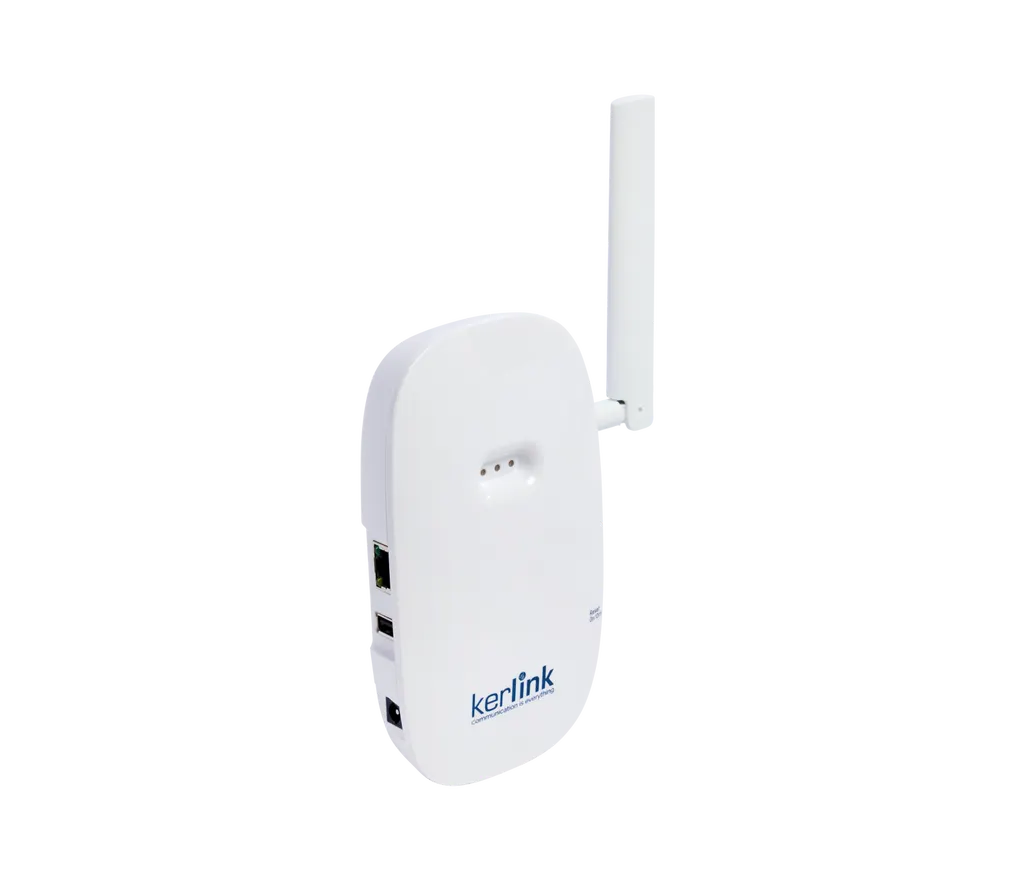
LoRaWAN Gateway for Logitech Spot
Logitech LoRaWAN Gateway for Logitech Spot (950-000124) Indoor Hub
- Platforms
- Only with Logitech Spot sensor
- Connectivity
- Wi-Fi 2.4GHz and Ethernet (RJ45)
Priceon request
QuotationWithin 1 working day
DeliveryConfirmed with your quote, based on stock
Overview
This indoor Kerlink hub connects hundreds of Logitech Spot sensors over LoRaWAN, with no Wi-Fi or cabling between sensors and the hub. It stays separate from your corporate Wi-Fi, encrypts sensor traffic end to end and is managed through Sync. It suits multi-floor offices in West Bay or Lusail where Spot sensors cover rooms without a CollabOS device. Request a quote from SmartRooms Qatar.
What this gateway does for a Spot sensor network
The Logitech LoRaWAN Gateway for Logitech Spot (950-000124) is an indoor hub built on a Kerlink gateway and configured for Logitech Spot sensors. It is designed to connect hundreds of sensors across an office, particularly in areas that do not have a Logitech CollabOS device such as a Tap Scheduler or Rally Bar. Sensors reach the hub over LoRaWAN, a long-range wireless protocol, so no Wi-Fi link or cabling is needed between each sensor and the gateway.
Radio performance and placement
Coverage depends mostly on where the hub sits. Choose a central position on the floor or in the building with clear, unobstructed reception. The hub has a swivel LoRa antenna with 3 dBi peak gain on an SMA or RP-SMA connector, a receive sensitivity of -141 dBm at SF12, and transmit power that can be configured between 5 dBm and 27 dBm. These settings let planners tune the radio to the size and layout of each floor.
Security and remote management
The LoRaWAN link is encrypted end to end, and the gateway runs separately from your corporate Wi-Fi. It can therefore sit outside the main corporate network while still sending all sensor data securely to the Sync platform. The hardware includes SecureBoot, SecureStorage, mTLS protection and SafeReboot. You provision and configure the gateway remotely through the Sync Portal, then monitor it and the Spot sensors from Sync. Firmware is required for configuration and management, so confirm firmware access with your IT team before installation.
Where it fits in Qatar
Three situations where this hub makes sense:
- Multi-floor head office in West Bay or Lusail: open-plan floors and meeting rooms where Spot sensors cover spaces without a CollabOS device, all managed from Sync.
- University building in Education City: teaching and seminar rooms spread across several wings, where sensors run without extra cabling between rooms.
- Administrative block at an industrial site in Mesaieed: a sensor data network kept apart from the Wi-Fi used by staff.
Planning the installation
The hub mounts on a wall using two oblong holes, or it can lie flat on a table using four domes. Backhaul is either Ethernet (RJ45, 10/100 Mbps) or Wi-Fi 2.4GHz. Ports and controls include a USB Type A port for configuration, a WPS button, a reset button and three status LEDs for power, backhaul and LoRa activity. The casing is rated IP30, so keep the unit indoors. The gateway itself is rated for -20°C to +55°C and 5% to 95% humidity, excluding the power supply. The supply is listed for 230 VAC input and 12 VDC output through a 2.5 mm/5.5 mm jack. Qatar mains is 240 V, 50 Hz, so ask SmartRooms Qatar to confirm the supplied unit suits your site before ordering. The box contains the indoor LoRa gateway, the power supply and user documentation.
Every site is different, so SmartRooms Qatar offers a free site survey to pick the hub position before installation. Request a quote and our team will confirm the configuration, accessories and availability with your quotation.
Highlights
- Connects hundreds of Logitech Spot sensors over LoRaWAN
- No Wi-Fi or cabling between sensors and the hub
- Encrypted LoRaWAN link, separate from corporate Wi-Fi
- Swivel LoRa antenna with 3 dBi peak gain
- Receive sensitivity of -141 dBm at SF12
- Remote provisioning and management through Sync
Room fit
Tell us the room size and platform (Teams, Zoom or BYOD) and we confirm the right combination with your quotation.
Estimated timeline
Quotation within 1 working day · delivery timing depends on stock availability, and we confirm it with your quotation.
Specifications
24 specifications · Source: manufacturer · checked Oct 2026
Part Number1
- Items
- 950-000124
Technical Specifications - System Requirements2
- Compatibility
- Only with Logitech Spot sensor
- Additional software
- Firmware required for configuration and management, see hub.sync.logitech.com/logitech-spot for more details.
Technical Specifications - Electrical & Environmental3
- Power supply
- 230VAC/12VDC with provided jack connector 2.5mm/5.5mm
- Operating temperature
- -20°C +55°C (for gateway only, without power supply)
- Humidity
- 5% to 95%
Technical Specifications - Ports & Interfaces5
- Connectivity
- RJ45
- Buttons
- WPS push button, Reset button
- Programmable LEDs
- 1 x LED (green/red) for Power status, 1 LED (green/red) for Backhaul status, 1 LED (green/red) for LoRa rf activity Rx/Tx
- USB (Type A)
- for configuration
- SMA or RP-SMA
- for LoRa antenna
Technical Specifications - Mounting1
- Mounting options
- Wall mounting by 2 oblong holes or lay on a table (4 domes)
Technical Specifications - Connectivity5
- Ethernet
- 10/100 Mbps
- Backhaul connectivity
- Wi-Fi 2.4GHz and Ethernet (RJ45)
- Rx Sensitivity
- -141 dBm (SF12)
- TX Conducted Power
- configurable from 5dBm to 27dBm
- Antenna gain
- LoRa swivel antenna 3 dBi peak gain
Technical Specifications - Security1
- Security Options
- SecureBoot, SecureStorage, mTLS Protection, SafeReboot
Technical Specifications - General Specifications6
- BLE sniffer
- Sniffer for LBT (Listen Before Talk)
- Spectrum analysis
- compliant
- Casing
- IP30
- CPU
- ARM Cortex A9
- Main memory
- DDRAM 256MB
- Flash memory
- 8GB eMMC (6GB available for user)
Downloads
1 file from the manufacturerQuestions about LoRaWAN Gateway for Logitech Spot
What is the Logitech LoRaWAN Gateway for Logitech Spot used for?
It is the hub that links Logitech Spot sensors to your network. It is an indoor Kerlink gateway configured for Spot sensors, aimed at office areas that lack a CollabOS device such as a Tap Scheduler or Rally Bar. Sensors reach the hub over LoRaWAN, so you avoid running Wi-Fi or cabling between each sensor and the gateway, and the data is sent to Sync for monitoring and management. Request a quote if you are planning coverage for a whole floor or building.
Which sensors work with this gateway?
According to the manufacturer, the gateway works only with Logitech Spot sensors. Each Spot sensor must be activated to ensure complete LoRaWAN connectivity, so include commissioning in your plan. When you request a quote, SmartRooms Qatar can review your sensor list and floor plans with you so the rollout matches the spaces you want covered.
How many Spot sensors can one gateway connect?
The manufacturer describes the gateway as able to connect hundreds of Spot sensors. Real capacity depends on the building layout, the walls and where the hub is placed, so the number one gateway covers in your building should be confirmed through a site survey. For a large office, the survey shows whether one hub covers the required floor or whether more hubs are needed. Attach your floor plans when you request a quote.
Where should the gateway be placed for the best reception?
Place it in a central position on the floor or in the building where reception is clear and unobstructed. The hub has a swivel LoRa antenna with 3 dBi peak gain on an SMA or RP-SMA connector, so you can angle it once the position is set. Where possible, avoid dense obstructions such as lift shafts. A site survey before mounting helps identify the best point in a multi-floor office in West Bay or Lusail.
Does the gateway need Wi-Fi to connect the sensors?
No. The sensors connect to the gateway over LoRaWAN, so no Wi-Fi link or cabling is needed between them and the hub. The hub itself needs a backhaul connection, which can be Wi-Fi 2.4GHz or Ethernet (RJ45, 10/100 Mbps). Ethernet is the simpler choice in an office with a wired network point near the mounting position, and the gateway stays separate from the Wi-Fi network used by staff.
Can the gateway sit outside the corporate network?
Yes. The manufacturer states that the gateway is separate from your Wi-Fi network, which allows it to sit outside the corporate network while sending sensor data securely to the Sync platform. The LoRaWAN link uses end-to-end encryption, and the hardware includes SecureBoot, SecureStorage, mTLS protection and SafeReboot. This suits government bodies and banks that want sensor traffic kept away from staff networks.
How is the gateway set up and managed?
You provision and configure it remotely through the Sync Portal, and monitor the gateway and Spot sensors from Sync, Logitech's platform for managing collaboration devices and spaces. Firmware is required for configuration and management, so your IT team should confirm firmware access before installation. A USB Type A port is provided for local configuration. SmartRooms Qatar can include the planned setup in your quotation.
What power does the gateway need?
The power supply is listed for 230 VAC input and 12 VDC output, connecting to the gateway through a 2.5 mm/5.5 mm jack. The box includes the power supply, so no separate adapter is needed. Qatar mains is 240 V, 50 Hz, so ask SmartRooms Qatar to confirm that the supplied unit suits your site before you order. The operating temperature range applies to the gateway only, without the power supply.
Can it be installed in a hot plant room or outdoors in Qatar?
No. It is an indoor device with an IP30 casing, so keep it inside buildings and away from outdoor exposure. The gateway is rated for -20°C to +55°C and 5% to 95% humidity, excluding the power supply. Summer temperatures in Qatar can exceed 45°C, so check the ambient temperature of a plant room or roof space before placing the hub there. If the location is uncertain, confirm conditions with SmartRooms Qatar first.
How is the gateway mounted?
It can be wall mounted using two oblong holes, or laid flat on a table using four domes. Wall mounting keeps the unit off desks and tables in a meeting room or open-plan area. Plan the Ethernet cable route before fixing the unit to the wall, and keep it clear of large metal objects. A site survey confirms the mounting height and position.
We are a university in Education City. Can we buy with a purchase order?
Yes. SmartRooms Qatar accepts purchase orders (LPOs), government tenders including Monaqasat, and payment by bank transfer, cheque or purchase order. Send the Spot sensor count, the floor plan and the spaces to be covered, and we will return a quotation, usually within one working day. Products are covered by the manufacturer's warranty.
Is a site survey needed before installing the gateway?
A site survey is recommended because reception depends on walls, floors and building layout. SmartRooms Qatar provides free site surveys, which help place the hub for a multi-floor office in West Bay or a teaching block in Education City. The survey sets the hub position, mounting method and Ethernet route before the quotation is finalised.



