






Barco
ClickShare Power Supply 100W
Barco ClickShare Power Supply 100W, 100-Watt Video Conferencing Accessory
PC Mount
Logitech PC Mount 939-001825 for Mini PCs and Chromeboxes
Priceon request
QuotationWithin 1 working day
DeliveryConfirmed with your quote, based on stock
Overview
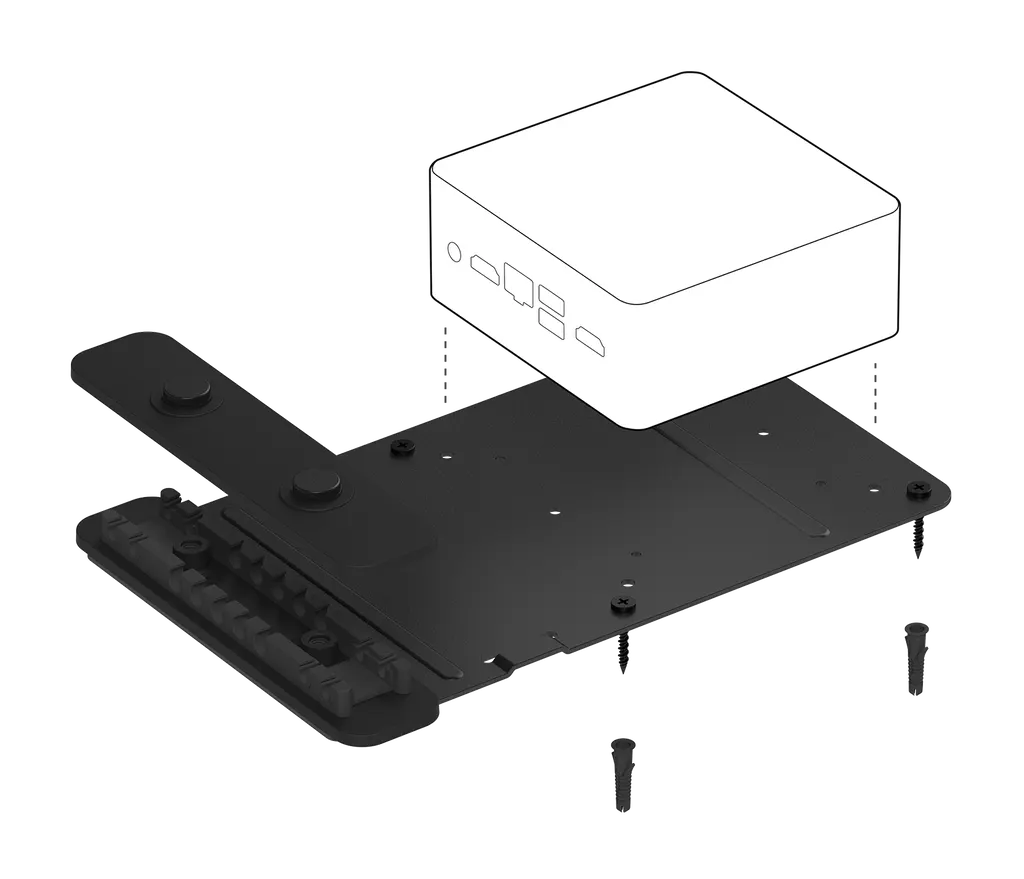
The Logitech PC Mount 939-001825 is a graphite steel bracket for mini PCs used with Logitech video conferencing room systems. It fits Intel NUC and most Chromeboxes on a 100 mm VESA pattern, and its two-piece cable clamp holds USB, HDMI, power and network cables in place. Hardware is included to hide the computer behind a wall-mounted display or beneath a table. Suited to meeting rooms across Qatar.
What this mount does in a Logitech video room
The Logitech PC Mount 939-001825 is a graphite steel bracket that gives a small form factor computer a fixed place in a room. It is built for the computer that runs a Logitech video conferencing room solution, so the system is not left sitting on a desk, shelf or floor where cables are easily knocked loose. Mounting the computer out of sight also keeps tables and walls tidy in meeting rooms where people spend long sessions.
Fit, cable control and dimensions
The bracket is designed for SFF computers and Chromebox units that use a 100 mm VESA pattern, and Intel NUC and most Chromeboxes are listed as compatible. The two-piece cable retention clamp holds USB, HDMI, power and network leads, which reduces strain on each port when the room is cleaned or furniture is moved. The manufacturer lists the following dimensions for the mount in its wall-mount configuration:
- Height: 26 mm
- Width: 164 mm
- Depth: 250 mm
- Finish: Graphite
The hardware in the box lets you mount the computer behind a display on the wall or beneath a table, so the same bracket suits either layout.
Where it fits in Qatar
In a boardroom in West Bay, a wall-mounted display can carry a computer behind it, leaving the wall and the table free of boxes and loose leads. In a university seminar room in Education City, a PC fixed beneath a lectern keeps the presenter's desk clear while the cables run neatly to the room system. In a serviced meeting room at The Pearl, a computer hidden under the table reduces clutter for guests who expect a clean setup for video calls with teams in other countries.
What to plan before you order
- Confirm that your computer uses a 100 mm VESA pattern or a compatible mounting plate.
- Measure the clear space behind the display or under the table against the listed dimensions.
- Plan cable routes for power and network so that leads reach their ports without strain.
- Leave room for airflow around the computer after it is mounted.
SmartRooms Qatar offers free site surveys, which help confirm wall construction, cable routes and the fit of the mount before installation. For a school or ministry fitting out several rooms, we can supply and install mounts across all 8 municipalities of Qatar, and purchase orders (LPOs) and government tenders are accepted.
To receive a suitable quotation, request a quote from SmartRooms Qatar with your room layout and computer model. Quotations are usually issued within one working day.
Highlights
- Graphite steel bracket for mini PCs and Chromeboxes
- Fits Intel NUC and most Chromeboxes
- Built for a 100 mm VESA pattern
- Two-piece clamp for USB, HDMI, power and network cables
- Hardware included for mounting behind a display or under a table
- Part number 939-001825
Room fit
Tell us the room size and platform (Teams, Zoom or BYOD) and we confirm the right combination with your quotation.
Estimated timeline
Quotation within 1 working day · delivery timing depends on stock availability, and we confirm it with your quotation.
Specifications
4 specifications · Source: manufacturer · checked Oct 2026
Part Number1
- Items
- 939-001825
Dimensions - Tap with Wall Mount3
- Height
- 26 mm
- Width
- 164 mm
- Depth
- 250 mm
Downloads
1 file from the manufacturerQuestions about PC Mount
What is the Logitech PC Mount 939-001825 for?
It is a graphite steel bracket that holds a small computer, such as an Intel NUC or Chromebox, out of sight while it runs a Logitech video conferencing room solution. It is fixed on the wall behind a display or beneath a table, so the computer does not sit on a desk or the floor where cables can be pulled loose.
Which computers does the mount fit?
The mount is made for small form factor (SFF) computers and Chromebox units that sit on a 100 mm VESA pattern. Intel NUC and most Chromeboxes are listed as compatible. Before ordering, check the VESA pattern on your computer's base or mounting plate, and send the model to the SmartRooms Qatar team if you are unsure.
How does the cable retention clamp work?
The clamp has two pieces and holds USB, HDMI, power and network cables in place. Its job is to relieve strain on each connection, so a lead is not dislodged when the room is cleaned or furniture is moved. Plan cable length and routing before installation so each lead reaches its port without sharp bends.
What comes in the box?
The package includes the PC Mount with its cable retention clamp, mounting hardware and documentation. The part number is 939-001825 and the finish is graphite. Compare the contents with your installation plan before the fitting day, and ask the SmartRooms Qatar team to confirm anything else your wall or table needs.
What are the dimensions of the mount?
The manufacturer lists the mount at 26 mm high, 164 mm wide and 250 mm deep in its wall-mount configuration. Measure the space behind the display or under the table before ordering, allowing for the cable clamp and the size of the computer itself. Extra clearance helps prevent cables from being pinched when the computer is inserted.
Is a site survey needed before installing this mount?
SmartRooms Qatar offers free site surveys. For a computer mounted behind a wall display, a survey checks wall construction, the distance between the display and the mount, cable routes, and whether the computer's VESA pattern matches the mount. Ask for a survey when you request a quote so the installation can be planned properly.
Can we order several mounts on a purchase order for a school or ministry?
Yes. SmartRooms Qatar accepts purchase orders (LPOs) and government tenders, including Monaqasat, and also accepts bank transfer, cheque and purchase order payment. Quotations are usually issued within one working day. State the number of rooms and the computer model in each, so the mounts are quoted against the correct VESA pattern.
Can the PC be hidden behind a wall-mounted display in a West Bay boardroom?
Yes, the included hardware supports mounting a computer behind a display on the wall. In a West Bay boardroom, this keeps the table and wall free of boxes and visible cables. Confirm the wall construction and the gap between the display and the mount with your facilities team, then request a quote so the installation can be scheduled.
Can the mount hold a lectern PC at a university lecture hall in Education City?
The mount can be fixed beneath a table, which suits a lectern where the computer should stay out of the audience's view. Because lecterns are moved between sessions, the two-piece clamp helps keep USB and HDMI leads secure. Check the space under the lectern and the cable route before fixing the bracket.
Can the computer go under a table in a government meeting room in Msheireb?
Yes, the hardware also supports mounting the computer beneath a table, which keeps the desk surface clear for papers and devices. Because the working week runs from Sunday to Thursday and meetings are frequent, plan network and power routes so they can be reached for maintenance without moving the furniture.
What should a Lusail office check before installing a small meeting room?
Check that the computer uses a 100 mm VESA pattern, that the mount's 26 x 164 x 250 mm footprint fits the planned position, and that USB, HDMI, power and network leads can reach the clamp without strain. Checking these points early helps avoid rework after the room equipment arrives on site.
Is the mount suitable for a guest meeting room in The Pearl?
It can be, because a computer hidden behind a display or under a table reduces clutter for visitors. Shared rooms still need the cables secured in the clamp and a check that the computer matches the 100 mm VESA pattern. Ask SmartRooms Qatar to confirm the right mounting option for your computer model in your quotation.



