





Thursday, 22 October 2026 · 11 Jumada I 1448 AH Sun – Thu · 9:00 – 18:00
+971 56 914 9477 العربية
WhatsApp

PTZ Pro 2

Logitech PTZ Pro 2 HD 1080p PTZ Camera for Meeting Rooms

Field of view
90°
WhatsApp
Priceon request
QuotationWithin 1 working day
DeliveryConfirmed with your quote, based on stock
PDFDownload datasheet (ptz-pro-2-datasheet.pdf)
Overview

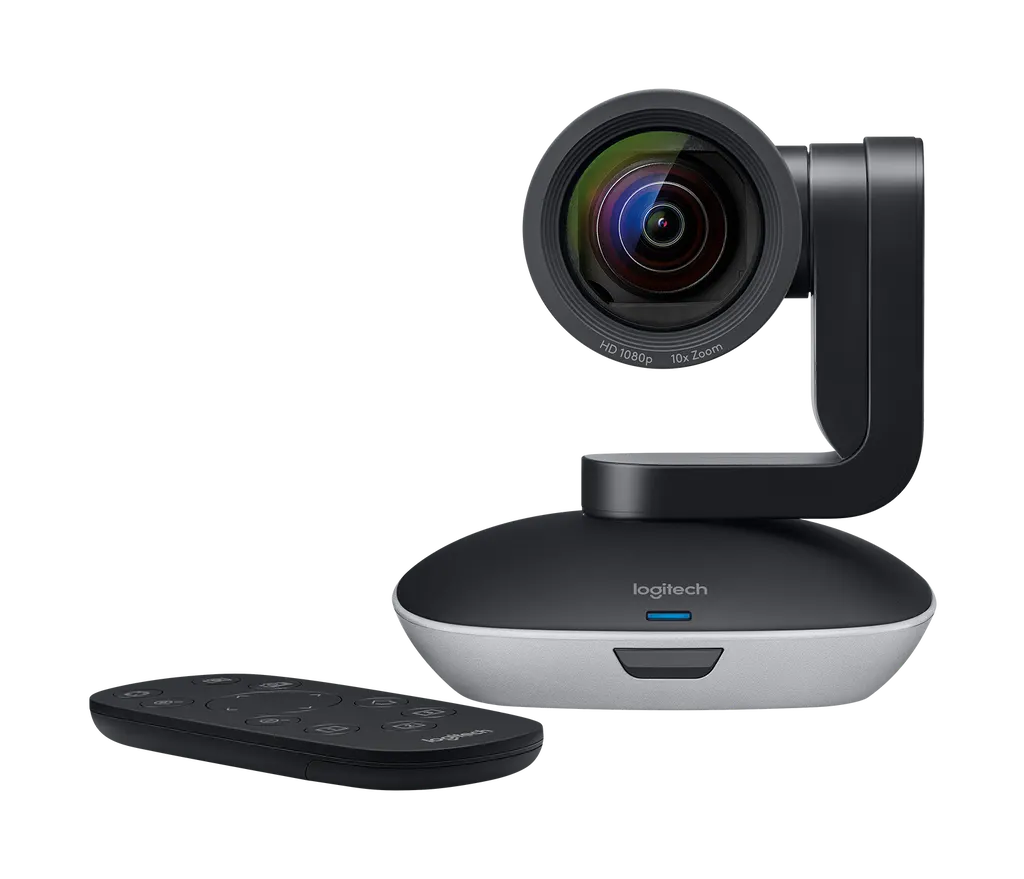
The Logitech PTZ Pro 2 is a dark grey pan-tilt-zoom camera that delivers 1080p video through a 10x HD zoom lens with autofocus. It connects over USB to Windows and Mac computers. Three presets and an infrared remote let one operator frame speakers, panelists and whiteboards. It suits lecture halls, classrooms and large meeting rooms across Doha, West Bay and Education City.

A 1080p PTZ camera for rooms where people sit far from the lens

The Logitech PTZ Pro 2 is a dark grey pan-tilt-zoom camera built for meeting rooms, classrooms and auditoriums. It captures Full HD 1080p video at 30 frames per second and carries a 10x HD zoom lens with autofocus. Connected by USB, it appears to the conference computer as a standard camera, so it works with the video conferencing applications your teams already use.

The specifications that shape the installation

The camera has a 90° diagonal field of view and 82.1° horizontal coverage. It pans ±90° and tilts through ±35° / 45°, so one unit can frame a whole table, then move to a presenter or whiteboard at the press of a button on the infrared remote, which has an 8.5 m range. Three presets save pan, tilt and zoom positions, and a home position button returns the camera to its default view. A video mute LED shows when the camera is off air.

Key figures for planning: the camera measures 146 mm high, 131 mm wide and 130 mm deep and weighs 580 g. The remote weighs 48 g and takes a CR2032 battery, which is included. The power cable is 3 m long and the power adapter ships with regional plugs.

Where it fits in Qatar

  • A university lecture hall in Education City: the camera frames the lecturer and the projection screen, while remote students follow the session on their own devices.
  • A boardroom in West Bay: the operator saves presets for the table, the lectern and the screen, so a call with colleagues abroad switches framing with one press.
  • A government meeting room in Msheireb: the camera works alongside the existing speakerphone or audio system, so the current sound equipment stays in use.

What to plan before installation

Decide between tabletop placement and wall mounting before ordering, because the dual-purpose bracket supports both. Wall mounting in a boardroom or lecture hall needs a clear sightline to the presenter and screen and a solid wall. A free site survey before drilling lets our team check sightlines, cable routes and the position of the conference computer. Keep the 3 m power cable and the USB cable out of walkways.

The source data does not state an operating temperature range or an outdoor rating. Before placing the camera in a space that is not air-conditioned, or near a window with strong sun, confirm the room conditions with the SmartRooms Qatar team. Also check that the supplied regional plug suits the sockets in the room.

Ordering several units

Schools, universities and ministries often equip several rooms in one project. SmartRooms Qatar supplies the PTZ Pro 2 across all 8 municipalities of Qatar, accepts purchase orders (LPOs) and handles government tenders, including Monaqasat. Quotations are usually issued within one working day. Request a quote for the PTZ Pro 2 and tell us the room sizes, mounting points and the audio system you already use, and we will confirm the configuration and next steps.

Highlights

  • 10x HD zoom lens with autofocus
  • 90° diagonal field of view, ±90° pan
  • Full HD 1080p at 30 fps over USB plug-and-play
  • Three camera presets plus a home position button
  • Certified for Skype for Business and Microsoft Teams
  • Dual-purpose bracket for wall mounting or tabletop use

Room fit

Tell us the room size and platform (Teams, Zoom or BYOD) and we confirm the right combination with your quotation.

Estimated timeline

Quotation within 1 working day · delivery timing depends on stock availability, and we confirm it with your quotation.

Specifications

18 specifications · Source: manufacturer · checked Oct 2026
Part Number1
Items
960-001186
Dimensions - Camera4
Height
146 mm
Width
131 mm
Depth
130 mm
Weight
580 g
Dimensions - Remote4
Height
10 mm
Width
50 mm
Depth
120 mm
Weight
48 g
Technical Specifications - Camera4
Items
Smooth motorized pan, tilt and zoom · ±90° pan · ± 35° / 45° tilt · 10x HD zoom · Full HD 1080p 30fps · H.264 UVC 1.5 with Scalable Video Coding (SVC) · Autofocus · 3 camera presets plus home position button · Video mute/unmute LED indicator · Standard tripod thread
Field of View > Diagonal
90°
Field of View > Horizontal
82.1°
Field of View > Vertical
52.2
Technical Specifications - Remote Control1
Items
IR 8.5 m range · CR2032 battery (included)
Technical Specifications - Cables / Power2
Items
AC Power adapter with regional plugs
Power cable
3 m
Technical Specifications - MOUNT1
Items
Dual-purpose bracket works for both wall mounting and tabletop elevation
Technical Specifications - COMPATIBILITY AND CERTIFICATIONS1
Items
Plug-and-play USB connectivity · Certified for Skype for Business and Microsoft Teams · Fuze® Certified · Compatible with Google Meet® · Cisco Jabber and WebEx compatible · Compatible with BlueJeans®, BroadSoft®, GoToMeeting®, Vidyo®, and other video conferencing, recording, and broadcasting applications that support USB cameras


Downloads

3 files from the manufacturer

Questions about PTZ Pro 2

What is the Logitech PTZ Pro 2 built for?
The PTZ Pro 2 is a pan-tilt-zoom camera for meeting rooms, classrooms and auditoriums where participants sit at a distance from the lens. It records Full HD 1080p at 30 fps, offers a 10x HD zoom with autofocus, and can be steered by remote from the back of the room. Organisations running hybrid meetings or lectures for remote audiences usually choose it when a fixed webcam cannot frame the room properly.
What field of view and zoom does it offer?
The camera has a 90° diagonal field of view, 82.1° horizontal, and a 10x HD zoom. Pan covers ±90° and tilt covers ±35° / 45°. A wide preset can take in the full table, while a tighter preset frames a presenter at the screen. Share your room layout with SmartRooms Qatar when requesting a quote, so we can advise where the camera should sit.
Is it compatible with Microsoft Teams and Zoom?
Yes. The camera is certified for Skype for Business and Microsoft Teams. The data also lists Fuze certification and compatibility with Google Meet, Cisco Jabber, WebEx, BlueJeans, BroadSoft, GoToMeeting and Vidyo. Zoom is named in the compatibility notes, and any application that recognises a USB camera can use it. Ask us to confirm your exact platform version before ordering.
Can I use it with our existing speakerphone or audio system?
Yes. The PTZ Pro 2 is designed to work alongside an existing audio system or speakerphone, and a speakerphone is not included in the box. Sound stays with your current equipment, so the camera only needs a USB connection to the conference computer. A Doha boardroom with a ceiling microphone array, for example, keeps its audio setup and simply adds the camera.
How is the camera mounted?
The box includes a dual-purpose bracket that works for wall mounting and for tabletop elevation, plus a standard tripod thread for other supports. Wall mounting suits a lecture hall or boardroom where the table should stay clear. Before drilling, SmartRooms Qatar offers a free site survey to check sightlines to the lectern and screen, the wall construction, and the route for the USB and power cables.
Can presets help a lecturer in a university hall?
Yes. The camera stores three presets of pan, tilt and zoom, plus a home position button. A lecturer in a hall in Education City can save a wide shot of the whole room, a close view of the lectern and a view of the whiteboard, then switch between them with one touch. This keeps remote students framed without a technician operating the camera during the lecture.
Is it suitable for hybrid meetings with teams abroad from West Bay?
It suits boardrooms in West Bay that connect to colleagues overseas. Because it connects by USB, the conference computer treats it as a standard camera, so the meeting platform can select it as the video source. One person can use the remote to pan and zoom toward whoever is speaking, and the mute LED shows when video is off. Run a test call with the remote participants before the first session.
Can it be used in an unventilated or outdoor space in Al Khor or Mesaieed?
The source data does not list an operating temperature range or an outdoor rating, so the PTZ Pro 2 should not be placed in an outdoor, dusty or unventilated area on the assumption that it will cope. Summer temperatures in Qatar can exceed 45°C. Confirm the room conditions with the SmartRooms Qatar team before installation, and we will advise on a suitable indoor position.
What power and plug arrangements come with it?
The camera comes with an AC power adapter that includes regional plugs, and the power cable is 3 m long. The data does not specify plug type beyond regional plugs, so confirm that the supplied plug suits the sockets in your room before installation. Our team can check this during the site survey or when you send your quotation request.
What is in the box?
The box contains the PTZ Pro 2 camera, the infrared remote with its CR2032 battery already included, a USB cable with power adapter connection, the power adapter with regional plugs, the dual-purpose mount, documentation and the warranty card. A speakerphone is not part of the package. Check the contents on delivery against your quotation, and ask us about any other accessories the room needs.
Can staff operate the camera from another location?
Yes. Pan, tilt and zoom can be controlled with the hand-held remote in the room, and the camera can also be operated from a remote location using downloadable software. This lets an IT or AV team adjust framing from another desk during a lecture or meeting. The remote has an 8.5 m infrared range, so keep a clear line of sight to the camera.
How do we order several units for a school fitting out classrooms in Al Rayyan?
Schools can order several PTZ Pro 2 units through a purchase order (LPO), and SmartRooms Qatar also handles government tenders, including Monaqasat. Send the number of rooms, the intended mounting positions and the audio equipment in each room with your request. Quotations are usually issued within one working day, and a site survey can confirm the layout for each classroom before installation.

Similar models

Biamp Vidi 100 Biamp Vidi 100 4K Conferencing Camera
Cameras
Biamp Vidi 150 Biamp Vidi 150 4K Conferencing Camera
Cameras
Biamp Vidi 250 Biamp Vidi 250 4K Conferencing Camera
120 Degrees Zoom Certified
Biamp Vidi 280 Biamp Vidi 280 4K Conferencing Camera with Dual Sensors
Ultrawide Lens Zoom Certified
Biamp Vidi Content Cam 250 Biamp Vidi Content Cam 250 4K Whiteboard Content Camera Kit
120° Up to 5x digital zoom
Email Call


