






Barco
ClickShare Power Supply 100W
Barco ClickShare Power Supply 100W, 100-Watt Video Conferencing Accessory
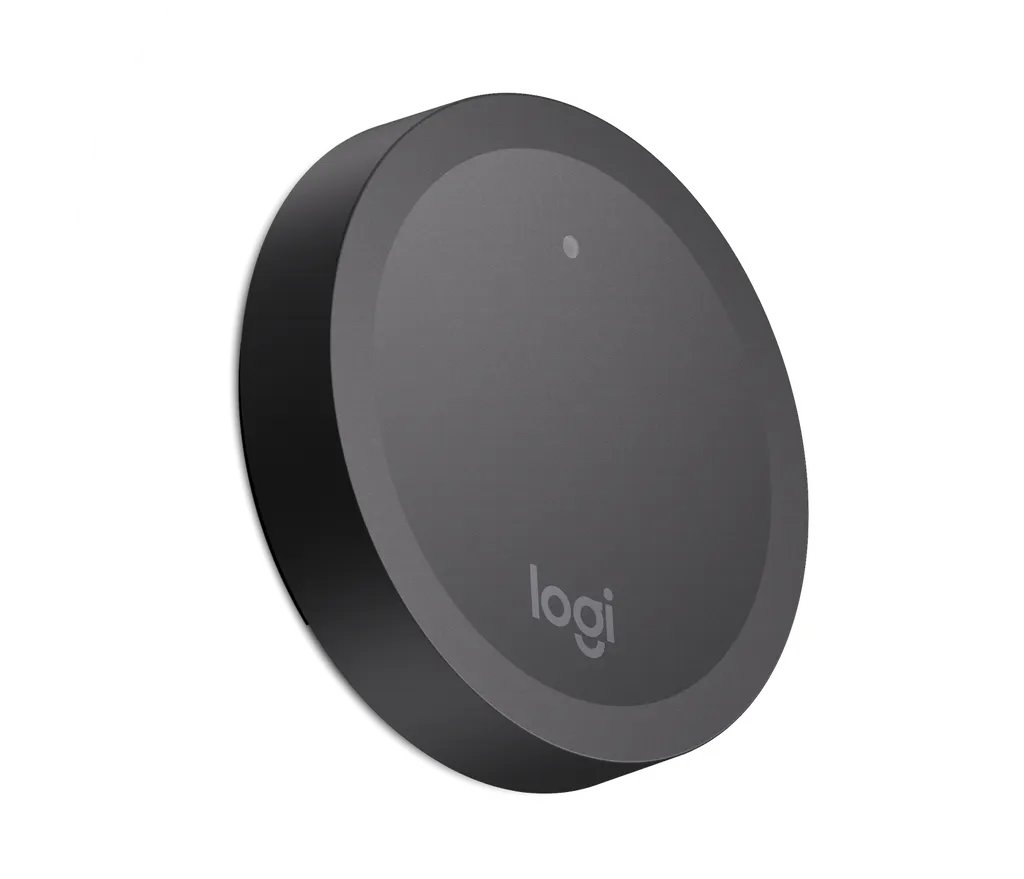
Rally Camera Preset Button
Logitech Rally Camera Preset Button 952-000226 Wireless Graphite Accessory
- Platforms
- Rally Camera
Priceon request
QuotationWithin 1 working day
DeliveryConfirmed with your quote, based on stock
Overview
The Logitech Rally Camera Preset Button (952-000226) is a graphite wireless accessory that lets staff control a teaching space from a fixed point in the room. Each Rally Camera supports up to five preset buttons. It suits universities, colleges and schools in Qatar running hybrid lessons. It requires Rally Camera firmware 254.123 or later, so check your camera before ordering. Request a quote from SmartRooms Qatar.
A wireless preset button built for Rally Cameras
The Logitech Rally Camera Preset Button, model 952-000226, is a graphite accessory that works only with the Logitech Rally Camera. Instead of relying on a remote or a fixed touch panel, a presenter presses a button placed on a desk, lectern or wall to recall a saved camera setting. Because the button is wireless, it can sit where the presenter stands rather than where a cable happens to run.
Specifications that matter for planning
These figures from the manufacturer data help you plan placement and mounting:
- Preset button: 71.9 mm diameter and 15.2 mm height.
- Wall mount: 67.2 mm diameter and 5.8 mm height.
- Weight: 36.8 g without the button mount; 37.5 g with the button mount and no batteries; 43.2 g with the button mount and two CR2032 batteries.
- Capacity: up to five preset buttons per Rally Camera.
Firmware and compatibility checks before ordering
The button requires Rally Camera firmware version 254.123 or better. Confirm the firmware on every camera before the buttons arrive, particularly in rooms where older cameras are already installed. The compatibility listed for this model is Rally Camera only, so do not plan to use it with other cameras or room systems.
Where it fits in Qatar
- University lecture halls in Education City or Doha: a lecturer can start a preset framing the board or podium without leaving the lectern.
- Private and international schools in Al Rayyan or Lusail: teachers running hybrid lessons can move between the whiteboard, a group table and students joining from home while keeping a hand free.
- Training centres in Msheireb or West Bay: trainers presenting to on-site and remote delegates can switch views from the same spot in the room.
What to plan for on site
Choose the position of each button around the presenter's usual movements, and decide whether it will sit on a desk or on the wall using the wall mount. The box contains the preset button, a button mount, mounting hardware and documentation. Batteries are not listed among the box contents, so confirm battery supply in your quotation before ordering. SmartRooms Qatar offers free site surveys, which help map button positions in rooms with more than one camera. We deliver to all eight municipalities of Qatar, offer professional installation, and usually issue quotations within one working day. Products are covered by the manufacturer's warranty. Organisations ordering several units can issue a purchase order or LPO, and payment by bank transfer, cheque or purchase order is accepted.
Tell us how many Rally Cameras and rooms need control, and the SmartRooms Qatar team will prepare a quotation for the 952-000226 preset buttons. Request a quote today.
Highlights
- Graphite wireless preset button for Rally Camera
- Maximum of five preset buttons per Rally Camera
- Requires Rally Camera firmware 254.123 or better
- Preset button: 71.9 mm diameter, 15.2 mm height
- Wall mount: 67.2 mm diameter, 5.8 mm height
- Weighs 36.8 g without the button mount
Room fit
Tell us the room size and platform (Teams, Zoom or BYOD) and we confirm the right combination with your quotation.
Estimated timeline
Quotation within 1 working day · delivery timing depends on stock availability, and we confirm it with your quotation.
Specifications
10 specifications · Source: manufacturer · checked Oct 2026
Part Number1
- Items
- 952-000226
Dimensions - Preset button2
- Height
- 15.2 mm
- Diameter
- 71.9 mm
Dimensions - Wall mount2
- Height
- 5.8 mm
- Diameter
- 67.2 mm
Dimensions - With button mount and without batteries1
- Weight
- 37.5 g
Dimensions - With button mount and 2-CR2032 batteries1
- Weight
- 43.2 g
Dimensions - Without button mount1
- Weight
- 36.8 g
Technical Specifications - System Requirements2
- Compatibility
- Rally Camera
- Important
- Preset buttons require Rally Camera firmware version 254.123 or better. Maximum of five (5) preset buttons per Rally Camera.
Downloads
0 files from the manufacturerNo downloadable files are listed for this model yet. Ask us and we will send the datasheet.
Questions about Rally Camera Preset Button
What is the Logitech Rally Camera Preset Button used for?
It is a wireless accessory that lets a presenter trigger saved camera settings from a fixed point in the room. It is designed for teaching spaces where in-person and online participants join the same lesson. Teachers and lecturers can use it without walking to a control panel, which suits universities, colleges and schools in Qatar that run hybrid classes.
Which cameras is the preset button compatible with?
The compatibility listed for model 952-000226 is the Logitech Rally Camera only, and the manufacturer data names no other camera. If your room uses a different camera, ask the SmartRooms Qatar team to confirm before requesting a quote. Each Rally Camera supports up to five preset buttons, so larger rooms need a clear plan for every camera.
What firmware version does the Rally Camera need?
Preset buttons require Rally Camera firmware version 254.123 or better. Check the firmware on every camera that will be linked to buttons, especially units already installed in classrooms or lecture halls for some time. If a camera is on an older version, plan the update before installation so the system works from the first day of term. List your camera count when you request a quote.
How many preset buttons can one Rally Camera support?
Each Rally Camera supports a maximum of five preset buttons. Start by listing the positions the room actually needs, such as the lectern, the whiteboard and the audience view, then confirm the total stays within five. If the room layout may change later, leave one position free for future use.
What are the dimensions and weight of the preset button?
The preset button measures 71.9 mm in diameter and 15.2 mm in height. The wall mount measures 67.2 mm in diameter and 5.8 mm in height. The button weighs 36.8 g without the button mount, 37.5 g with the mount and no batteries, and 43.2 g with the mount and two CR2032 batteries. Its small footprint suits desks, lecterns and walls in compact classrooms.
What is included in the box?
The box includes the preset button, a button mount, mounting hardware and documentation. The manufacturer data also lists wall mount dimensions, so decide which mounting arrangement your room needs before ordering. Mention the intended mounting position in your quotation request so the equipment matches the room layout.
Are batteries included, and which type is used?
The weight figure that includes batteries refers to two CR2032 batteries, but batteries are not listed in the box contents. Confirm battery supply in your quotation before ordering so the button is ready to use on arrival. It is also worth keeping spare CR2032 cells with the facilities team at your school or university.
Would it suit a lecture hall in Education City?
Yes, provided the hall uses a Rally Camera on firmware 254.123 or later. A lecturer can place one button on the lectern and another near the front desk, so the camera framing changes without using a separate control panel. Request a site survey to confirm the camera position and how many preset positions the hall needs.
Is it a good fit for a school in Al Rayyan running hybrid lessons?
It suits classrooms where teachers move between the whiteboard, a group table and students joining remotely. A teacher can press a preset button from the desk and keep a hand free for writing. A school equipping several classrooms can issue one LPO covering all the units and cameras, which simplifies approval.
Can the button handle Qatar's heat and dust?
The manufacturer data for this model does not list an operating temperature range or a dust rating, so we cannot confirm those conditions here. Use the button in air-conditioned teaching spaces and confirm the environment with the SmartRooms Qatar team before installation, especially if the button would sit near a window or entrance.
Does SmartRooms Qatar offer a site survey and installation?
Yes. SmartRooms Qatar offers free site surveys and professional installation, which helps when positioning buttons around a lectern, desk or wall mount in a room with more than one camera. Delivery covers all eight municipalities of Qatar, and quotations are usually issued within one working day. Products are covered by the manufacturer's warranty.
Is this model still available, and what should I include in a quote request?
This is a current model, and you can request a quote for the graphite Logitech Rally Camera Preset Button 952-000226 directly. Include the Rally Camera model, the firmware version and the number of buttons needed for each room. Payment can be made by bank transfer, cheque or purchase order, and government buyers can use purchase orders or government tenders.



