





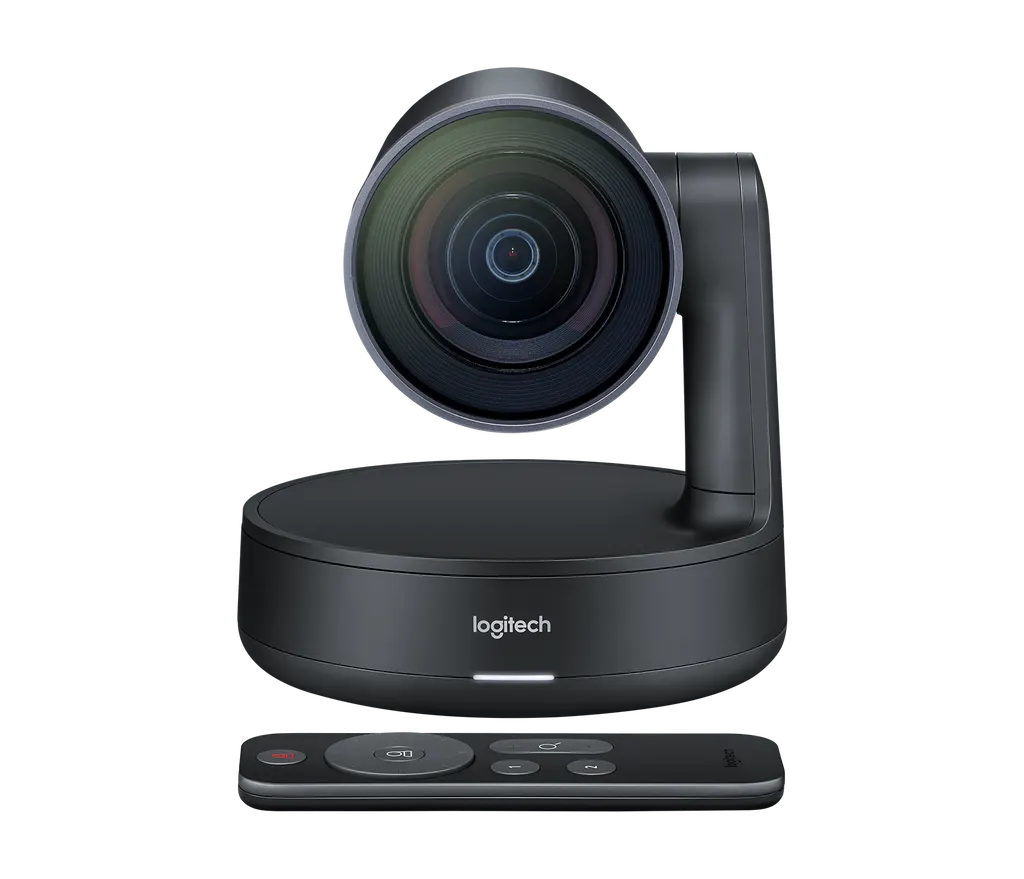
Rally Camera
Logitech Rally Camera 4K PTZ Video Conferencing Camera
- Field of view
- 90°
The Logitech Rally Camera is a dark grey 4K pan-tilt-zoom camera for meeting rooms where people sit at different distances from the lens. It offers 15x HD zoom, a 90° diagonal field of view, automatic framing and a USB 3.0 Type-C connection. It suits boardrooms, training rooms and lecture halls in Doha, Lusail and Education City that run calls with teams abroad.
What the Rally Camera does in a meeting room
The Logitech Rally Camera is a standalone PTZ camera for rooms where people sit at varying distances and move during a call. Instead of a fixed wide lens, it pans, tilts and zooms toward the person speaking, so remote participants see faces rather than an empty table. Its body measures 182.5 mm high and 152 mm wide and deep, and its dark grey finish suits a table, a wall or a tripod.
Imaging, framing and motion
The camera captures up to 4K video at 30 frames per second, and its imaging system also supports 1440p, 1080p, 900p, 720p and SD. The 15x HD zoom, ±90° pan and +50°/-90° tilt cover a wide area, while the 90° diagonal field of view (82.1° horizontal and 52.2° vertical) takes in a full table. RightSight automatic camera control keeps participants framed, and RightLight with Wide Dynamic Range balances light and prioritises faces in dim or backlit rooms. Pan and tilt speed adapts to the zoom level, so the camera moves quickly when zoomed out and more slowly when zoomed in. Three camera presets let an operator return to set framings between sessions.
Connecting it to your conferencing platform
The camera connects through a 2.2 m USB 3.0 Type-C cable and works plug-and-play with Windows 7, 8.1 or 10 and macOS 10.10 or later. The specification lists certification for Skype for Business and Microsoft Teams, Zoom Certified status, Fuze certification and Cisco compatibility. It is also listed as compatible with Google Hangouts Meet, BlueJeans, GoToMeeting, Vidyo and other applications that accept USB cameras. RightSight automatic control is listed as available on Windows 10 and macOS. Before choosing a spot, confirm with your IT team that the room PC has a USB 3.0 port.
Where it fits in Qatar
A boardroom in a West Bay office tower, where executives join calls with colleagues in Europe, is a natural fit: the camera follows whoever is speaking without a camera operator. In a university seminar room in Education City, the 15x zoom can frame a presenter at the front while keeping students at the back in view. A hotel meeting room in The Pearl or Msheireb hosting a mixed panel can use the three presets to return to set framings between sessions. A private school in Al Rayyan fitting out a staff training room can use the same setup to run sessions with colleagues at other branches.
Planning the installation
Decide on the mounting position before ordering. The package includes a camera mount with mounting hardware, a power splitter with case, an RF remote control with a CR2032 battery, and a power adapter with regional plugs. The camera can sit on a table, be fixed to a wall with the invertible mount, attach to a VESA-compatible display through the optional TV Mount for MeetUp, or use its standard tripod thread. The product data does not list an operating temperature range, so ask the SmartRooms Qatar team to confirm the environment before installing near windows or in hot or dusty areas. A free site survey lets us check cable routes and mounting height.
Send us your room sizes and proposed mounting positions and we will prepare a quotation, usually within one working day. Request a quote for your rooms today.
Highlights
- 4K video at up to 30 frames per second
- 15x HD zoom with ±90° pan and +50°/-90° tilt
- 90° diagonal field of view for full-table coverage
- RightSight automatic framing on Windows 10 and macOS
- USB 3.0 Type-C connection with plug-and-play operation
- Table, wall, tripod or VESA display mounting options
Room fit
Tell us the room size and platform (Teams, Zoom or BYOD) and we confirm the right combination with your quotation.
Estimated timeline
Quotation within 1 working day · delivery timing depends on stock availability, and we confirm it with your quotation.
Specifications
Part Number1
- Items
- 960-001227
Dimensions - Rally Camera3
- Height
- 182.5 mm
- Width
- 152 mm
- Depth
- 152 mm
Dimensions - Rally Camera Power Splitter3
- Height
- 21.4 mm
- Width
- 81 mm
- Depth
- 60.5 mm
Dimensions - Rally Camera Mounting Bracket3
- Height
- 88 mm
- Width
- 110 mm
- Depth
- 170 mm
Dimensions - USB 3.0 cable1
- Length
- 2.2 m
Dimensions - Power Adapter Cable1
- Length
- 3 m
Technical Specifications - Camera7
- Ultra-HD imaging system supports
- 4K, 1440p, 1080p, 900p, 720p, and SD at 30fps 1080p, 720p at 30fps and 60 fps
- Items
- Smooth motorized pan, tilt and zoom · 15X HD zoom · Autofocus · 3 camera presets · Kensington security slot · Video mute/unmute LED indicator · Standard tripod thread
- Pan
- ±90°
- Tilt
- +50° / -90°
- Field of View > Diagonal
- 90°
- Field of View > Horizontal
- 82.1°
- Field of View > Vertical
- 52.2°
Technical Specifications - RIGHTSENSE TECHNOLOGIES1
- Items
- RightLight with Wide Dynamic Range (WDR) · RightSight automatic camera control Please see RightSight Availability for details.
Technical Specifications - Remote Control1
- Items
- RF remote control (line of sight not required) · CR2032 battery (included)
Technical Specifications - Cables / Power1
- Items
- AC Power adapter with regional plugs · Power cable (3 m)
Technical Specifications - MOUNT1
- Items
- Invertible wall mount with power splitter bay and cable management
Technical Specifications - COMPATIBILITY AND CERTIFICATIONS1
- Items
- Plug-and-play USB connectivity · Certified for Skype® for Business and Microsoft® Teams · Zoom® Certified · Fuze® Certified · Cisco® compatible · Compatible with Google Hangouts Meet™, BlueJeans®, BroadSoft®, GoToMeeting®, Vidyo®, and other video conferencing, recording, and broadcasting applications that support USB cameras




