






Barco
ClickShare Power Supply 100W
Barco ClickShare Power Supply 100W, 100-Watt Video Conferencing Accessory
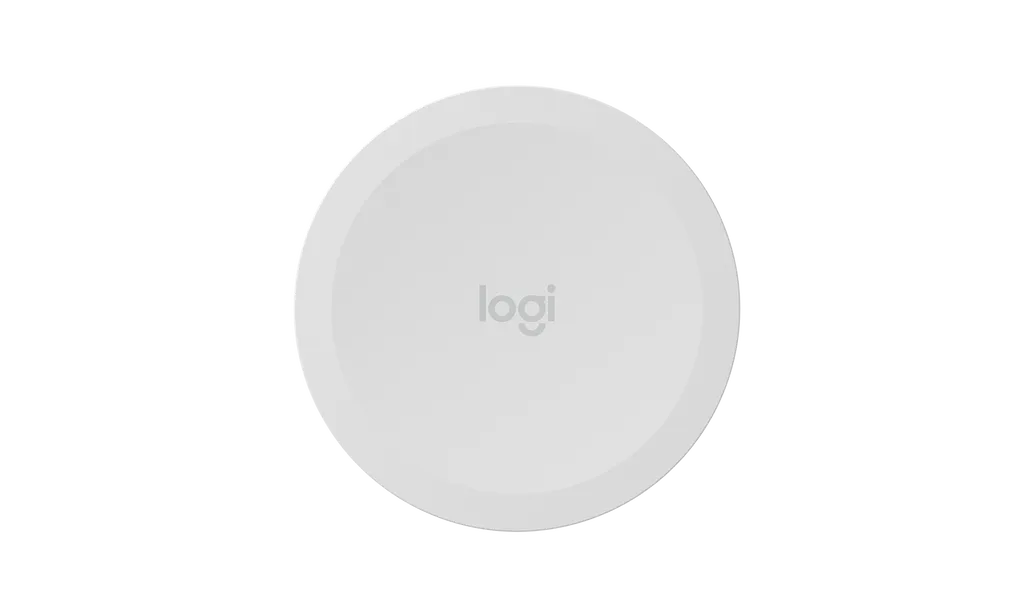
Share Button for Logitech Scribe in White
Logitech Share Button for Logitech Scribe in White (952-000102)
Priceon request
QuotationWithin 1 working day
DeliveryConfirmed with your quote, based on stock
Overview
The Logitech Share Button in white is an optional wireless accessory for Logitech Scribe. Presenters press it with a finger, elbow or marker to start or stop sharing the whiteboard in a video meeting. It runs on two CR2032 batteries, mounts with adhesive backing and comes in white as an alternative to purple. Suited to meeting rooms and classrooms in Doha that already run Scribe. Request a quote.
What this Share Button does in a meeting
The Logitech Share Button in white is a wireless accessory that pairs with Logitech Scribe, so a presenter can start or stop sharing a whiteboard into a video call without walking to a laptop. The button responds to a press anywhere on its surface, which means a finger, an elbow or the cap of a marker can trigger it. That matters in rooms where the presenter is standing at the board with both hands busy.
Because the button is optional, it suits rooms where Scribe is already in use or planned. It is supplied as a standalone item and does not replace any part of the Scribe setup. The white finish is offered as an alternative to the purple version, so you can choose the colour that suits the room.
Specifications that matter for planning
- Connectivity: wireless link using Bluetooth Low Energy
- Power: two CR2032 coin-cell batteries, so no mains socket is needed
- Dimensions: 71.8 mm diameter and 12.7 mm height
- Weight: 108 g
- Mounting: adhesive-backed
The small footprint and light weight let you place the button on a wall beside the whiteboard or on a nearby surface where the presenter naturally reaches. The manufacturer data does not list a battery life, so build a battery check into your handover routine.
Where it fits in Qatar
In a university training room in Education City, a lecturer writing equations on a whiteboard can share the board with students abroad in a single press. In a company boardroom in West Bay, a director can present handwritten notes to a regional team without searching for a remote. In a school in Al Wakrah, a teacher running bilingual lessons can keep the board in front of the class while sharing content with a specialist connected from elsewhere.
Planning the installation
Adhesive mounting is quick, but the surface must be clean, dry and flat for the backing to hold. A free site survey from SmartRooms Qatar before fixing confirms placement relative to the whiteboard and the presenter's usual position. Check sharing support with your video conferencing provider, because the manufacturer notes that support may vary by service, and review the Logitech Scribe compatibility information before ordering.
Each order includes the Share Button and its documentation. Organisations fitting out several rooms can send one purchase order or LPO covering all units, and the product is covered by the manufacturer's warranty. Request a quote from SmartRooms Qatar and we will confirm the right pairing and delivery to any of the eight municipalities of Qatar.
Highlights
- Optional wireless button for Logitech Scribe whiteboard sharing
- Press anywhere on the button with a finger, elbow or marker
- White finish offered as an alternative to purple
- Bluetooth Low Energy wireless connection
- Powered by two CR2032 coin-cell batteries
- 71.8 mm diameter, 12.7 mm high, 108 g, adhesive-backed
Room fit
Tell us the room size and platform (Teams, Zoom or BYOD) and we confirm the right combination with your quotation.
Estimated timeline
Quotation within 1 working day · delivery timing depends on stock availability, and we confirm it with your quotation.
Specifications
7 specifications · Source: manufacturer · checked Oct 2026
Part Number1
- Items
- 952-000102
Dimensions - Share Button3
- Height
- 12.7 mm
- Weight
- 108 g
- Diameter
- 71.8 mm
Technical Specifications - Share Button2
- Power
- 2 x CR2032 battery
- Items
- Adhesive-backed mounting · Share button support may vary by video conferencing service provider. See www.logitech.com/support/scribe-compatibility for latest information.
Technical Specifications - Interfaces1
- Items
- Bluetooth® Low Energy
Downloads
1 file from the manufacturerQuestions about Share Button for Logitech Scribe in White
What is the Logitech Share Button for?
It is an optional wireless button that pairs with Logitech Scribe so a presenter can start or stop whiteboard sharing in a video meeting. Rather than walking back to a laptop, the presenter presses the button, which responds to a finger, an elbow or a marker. It suits meeting rooms, training rooms and classrooms in Qatar where the presenter spends most of the session at the board.
Will it work with every video conferencing platform?
Not necessarily. The manufacturer states that support for the Share Button may vary by video conferencing service provider, so check the Logitech Scribe compatibility information for your platform before ordering. If your organisation runs a cloud meeting service for calls with partners abroad, confirm that service is covered. SmartRooms Qatar can help you check the platform your team uses before you request a quote.
How is the Share Button powered, and does it need a mains socket?
It is powered by two CR2032 coin-cell batteries and connects over Bluetooth Low Energy, so it does not need a mains socket. That makes it practical on a wall beside a whiteboard where no power outlet is nearby. The manufacturer data does not state battery life, so ask SmartRooms Qatar to advise on a battery check schedule for your rooms.
Can I stick it to a wall beside the whiteboard without drilling?
Yes. The button is adhesive-backed, so it can be fixed without drilling. It measures 71.8 mm across, stands 12.7 mm high and weighs 108 g. Before fixing it, clean and dry the surface and choose a position the presenter can reach naturally from the board. A site survey from SmartRooms Qatar can confirm the spot before the backing is peeled.
What comes in the box?
The box contains the Share Button and its documentation. The Logitech Scribe unit itself is not listed in the package, so if you do not already have Scribe, include it in your quotation request. Because this accessory is designed to pair with Scribe, confirm the Scribe unit and the button together before the order is placed.
Why choose the white version rather than the purple one?
The white finish is offered as an alternative to purple, so the accessory can match the colour of the room. In a boardroom in West Bay or a meeting room in Msheireb with neutral walls and furniture, white keeps the whiteboard area visually calm. Tell the SmartRooms Qatar team the colour of your room and the number of units, and the quotation will reflect exactly what you need.
Is it useful for schools in Qatar?
Yes, especially in a classroom where a teacher writes lessons on a whiteboard during a live session. A private school in Al Rayyan, for example, could let a teacher share the board with a specialist or a parent connected from elsewhere while staying at the front of the class, with the button mounted within arm's reach. Schools buying for several classrooms can request one quotation and submit a single LPO.
Can it go near a window or in a hot lobby in Qatar?
The manufacturer data does not list an operating temperature range or environmental rating for this button, so do not assume it suits hot or sunlit areas. Summer temperatures in Qatar can exceed 45°C, so plan it for air-conditioned meeting rooms and ask SmartRooms Qatar to confirm the environment for any position near glass or a lobby entrance.
How do I plan a multi-room project with several buttons?
List each room that has or will have Logitech Scribe, note the wall position beside each board and the colour needed, then send that list with your request. A group of meeting rooms at a Doha hotel or a company headquarters in Lusail can be quoted in one batch. Organisations with a purchase order process can submit one LPO covering all units, and the quotation will show the agreed quantities.
How is this different from the Scribe unit itself?
The Scribe unit is the whiteboard sharing solution. The Share Button is an optional accessory that adds a wireless trigger, so the presenter can start or stop sharing from the board. Choose the button if you want that control at the whiteboard, and skip it if the team prefers to start sharing from the meeting software itself.
Can I get a site survey before I buy?
Yes. SmartRooms Qatar offers free site surveys across Qatar, which is useful for a small wall-mounted accessory where placement relative to the whiteboard and the presenter's usual position matters. After the survey, the team usually sends a quotation within one working day. Ask for the survey when you request the quote, particularly for schools, universities and offices in Doha fitting several rooms at once.
Is the product covered by a warranty?
Yes, the Logitech Share Button is covered by the manufacturer's warranty. The source data does not state the warranty period or terms, so ask SmartRooms Qatar to confirm the warranty terms in your quotation before you place a purchase order or respond to a government tender.



