






Biamp
Evoko Kleeo Desk Manager 6-pack + 1yr license
Biamp Evoko Kleeo Desk Manager 6-Pack (910-01972) Desk Booking Display
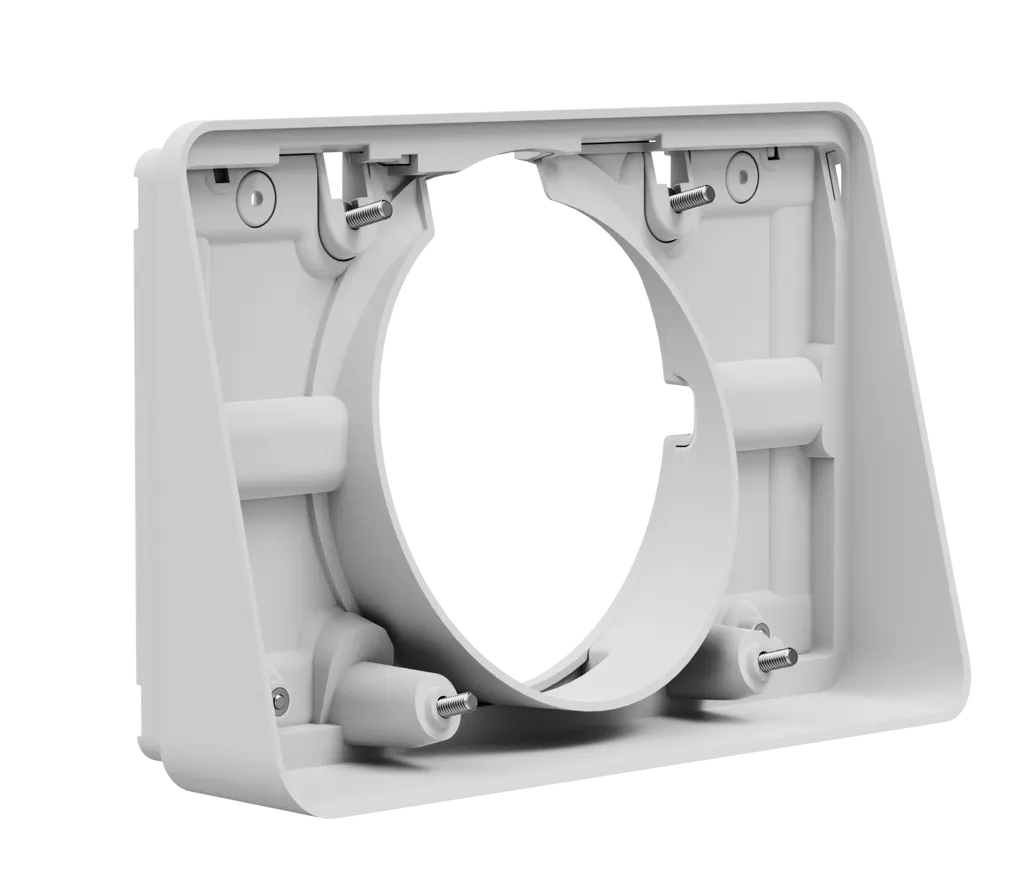
Tap Scheduler Angle Mount
Logitech Tap Scheduler Angle Mount 14º Bracket for Room Booking Displays
Priceon request
QuotationWithin 1 working day
DeliveryConfirmed with your quote, based on stock
Overview
Lower-height booking displays read more easily with this accessory. The Logitech Tap Scheduler Angle Mount adds a 14º angle to the scheduler's mounting bracket and comes with an angle plinth, a reversible interface, mounting hardware and documentation, in off-white or graphite. It suits meeting-room doors in government offices, schools, universities and hotels across Qatar.
What the Tap Scheduler Angle Mount does
The Logitech Tap Scheduler Angle Mount is an accessory for the Logitech Tap Scheduler room booking display. It sets the scheduler at a tilt so the room's booking calendar can be read from the positions people actually stand or walk past. The mount adds a 14º angle to the device's mounting bracket, which gives installers more freedom over height and placement. It changes how the scheduler is positioned and angled, and it does not alter the device itself.
Specifications that affect planning
The mount is sold in two finishes, each with its own part number: off-white (952-000127) and graphite (952-000126). Each set contains:
- Angle plinth: 132.1 mm high, 213.4 mm wide and 54.8 mm deep.
- Reversible interface: 121.7 mm high, 208.1 mm wide and 10.5 mm deep.
- Mounting hardware and printed documentation.
These dimensions tell you how much space to allow on the wall or surface behind the scheduler. Confirm the footprint of the plinth and interface at the chosen location before ordering, especially where the display sits close to a door frame.
Where it fits in Qatar
Booking displays are usually placed beside meeting-room doors, so the angle matters most where the mounting height is low or people approach the room from the side. Three typical settings:
- Government ministry and authority offices in Msheireb or West Bay, where several boardrooms share one corridor and staff need to see which room is free before walking in.
- University and training centre rooms in Education City, where timetables change through the term and students and staff need a clear view of the schedule at the entrance.
- Hotel and serviced-apartment meeting rooms in The Pearl or Lusail, where guests pass the door on their way to the lobby or business centre and want to check the schedule quickly.
Planning the installation
Choose the finish to suit the wall or door frame behind the scheduler: off-white for lighter walls, graphite where the surround is darker. Measure the mounting height and the viewing angle from the usual approach to the door before settling on a position. SmartRooms Qatar offers free site surveys, and professional installation is available across Qatar, so the mount can be checked against the wall type before it is fixed.
Ordering for several rooms
Organisations fitting out several rooms can order by LPO, and SmartRooms Qatar supports government tenders, including those on Monaqasat. List each room, its finish, its part number and its wall position on your request, because rooms often need different finishes or heights. Quotations are usually sent within one working day. Request a quote for the Tap Scheduler Angle Mount and the SmartRooms Qatar team will confirm the parts, delivery estimate and installation plan for your site.
Highlights
- Adds a 14º angle to the Tap Scheduler mounting bracket
- Off-white (952-000127) and graphite (952-000126) finishes
- Angle plinth: 132.1 × 213.4 × 54.8 mm (H × W × D)
- Reversible interface: 121.7 × 208.1 × 10.5 mm
- Supplied with mounting hardware and documentation
Room fit
Tell us the room size and platform (Teams, Zoom or BYOD) and we confirm the right combination with your quotation.
Estimated timeline
Quotation within 1 working day · delivery timing depends on stock availability, and we confirm it with your quotation.
Specifications
8 specifications · Source: manufacturer · checked Oct 2026
Part Number2
- Off-white
- 952-000127
- Graphite
- 952-000126
Dimensions - Angle Plinth3
- Height
- 132.1 mm
- Width
- 213.4 mm
- Depth
- 54.8 mm
Dimensions - Reversible Interface3
- Height
- 121.7 mm
- Width
- 208.1 mm
- Depth
- 10.5 mm
Downloads
1 file from the manufacturerQuestions about Tap Scheduler Angle Mount
Who should buy the Tap Scheduler Angle Mount in Qatar?
It suits organisations that use or plan to use a Logitech Tap Scheduler and need it mounted at a lower height or at an angle that is easier to read. Typical buyers are facilities and IT teams in government offices, schools, universities and hotels across Doha and the wider country who want booking information visible at the door without redesigning the wall.
Which colours and part numbers are available?
The mount comes in two finishes. Off-white is part number 952-000127, and graphite is part number 952-000126. Both are current models. Match the finish to the wall or door frame behind the scheduler, and quote the part number with the colour you need so the correct finish is supplied to your site.
How much angle does the mount add to the scheduler?
The Angle Mount adds a 14º angle to the Tap Scheduler's mounting bracket. That tilt helps when the scheduler sits at a lower height or needs to be read from the side, which is common beside meeting-room doors. It changes the viewing angle of the existing device without requiring a different scheduler.
What is included in the box?
The listed contents are the angle plinth, the reversible interface, mounting hardware and documentation. The Tap Scheduler itself is not on that list, so confirm in your quotation whether the scheduler is supplied in your order or already on site. When ordering for several rooms, state the part number for each unit.
What are the dimensions of the angle plinth and reversible interface?
The angle plinth measures 132.1 mm high, 213.4 mm wide and 54.8 mm deep. The reversible interface measures 121.7 mm high, 208.1 mm wide and 10.5 mm deep. Measure the wall space behind the scheduler before ordering, so the assembly fits beside the door frame at the height you have chosen.
Would this mount suit a boardroom door in an Al Sadd office?
It suits a booking display placed beside a boardroom door in an Al Sadd office where the mounting height is lower than usual. Staff walking down the corridor can check whether the room is free before going in. Measure the mounting height against the normal approach to the door, and request a site survey so the mount is level and clear of the frame.
Is it useful for lecture and seminar rooms at a campus in Education City?
It can be, where the schedule display sits at the room entrance at a lower height and students or staff need to read it quickly. The mount changes only the position and viewing angle of the scheduler. It is not a scheduling system, so review the room booking setup with your IT team before ordering.
Could a hotel meeting room in The Pearl use it?
Yes, where the booking display sits beside the door at a lower height and guests and staff pass along the corridor. Choose the finish that suits the room's interior, and ask SmartRooms Qatar for a site survey to confirm that the mount position works with the room layout and the direction the door swings.
Would it suit a visitor reception in Lusail where people book rooms?
It can suit a reception or waiting area in a Lusail office, where visitors and staff check room availability before entering a meeting. The 14º angle helps when the scheduler is mounted lower on the wall. Confirm the wall type and the footprint of the plinth and interface before installation, because reception areas often have finishes that need checking first.
Is the mount compatible with other schedulers or displays?
The mount is designed for the Logitech Tap Scheduler, as its name and description indicate. The source data does not list other devices as compatible, so do not assume it fits another model. Send the make and model of your device with your quote request, and the SmartRooms Qatar team will confirm compatibility before you order.
Do I need a site survey before fitting the mount?
A site survey is advisable before fitting, and SmartRooms Qatar offers free site surveys. It confirms the mounting height, the wall or surface type and the clearance around the plinth and reversible interface. Once the survey is complete, the quotation can list the correct finish and the mounting hardware for each room.
Can we order several units through an LPO or a government tender?
Yes. SmartRooms Qatar accepts purchase orders (LPOs) and government tenders, including those on Monaqasat, and accepts payment by bank transfer, cheque or purchase order. For a school or office fitting out several rooms, list each room, its finish, its part number and its location. Quotations are usually sent within one working day.
Similar models



Biamp
Evoko Liso Freestand Mount - Boltable
Biamp Evoko Liso Freestand Mount (Boltable) 910-01935 Floor Stand
