






Barco
ClickShare Power Supply 100W
Barco ClickShare Power Supply 100W, 100-Watt Video Conferencing Accessory
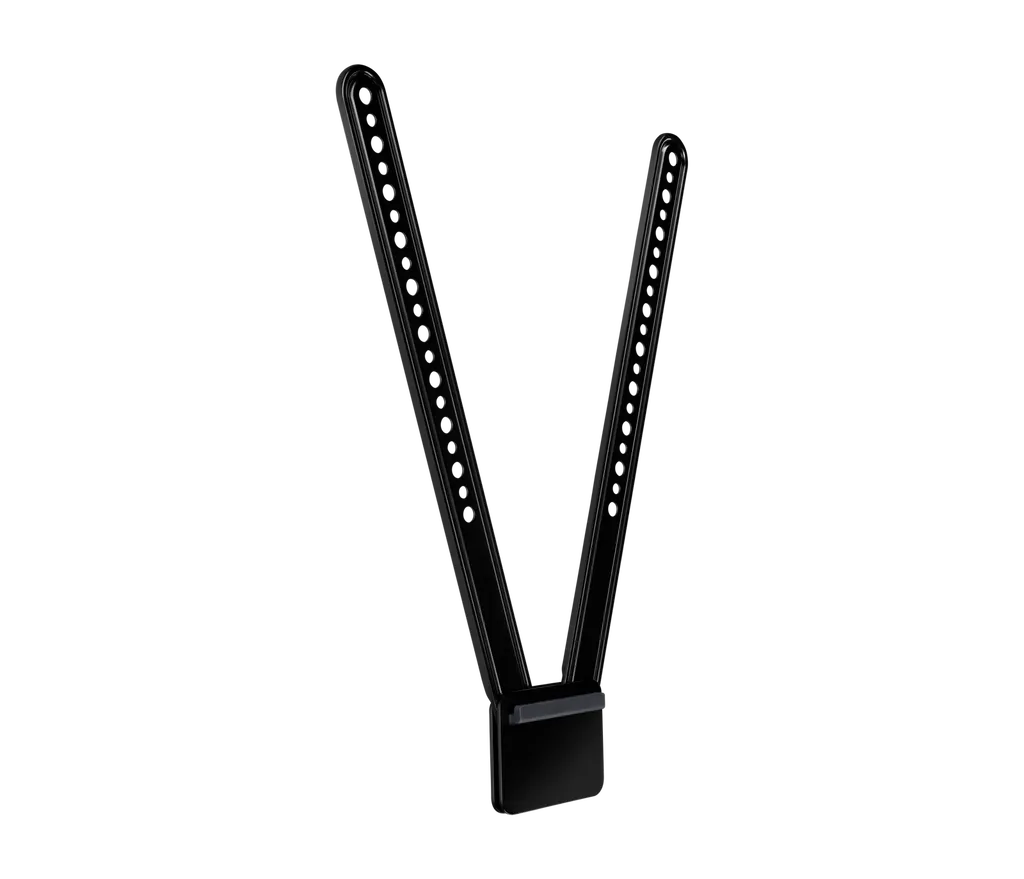
TV Mount for MeetUp
Logitech TV Mount for MeetUp (939-001498 / 939-001656) Display Mount
Priceon request
QuotationWithin 1 working day
DeliveryConfirmed with your quote, based on stock
Overview
The Logitech TV Mount for MeetUp holds the MeetUp ConferenceCam on the back of a flat-panel display, either above or below the screen, using the VESA mounting points most displays have. Two part numbers cover different panel sizes: the standard mount (939-001498) for displays up to 1397 mm diagonal and the XL (939-001656) for displays up to 2286 mm. It suits meeting rooms, classrooms and boardrooms across Qatar that need a camera positioned properly. Request a quote.
What this mount does for a MeetUp camera
The Logitech TV Mount for MeetUp is an accessory that holds the Logitech MeetUp ConferenceCam on the back of a flat-panel display, so the camera sits directly above or below the screen instead of on a desk or shelf. Fixing the camera to the display keeps its height predictable from meeting to meeting and frees desk space in small rooms.
The mount attaches through the VESA mounting points found on the back of most flat-panel TVs and monitors. A swing arm and multiple mounting holes let it fit a wide range of display models, and its 16 mm depth keeps the profile slim against the back of the panel.
Choosing between the standard mount and the XL
Two part numbers cover different display sizes. The standard TV Mount (939-001498) is designed for displays up to 1397 mm measured diagonally. It measures 400 mm high, 83 mm wide and 16 mm deep, and weighs 280 g.
The TV Mount XL (939-001656) is designed for displays up to 2286 mm. It measures 700 mm high, 83 mm wide and 16 mm deep, and weighs 825 g. Measure your panel's diagonal and confirm its mounting points before choosing, because the XL is the right option for a large display in a lecture hall or boardroom.
Mounting above or below the display
The mount's design allows the camera to sit above or below a flat-panel monitor. Placing the camera below the display generally gives the most natural view of participants seated at a table, and the same mount supports the above-screen position when the layout calls for it.
- Below the screen: suits tables facing the display and rooms where participants sit close to the panel.
- Above the screen: suits rooms where the display sits low or where furniture would block a lower camera.
Where it fits in Qatar
A boardroom in West Bay or Lusail with a large wall-mounted display is a typical fit for the XL. A camera fixed to the display keeps the meeting view consistent when teams in Doha connect with colleagues abroad during the Sunday to Thursday working week.
An education site in Education City or Al Wakrah fitting out several classrooms or training rooms can standardise on the standard mount for displays up to 1397 mm. Ordering one set per room keeps the camera position identical across spaces.
A meeting room in a hotel or serviced apartment in The Pearl or Msheireb benefits from a camera that is out of the way and does not clutter a credenza or shelf.
Planning the installation
The source data does not list the VESA pattern sizes or the weight limits of the displays this mount supports, so confirm both against your display's documentation before ordering. Allow clearance for the camera cable and for the swing arm, and check the mounting height against the seating layout in the room.
The data also does not give an operating temperature range for this mount. Rooms with summer temperatures above 45°C or dust exposure should be confirmed with the SmartRooms Qatar team before installation. SmartRooms Qatar offers free site surveys and professional installation, which is useful for a large display where the mount and wall must be checked together.
Request a quote from SmartRooms Qatar with your display model, its diagonal size and a short description of the room layout, and our team will confirm which part number suits your installation.
Highlights
- Holds the MeetUp ConferenceCam above or below a flat-panel display
- Attaches to VESA mounting points on the back of the display
- Standard mount for displays up to 1397 mm diagonal (939-001498)
- XL mount for displays up to 2286 mm (939-001656)
- Swing arm and multiple mounting holes for varied display models
- Standard: 400 mm high, 280 g; XL: 700 mm high, 825 g
Room fit
Tell us the room size and platform (Teams, Zoom or BYOD) and we confirm the right combination with your quotation.
Estimated timeline
Quotation within 1 working day · delivery timing depends on stock availability, and we confirm it with your quotation.
Specifications
10 specifications · Source: manufacturer · checked Oct 2026
Part Number2
- TV Mount
- 939-001498
- TV Mount XL
- 939-001656
Dimensions - TV Mount4
- Height
- 400 mm
- Width
- 83 mm
- Depth
- 16 mm
- Weight
- 280 g
Dimensions - TV Mount XL4
- Height
- 700 mm
- Width
- 83 mm
- Depth
- 16 mm
- Weight
- 825 g
Downloads
0 files from the manufacturerNo downloadable files are listed for this model yet. Ask us and we will send the datasheet.
Questions about TV Mount for MeetUp
What is the Logitech TV Mount for MeetUp used for?
It attaches the Logitech MeetUp ConferenceCam to the back of a flat-panel TV or monitor, so the camera sits directly above or below the screen rather than on a desk. This suits meeting rooms where the display is the focal point and the camera needs a fixed position. It is an accessory for the MeetUp camera. Request a quote from SmartRooms Qatar and we will confirm it fits your display and room.
What is the difference between part numbers 939-001498 and 939-001656?
939-001498 is the standard TV Mount for displays up to 1397 mm measured diagonally. It is 400 mm high and weighs 280 g. 939-001656 is the TV Mount XL for displays up to 2286 mm, measuring 700 mm high and weighing 825 g. Both are 83 mm wide and 16 mm deep. Choose by your panel's diagonal size and the room layout, and ask SmartRooms Qatar to confirm the right part before you order.
Can the camera be mounted above or below the display?
Yes. The mount's design lets the MeetUp ConferenceCam sit above or below a flat-panel monitor. Placing it below the screen generally gives the most natural view of participants, but both positions are available with the same mount. In a boardroom in Msheireb where participants sit at a table facing the display, below-screen mounting is a common choice. Confirm the position against the room's seating plan during your site survey.
Which displays does the mount fit?
The mount is designed for flat-panel TVs and monitors that follow the VESA standard for mounting points on their backs. A swing arm and multiple mounting holes help it fit a range of models. The standard mount covers displays up to 1397 mm diagonal, and the XL covers displays up to 2286 mm. The source data does not list VESA pattern sizes or display weight limits, so send your display model to SmartRooms Qatar before ordering.
Is this mount compatible with cameras other than the MeetUp ConferenceCam?
The product data describes this mount only for the Logitech MeetUp ConferenceCam, so do not assume it will fit another camera. Camera size, weight and mounting interface all affect fit. If you plan to use a different camera with a flat panel, include its model in your quote request so the SmartRooms Qatar team can check compatibility before any order is placed.
Is it suitable for a classroom at a school in Al Wakrah?
It suits a classroom with a flat-panel display within the standard mount's range of up to 1397 mm diagonal. A private school in Al Wakrah fitting out several classrooms would order one set per room so the camera sits at the same height in each space. Each order can be placed on an LPO, and the team can help plan the mounting height so teachers and students have a clear view of the board.
Can it be used in a large boardroom display in West Bay or Lusail?
The XL, part number 939-001656, is the option to check for larger displays up to 2286 mm diagonal. It measures 700 mm high and weighs 825 g. Before installation, confirm that the display itself and its wall or stand can carry the mount and camera. A free site survey from SmartRooms Qatar can check the wall, the display's mounting points and the clearance needed for the swing arm.
What comes in the box?
The box includes the TV mount, the mounting hardware and the user documentation. The MeetUp ConferenceCam is not listed in the box contents, so it must be ordered separately if you do not already own one. When requesting a quote, state whether you already have the camera and which display you plan to use, so the quotation covers the correct items.
Does the mount need professional installation?
Mounting a camera to a display, especially a large one, benefits from professional installation because the display's mounting points, weight and the room layout all need checking. SmartRooms Qatar offers professional installation and free site surveys across Qatar, including the eight municipalities. A survey before ordering helps confirm the correct part number, the mounting height and the cable routing for the room.
How much space and weight do I need to plan for?
The standard mount measures 400 mm high, 83 mm wide and 16 mm deep, and weighs 280 g. The XL measures 700 mm high, 83 mm wide and 16 mm deep, and weighs 825 g. Plan for clearance above or below the display for the camera and the swing arm, and check that the chosen position does not block door frames, cabinets or ceiling fixtures in the room.
Can it be installed in a hot or dusty area such as a lobby or outdoor-facing room?
The source data gives no operating temperature range or environmental rating for this mount. Given Qatar's summer temperatures above 45°C and dust storms, do not assume it suits lobbies with direct sunlight, outdoor-facing spaces or unconditioned areas. Tell the SmartRooms Qatar team the exact location when you request a quote so the environment can be confirmed before installation.
Is the mount covered by warranty and how do I order it?
Products supplied by SmartRooms Qatar are covered by the manufacturer's warranty. To order, request a quote with the part number and your display model. Quotations are usually issued within one working day. We accept purchase orders and LPOs, government tenders including Monaqasat, and payment by bank transfer, cheque or purchase order, and deliver to all eight municipalities of Qatar.



