






Barco
ClickShare Power Supply 100W
Barco ClickShare Power Supply 100W, 100-Watt Video Conferencing Accessory
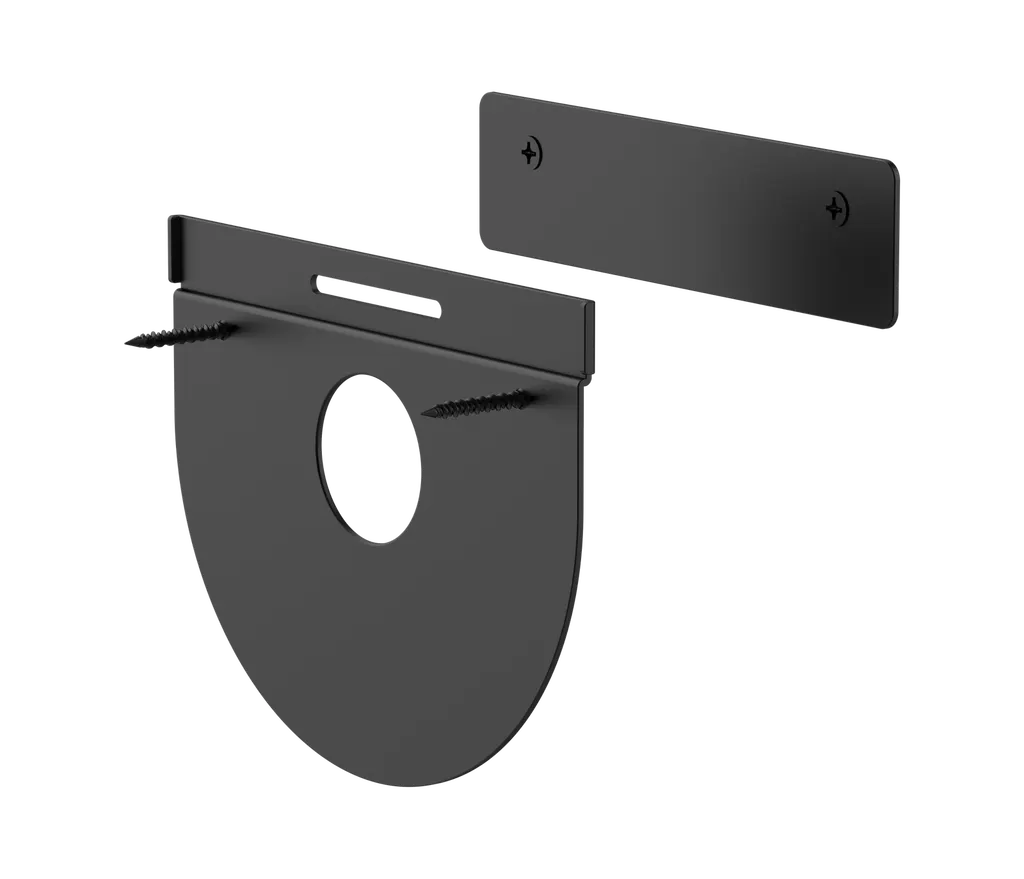
Wall Mount for Logitech Tap
Logitech Wall Mount for Logitech Tap 939-001817 - Black Touch Controller Mount
Priceon request
QuotationWithin 1 working day
DeliveryConfirmed with your quote, based on stock
Overview
The Logitech Wall Mount for Logitech Tap, part 939-001817 in black, fixes Tap and Tap IP touch controllers to the wall with a plate and cleat design. It supports in-wall or down-wall cabling, includes a magnetic HDMI cable clip and dock, and sets the controller at a 14-degree display angle. It suits huddle rooms and corridor points in Qatar's offices and schools. Request a quote from SmartRooms Qatar.
A flush wall mount for Logitech Tap and Tap IP controllers
The Logitech Wall Mount for Logitech Tap, part number 939-001817, gives Tap and Tap IP meeting room touch controllers a fixed position on the wall. Its plate and cleat construction holds the controller firmly and adds very little depth, so the device sits close to the wall rather than projecting from it. The part is listed in black.
Cable routing and HDMI management
The rear and bottom cable exits on the controller both work with this mount, so cabling can run inside the wall or down it. An in-wall run keeps the wall clean in an executive office, while a down-wall run can be the practical choice when the wall is already finished. When Tap is used with applications that support wired content sharing, the magnetic HDMI cable clip and dock keep the cable within reach but out of the way.
Where this wall mount fits in Qatar
- Huddle rooms in West Bay or Msheireb offices: a small meeting room where the controller sits beside the door, keeping the table clear and the cable hidden behind the wall.
- Corridor points in Lusail or The Pearl: the manufacturer recommends this mount for hallways, so it suits a touch controller placed in a corridor near a meeting room in an office or serviced building.
- Education City or Al Sadd seminar rooms: a wall-fixed controller for a university or school room where staff want no loose equipment on the table.
Planning the installation
Before fixing the mount, measure the space beside the door or behind the table. The manufacturer lists the footprint with Tap fitted as 244 mm wide, 179 mm deep and 58 mm high. Mounting hardware is in the box, but the wall construction and the cable route should be checked first. SmartRooms Qatar offers a free site survey, which is the simplest way to confirm these points before installation.
- Confirm the controller model: Tap or Tap IP.
- Choose the rear exit for an in-wall run or the bottom exit for a down-wall run.
- Decide whether the room needs the magnetic HDMI clip.
- Check the operating environment, since the source data gives no temperature range.
Ordering for one room or a whole project
SmartRooms Qatar supplies this mount with delivery to all eight municipalities of Qatar, and professional installation is available. Quotations are usually issued within one working day. Organisations can order on a purchase order (LPO), including for government tenders through Monaqasat, and pay by bank transfer, cheque or purchase order. Products are covered by the manufacturer's warranty. Send your room list, controller model and site location, and request a quote today so your team can plan the wall work.
Highlights
- Holds Logitech Tap and Tap IP touch controllers flush to the wall
- Plate and cleat construction adds virtually no thickness
- Rear and bottom cable exits support in-wall or down-wall cabling
- Magnetic HDMI cable clip and dock for wired content sharing
- 14-degree display angle for the mounted controller
- Mounted size: 244 mm wide, 179 mm deep, 58 mm high
Room fit
Tell us the room size and platform (Teams, Zoom or BYOD) and we confirm the right combination with your quotation.
Estimated timeline
Quotation within 1 working day · delivery timing depends on stock availability, and we confirm it with your quotation.
Specifications
4 specifications · Source: manufacturer · checked Oct 2026
Part Number1
- Items
- 939-001817
Dimensions - Tap with Wall Mount3
- Height
- 58 mm
- Width
- 244 mm
- Depth
- 179 mm
Downloads
2 files from the manufacturerQuestions about Wall Mount for Logitech Tap
What is the Logitech Wall Mount for Tap designed to hold?
It is a wall mount for Logitech Tap and Tap IP meeting room touch controllers. The plate and cleat construction holds the controller firmly against the wall, so it sits flush rather than standing out. The manufacturer part number is 939-001817, and the listing is black. If you are equipping a meeting room in Doha or Lusail with a wall-mounted touch controller, this mount is designed for that job. Request a quote to confirm the right model for your room.
Does the mount come with the touch controller?
No. The box contents listed for this part are the wall mount assembly with plate and cleat, a magnetic HDMI cable clip and dock, mounting hardware and documentation. The Tap or Tap IP controller is not in that list, so you need to specify the controller separately when you request a quote. SmartRooms Qatar can quote the controller and mount together for a meeting room project, with delivery to all eight municipalities of Qatar.
How much space does the mounted controller take up on the wall?
The manufacturer lists the dimensions with Tap fitted to the mount as 244 mm wide, 179 mm deep and 58 mm high. The plate and cleat design is described as adding virtually no thickness, so the controller sits close to the wall. Measure the wall area beside a door or behind a meeting table before ordering, and allow room for the cable exit you intend to use. A free site survey from SmartRooms Qatar can check this before installation.
Can cables run inside the wall or down the wall?
Yes. The controller's rear and bottom cable exits are both compatible with this mount, so you can route cabling either within the wall or down it. In a Doha office where cables must stay hidden, the in-wall option keeps them out of sight. Decide the route before the wall is finished, because the cable exit you choose determines where the controller's cable needs to come out.
How does the magnetic HDMI cable clip work?
When Tap is used with applications that support wired content sharing, the magnetic HDMI cable clip and dock keep the HDMI cable within reach while keeping it out of the way. The clip is included with the mount. It suits a room where presenters connect a laptop by cable, such as a boardroom in Msheireb or a training room in Education City. Check that your meeting software supports wired content sharing before you rely on the cable route.
Is this mount suited to a small huddle room?
Yes. The manufacturer recommends this wall mount for huddle rooms and hallways, and lists it as compatible with Tap and Tap IP. A small huddle room in a West Bay office can use the wall beside the door or next to the screen without taking up table space. The mount sets the controller at a 14-degree display angle. Tell the SmartRooms Qatar team the room size and layout when you request a quote.
How does this model differ from the table and riser mounts in the range?
The source range also lists a table mount and a riser mount for Tap. Both of those swivel and pass cables through a grommet, which this wall mount does not offer. The table mount has a 14-degree display angle, while the riser mount is an elevated table mount with a 30-degree display angle. Choose this wall mount when the wall is the fixing point and table space is limited. Request a quote to compare the options for your room.
Can the controller swivel or pass cables through a grommet?
No. This wall mount does not offer the 180-degree swivel or through-grommet cabling listed for the table and riser mounts. Its strengths are the 14-degree display angle, in-wall or down-wall cabling, and the magnetic HDMI cable clip. If your room needs the controller angled toward different seats, ask SmartRooms Qatar for a quote on a table or riser option and describe the room layout in your request.
Is it suitable for mounting near a window or entrance in summer?
The source data does not give an operating temperature range for this mount, so its performance in heat cannot be confirmed from the data. Qatar summer heat and dust can be severe near glazed entrances, so confirm the exact location with the SmartRooms Qatar team before fitting. When you request a quote, tell the team the room's orientation and whether the wall receives direct sunlight, so the location can be reviewed before installation.
What should a school in Education City check before installing this mount?
Start with a free site survey. Check the wall construction, the position of existing power outlets, and the cable exit you plan to use: the rear exit for an in-wall run or the bottom exit for a down-wall run. Measure the 244 mm width and 58 mm height against the wall space beside the classroom door, and plan the HDMI cable route if the room will share wired content. SmartRooms Qatar handles professional installation, so you receive a clear plan before work starts.
Can a facilities team order several mounts for one project using a purchase order?
Yes. SmartRooms Qatar accepts purchase orders (LPOs) and supports government tenders, including those on Monaqasat. Send the quantity, the controller model for each room and the installation site in one request, and a quotation is usually issued within one working day. Payment can be made by bank transfer, cheque or purchase order. Each mount comes with its own mounting hardware and HDMI cable clip, so match the quantity to the number of controllers.
Is this mount available in colours other than black?
The source data lists one variant for part number 939-001817, which is black, and names no other colour for this part. The version offered on this page is therefore the black one. If your room design calls for a different finish, ask the SmartRooms Qatar team to confirm the colour in your quotation before you order. Mentioning the wall colour of the room in your request helps the team check the finish against the space.



