Thursday, 22 October 2026 · 11 Jumada I 1448 AH Sun – Thu · 9:00 – 18:00
+971 56 914 9477 العربية
WhatsApp

Wall Mount for Video Bars

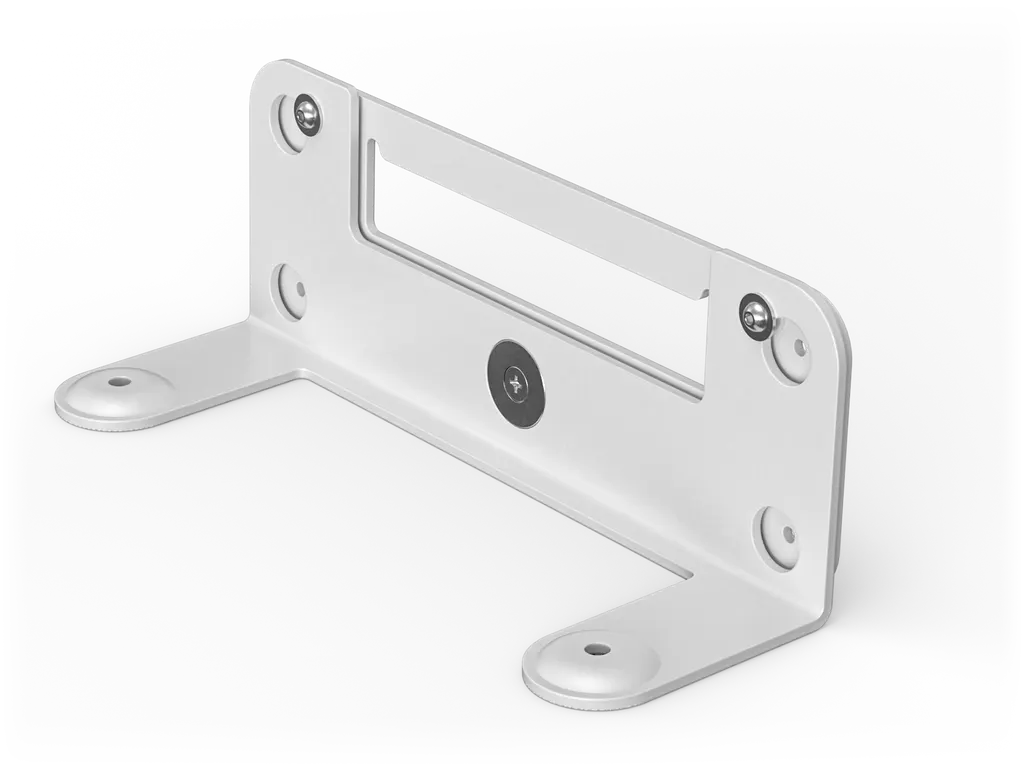
Logitech Wall Mount for Video Bars 952-000044 for Rally Bar

WhatsApp
Priceon request
QuotationWithin 1 working day
DeliveryConfirmed with your quote, based on stock
PDFDownload datasheet (rally-accessories-datasheet.pdf)
Overview

A white wall mounting kit from Logitech for the Rally Bar and Rally Bar Mini video bars. It supplies a 10° tilt down adapter, built-in angle adjustment to level the bar with the display, and room for the bar's cable retention cover, so cables can exit up, down or both. It also fits compatible mobile carts. Suited to meeting rooms in Doha and Lusail. Request a quote.

What this wall mount does for a Rally Bar installation

The Logitech 952-000044 is a white wall mounting kit made for two video bars, the Rally Bar and the Rally Bar Mini. Rather than leaving the bar on a shelf or a credenza, the kit lets you fix it to the wall, either directly beneath the display or in a higher position where a tilt down adapter points the camera across the room. For facilities teams in Qatar, that usually means a tidier meeting room with fewer loose cables and more usable table space.

The facts that matter when you specify it

  • Compatible devices: Rally Bar and Rally Bar Mini only.
  • Tilt down adapter: a 10° downward tilt for rooms where mounting above the display makes sense.
  • Angle adjustment: built into the mount so the video bar can be levelled against the display.
  • Mounting pattern: VESA 200 x 50mm, an industry-standard pattern that also suits compatible mobile carts.
  • Cable management: works with the video bar's built-in cable retention cover, so cables can run up, down, or both.
  • Box contents: wall mount, tilt down adapter, screws and documentation.

The angle adjustment is worth checking at installation. A bar that sits slightly off level beneath a wall-mounted screen is noticeable in a boardroom, and the adjustment exists to correct that before the room is handed over.

Where it fits in Qatar

A boardroom in West Bay or Msheireb with a large display on a feature wall is a natural fit. The bar sits beneath the screen, so participants look toward the camera rather than at a bar on the table, and the wall stays uncluttered.

In a training room at a university in Education City, the display may be mounted high while attendees sit at the back. Here the 10° tilt down adapter matters most, because it angles the bar to cover the whole room rather than only the front rows.

Event venues and hotel meeting spaces in Lusail or Doha often reconfigure rooms several times a week. Where a fixed wall position is not practical, the 200 x 50mm VESA pattern allows the same bar to be used on a compatible mobile cart instead.

What to plan before you mount

Start with the wall. Confirm the wall construction, the fixing points and the display position, then decide whether the bar sits beneath the screen or needs the tilt down adapter. Measure the cable route from the bar to the room's connections so the retention cover can keep them secure. If the room has glass partitions, stone cladding or a large window, a free site survey from SmartRooms Qatar is worth booking before any drilling.

Check the environment as well. The source data for this mount does not state an operating temperature range, so confirm the room's conditions with the SmartRooms Qatar team, particularly where the bar would sit near a window in Qatar's summer heat.

Plan the video bar separately. The kit contains the mount, tilt down adapter, screws and documentation, so the bar itself must be specified alongside it. Check the model against the compatibility list before ordering.

Requesting a quote

Send SmartRooms Qatar the room type, the number of rooms, the display model and whether each room uses a fixed wall position or a mobile cart. The team usually returns a quotation within one working day, and organisations ordering several units can work from a purchase order (LPO) or a government tender. Request a quote for the Logitech 952-000044 and list the rooms you need covered.

Highlights

  • Compatible with Rally Bar and Rally Bar Mini
  • Includes a 10° tilt down adapter
  • Built-in angle adjustment to level the video bar
  • VESA pattern 200 x 50mm, also suits mobile carts
  • Cables can run up, down, or both
  • Part number 952-000044, white finish

Room fit

Tell us the room size and platform (Teams, Zoom or BYOD) and we confirm the right combination with your quotation.

Estimated timeline

Quotation within 1 working day · delivery timing depends on stock availability, and we confirm it with your quotation.

Specifications

2 specifications · Source: manufacturer · checked Oct 2026
Part Number1
Items
952-000044
Technical Specifications - Compatible devices1
Items
Rally Bar · Rally Bar Mini

Downloads

1 file from the manufacturer

Questions about Wall Mount for Video Bars

Which video bars is this wall mount designed for?
The Logitech 952-000044 is listed for the Rally Bar and the Rally Bar Mini, and no other video bars are named in its compatibility data. The box contains the wall mount, a tilt down adapter, screws and documentation. If your room uses a different bar, confirm compatibility with the SmartRooms Qatar team before ordering, so the quotation matches the equipment you intend to fit.
Can a Rally Bar sit beneath a display in a boardroom?
Yes. The mount is designed to position the video bar below the display, which keeps the camera at a natural eye line for participants. In a boardroom in West Bay or Msheireb with a large wall-mounted screen, the bar stays off the table, and the built-in angle adjustment lets the installer align it level with the display.
When do I need the 10° tilt down adapter?
Use it in rooms where mounting above the display makes sense. The adapter tilts the bar 10 degrees downward so the camera covers the room rather than only the front rows. A training room at a university in Education City with a high display and attendees seated at the back is a typical case. Measure the screen height and seating distance before choosing the position.
What does the built-in angle adjustment do?
It lets the installer level the video bar with the display, so the bar does not look tilted against a wall-mounted screen. This matters in a ministry meeting room in Msheireb or a corporate suite in Doha where the screen is the focal point. Check the level during installation, before the room is handed over for daily use.
Can the cables be routed neatly on the wall?
Yes. The mount works with the built-in cable retention cover of the video bar, so cables can run up, down, or both while staying securely connected. In a Doha office where cable runs drop to a floor box, route them downward. Decide the cable direction and check the length of the run before fixing the bar, so the routing is planned rather than improvised.
Can the mount be used on a mobile cart?
Yes. The 200 x 50mm VESA pattern is compatible with mobile carts, which helps hotels and event venues in Lusail or Doha that reconfigure rooms often. Before buying, confirm that the cart's mounting plate matches the same 200 x 50mm pattern, because the source data does not name any specific cart models.
What is in the box?
The kit contains the wall mount, the tilt down adapter, screws and documentation. The video bar itself is not part of this kit, so it must be specified separately. When you request a quote, tell the SmartRooms Qatar team how many rooms need a tilt down adapter and how many fixed positions you need, so the quotation lists the correct parts.
Is this suitable for a bank or consultancy boardroom?
It suits meeting rooms that connect Doha with teams abroad, such as a consultancy office in West Bay or a bank meeting room linked to overseas branches. A wall-fixed bar gives the room a tidy, formal look. The exact placement depends on room size and screen position, and a free site survey from SmartRooms Qatar can confirm the layout before installation.
Can I install it near a window in Qatar's summer heat?
The source data for this mount does not give an operating temperature range, so its suitability for hot or sunlit spaces cannot be confirmed from the specification. Air-conditioned indoor rooms are the usual setting for a meeting room bar. If the site is near a window or glass facade, confirm the conditions with the SmartRooms Qatar team before choosing the mounting position.
Do I need a site survey before mounting?
It is advisable, particularly in rooms with glass partitions, stone cladding or large windows. SmartRooms Qatar offers free site surveys to confirm fixing points, cable routes and whether the tilt down adapter is needed. In a project in Lusail or The Pearl, a survey before drilling helps avoid fixing in an unsuitable position and gives an accurate basis for the quotation.
How can a school or government office order several units?
Schools and government entities can order several mounts against a purchase order (LPO) or through a government tender, including Monaqasat. SmartRooms Qatar usually issues a quotation within one working day, and payment can be made by bank transfer, cheque or purchase order. List the number of rooms, the display model and whether each room is fixed or uses a cart.

Similar models

Biamp Parlé ABC 2500a Biamp Parlé ABC 2500a All-in-One Conferencing Audio Bar
Zoom Certified Microsoft Teams Certified
Biamp Parlé CBC 2500 CM Biamp Parlé CBC 2500 CM Ceiling-Mounted Conferencing Bar
Zoom Certified Microsoft Teams Certified
Biamp Parlé CBC 2500 PM Biamp Parlé CBC 2500 PM Pole-Mounted Conferencing Bar
Zoom Certified Microsoft Teams Certified
Biamp Parlé N 100 Biamp Parlé N 100 Network and USB Expander for Parlé Conferencing Bars
TAA Compliant
Biamp Parlé PMA 2000-DM Biamp Parlé PMA 2000-DM Display Mount Kit for Parlé 2000 Video Bars
Video bars
Email Call