






Biamp
Evoko Kleeo Desk Manager 6-pack + 1yr license
Biamp Evoko Kleeo Desk Manager 6-Pack (910-01972) Desk Booking Display
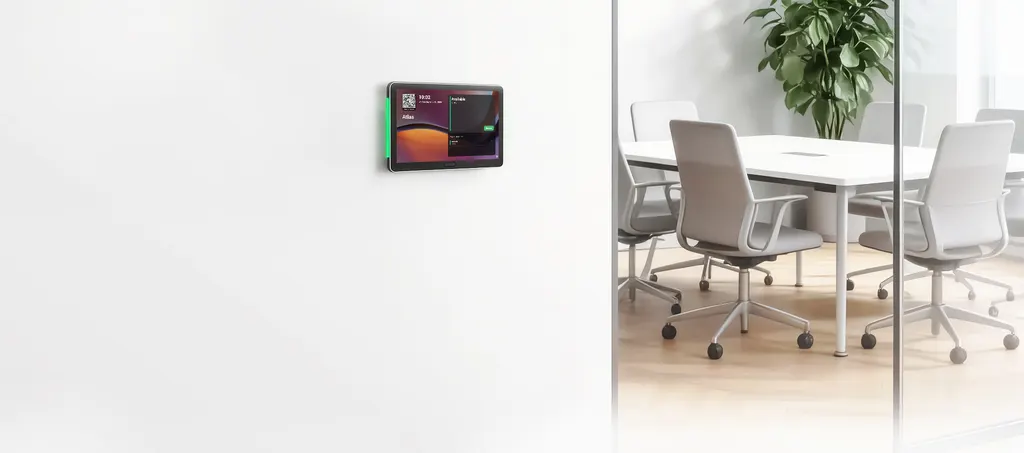
Panel SP10
MAXHUB Panel SP10 11-inch Room Booking Panel
Priceon request
QuotationWithin 1 working day
DeliveryConfirmed with your quote, based on stock
Overview
The MAXHUB Panel SP10 is an 11-inch room booking panel with a 1920 × 1200 display, Android 15 and MDEP support for native Microsoft Teams scheduling. It draws up to 11W over PoE, connects over Wi-Fi 6, and mounts on walls, glass partitions, mullions or backboxes. It suits meeting rooms in Doha and Lusail where staff need to check availability at the door.
A booking panel sized for the door of a meeting room
The MAXHUB Panel SP10 is an 11-inch room booking panel meant to sit beside a meeting room door and show whether the room is free. Its 1920 × 1200 display presents the room calendar clearly, and the manufacturer describes high-visibility LED bars that signal occupancy at a glance. When a room is free, staff can reserve it with a single tap, which suits meetings that are not yet in the calendar.
Display, software and ports for scheduling
- Display: 11 inches, 1920 × 1200 resolution, 60Hz refresh rate
- Software: Android 15 with MDEP supported, positioned for native Microsoft Teams room scheduling
- Wireless: Wi-Fi 6 (802.11ax) and Bluetooth 5.3
- Ports: one USB 2.0, one USB Type-C listed for debugging, one DC input and one RJ45
The RJ45 port is the wired connection that carries power when the panel runs on PoE, so it should be planned first. The USB Type-C port is listed for debug purposes, which makes it a service connection rather than a daily-use port.
Power over Ethernet and the mounting kit
The panel draws a maximum of 11W and requires a PoE 802.3af or above source. The PoE adapter and the DC adapter are not included, so confirm that your switch or injector meets the 802.3af standard before ordering. The box contains a wall mount bracket, a mullion bracket, an electrical box bracket, a screwdriver, two double-sided tapes and a screw bag. The manufacturer lists wall, glass partition, mullion and backbox installation, which covers the common surfaces in an office fit-out.
Where the SP10 fits in Qatar
Government floors in Msheireb: A ministry floor with boardrooms and breakout rooms can place one panel beside each door, so staff check availability before walking across the floor.
University seminar rooms in Education City: Several faculty groups sharing seminar rooms can book from the panel, with the status visible to everyone in the corridor.
Glass-walled offices in West Bay or Lusail: Meeting rooms with glass partitions suit the glass wall mount option, which avoids opening a solid wall.
Summer in Qatar regularly passes 45°C, and the source data gives no operating temperature range for the SP10. Keep panels inside air-conditioned rooms and ask the SmartRooms Qatar team to confirm the environment before fixing one near an external door or a window that receives direct sun.
What to plan before you order
- Confirm PoE 802.3af switch ports and cable routes to each door.
- Choose the bracket for each surface: wall, glass, mullion or backbox.
- Agree the Microsoft Teams and calendar setup with your IT team.
- Book a free site survey before installing several panels across a floor.
- Note the three-year manufacturer warranty stated in the product data.
SmartRooms Qatar delivers to all eight municipalities of Qatar and can supply several panels under one purchase order (LPO). Send us your room list, mounting surfaces and network details, and request a quote. Quotations are usually issued within one working day.
Highlights
- 11-inch display at 1920 × 1200 resolution and 60Hz
- PoE 802.3af or above power, 11W maximum
- Wi-Fi 6 (802.11ax) and Bluetooth 5.3 connectivity
- MDEP supported on Android 15
- Wall, glass partition, mullion and backbox mounting options
- Wall, mullion and electrical box brackets included
Room fit
Tell us the room size and platform (Teams, Zoom or BYOD) and we confirm the right combination with your quotation.
Estimated timeline
Quotation within 1 working day · delivery timing depends on stock availability, and we confirm it with your quotation.
Specifications
24 specifications · Source: manufacturer · checked Oct 2026
Panel SP1024
- Display · Size
- 11 inch
- Display · Resolution
- 1920(H) × 1200(V)
- Display · Refresh Rate
- 60Hz
- System · MDEP
- Supported
- System · Android OS
- Android 15
- Power · PoE IN
- PoE 802.3af or above
- Power · Overall Power (Max.)
- 11W
- I/O Port · USB 2.0
- 1
- I/O Port · TYPE-C
- 1 (For Debug Purpose)
- I/O Port · DC
- 1 (DC Adapter not included)
- I/O Port · RJ45
- 1 (PoE Adapter not included)
- Connectivity · Wi-Fi
- Wi-Fi 6, 802.11ax
- Connectivity · Bluetooth
- 5.3
- Physical Specifications · Dimension (L×H×D)
- 266.6×180.8×28 mm
- Physical Specifications · Net Weight
- 0.73 KG
- Packaging · Package Dimension (L×W×H)
- 368×246×99 mm (1 pcs)
- Packaging · Master Carton (L×W×H)
- 515×390×330 mm (6 pcs)
- Packaging · Gross Weight
- 2.36 KG (1 pcs) / 14.86 KG (6 pcs)
- Accessories · Wall Mount Bracket
- ×1
- Accessories · Mullion Bracket
- ×1
- Accessories · Electrical Box Bracket
- ×1
- Accessories · Screwdriver
- ×1
- Accessories · Double-sided Tape
- ×2
- Accessories · Screw Bag
- ×1
Downloads
3 files from the manufacturerQuestions about Panel SP10
What is the MAXHUB Panel SP10 used for?
The MAXHUB Panel SP10 is a room booking panel that mounts beside a meeting room door and shows whether the room is free or occupied. It suits offices, government floors, schools and campuses where rooms are shared and staff need to see bookings before they walk in. Its 11-inch display shows the room calendar, and a single tap reserves a free room for an ad hoc meeting.
Does the Panel SP10 work with Microsoft Teams room scheduling?
The data lists MDEP as supported and describes native Microsoft Teams compatibility through the MDEP ecosystem, with calendar synchronisation for room availability. The panel runs Android 15. Before ordering, have your IT team confirm the Microsoft Teams account and room mailbox setup, because that configuration depends on your own environment and sits outside the panel itself.
What display and resolution does it have?
The Panel SP10 has an 11-inch display with a 1920 × 1200 resolution and a 60Hz refresh rate. The manufacturer also states anti-glare and anti-fingerprint properties, based on an approval sheet, which helps in corridors with bright lighting. Confirm that the display suits the lighting at your location when you request a quote.
How is the Panel SP10 powered?
The panel is powered over Ethernet using PoE 802.3af or above, with a maximum overall power of 11W. Neither the PoE adapter nor the DC adapter is included, so power must come from a compliant PoE switch or injector connected to the RJ45 port. Check port availability and cable runs to each room door before the order is placed.
Which mounting options does the Panel SP10 support?
The manufacturer lists four installation options: standard wall mount, glass wall mount, mullion mount and backbox mount. The box includes a wall mount bracket, a mullion bracket and an electrical box bracket, which cover the surfaces most often found in an office fit-out. Glass partitions and mullions need a site check, so SmartRooms Qatar offers a free site survey before installation.
What comes in the box?
Each Panel SP10 ships with a wall mount bracket, a mullion bracket, an electrical box bracket, a screwdriver, two double-sided tapes and a screw bag. The PoE adapter and DC adapter are not part of the package. The panel has a net weight of 0.73 kg and dimensions of 266.6 × 180.8 × 28 mm, which helps when planning the space around the door frame.
Can I install a booking panel on a glass partition in a Doha office?
Yes, the manufacturer lists a glass wall mount option for the Panel SP10. An office in West Bay or Lusail with glass-walled meeting rooms can fix the panel to the glass partition instead of opening a solid wall. Because glass and fixing conditions vary, the SmartRooms Qatar team can arrange a free site survey to check the surface and confirm the right bracket before installation is scheduled.
Which ports and wireless standards does it offer?
The panel has one USB 2.0 port, one USB Type-C port listed for debugging, one DC input and one RJ45 port. Wireless connectivity is Wi-Fi 6 (802.11ax) and Bluetooth 5.3. Plan the RJ45 connection first, because it carries PoE power, and treat the Type-C port as a service connection rather than a route for everyday use.
Can the panel be placed near a window or external door in summer?
The source data does not state an operating temperature range for the Panel SP10, so it should not be placed where direct sunlight or outdoor heat reaches it. Qatar summers regularly exceed 45°C. Keep the panel inside air-conditioned meeting rooms and ask the SmartRooms Qatar team to confirm the environment before you approve the quotation.
How could a private school in Al Wakrah use this panel?
A private school in Al Wakrah with shared meeting rooms, laboratories or training spaces can place a panel beside each door, so teachers see which room is free during the school day. Staff reserve a room with one tap, which helps avoid double bookings. Agree with your IT team how the panels will connect to the school network and staff calendar before ordering several units.
Can a government office order several panels on a purchase order?
Yes. SmartRooms Qatar accepts purchase orders (LPOs) and supports government tenders, including Monaqasat. A ministry floor with a number of meeting rooms can order the panels together under one LPO. Send the room list and the required quantity with your request, and the quotation is usually issued within one working day.
What warranty applies to the Panel SP10?
The manufacturer data lists a three-year warranty for the Panel SP10, and the full warranty terms are published on the manufacturer's website. Ask the SmartRooms Qatar team to attach the warranty terms that apply to your order to your quotation, especially if you are buying panels for several meeting rooms at once.
Similar models



Biamp
Evoko Liso Freestand Mount - Boltable
Biamp Evoko Liso Freestand Mount (Boltable) 910-01935 Floor Stand
