






Barco
ClickShare Power Supply 100W
Barco ClickShare Power Supply 100W, 100-Watt Video Conferencing Accessory
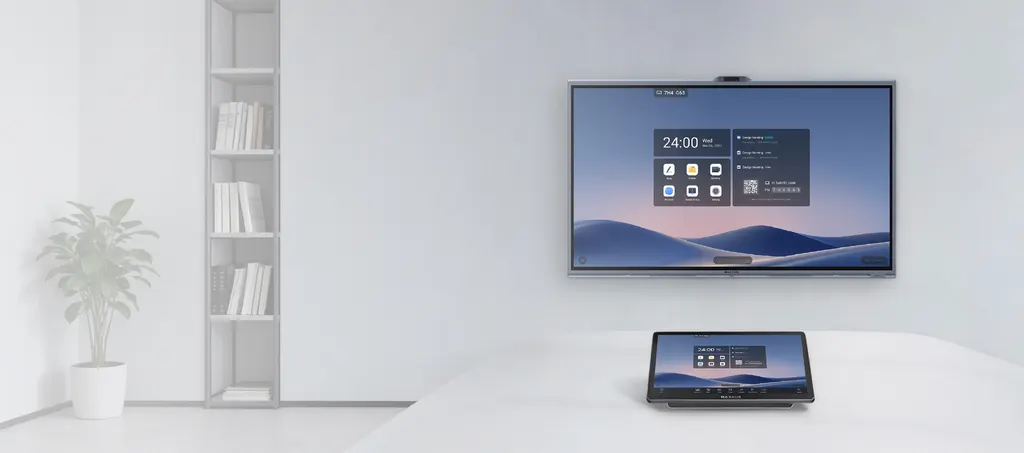
TCP30M Console
MAXHUB TCP30M Console 11.6-inch Android Touch Console
Priceon request
QuotationWithin 1 working day
DeliveryConfirmed with your quote, based on stock
Overview
The MAXHUB TCP30M is an 11.6-inch Android touch console for meeting rooms, with one-tap joining of Microsoft Teams, Zoom, Google Meet and Webex. Its 1920 × 1080 capacitive touchscreen can sit on a desk or mount on a wall, and a USB-C port delivers up to 65W to a laptop. It suits huddle rooms and boardrooms in Doha, Lusail and West Bay. Request a quote for supply and installation.
What the TCP30M console does in a meeting room
The MAXHUB TCP30M is a touch console built around an 11.6-inch capacitive screen. It runs Android and gives the person at the table direct control of a video call. From the screen, a user can join a meeting from a calendar entry, switch the camera on or off, mute the microphone, adjust volume and change screen brightness without reaching for a remote. The product data lists Microsoft Teams, Zoom, Google Meet and Webex among the supported meeting platforms.
Display, touch and power facts that matter
- Screen: 11.6-inch panel at 1920 × 1080 resolution, 60Hz refresh rate and an ELED backlight.
- Brightness: 250 nits minimum and 300 nits maximum with glass, with a lifespan of 20,000 hours or more.
- Touch surface: capacitive touch with anti-fingerprint and anti-glare treatment.
- Power: 19V DC 4.5A input and a USB-C port with up to 65W Power Delivery output.
- Size and weight: 278 × 164 × 82 mm and 1.16 kg, a compact unit for desk or wall use.
The 65W output matters most in long sessions. A laptop plugged into the console can keep charging through a meeting, so the presenter is not tied to a wall socket or a battery that runs low halfway through. The PIR motion sensor wakes the screen when someone approaches, so the console is ready before the meeting starts.
Where the console fits in Qatar
A boardroom in West Bay or Msheireb that connects directors in Doha with colleagues abroad can place the console on the table, so the chair controls the call from the seat. The screen is small, so it works best as a control point beside a main display rather than as the room's only screen.
A university seminar room in Education City can wall-mount the console near the door and keep the table clear for the presenter. A private school in Al Wakrah fitting out staff meeting rooms can rely on the sensor so teachers walk into a room where the console is already awake, with meeting apps one tap away.
What to plan before installation
- Choose desk placement or wall mounting for each room; the product data supports both.
- Plan the network route, since the box includes a 7.5m Ethernet cable.
- Allow a power point near the console for the 1.5m AC cable and 19V adapter.
- Confirm which meeting platform each room uses before the first session.
The standard accessories list does not include a wall bracket, so ask for mounting hardware to be included in the quotation for wall installations. Summer temperatures in Qatar often exceed 45°C, and the product data does not give an operating temperature range, so confirm the position against windows and air-conditioning during a free site survey from SmartRooms Qatar.
Quotations usually arrive within one working day. Request a quote for the MAXHUB TCP30M, and the SmartRooms Qatar team will confirm the accessories, delivery across Qatar's eight municipalities and professional installation. Purchase orders, LPOs and government tenders are welcome.
Highlights
- 11.6-inch capacitive touchscreen at 1920 × 1080 resolution
- One-tap joining for Teams, Zoom, Google Meet and Webex
- USB-C port delivers up to 65W to a laptop
- PIR motion sensor wakes the screen automatically
- Android OS with 250 to 300 nits brightness with glass
- Supports desk placement or wall mounting
Room fit
Tell us the room size and platform (Teams, Zoom or BYOD) and we confirm the right combination with your quotation.
Estimated timeline
Quotation within 1 working day · delivery timing depends on stock availability, and we confirm it with your quotation.
Specifications
24 specifications · Source: manufacturer · checked Oct 2026
TCP30M Console24
- Display · Size
- 11.6 inch
- Display · Resolution
- 1920 × 1080
- Display · Frequency Refresh Rate
- 60Hz
- Display · Back Light Unit
- ELED
- Display · Brightness With Glass
- 250 nits (Min.) 300 nits (Max.)
- Display · Lifespan
- ≥ 20000 hours
- Touch System · Type
- Capactive touch
- Touch System · Surface Treatment
- Anti-fingerprint, Anti-glare
- Sensor · Motion Sensor
- PIR sensor for automatic wake-up
- Power · Power Input
- 19V DC 4.5A
- Power · Power Output
- Type-C PD 65W(Max.)
- Operating System · OS
- Android
- Physical Specification · Product Dimension
- 278 × 164 × 82 mm /11 × 6.4 × 3.2 inch
- Physical Specification · Product Weight
- 1.16 kg / 2.56 lbs
- I/O Port · USB-C
- ×1
- I/O Port · RJ45 (INTERNET)
- ×1
- I/O Port · RJ45 (EXT)
- ×1
- I/O Port · USB 2.0
- ×1
- I/O Port · DC In
- ×1
- Standard Accessories · Type-C Cable (1.5m/4.92ft)
- ×1
- Standard Accessories · Ethernet Cable (7.5m/24.61ft)
- ×1
- Standard Accessories · Screwdriver
- ×1
- Standard Accessories · Power Adapter
- ×1
- Standard Accessories · AC Cable(1.5m/4.9ft)
- ×1
Downloads
0 files from the manufacturerNo downloadable files are listed for this model yet. Ask us and we will send the datasheet.
Questions about TCP30M Console
What is the MAXHUB TCP30M used for, and who is it for?
The TCP30M is a touch console that sits in a meeting room and controls video calls. It runs Android and lets a user join scheduled meetings, switch the camera on, mute the microphone and change volume from its 11.6-inch screen. It suits huddle rooms, small boardrooms and training rooms where a presenter needs a control point at the table rather than a remote control.
Which meeting platforms can I join with one tap?
The product data lists Microsoft Teams, Zoom, Google Meet and Webex. The console can sync meeting schedules and join these platforms with a single tap on its touchscreen. Before installation, confirm with your IT team which platform each room uses and that the accounts are ready, so the first meeting in each room starts without delay.
Can the console sit on a desk and also be wall-mounted?
Yes. The product data states that the TCP30M can be placed on a desk or wall-mounted for specialised setups. The standard accessories are a Type-C cable, Ethernet cable, screwdriver, power adapter and AC cable, with no wall bracket listed. Ask for mounting hardware in your quotation, and book a free site survey to check wall height and cable routing first.
What screen size and resolution does the TCP30M have?
The display measures 11.6 inches with a 1920 × 1080 resolution and a 60Hz refresh rate. It uses an ELED backlight and a capacitive touch surface with anti-fingerprint and anti-glare treatment. Because the screen is compact, it works well as a control panel beside the room's main display, showing a real-time preview and supporting annotation.
How bright is the screen, and will it work near windows?
The product data gives brightness of 250 nits minimum and 300 nits maximum with glass, with a backlight lifespan of 20,000 hours or more. Brightness can be adjusted from the console. For rooms with large windows in Doha or Lusail, check the placement against daylight and glare during the site survey before choosing the mounting position.
Can the console charge my laptop during a meeting?
Yes. The USB-C port delivers up to 65W Power Delivery, so a compatible laptop can charge while connected for the session. The 65W figure is the maximum output stated in the data, and the actual charging rate depends on the laptop. This helps long board meetings in West Bay or Msheireb run without a battery warning in the middle of the discussion.
Which ports does the TCP30M include?
The console has one USB-C port, two RJ45 ports labelled INTERNET and EXT, one USB 2.0 port and one DC In port. Use the INTERNET port for the network connection, as labelled. Confirm the intended use of the EXT port with SmartRooms Qatar during planning, so the cable plan for your meeting room is set before installation.
How does the PIR motion sensor help in daily use?
The PIR sensor detects movement and wakes the screen automatically. In a staff meeting room at a private school in Al Wakrah, teachers walking in find the console already awake, with the meeting platforms one tap away. This removes the need for someone to switch the screen on before each department meeting or parent discussion.
What accessories come in the box?
The standard accessories are a 1.5m Type-C cable, a 7.5m Ethernet cable, a screwdriver, a power adapter with a 19V DC 4.5A input and a 1.5m AC cable. Because Qatar's mains is 240 V with BS 1363 sockets, confirm with SmartRooms Qatar that the supplied AC cable suits the socket in each room before the installation day.
Is the TCP30M suitable for hot or semi-outdoor areas?
The product data does not state an operating temperature range or an ingress rating, so the console should not be placed in an unconditioned or outdoor space without confirmation. Summer temperatures in Qatar often exceed 45°C. Ask SmartRooms Qatar to check the position against sun exposure and air-conditioning during a free site survey before ordering.
Can a ministry or school buy several units through an LPO or government tender?
Yes. SmartRooms Qatar accepts purchase orders (LPOs) and government tenders, including Monaqasat, and delivers to all eight municipalities of Qatar. A ministry fitting out ten meeting rooms in Msheireb can request one quotation covering every unit, with accessories and installation listed per room, and pay by bank transfer, cheque or purchase order.
What operating system does it run, and what warranty applies?
The TCP30M runs Android. Products supplied by SmartRooms Qatar are covered by the manufacturer's warranty. The product data does not list a warranty period, so ask for the warranty terms with your quotation and compare them with any other console you are considering for the same meeting rooms.



