





UC P30
MAXHUB UC P30 4K Dual-Camera Video Conferencing Camera
- Field of view
- DFOV 90°/ HFOV 80°/ VFOV 49.2°
- Zoom
- 12x
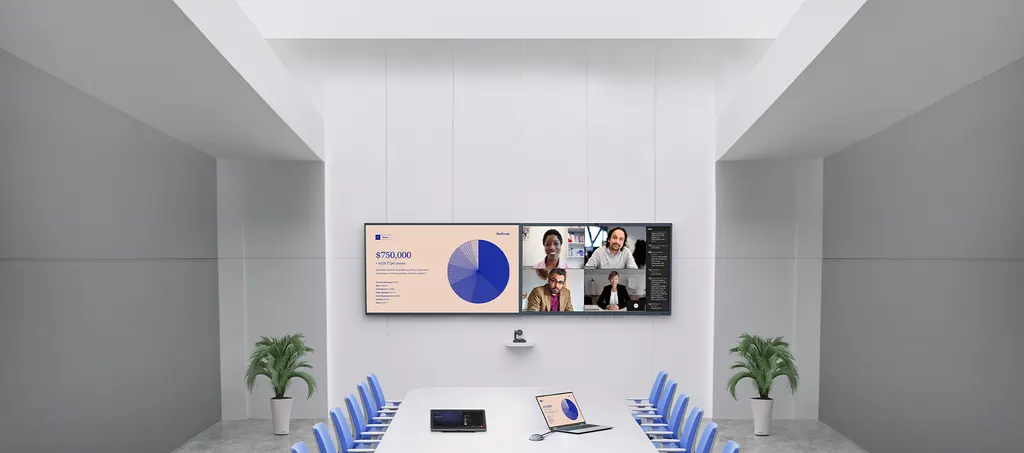
The MAXHUB UC P30 is a 4K intelligent dual-camera suited to meeting rooms of medium to large size. Its Sony image sensors work with a 12x optical zoom lens and a 90° DFOV, and it can be powered over a single PoE+ cable. Auto framing and speaker tracking keep participants in shot. It suits boardrooms and training rooms in Doha, West Bay and Lusail, and SmartRooms Qatar supplies it by quotation.
A dual-camera view for medium to large rooms
The MAXHUB UC P30 is a 4K camera built for meeting spaces where one fixed lens cannot cover every seat. Its dual-camera design uses a Sony image sensor rated at 8.42M pixel, so the system can capture the room from more than one viewpoint. A 12x optical zoom lens lets an operator frame a presenter at the far end of a long table without moving the unit, while the 90° DFOV gives wide coverage when participants are spread across the room.
Specifications that shape room planning
The figures below help decide where the camera goes and how it is controlled:
- Field of view: DFOV 90°, HFOV 80° and VFOV 49.2°.
- Lens: focal length 4.8 mm to 57.8 mm, aperture F1.8 to F3.6.
- Pan and tilt: motorised pan of ±170° and tilt of ±90°.
- Presets: 10 via IR remote, and 128 via RS-232.
- Power: 12 V DC 2A, or PoE+ input up to 25 W, with consumption of 22 W or less.
- Size and weight: 181 × 151.5 × 178.4 mm, 2.3 kg net.
Outputs, control and management
The camera offers several ways to connect. USB 3.0 carries H.264 or MJPEG up to 2160p at 30 fps, or YUV up to 1080p at 30 fps. USB 2.0 provides up to 1080p at 30 fps. HDMI reaches 2160p at 30 fps, and the IP output sends a first stream up to 2160p at 30 fps alongside a second stream up to 720p at 30 fps. Image flip and image mirror keep the picture correct in an inverted installation. According to the manufacturer, the unit integrates with MAXHUB displays, Extron controls and Shure audio. Onsite IT staff can manage the device over USB with MAXHUB ALIGN software, while remote teams can reach it through the cloud-based MAXHUB Pivot service.
Where it fits in Qatar
Consider three typical rooms. In a ministry boardroom in Msheireb, meetings may include officials in Doha joining colleagues in other cities or countries, and presets let a moderator move quickly between speakers. A training room in Education City may need to cover a group seated across several rows, where the wide field of view and the 4.8 mm to 57.8 mm focal range matter. A corporate meeting room in Lusail or The Pearl that runs back-to-back calls with teams in Europe and Asia can use the USB output for conferencing software and the IP stream for network-based video systems.
Planning before you order
- Fix the mounting position and use the included mounting kit for a unit weighing 2.3 kg net.
- Choose power: a PoE+ port rated up to 25 W, or the 12 V DC 2A adapter.
- If you plan to use the 128 RS-232 presets, confirm the room control system supports RS-232.
- The source data does not state an operating temperature range, so confirm the installation environment with the SmartRooms Qatar team before mounting near a window or in a hot space.
- Book a free site survey to check sightlines, cable runs and the distance from table to camera.
- For several rooms, the four-unit package weighs 16.9 kg gross, which helps with delivery planning.
Request a quote from SmartRooms Qatar for the MAXHUB UC P30. We usually return quotations within one working day, with installation details included.
Highlights
- Dual-camera 4K system with Sony image sensors
- 12x optical zoom and 90° DFOV coverage
- PoE+ power over a single Cat5e cable
- Auto framing, speaker and presenter tracking
- USB, HDMI and IP outputs up to 2160p at 30fps
- Pan ±170°, tilt ±90°, 10 IR and 128 RS-232 presets
Room fit
Tell us the room size and platform (Teams, Zoom or BYOD) and we confirm the right combination with your quotation.
Estimated timeline
Quotation within 1 working day · delivery timing depends on stock availability, and we confirm it with your quotation.
Specifications
UC P3021
- Dual Camera · Image Sensor
- Sony 4K, 8.42M pixel
- Dual Camera · Video Outputs (USB 3.0)
- H.264/MJPEG up to 2160p@30fps, YUV up to 1080p@30fps
- Dual Camera · Video Outputs (USB 2.0)
- H.264/MJPEG up to 1080p@30fps
- Dual Camera · Video Outputs (HDMI)
- H.264/MJPEG up to 2160@30fps
- Dual Camera · Video Outputs (IP)
- H.264/MJPEG up to 2160p@30fps (First Stream) H.264/MJEPG up to 720p@30fps (Second Stream)
- Dual Camera · Optical Zoom
- 12x
- Dual Camera · Digital Zoom
- 3x
- Dual Camera · Field of View (FOV)
- DFOV 90°/ HFOV 80°/ VFOV 49.2°
- Dual Camera · Lens Focal Length
- 4.8 mm ~ 57.8 mm
- Dual Camera · Lens Aperture (F#)
- 1.8 ~ 3.6
- Dual Camera · Motorized Pan & Tilt
- Pan: ±170°, Tilt: ±90°;
- Dual Camera · Preset Number
- 10 Presets via IR Remote, 128 Presets via RS232
- Dual Camera · Image Flip and Image Mirror
- Yes
- Power · Power Supply
- DC in 12V, 2A / POE+ in (Max 25W)
- Power · Power Consumption
- ≤ 22W
- Mechanical Specifications · Product Dimension
- 181 × 151.5 × 178.4 mm / 7.13 × 5.96 × 7.02 inches
- Mechanical Specifications · Package Dimension (1 unit)
- 295 × 245 × 243 mm / 11.61 × 9.65 × 9.57 inches
- Mechanical Specifications · Package Dimension (4 units)
- 610 × 510 × 265 mm / 24.02 × 20.08 × 10.43 inches
- Mechanical Specifications · Net Weight (1 unit)
- 2.3 kg / 5.34 lbs
- Mechanical Specifications · Gross Weight (1 unit)
- 3.95 kg / 8.71 lbs
- Mechanical Specifications · Gross Weight (4 units)
- 16.9 kg / 37.26 lbs




