






Barco
ClickShare Power Supply 100W
Barco ClickShare Power Supply 100W, 100-Watt Video Conferencing Accessory
TCP33T
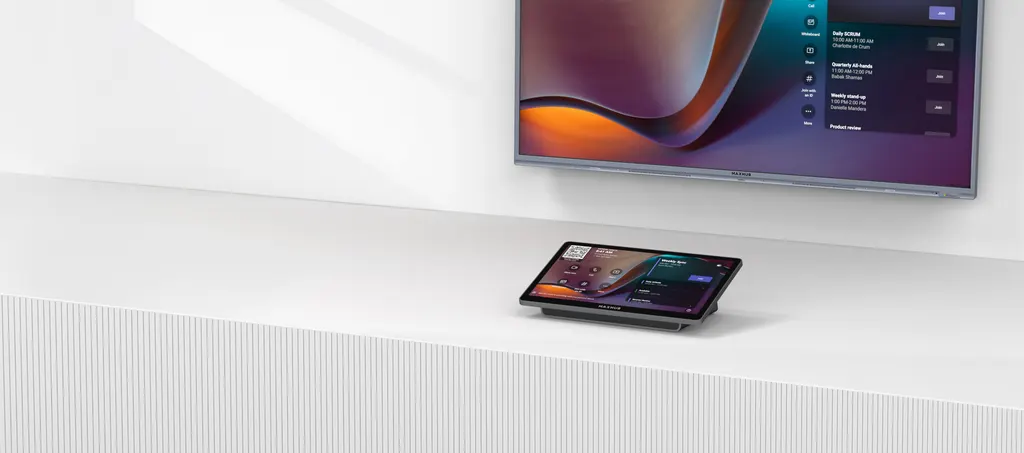
MAXHUB TCP33T Universal Console for Microsoft Teams Rooms
- Platforms
- ×1
Priceon request
QuotationWithin 1 working day
DeliveryConfirmed with your quote, based on stock
Overview
The MAXHUB TCP33T is an 11.6-inch touch console that lets meeting participants control Microsoft Teams Rooms on a Surface Hub or XBoard from their seats. Certified by Microsoft for Teams Rooms, according to the maker. It includes a PoE injector, a USB-C content-sharing port and a motion sensor. It suits Doha and Lusail boardrooms already on Teams Rooms. Request a quote.
What the TCP33T does in a Teams Rooms meeting
The MAXHUB TCP33T is a touch console built for rooms where a Surface Hub or MAXHUB XBoard runs Microsoft Teams Rooms. Instead of walking to the main display, a participant taps the 11.6-inch screen to join a call, invite attendees, adjust the microphone, camera and volume, or start sharing. The manufacturer describes it as the first Teams Rooms certified console designed for this pairing, so it is aimed at organisations already committed to that platform.
Display, touch and sensor details that matter
The panel offers a 1920 × 1080 resolution and a 60Hz refresh rate, on an ELED backlight rated at 250 to 300 nits with glass. Its capacitive touch surface has anti-fingerprint and anti-glare treatment, which helps reduce reflections from overhead lights and keeps the screen clean through heavy daily use. The display lifespan is rated at 20,000 hours or more. A built-in PIR motion sensor wakes the console when someone approaches, so the controls are ready before the first person sits down.
- Connectivity: one USB-C port for wired content sharing, and one RJ45 port for a PoE injector or an XBoard V7 Teams Room.
- Dimensions: 278 × 164 × 82 mm, weighing 1.16 kg.
- Security: a Kensington slot for securing the console to furniture.
Where it fits in Qatar
In a boardroom in Msheireb, a console placed on the table lets the chair start a call with a partner team abroad without standing up. In a university seminar room in Education City, the console sits beside the Surface Hub, and visiting lecturers share slides over the USB-C cable without hunting for adapters. In a real estate sales gallery in Lusail, the console can be wall-mounted beside a display to present projects to clients.
The operating range is 0°C to 40°C, which sits below Qatar summer outdoor temperatures that can exceed 45°C. Keep the console inside air-conditioned rooms, and not on open terraces or in semi-outdoor pavilions.
Planning the installation
The kit includes a PoE injector, two 7.5 m Ethernet cables, a 1.8 m Type-C cable, a USB-A to RJ45 adapter, a Quick Start Guide, a screwdriver and a power cord. The manufacturer lists wall and table mounting. Before drilling into a wall or choosing a table position, the SmartRooms Qatar team can carry out a free site survey to plan cable routes from the network point to the console and confirm the distance to the display.
For schools, agencies and companies buying several units, quotations are usually issued within one working day. Purchase orders (LPOs) and government tenders through Monaqasat are supported, and the products carry the manufacturer's warranty.
Request a quote from SmartRooms Qatar for the MAXHUB TCP33T. Tell us the room type, the Surface Hub or XBoard model already in place and the number of consoles you need.
Highlights
- 11.6-inch 1920 × 1080 capacitive touch display
- Built-in PIR sensor wakes the console on approach
- Operating temperature 0°C to 40°C
- Includes PoE injector and two 7.5 m Ethernet cables
- USB-C wired content sharing and RJ45 port for XBoard V7
- Wall or table mounting options
Room fit
Tell us the room size and platform (Teams, Zoom or BYOD) and we confirm the right combination with your quotation.
Estimated timeline
Quotation within 1 working day · delivery timing depends on stock availability, and we confirm it with your quotation.
Specifications
26 specifications · Source: manufacturer · checked Oct 2026
TCP33T26
- Display · Size
- 11.6 inch
- Display · Resolution
- 1920 × 1080
- Display · Frequency Refresh Rate
- 60Hz
- Display · Back Light Unit
- ELED
- Display · Brightness With Glass
- 250 nits (Min.) 300 nits (Max.)
- Display · Lifespan
- ≥ 20000 hours
- Touch System · Type
- Capactive touch
- Touch System · Surface Treatment
- Anti-fingerprint, Anti-glare
- Sensor · Motion Sensor
- PIR sensor for automatic wake-up
- Environmental Condition · Operating Temperature
- 0°C ~ 40°C / 0°F ~ 104°C
- Environmental Condition · Operating Humidity
- 10%~90% RH
- Environmental Condition · Storage Temperature
- -20°C ~ 60°C / -4°F ~ 140°F
- Environmental Condition · Storage Humidity
- 1O%~ 90% RH
- Environmental Condition · Altitude
- Below 5000 m
- Physical Specification · Product Dimension
- 278 × 164 × 82 mm /11 × 6.4 × 3.2 inch
- Physical Specification · Product Weight
- 1.16 kg / 2.56 lbs
- I/O Port · USB-C (Content Sharing)
- × 1
- I/O Port · RJ45 (to connect POE Injector or MAXHUB XBoard V7 Teams Room)
- ×1
- I/O Port · Kensington Slot
- × 1
- Standard Accessories · Power Cord
- Yes
- Standard Accessories · Ethernet Cable (7.5 m/24.6 ft)
- ×2
- Standard Accessories · USB-A to RJ45 Adapter
- ×1
- Standard Accessories · POE Injector
- ×1
- Standard Accessories · Type-C Cable (1.8 m/5.9 ft)
- ×1
- Standard Accessories · Quick Start Guide
- ×1
- Standard Accessories · Screwdriver
- × 1
Downloads
6 files from the manufacturerQuestions about TCP33T
Is the TCP33T right for a Doha boardroom that already runs Teams Rooms?
The TCP33T is a touch console for Microsoft Teams Rooms meetings. Participants use its 11.6-inch screen to join calls, invite attendees, control mute, camera and volume, and start content sharing from their seats. It suits rooms where a Surface Hub or MAXHUB XBoard is the main display, such as boardrooms and training rooms in Doha and Lusail.
Which displays does the TCP33T work with?
The manufacturer designs the TCP33T for Microsoft Surface Hub and MAXHUB XBoard, and its feature list names the Surface Hub 3 as a pairing. The RJ45 port connects to a PoE injector or an XBoard V7 Teams Room, while the USB-C port carries wired content sharing. Confirm the exact Surface Hub or XBoard model in your room when you request a quote.
Does the box include a PoE injector and cables?
Yes. Standard accessories are one PoE injector, two Ethernet cables of 7.5 m (24.6 ft) each, one USB-A to RJ45 adapter, one 1.8 m (5.9 ft) Type-C cable, a Quick Start Guide, a screwdriver and a power cord. In an office in Doha or a meeting room in Lusail, the longer Ethernet lengths help reach a network point that is not directly behind the table.
Can the TCP33T sit in an unshaded meeting room in Doha during summer?
Not outdoors or in semi-open spaces. The rated operating temperature is 0°C to 40°C, with humidity from 10% to 90% RH. Outdoor temperatures in Qatar in summer can exceed 45°C, so install the console inside air-conditioned rooms only. Ask the SmartRooms Qatar team to check your room conditions during the site survey.
Will the console be ready when a visitor walks into a training room?
Yes, because the console has a PIR motion sensor that detects an approaching person and wakes the connected Teams Room device, such as a Surface Hub. Controls are ready before trainees or visitors sit down, which saves time at the start of a session. The sensor is built into the console, so it adds no separate unit to the room. Plan its position during the survey so it covers the seating area.
What are the specifications of the 11.6-inch screen?
The screen offers a 1920 × 1080 resolution and a 60Hz refresh rate, with an ELED backlight. Brightness is listed as 250 nits minimum and 300 nits maximum with glass. The capacitive touch surface has anti-fingerprint and anti-glare treatment, and the display lifespan is rated at 20,000 hours or more.
How do we mount the console in a Lusail sales gallery?
The manufacturer lists two options: fixed to a wall for a streamlined, space-saving look, or resting on a table for direct use. The console measures 278 × 164 × 82 mm and weighs 1.16 kg, so it is light enough for a wall bracket or a table position. A Kensington slot is provided for security, but a cable lock is not in the accessory list. SmartRooms Qatar can check the wall or table surface in a free site survey before installation.
Can presenters in a university seminar room share content without adapters?
Yes, using a cable. The USB-C content-sharing port on the console carries presentations and media to the connected Surface Hub or XBoard, and the included Type-C cable is 1.8 m long. Visiting lecturers can connect a laptop without swapping cables at the display. The sharing path described for this model is wired.
Can a Qatari ministry use the TCP33T in its meeting rooms?
The manufacturer describes the TCP33T as a Microsoft Teams Rooms certified console, which is a useful starting point for a government meeting room. Check your ministry or authority requirements and the tender specification before you rely on it. SmartRooms Qatar supplies government bodies and can prepare quotations for tenders through Monaqasat.
How should a school in Al Wakrah order several consoles?
Send your room list and the Surface Hub or XBoard model in each room. SmartRooms Qatar usually issues a quotation within one working day. Purchase orders (LPOs) are accepted, and payment can be made by bank transfer, cheque or purchase order. Delivery covers all eight municipalities of Qatar, and professional installation is available. Products carry the manufacturer's warranty.



