





Thursday, 22 October 2026 · 11 Jumada I 1448 AH Sun – Thu · 9:00 – 18:00
+971 56 914 9477 العربية
WhatsApp

CC100

Nearity CC100 Conference Room Webcam with Auto Focus

Video
2K
Field of view
75°
Microphones
2-element ECM microphones
Pickup range
-60° -60°
WhatsApp
Priceon request
QuotationWithin 1 working day
DeliveryConfirmed with your quote, based on stock
PDFDownload datasheet (Datasheet - CC100.pdf)
Overview

The Nearity CC100 is a USB conference webcam with a 4MP sensor, 2K maximum resolution and a 75° field of view. Two noise-canceling microphones pick up voices within 3m, and the camera runs on USB power at 5V/0.5A. It suits huddle rooms, staff desks and online classrooms in Qatar that need a clear, compact camera on a single USB-A connection. Request a quote for CC100 units for your meeting spaces.

What the Nearity CC100 does in a meeting room

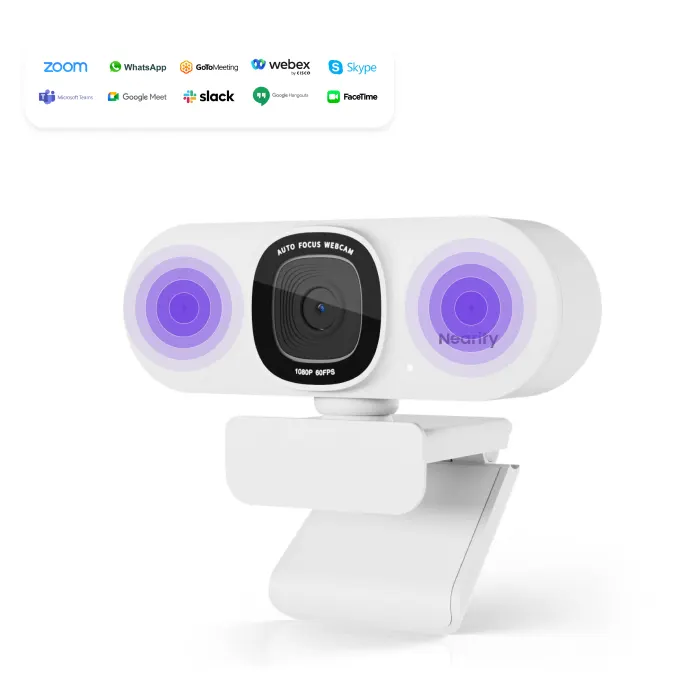
The Nearity CC100 is a USB conference webcam for desks and screens, aimed at small and mid-sized rooms where one or two people need clear video and audio for remote participants without installing a full room system. It connects to a PC or laptop through one USB 2.0 Type-A port, and the meeting software detects it as the camera. Nearity lists it in its USB Conference Cameras series.

Image specifications and what they mean for planning

The camera uses a 4MP sensor with a maximum resolution of 2K and a 16:9 aspect ratio. Its lens has an F2.4 aperture and a 4.4mm focal length, and the listed field of view is 75° diagonal and 63° horizontal. Frame rates depend on the format: video characteristics list up to 1080p at 60fps, MJPEG runs up to 2K at 30fps, and YUY2 runs up to 480p at 30fps. Check which format your conferencing platform selects, because the frame rate ceiling changes with it. The data also lists anti-flicker, auto exposure, automatic white balance and 3D noise suppression as supported video features.

Audio: two microphones and noise handling

Two ECM microphones capture voices within an effective pickup distance of 10 feet, which is about 3m. The specification gives a sensitivity of -38dB at 1kHz and a signal-to-noise ratio of 70dB at 1kHz, and the maximum background noise suppression is 15dB. The camera also provides echo elimination and noise cancellation. This matters in rooms beside an air-conditioning unit or a busy corridor, because remote participants judge the call by how clearly they hear each speaker.

Where it fits in Qatar

  • Huddle rooms in Msheireb or West Bay offices: a camera on a table for four to six people, connected to a laptop running meetings with colleagues abroad.
  • Online teaching in private schools across Al Rayyan and Lusail: a teacher-side camera for hybrid lessons, framing the teacher and a small group of students.
  • Telehealth consultations in clinics near Al Sadd: a setup where the lens cover and camera on/off control keep the clinician in charge of when the feed is live.

Installation and planning checklist

The CC100 measures 106mm high, 56mm wide and 61mm deep, weighs 154g and is finished in white. It can attach to a screen, sit on a desk or stand on a tripod, and optional tripod, TV and wall brackets are listed. Decide on the mount before ordering so it matches your display or wall. The data does not give an operating temperature range, so confirm the installation environment with the SmartRooms Qatar team, especially if the camera would sit near a window or in an unairconditioned space during summer. SmartRooms Qatar offers free site surveys to confirm the mounting position before installation.

Request a quote from SmartRooms Qatar for the Nearity CC100. The team will confirm delivery to your municipality with the quotation, usually within one working day.

Highlights

  • 2K maximum resolution from a 4MP sensor
  • 75° field of view with listed auto focus
  • Two noise-canceling microphones with 3m pickup range
  • Single USB 2.0 Type-A connection powered at 5V/0.5A
  • Windows, Mac and Linux compatible
  • Camera and mute on/off controls plus a lens cover

Room fit

Tell us the room size and platform (Teams, Zoom or BYOD) and we confirm the right combination with your quotation.

Estimated timeline

Quotation within 1 working day · delivery timing depends on stock availability, and we confirm it with your quotation.

Specifications

27 specifications · Source: manufacturer · checked Oct 2026
Camera Features7
Aperture
F2.4
Sensor
1/2.9inches, 4MP
Focusing mode
Fixed focus 4.4mm
FOV(D)
75°
FOV(H)
63°
FOV(W)
37°
_items
Non-distortion lens
Video Characteristics5
_items
Anti-flickering supported · Auto-exposure supported · Automatic white balance supported · 3D noise suppression · max of 1080P@60fps
Max Resolution
2K
Aspect ratio
16:9
YUY2
max of 480P@30fps
MJPEG
max 2k@30fps
Microphone Features3
Microphone type
2-element ECM microphones
Sensitivity
-38dB@1kHz
S/N
70dB@1kHz
Audio characteristics3
Area sound pickup range
-60° -60°
Maximum background noise Suppression
15dB
Effective pickup distance
10feet
Physical characteristics5
Height
106mm(4.2 inches)
Width
56mm (2.2 inches)
Depth
61mm(2.4 inches)
Net weight
154g(5.43 oz)
Color
White
Power and Connectivity2
_items
USB2.0 Type-A · Camera on/off · Mute on/off
External power supply
USB 5V/0.5A
Optional Mounts1
_items
Tripod bracket / TV bracket / Wall bracket
compatible Operating Systems1
_items
Windows/Mac/Linux

Downloads

1 file from the manufacturer

Questions about CC100

Who is the Nearity CC100 best suited to?
The CC100 suits small and mid-sized rooms where one or two people talk with remote participants, such as an eight-person meeting room in West Bay or a manager's office in Msheireb. Its 75° field of view keeps several seated people in frame without capturing much of the wall behind them. It is a desk or screen camera rather than a full room system, so it fits teams that want a simple USB setup.
What video resolution and frame rates does the CC100 support?
The CC100 uses a 4MP sensor with a maximum resolution of 2K and a 16:9 aspect ratio. Frame rates depend on the format. Video characteristics list up to 1080p at 60fps, MJPEG runs up to 2K at 30fps, and YUY2 runs up to 480p at 30fps. Your conferencing platform chooses the format during the call, so check its video settings if you need the highest quality on your network.
Does the CC100 have auto focus?
Nearity's feature list describes auto focus, but the spec sheet lists a 4.4mm lens with fixed focus mode and an F2.4 aperture. Before you buy, ask the SmartRooms Qatar team to confirm how focus behaves at your intended seating distance, and test the camera in the room where it will be used. A fixed-focus lens works best when people sit at a consistent distance from it.
How far can the CC100 microphones pick up speech?
The two ECM microphones have an effective pickup distance of 10 feet, which is about 3m. The specification gives a sensitivity of -38dB at 1kHz, a signal-to-noise ratio of 70dB at 1kHz, and a maximum background noise suppression of 15dB. For a table of four to six people, place the camera near the centre of the table so the nearest speaker is inside the pickup range.
Which operating systems work with the CC100?
The CC100 is listed as compatible with Windows, Mac and Linux. It connects through a USB 2.0 Type-A port, so any laptop or desktop with a free USB-A socket can start a call. If your Mac laptops only have USB-C ports, ask the SmartRooms Qatar team whether you need an adapter before ordering.
How is the CC100 powered and connected?
The CC100 takes its power from the USB connection, with an external power supply rated USB 5V/0.5A. It has one USB 2.0 Type-A connector, plus camera on/off and mute on/off controls. The data does not list a separate mains adaptor, so the camera relies on the host USB port supplying 5V at 0.5A. Use a direct port on the computer where possible, and test any USB hub before deployment.
What does the NearSync app do for the CC100?
The NearSync Desktop app is listed for select models, including the CC100. It is used to adjust image settings and to download firmware updates. Ask the SmartRooms Qatar team to confirm the app's availability for your operating system before rollout, and add firmware checks to your IT maintenance routine so meeting room cameras stay up to date.
How should the CC100 be mounted in a meeting room?
The camera can attach to a screen, sit on a desk or stand on a tripod, and optional tripod, TV and wall brackets are listed. It measures 106mm high, 56mm wide and 61mm deep, and weighs 154g. Before ordering, check that the bracket type suits your display or wall, and set the height so the lens sits at eye level. A free site survey from SmartRooms Qatar can confirm the mounting point before installation.
Can the CC100 be used in a hot office or a room with a window in summer?
The source data does not give an operating temperature range for the CC100, so we cannot confirm its performance in extreme heat. Summer temperatures in Qatar regularly exceed 45°C, so keep the camera out of direct sunlight, away from windows and away from heat-producing equipment, and inside an air-conditioned room. Ask the SmartRooms Qatar team to confirm a suitable environment before installing it in an uncooled space.
Is the CC100 suitable for online teaching in a private school in Al Rayyan?
Yes, for hybrid lessons in a classroom or small seminar room. Nearity lists online teaching among the intended uses, and the 75° field of view keeps the teacher and a small group of students in frame. Two microphones with a 3m pickup range help the teacher's voice reach students joining from home. A full classroom may need a larger room system, which the SmartRooms Qatar team can assess during a site survey.
Can the CC100 support telehealth consultations at a clinic near Al Sadd?
The source data lists telehealth among the intended uses. In a consultation room, mount the camera at the clinician's eye level on the screen, use the lens cover when the camera is not needed, and use the camera on/off control so the feed is live only when a call starts. The clinic's IT team should review its data and privacy policies before deployment, as these are outside what SmartRooms Qatar sets.
How do schools or government offices order several CC100 units in Qatar?
Schools and ministries can order several CC100 units on one purchase order or LPO, and government tenders, including those on Monaqasat, are supported. Request a quote listing the number of rooms and the mounting type, and SmartRooms Qatar will usually respond within one working day. Payment can be made by bank transfer, cheque or purchase order, and the products are covered by the manufacturer's warranty.

Similar models

Biamp Vidi 100 Biamp Vidi 100 4K Conferencing Camera
Cameras
Biamp Vidi 150 Biamp Vidi 150 4K Conferencing Camera
Cameras
Biamp Vidi 250 Biamp Vidi 250 4K Conferencing Camera
120 Degrees Zoom Certified
Biamp Vidi 280 Biamp Vidi 280 4K Conferencing Camera with Dual Sensors
Ultrawide Lens Zoom Certified
Biamp Vidi Content Cam 250 Biamp Vidi Content Cam 250 4K Whiteboard Content Camera Kit
120° Up to 5x digital zoom
Email Call




