





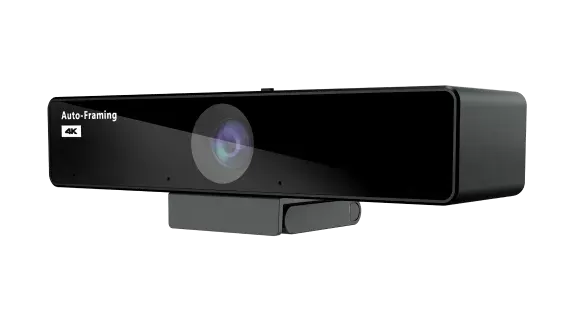
V30
Nearity V30 4K Conference Camera with Auto Framing
- Field of view
- 120°
- Pickup range
- 4m(13ft)
- Platforms
- Windows/Mac/Linux
The Nearity V30 is a USB conference camera that outputs 4K video at up to 30 fps and keeps participants framed with auto framing. Its 120-degree diagonal field of view covers a meeting table, and its four-microphone array picks up speech up to 4 m away. A lens cover slide gives a simple physical privacy switch. It suits huddle rooms and boardrooms in Doha where teams join calls from a laptop.
What the Nearity V30 delivers in a meeting room
The Nearity V30 is a USB conference camera built around a 1/2.8-inch, 8MP CMOS sensor. It connects to a computer over a single USB 2.0 Type-C port and sends its picture to the conferencing application running on that machine. Video output reaches 4K UHD with H.264 at up to 2160p and 30 fps. When a platform uses MJPEG the ceiling is 1080p at 30 fps, and uncompressed YUV tops out at 480p at 30 fps, so the sharpness you actually see depends on the codec your software uses.
Framing and field of view for groups
The lens has an F/1.8 aperture and a 120-degree diagonal field of view, with 110 degrees horizontal and 75 degrees vertical. Facial recognition drives the auto framing, so the image follows people who lean forward or walk to a whiteboard during a call. The 6x digital zoom gives a closer view of a presenter at the far end of the room, although digital zoom works by cropping the image rather than changing the lens.
Sound pickup and noise control
The four-element MEMS microphone array has an effective pickup distance of 4 m (13 ft) and a pickup range of -60 to 60 degrees. Noise suppression, automatic gain control and reverberation reduction work together to keep speech at a consistent level. A deep-learning algorithm targets non-stationary noise such as keyboard typing and mouse clicks, which helps when a participant is taking notes on a laptop during a call.
Where it fits in Qatar
- A boardroom in West Bay or Msheireb: one camera at the head of the table, with the microphone array covering participants on both sides for calls with teams abroad.
- A government office in Doha: hybrid meetings where staff working in Arabic and English join from separate desks and need a clear image of the room.
- A private school in Al Wakrah: a small staff room where a department head joins a regional review without moving the furniture.
- An engineering team in the Industrial Area: a compact room where the privacy slide covers the lens whenever the room is not in use.
What to plan before ordering
- Measure the room so the 120-degree diagonal view covers the seating, and keep participants within the 4 m pickup distance.
- Check that the host computer has a free USB Type-C port that suits the cable supplied in the box.
- Confirm Windows, Mac or Linux and the conferencing software your team uses before ordering.
- The source data does not give an operating temperature range. If the camera would sit near a window or outside an air-conditioned area, confirm the environment with the SmartRooms Qatar team, because summer temperatures in Qatar exceed 45°C.
- The camera measures 180 mm high, 55 mm wide and 49 mm deep, and weighs 273 g in space gray.
The source data does not list a wall or display mount, so confirm the fixing method when you request a quote. SmartRooms Qatar offers free site surveys, which let the team check camera position against the display and seating before any order is placed.
Ready to equip a meeting room? Request a quote from SmartRooms Qatar and the team will usually reply within one working day with a proposed configuration, delivery to all eight municipalities and installation options.
Highlights
- 4K UHD video with H.264 up to 2160p at 30 fps
- 120-degree diagonal field of view with 6x digital zoom
- AI auto framing driven by facial recognition
- Four-element MEMS microphone array with 4 m pickup
- Deep-learning noise reduction for keyboard and mouse sounds
- Lens cover slide for physical privacy, USB 2.0 Type-C connection
Room fit
Tell us the room size and platform (Teams, Zoom or BYOD) and we confirm the right combination with your quotation.
Estimated timeline
Quotation within 1 working day · delivery timing depends on stock availability, and we confirm it with your quotation.
Specifications
Camera features5
- _items
- F/1.8 aperture · 6x digital zoom
- Sensor
- 1/2.8 inches CMOS, 8MP
- FOV(D)
- 120°
- FOV(H)
- 110°
- FOV(V)
- 75°
Video characteristics5
- _items
- Anti-flickering supported · Auto-exposure supported · Automatic white balance supported · 3DNR supported · Support Auto-framing · UHD (4K)
- Aspect ratio
- 16:9
- YUV
- max of 480P@30fps
- MJPEG
- max of 1080P@30fps
- H264
- max of 2160P@30fps
Microphone Features4
- _items
- 4 MEMS microphone array
- Effective pickup distance
- 4m(13ft)
- Sensitivity
- -38dBV/Pa 94dB SPL@1kHz
- SNR
- 63dBV/Pa 94dB SPL@1kHz,A-weighted
Audio characteristics2
- Area sound pickup range
- -60°~60°
- _items
- Noise suppression · Automatic Gain Control (AGC) · Reverberation reduction
Physical characteristics5
- Height
- 180mm (7 inches)
- Width
- 55mm (2.1 inches)
- Depth
- 49mm (1.9 inches)
- Net weight
- 273g(9.63 oz)
- Color
- space gray
Power and connectivity3
- External power supply
- USB 5V/1A
- Compatible operating systems
- Windows/Mac/Linux
- _items
- USB 2.0 Type-C
Packing List1
- _items
- 1x V30 · 1x USB cable · 1x User manual




