






Barco
ClickShare Power Supply 100W
Barco ClickShare Power Supply 100W, 100-Watt Video Conferencing Accessory
WT400D
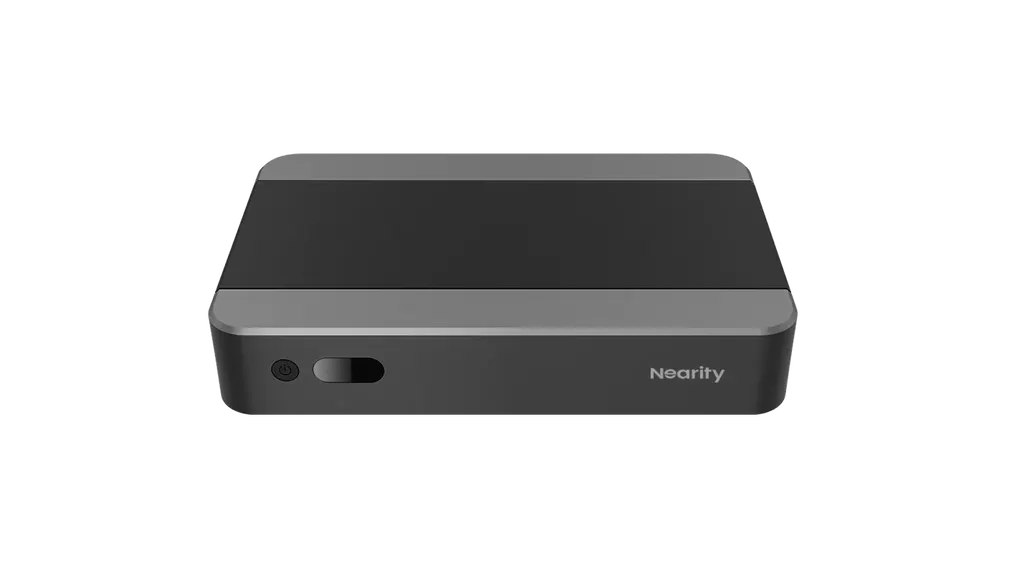
Nearity WT400D Conference Roomhost with Intel Core i5 Meeting Room PC
- Connectivity
- 2(HDMI2.0*1
Priceon request
QuotationWithin 1 working day
DeliveryConfirmed with your quote, based on stock
Overview
The Nearity WT400D is a conference room host built around an Intel 11th-generation Core i5-11300H, 16GB DDR4 memory and a 128GB SSD. Three HDMI outputs run 4K at 60fps, and two HDMI inputs plus a LAN/PoE port add connection options. Its body mounts behind a display or inside a cabinet, suiting meeting rooms in Doha and West Bay that run Zoom Rooms or Webex. Request a quote.
A compact room host built on Intel 11th-generation processing
The Nearity WT400D is a conference room host: a small computer that runs your video conferencing software and drives the room display, while a Nearity camera, microphone and touch controller handle capture and control. At its core is an Intel 11th-generation Core i5-11300H processor. The manufacturer describes its audio and video encoding and decoding as a strength, and it lists support for platforms including Zoom Rooms and Webex.
Video, audio and network specifications that matter
Each unit has 16GB of DDR4 memory (two 8GB modules) and a 128GB SSD. Video is where the WT400D stands out for multi-screen rooms: three HDMI 2.0 outputs run at 4K and 60fps, so a room with a main display and a second screen can be driven from one host. Two HDMI inputs, one HDMI 2.0 at 4K 60fps and one HDMI 1.4 at 4K 30fps, accept laptops or other sources. Audio has one line input and one line output.
Networking uses two RJ45 ports, one labelled LAN and one labelled PoE, both supporting 10/100/1000 Mbps with automatic speed selection. Ask the SmartRooms Qatar team which port suits your switch layout before cabling.
Where it fits in Qatar
Its compact footprint suits several common room types:
- Boardrooms in West Bay or Msheireb: a host placed behind the main display keeps the table clear while directors join calls with colleagues abroad.
- Medium meeting rooms in the Industrial Area or Al Sadd: paired with a PTZ camera and touch controller, staff can start video calls directly from the controller.
- Seminar rooms in Education City or private school classrooms: the manufacturer positions the range from education to enterprise use, so one host type can serve lectures and staff meetings alike.
The source data does not state an operating temperature range. Before placing the unit in a closed cabinet, confirm ventilation with the SmartRooms Qatar team, especially for summer use when temperatures in Doha can exceed 45°C.
Planning the installation
The host measures 225 x 142 x 40 mm and weighs 0.8 kg net, or 1.77 kg in its shipping package measuring 348 x 308 x 150 mm. Its stated input range is 100 to 240 V, and the box includes the unit and one power cable. Confirm that the supplied plug suits the BS 1363 (Type G) sockets used in Qatar. Mounting behind a display or inside a cabinet requires routing for HDMI, power and network cables. SmartRooms Qatar offers free site surveys to measure cabinet depth, cable runs and ventilation before installation.
Request a quote
If you are equipping one room or a whole floor, send SmartRooms Qatar your room size, display count and conferencing platform, and we will return a quotation, usually within one working day. Schools, ministries and companies can order against a purchase order (LPO) or tender requirements, and payment can be made by bank transfer, cheque or purchase order. The unit is covered by the manufacturer's warranty. Request a quote for the WT400D today.
Highlights
- Intel 11th-generation Core i5-11300H processor
- 16GB DDR4 memory and 128GB SSD storage
- Three HDMI 2.0 outputs at 4K 60fps
- Two HDMI inputs, one at 4K 60fps and one at 4K 30fps
- LAN and PoE RJ45 ports, 10/100/1000 Mbps
Room fit
Tell us the room size and platform (Teams, Zoom or BYOD) and we confirm the right combination with your quotation.
Estimated timeline
Quotation within 1 working day · delivery timing depends on stock availability, and we confirm it with your quotation.
Specifications
16 specifications · Source: manufacturer · checked Oct 2026
Hardware3
- _items
- Core 11th I5-11300H
- Memory
- 16G(8G*2) DDR4
- Storage
- 128G SSD
Interfaces8
- _items
- Core 11th I5-11300H
- Memory
- 16G(8G*2) DDR4
- Storage
- 128G SSD
- Audio port
- LINE IN*1, LINE OUT*1
- HDMI IN
- 2(HDMI2.0*1, 4K@60fps, HDMI1.4*1, 4K@30fps)
- HDMI OUT
- 3(HDMI2.0*3, 4K@60fps)
- Power Supply
- 100~240V;2.4~1.25A
- Network Interface
- RJ45*2(LAN*1, POE*1),10/100/1000Mbps adaptive
Dimension4
- Product Dimension
- 225mm(L)*142mm(W)*40mm(H)
- Package Dimension
- 348mm(L)*308mm(W)*150mm(H)
- Net Weight
- 0.8kg
- Gross Weight
- 1.77kg
Packing List1
- _items
- WT400D*1,Power cable*1
Downloads
1 file from the manufacturerQuestions about WT400D
What is the Nearity WT400D used for?
The WT400D is a conference room host, a compact unit that runs video conferencing software and sends the call to the room display. It pairs with a camera, microphone and touch controller from Nearity to form a complete system. The manufacturer positions it for small and medium rooms, from classrooms to corporate meeting spaces, so each room can have one dedicated unit.
Which video conferencing platforms does it support?
The manufacturer states that the WT400D supports platforms such as Zoom Rooms and Webex. Confirm the exact platform, licence type and software version you plan to run before ordering. SmartRooms Qatar can review your setup when preparing the quotation, which usually arrives within one working day.
What processor, memory and storage does it have?
The unit uses an Intel 11th-generation Core i5-11300H processor, 16GB of DDR4 memory built from two 8GB modules, and a 128GB SSD. The manufacturer highlights its audio and video encoding and decoding for calls. With 128GB of storage, keep the operating system and conferencing software on the SSD and avoid storing large media files locally.
How many displays can one WT400D drive?
The WT400D has three HDMI 2.0 outputs, each rated for 4K at 60fps. This allows a room with more than one screen, such as a main display plus a second screen, to run from one host. Check your display inputs and cable lengths before ordering, and ask the SmartRooms Qatar team to confirm the layout during the free site survey.
Can a presenter in a Msheireb meeting room connect a laptop?
Yes. The WT400D has two HDMI inputs: one HDMI 2.0 input at 4K 60fps and one HDMI 1.4 input at 4K 30fps. It also has one line input and one line output for audio. Use the 4K 60fps input for a laptop presenting high-resolution slides, and the 4K 30fps input for a secondary source where smooth motion matters less.
Does it work with Nearity cameras, microphones and controllers?
The manufacturer states that the WT400D integrates with all NEARITY video conference solutions. It can be paired with the 520D dual-lens PTZ camera, the A20 speaker microphone and the B10 touch controller to build a full suite for small and medium rooms. Ordering these accessories with the host lets you receive one quotation covering the whole room.
Can it be hidden behind a display or in a cabinet in Doha's heat?
Its small body, 225 x 142 x 40 mm, allows it to be mounted behind a display or tucked into a cabinet. However, the source data gives no operating temperature range, and summer temperatures in Doha can exceed 45°C. Before enclosing the unit, confirm airflow and cabinet ventilation with the SmartRooms Qatar team during the site survey.
What power supply does it need?
The WT400D accepts a stated input range of 100 to 240 V and includes one power cable in the box. That range covers the 240 V mains supply used in Qatar, but confirm the plug on the supplied cable suits BS 1363 (Type G) sockets in your building before installation. If you are equipping several rooms, request spare cables in your quotation.
Which network port should I use?
The unit has two RJ45 ports, labelled LAN and PoE, both supporting 10/100/1000 Mbps with adaptive speed selection. Use the LAN port for the main network connection unless your switch layout requires otherwise. Discuss your switch and cabling plan with the SmartRooms Qatar team, since installation planning usually starts with a free site survey.
Is it suitable for a boardroom in West Bay that calls overseas offices?
Yes, provided the room is small or medium sized, since the manufacturer offers this range for rooms of that size. The host can sit out of sight behind the main display, keeping the table clear. Confirm room size and participant numbers with the team, because larger boardrooms that need wider camera coverage may require a different configuration in the quotation.
Can it serve a seminar room in Education City or a school classroom?
Yes. The manufacturer describes its range as covering education through enterprise use. A seminar room in Education City can use the WT400D with a PTZ camera and touch controller to connect remote speakers or students during lectures. For a classroom in Al Wakrah, confirm the room size first, since the bundle is aimed at small and medium rooms rather than large halls.
We are ordering several units for a school in Al Wakrah. Can we use a purchase order?
Yes. SmartRooms Qatar accepts purchase orders (LPOs) and tender-based orders, with payment by bank transfer, cheque or purchase order. Send your quantity and room list, and the quotation can show each host with its accessories. The unit is covered by the manufacturer's warranty, so keep purchase records for every room it is installed in.



