





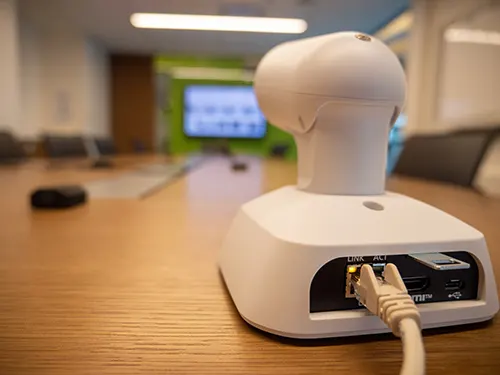
AW-UE4
Panasonic AW-UE4 4K PTZ Conference Camera
- Zoom
- Digital Zoom: 4x
The Panasonic AW-UE4 is a compact 4K PTZ conference camera that outputs 4K UHD at 29.97p or 25p over HDMI, LAN or USB. Its 111° ultra-wide lens captures a whole room from one position, and it runs on PoE or USB power over a single cable. It suits meeting rooms, lecture theatres and training rooms across Qatar. Request a quote for supply and installation.
What the AW-UE4 captures and outputs
The Panasonic AW-UE4 is a compact pan-tilt-zoom camera built for rooms where one lens has to cover the whole space. It uses a 1/2.5-type MOS sensor behind a lens with a 111° horizontal field of view when distortion correction is off, and 108° when it is on. The camera outputs 4K UHD, and it also supports 1080 and 720 formats at several frame rates for systems that do not need full 4K.
Panasonic lists 4K output at 30p, 29.97p and 25p, but notes that the actual UHD output is 29.97p or 25p. Plan your display and recording chain around those two rates.
Key specifications and what they mean in use
- Movement: manual pan of ±110° and tilt of ±25°, with 4x digital zoom.
- Low light: minimum illumination of 4 lx under the stated test conditions, with gain up to 42 dB.
- Audio: built-in stereo microphone with mute and automatic level control.
- Streaming: MJPEG, H.264 and H.265, over RTSP, RTMP and RTMPS.
- Finish: AW-UE4WG in white or AW-UE4KG in black.
Connecting it with one cable
Power over Ethernet (PoE) to IEEE 802.3at, with a 37 V to 57 V input, lets a single LAN cable carry both power and control. Without PoE, the camera can draw 5 V from a computer's USB port, which removes the need for an AC adapter in a USB-only setup. HDMI output does need an AC adapter or PoE supply. The RJ-45 LAN port handles IP control, and the manufacturer lists the AW-RP60GJ and AW-RM50G controllers as supported. HDCP and Viera Link are not supported on the HDMI output, so check the rest of your AV chain before ordering. With a PoE hub, cable runs of up to 100 m are supported using Category 5e or above.
Where it fits in Qatar
A private school in Al Wakrah recording lessons in a single hall can mount one unit high on a wall to cover the stage and seating. A training centre in Education City or Lusail running hybrid courses can stream lectures over RTMP to remote learners, or use the USB output for a live call from the instructor's laptop. In a Doha boardroom in West Bay where meetings connect with teams abroad, the wide 111° view helps keep most of the table in frame from one camera position.
Planning the installation and environment
Decide early between desktop and suspended installation, as both are supported. The body measures 123 mm wide, 131 mm high and 139 mm deep, or 152 mm deep with the mount bracket, and weighs about 0.5 kg without the bracket. Keep subjects at least 700 mm from the lens, which is the single focus distance. The ambient operating range is 0 °C to 40 °C at 20 to 90 percent humidity without condensation, so install in an air-conditioned room away from direct sunlight and window glare. Summer temperatures in Qatar can pass 45 °C, so confirm the mounting position with the SmartRooms Qatar team before ordering.
Request a quote with your room size, preferred mounting and the video system you use. SmartRooms Qatar usually replies with a quotation within one working day, offers free site surveys, and delivers to all eight municipalities of Qatar with professional installation. Purchase orders and government tenders are welcome.
Highlights
- 4K UHD output at 29.97p or 25p
- 111° horizontal field of view with distortion correction off
- HDMI, LAN (RJ-45) and USB Type-C connections
- Power via PoE (IEEE 802.3at) or computer USB
- Manual pan ±110° and tilt ±25°
- Operating range 0 °C to 40 °C, 20 to 90% humidity
Room fit
Tell us the room size and platform (Teams, Zoom or BYOD) and we confirm the right combination with your quotation.
Estimated timeline
Quotation within 1 working day · delivery timing depends on stock availability, and we confirm it with your quotation.
Specifications
General10
- Power Requirements
- DC 5 V±5 % (4.75 V to 5.25 V)
- PoE
- PoEIEEE802.3at compliant: DC37 V to 57 V
- Current Consumption
- 1.0A (USB input), 0.2A (PoE power supply)
- Ambient Operating Temperature
- 0 °C to 40 °C (32 °F to 104 °F)
- Ambient Operating Humidity
- 20 % to 90 % (no condensation)
- Storage Temperature
- -20 °C to 50 °C (-4 °F to 122 °F)
- Weight
- Approx. 0.5 kg (1.1 lb) (excluding mount bracket)
- Dimensions
- W 123 mm x H 131 mm x D 139 mm(4-53/64 inches x 5-5/32 inches x 5-29/64 inches)(excluding protrusions, mount bracket)W 123 mm x H 131 mm x D 152 mm(4-53/64 inches x 5-5/32 inches x 5-62/64 inches)(excluding mount bracket)
- Finish
- AW-UE4WG: WhiteAW-UE4KG: Black
- Controller Supported
- See the Compatibility Chart for Operation Devices and Application Software page
Camera Unit15
- Imaging Sensor
- 1/2.5-type MOSx1
- Zoom
- • Digital Zoom: 4x
- Lens
- F2.4 (f=2.21 mm, 35 mm conversion: 13.4 mm)
- Angle of View Range
- LDC *2 Off: Horizontal field of view 111°, vertical field of view 75°, diagonal field of view 120°LDC *2 On: Horizontal field of view 108°, vertical field of view 75°, diagonal field of view 116°
- Focus
- Single focus
- Focus Distance
- 700 mm
- Minimum Illumination
- 4 lx (conditions: 50 IRE, gain 42 dB, shutter speed 1/60)
- Horizontal Resolution -> 4K
- 1,400 TV typ (center area)
- Horizontal Resolution -> HD
- 900 TV typ (central area)
- Digital Pan and Tilt Angle
- 2x digital zoom: Pan approx. ± 34°, tilt approx. ± 21°4x digital zoom: Pan approx. ± 45°, tilt approx. ± 30°
- Gain Selection
- Auto, 0 to 42 dB *3Can be set in 3 dB increments
- Electronic Shutter Speed -> FullAuto
- Full Auto Mode with Slow Shutter On / Shutter Priority Mode 1/1, 1/2, 1/5, 1/10, 1/20, 1/30, 1/60, 1/120, 1/240, 1/480, 1/1000, 1/2000, 1/4000, 1/8000, 1/16000 [60 Hz/59.94 Hz]1/1, 1/2, 1/5, 1/10, 1/20, 1/25, 1/50, 1/100, 1/250, 1/500, 1/1000, 1/2000, 1/4000, 1/8000, 1/16000 [50 Hz]Full Auto Mode with Slow Shutter Off1/60, 1/120, 1/240, 1/480, 1/1000, 1/2000, 1/4000, 1/8000, 1/16000 [60 Hz/59.94 Hz]1/50, 1/100, 1/250, 1/500, 1/1000, 1/2000, 1/4000, 1/8000, 1/16000 [50 Hz]
- Electronic Shutter Speed -> Manual
- 1/1, 1/2, 1/5, 1/10, 1/20, 1/30, 1/60, 1/120, 1/240, 1/480, 1/1000, 1/2000, 1/4000, 1/8000, 1/16000 [60 Hz/59.94 Hz]1/1, 1/2, 1/5, 1/10, 1/20, 1/25, 1/50, 1/100, 1/250, 1/500, 1/1000, 1/2000, 1/4000, 1/8000, 1/16000 [50 Hz]
- White Balance
- ATW, AWB A, AWB B, 3200K, 5600K
- Chroma Amount Variability
- 11 steps (0 to 10)
Input Connector1
- DC IN
- PoE
Output Connector1
- HDMI
- HDMI Connector4:4:4/8 bit・HDCP is not supported.・Viera Link is not supported.
Input/Output Connector2
- LAN
- LAN terminal for IP control (RJ-45)
- USB
- Type-C connector
Pan-tilt Head Unit4
- IP connecting cable
- ・When a PoE ethernet hub is used: LAN cable *8(category 5e or above), max. 100 m (328 ft)・When a PoE ethernet hub is not used: LAN cable *8(category 5 or above), max.100 m (328 ft)
- Installation Method *4
- Stand-alone (Desktop) or suspended (Hanging) *7
- Panning Range
- ±110° (manual)
- Tilting range
- ±25° (manual)
IP Streaming11
- Image Streaming Mode
- MJPEG (HTTP), H.264 (RTSP/RTMP/RTMPS), H.265 (RTSP)
- Image Resolution
- [MJPEG]1280×720、640×360[H.264/H.265]3840×2160、1920×1080、1280×720、640×360
- Image Transmission Setting (MJPEG) -> Frame Rate *7
- Max. 30fps (25fps)
- Image Transmission Setting (MJPEG) -> Max Bit Rate *7
- Unspecified
- Image Transmission Setting (H.264) -> Frame Rate
- [60 Hz/59.94 Hz] 5fps / 15fps / 30fps / 60fps (4K up to 30fps)[50 Hz] 5fps / 10fps / 25fps / 50fps (4K up to 25fps)
- Image Transmission Setting (H.264) -> Max Bit Rate
- 1024kbps to 32768kbps
- Image Transmission Setting (H.265) -> Frame Rate
- [60 Hz/59.94 Hz] 5fps / 15fps / 30fps / 60fps (4K up to 30fps)[50 Hz 9] 5fps / 10fps / 25fps / 50fps (4K up to 25fps)
- Image Transmission Setting (H.265) -> Max Bit Rate
- 1024kbps to 32768kbps
- Audio Compression Format
- AAC-LC, 48kHz/16bit/2ch
- Supported Protocol -> IPv6
- TCP/IP, UDP/IP, HTTP, RTSP, RTP, RTP/RTCP, DNS, ICMPv6
- Supported Protocol -> IPv4
- TCP/IP, UDP/IP, HTTP, RTSP, RTP, RTP/RTCP, DHCP, DNS, ICMP, ARP, RTMP, RTMPS
USB web camera8
- Image output
- USB Video Class Ver1.1
- Video Compression Format
- YUV, MJPEG
- Image resolution -> YUV
- 640 x 360
- Image resolution -> MJPEG
- 3840 x 2160, 1920 x 1080, 1280 x 720, 640 x 360
- Image Transmission Setting (frame rate) -> YUV
- [60 Hz/59.94 Hz] :15fps[50 Hz]:10fps
- Image Transmission Setting (frame rate) -> MJPEG
- [60 Hz/59.94 Hz] 30fps *5/ 15fps *5/ 5fps[50 Hz] 25fps *5/ 10fps *5/ 5fps
- Audio Output
- USB Audio Class Ver1.0
- Audio Compression Format
- Linear PCM, 48KHz/16bit/2ch
Internal Mic3
- Internal Mic
- Stereo microphone
- Audio On/Off
- Available (mute function)
- ALC Function
- Available




