





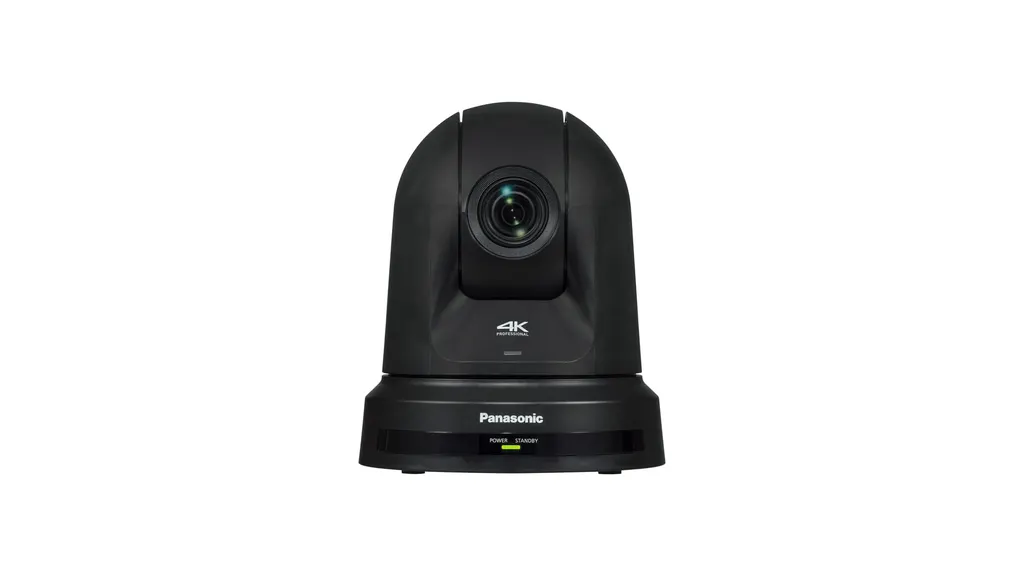
AW-UE40
Panasonic AW-UE40 4K PTZ Conference Camera
- Zoom
- Optical zoom: 24x
The Panasonic AW-UE40 is a remote 4K PTZ conference camera with a 1/2.5-type sensor, 24x optical zoom and a 74.1 degree wide view. It takes power, control and video over one PoE+ cable and streams via SRT, NDI HX2 (paid upgrade) and RTMP. It suits classrooms, lecture halls and boardrooms in Doha and beyond that mix in-room and online sessions. Request a quote.
A 4K PTZ camera for rooms that mix in-person and online sessions
The Panasonic AW-UE40 is a remote pan-tilt-zoom camera built around a 1/2.5-type 4K MOS sensor with approximately 8,490,000 effective pixels and a 24x optical zoom. One unit can cover a classroom, lecture room or boardroom without a dedicated camera operator. It is available in white (AW-UE40W) or black (AW-UE40K), so it can match a ceiling or wall finish during a fit-out.
Optics and picture quality for larger rooms
The motorised lens runs from 4.12 mm to 98.9 mm at F1.8 to F4.0. Its horizontal angle of view spans 74.1 degrees at the widest setting down to 3.3 degrees at full telephoto. The horizontal resolution is rated at 1,500 TV lines in UHD and 1,000 TV lines in Full HD, measured in the centre area. Intelligent zoom extends the range to 28x in UHD and 36x in Full HD, and digital extender zoom of 1.4x and 2x is also listed. Optical image stabilisation can be switched on from the menu, and minimum illumination is 3 lx at F1.8.
Power, control and cabling over a single network cable
With PoE+ (IEEE802.3at), one LAN cable carries power, control and video. The PoE+ supply range is DC 42 to 57 V, and the camera draws 0.6 A from it. Without PoE+, the supplied AC adapter provides 12 V DC and draws 1.8 A. IP control runs over RJ-45 at 100BASE-TX or 1000BASE-T, and an RS-422 control input is also fitted. Pan speeds are 60 degrees per second in normal mode, 90 degrees per second in Fast1 and 180 degrees per second in Fast2, with a pan range of plus or minus 175 degrees and a tilt range of -30 to 90 degrees. Privacy Mode turns the lens to face the back when the camera is on standby.
Streaming and connection options
- USB: a USB 2.0 device port with a Type-C connector, compatible with UVC and UAC, without bus power.
- HDMI: HDMI 1.4 output at 4:2:2 10-bit. HDCP and Viera Link are not supported.
- IP streaming: JPEG, H.264 and H.265, with SRT for stable transmission over unstable networks.
- Live platforms: RTMP and RTMPS send video directly to services such as YouTube Live and Facebook Live.
- NDI HX2: low-bitrate transmission over a single LAN cable, available as an optional paid upgrade.
Where the AW-UE40 fits in Qatar
A university training centre in Education City can mount the camera at the back of a seminar room and stream sessions to a remote cohort. A government ministry boardroom in West Bay can run meetings that connect Doha with teams abroad, with the camera framing the table at wide angle and tightening on the presenter. A training room in the Industrial Area can hang the camera from the ceiling and feed a laptop over USB for the company's online induction sessions.
What to plan before you order
- Check the subject distance. Focus distance is 100 mm at the wide end and 1,200 mm across the full zoom range.
- Plan the environment. The operating range is 0 to 40 degrees C, so the camera belongs in a cooled indoor room, not an unshaded or window-facing position where summer heat exceeds 45 degrees C.
- Confirm the power route. Use a PoE+ switch port or the 12 V DC adapter, and check the switch budget first.
- Measure cable runs. IP connections allow up to 100 m of category 5e cable.
- Choose the mount. The camera stands on a desk or hangs from a ceiling bracket, bringing total weight to about 2.05 kg.
SmartRooms Qatar offers a free site survey to confirm mounting height, cable routes and the room layout before installation. Send your room dimensions, network details and streaming platform, and request a quote for the Panasonic AW-UE40 today.
Highlights
- 1/2.5-type 4K MOS sensor with 1,500 TV lines horizontal resolution in UHD
- 24x optical zoom, with a 74.1 degree wide angle at the widest setting
- PoE+ (IEEE802.3at) carries power, control and video over one cable
- Pan speeds up to 180 degrees per second, pan range plus or minus 175 degrees
- SRT, RTMP/RTMPS streaming, and NDI HX2 as a paid upgrade
- Available in white (AW-UE40W) or black (AW-UE40K)
Room fit
Tell us the room size and platform (Teams, Zoom or BYOD) and we confirm the right combination with your quotation.
Estimated timeline
Quotation within 1 working day · delivery timing depends on stock availability, and we confirm it with your quotation.
Specifications
General11
- Power Requirements
- 12 V DC (10.8 V to 13.2 V) (Supplied AC adapter)
- PoE
- PoE+IEEE802.3at compliant : DC42 to 57 V(Software authentication (LLDP) is supported)
- Current Consumption
- 1.8 A (Supplied AC adaptor), 0.6 A (PoE+ power supply)
- Ambient Operating Temperature
- 0 °C to 40 °C (32 °F to 104 °F)
- Ambient Operating Humidity
- 20 % to 90 % (no condensation)
- Storage Temperature
- -20 °C to 50 °C (-4 °F to 122 °F)
- Weight
- Approx. 1.8 kg (3.97 lbs) (excluding ceiling mounting bracket)Approx. 2.05 kg (4.52 lbs) (including ceiling mounting bracket)
- Dimensions
- W 160.0 mm x H 192.1 mm x D 166.0 mm(6.299 inches x 7.563 inches x 6.535 inches)(Excluding protrusions, cable cover, ceiling mounting bracket)
- Finish
- AW-UE40W: WhiteAW-UE40K: Black
- Controller Supported
- See the "Compatibility Chart for Operation Devices and Application Software" page
- Image Stabilization
- MENU switching: Select between Off/O.I.S.
Camera Unit31
- Imaging Sensor
- 1/2.5-type MOSx1
- Effective Pixels
- Approx. 8,490,000 pixels
- Zoom
- • Optical zoom: 24x• i.Zoom UHD 28x, FHD 36x• Digital extender zoom: 1.4x , 2x
- Lens
- Motorized Optical 24x zoom, F1.8 to F4.0[f=4.12 mm (5/32 inches) to 98.9 mm (3‑29/32 inches);35 mm (1‑3/8 inches) equivalent: 25.0 mm (31/32 inches) to 600.0 mm (23‑5/8 inches)]
- Conversion Lens
- Not supported
- Angle of View Range
- Horizontal angle of view: 74.1° (wide) to 3.3° (tele)Vertical angle of view: 46.0° (wide) to 1.9° (tele)Diagonal angle of view: 81.8° (wide) to 3.8° (tele)
- Optical Filter -> ND Filter
- Not equipped
- Focus
- Switching between auto and manual
- Focus Distance
- Entire zooming range: 1200 mm (3.9 ft)Wide end: 100 mm (0.33 ft)
- Color Separation Optical System
- 1MOS
- Minimum Illumination
- 3 lx (F1.8, 59.94p, 50IRE, 42 dB, without accumulation)
- Horizontal Resolution -> 4K
- 1,500 Typ (Center area)
- Horizontal Resolution -> HD
- 1,000 Typ (Center area)
- Gain Selection
- Auto, 0 dB to 36 dB *1 (Super Gain function equipped : 37 dB to 42 dB)
- Frame Mix
- Auto, 0 dB, 6 dB, 12 dB, 18 dB, 24 dB *2
- Electronic Shutter Speed -> 59.94p/59.94i
- 1/60, 1/100, 1/120, 1/250, 1/500, 1/1000, 1/2000, 1/4000, 1/8000, 1/10000
- Electronic Shutter Speed -> 50p/50i
- 1/60, 1/100, 1/120, 1/250, 1/500, 1/1000, 1/2000, 1/4000, 1/8000, 1/10000
- Electronic Shutter Speed -> 29.97p
- 1/30, 1/60, 1/100, 1/120, 1/250, 1/500, 1/1000, 1/2000, 1/4000, 1/8000, 1/10000
- Electronic Shutter Speed -> 25p
- 1/25, 1/50, 1/60, 1/100, 1/120, 1/250, 1/500, 1/1000, 1/2000, 1/4000, 1/8000, 1/10000
- Electronic Shutter Speed -> 23.98p/24p
- 1/24, 1/48, 1/60, 1/100, 1/120, 1/250, 1/500, 1/1000, 1/2000, 1/4000, 1/8000, 1/10000
- Synchro Scan -> 59.94p/59.94i
- 60.0 Hz to 7200 Hz
- Synchro Scan -> 50p/50i
- 50.0 Hz to 7200 Hz
- Synchro Scan -> 29.97p
- 30.0 Hz to 7200 Hz
- Synchro Scan -> 25p
- 25.0 Hz to 7200 Hz
- Synchro Scan -> 23.98p/24p
- 24.0 Hz to 7200 Hz
- Gamma
- HD / Normal / Cinema1 / Cinema2 / Still Like
- White Balance
- • ATW : 3200 K, 5600 K (ATW Speed 3-stage variables.)• AWB : AWB-A / AWB-B• VAR (selectable between 2000 K and 15000 K by designating a value)
- Chroma Amount Variability
- OFF, -99 % to 99 %
- Scene File
- Full Auto, Scene1, Scene2, Scene3
- Output Format (HDMI) -> 4K
- 2160/29.97p (Native), 2160/25p (Native), 2160/24p (Just), 2160/23.98p (Native)
- Output Format (HDMI) -> HD
- 1080/59.94p, 50p, 1080/59.94i, 50i, 1080/29.97p (Native), 25p (Native),23.98p (over59.94i), 1080/24p (Just), 23.98p (Native), 720/59.94p, 50p
Input Connector1
- DC IN
- DC 12 V IN
Output Connector1
- HDMI
- HDMI 1.4 connector4:2:2/10bit• HDCP is not supported.• Viera Link is not supported.
Input/Output Connector4
- LAN
- LAN terminal for IP control (RJ-45) 100BASE-TX/1000BASE-T
- RS-422
- CONTROL IN RS422A (RJ-45)
- USB
- USB2.0 DEVICE, Type C connector, no USB bus-powered function.Only compatible with UVC (USB Video Class)* UVC 1.0, UAC 1.0
- MIC/LINE Input
- AAC compatibility (compatible with IP only)Φ3.5 mm stereo mini jack• During MIC inputInput level: -40 dBV (0 dB=1 V/Pa, 1 kHz)Supply voltage: 2.5 V±0.5 V (plug-in power compatible)• Input impedance: Approx. 2 kΩ (when plug-in power is turned ON)Approx. 20 kΩ (when plug-in power is turned OFF)• During LINE inputInput level: -10 dBVInput impedance: Approx. 3 kΩ• Input volume variable range: -36 dB to 12 dB (3 dB step)• Embedded audio output level: -12 dBFS• Sampling frequency: 48 kHz
Pan-tilt Head Unit8
- IP connecting cable
- • If you have a PoE+ ethernet hubLAN cable *3 (category 5e or above, straight cable) Max 100 m (328 ft)• If you don't have a PoE+ ethernet hubLAN cable *3 (category 5e or above, straight cable) Max 100 m (328 ft)
- AW protocol connecting cable
- •LAN cable *3 (category 5e or above, straight cable) Max 1000 m (3280 ft)
- Installation Method *4
- Stand-alone (Desktop) or suspended (Hanging) *4
- Speed range
- Speed range: 0.08°/s to 60°/s (Normal mode) *5
- Pan/tilt Operation Speed
- • 3 speed modes installedNormal: 60°/s, Fast1: 90°/s, Fast2: 180°/s
- Panning Range
- ±175°
- Tilting range
- -30°to 90° *6
- Quietness
- NC25 or less
Supported Operating Systems and Web Browsers4
- Windows *6
- Windows 10Windows® Internet Explorer® 11 (32 bit / 64 bit)Microsoft EdgeGoogle Chrome
- Mac *6
- Mac OS v11.0.1 / Safari 14.01Mac OS v11.0.1 / Google ChromeMac OS v10.15 / Google ChromeMac OS v10.14 / Google Chrome
- iPhone/iPad *9
- iOSSafariiPadOS
- Android *9
- Android OSGoogle Chrome
IP Streaming13
- Image Streaming Mode
- JPEG (MJPEG), H.264, H.265, NDI® HX *8,9 (H.264)
- Image Resolution
- 1920x1080, 1280x720, 640x360, 320x180
- Image Transmission Setting (JPEG)
- Frame rate: Maximum 30fpsImage quality (Fine / Normal)
- Image Transmission Setting (H.264) -> Transmission Type
- Unicast port (AUTO)Unicast port (MANUAL)Multicast port
- Image Transmission Setting (H.264) -> Transmission mode
- Constant bit rateFrame rateBest effort
- Image Transmission Setting (H.264) -> Frame Rate
- [60 Hz] 5fps / 15fps / 30fps / 60fps[50 Hz] 5fps / 12.5fps / 25fps / 50fps
- Image Transmission Setting (H.264) -> Max Bit Rate
- 512kbps / 768kbps / 1024kbps / 1536kbps / 2048kbps /3072kbps / 4096kbps / 6144kbps / 8192kbps / 10240kbps /12288kbps / 14336kbps / 16384kbps / 20480kbps / 24576kbps
- Image Transmission Setting (H.265) -> Transmission Type
- Unicastport(AUTO)Unicastport(MANUAL)Multicastport
- Image Transmission Setting (H.265) -> Frame Rate
- [60 Hz] 5fps / 15fps / 30fps / 60fps[50 Hz] 5fps / 12.5fps / 25fps / 50fps
- Image Transmission Setting (H.265) -> Max Bit Rate
- 512kbps / 768kbps / 1024kbps / 1536kbps / 2048kbps /3072kbps / 4096kbps / 6144kbps / 8192kbps / 10240kbps /12288kbps / 14336kbps / 16384kbps / 20480kbps / 24576kbps
- Audio Compression Format
- AAC-LC, 48 kHz / 16 bit / 2ch
- Supported Protocol -> IPv6
- TCP/IP, UDP/IP, HTTP, HTTPS, DNS, NTP, DHCPv6, RTP, MLD, ICMP, ARP, RTMP, SRT
- Supported Protocol -> IPv4
- TCP/IP, UDP/IP, HTTP, HTTPS, RTSP, RTP, RTP/RTCP, DHCP, DNS, DDNS, NTP, IGMP, ICMP, ARP, RTMP, RTMPS, SRT
NDI® Support4
- NDI® Support
- NDI® HX : Available to upgrade
- Image Resolution (NDI® HX)
- 1920x1080, 1280x720
- Image Streaming Setting (NDI® HX) -> Transmission Type
- TCP/UDPUnicast/Multicast
- Audio Compression Type (NDI® HX)
- AAC-LC, 48 kHz, 16 bit, 2 ch
Other Function1
- Tally LED Display Color
- red / green




