





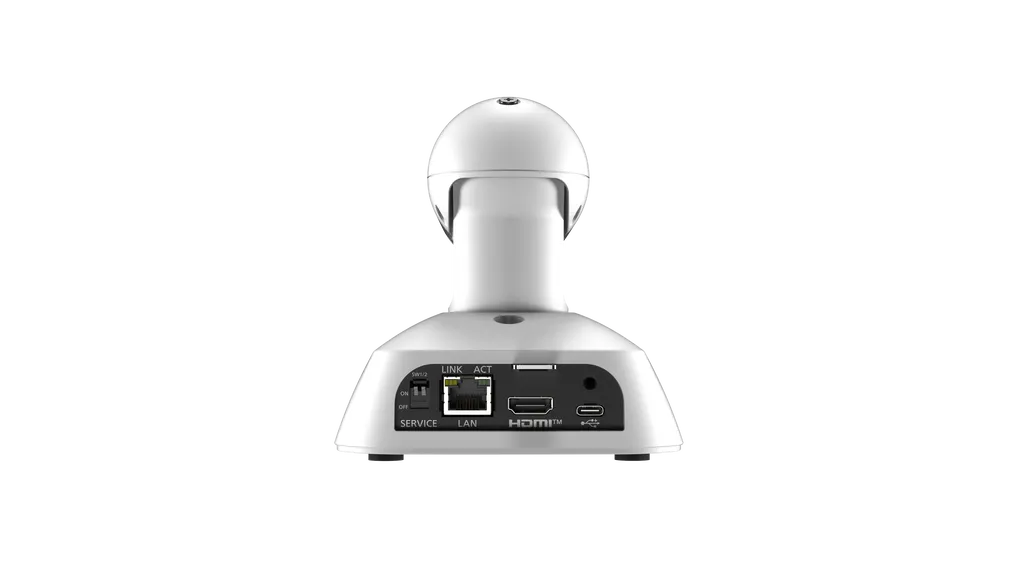
AW-UE5
Panasonic AW-UE5 4K Integrated PTZ Conference Camera
- Zoom
- Digital Zoom: Up to 5x
The Panasonic AW-UE5 is a compact 4K PTZ camera with a 121.8° horizontal field of view, AI group framing that keeps everyone in shot without manual camera moves, and PoE power so one Ethernet cable can carry power and IP video. It supports NDI HX2 and HX3 and 4K/60p HDMI output, suiting boardrooms, classrooms and event streaming teams across Doha.
What the Panasonic AW-UE5 does in a room
The AW-UE5 combines a 4K sensor, a wide lens and AI-based framing in one remote PTZ head. It suits organisations that want a whole room captured without assigning a camera operator. The lens gives a 121.8° horizontal field of view with lens distortion correction switched off, so a wide conference table or several rows of seats fit in one shot. Group Framing then adjusts the crop as people sit down, stand up or move, keeping the picture composed while staff focus on the meeting or lesson.
Pan and tilt are manual ranges of ±110° and ±25°, and digital zoom reaches 5x. A 1/2.8-type MOS sensor produces the image. Exposure can run fully automatic, in shutter priority or in manual mode, with gain from 0 to 42 dB. White balance offers ATW, AWB A, AWB B and fixed 3200K and 5600K settings. The camera is available in white (AW-UE5W) and black (AW-UE5K) finishes.
Video outputs and IP streaming
One camera feeds several destinations. The HDMI port outputs 4K at 2160/60p, 2160/59.94p, 2160/50p, 2160/30p, 2160/29.97p and 2160/25p, plus HD formats. Over the network it streams MJPEG, H.264 and H.265, with H.264 and H.265 reaching 3840 x 2160, and supports NDI HX2 and NDI HX3 for IP video in production workflows. The USB Type-C port presents the camera as a USB video device, with YUV output up to 1280 x 720 and MJPEG up to 3840 x 2160, plus a USB audio stream.
Two limits matter when you design the system. HDCP is not supported on the HDMI output, so protected sources will not pass through, and Viera Link is not supported.
Power, cabling and mounting
- Single-cable power: IEEE802.3at PoE compliant, DC 37 V to 57 V, so one network cable carries power and IP video.
- Cable run: up to 100 m of LAN cable, Category 5e or above when a PoE hub is used.
- Control: RJ-45 LAN port for IP control, compatible with AW-RP60, AW-RP150, AW-RP200 and AW-RM50AG controllers.
- Mounting: stand-alone on a desk or suspended from a ceiling bracket.
- Size and weight: 123 x 131 x 139 mm and about 0.5 kg, excluding the mount bracket.
Current draw is 3.0 A on the USB input and 0.3 A on PoE, so check your PoE switch budget when you plan several cameras on one switch.
Where it fits in Qatar
A boardroom in West Bay or Msheireb, where one camera on the table lets remote directors see the whole room rather than only the nearest speaker. A private school in Al Wakrah running hybrid lessons, where a teacher moves between the board and student tables and the camera keeps the group in frame. A training centre in Education City or a company in Lusail streaming lectures and events to partners abroad.
Heat and environment. The rated ambient operating range is 0 °C to 40 °C, with 20 % to 90 % humidity and no condensation. Qatar summers can exceed 45 °C, so install the AW-UE5 in an air-conditioned room, away from direct sunlight, windows and outdoor areas. If conditions are unclear, ask the SmartRooms Qatar team to check them before you order.
Planning the installation
Decide the camera position before ordering. Measure the distance to the furthest seat, keep the lens clear of objects within the 300 mm minimum focus distance, and plan the cable route back to the PoE switch within the 100 m limit. SmartRooms Qatar offers a free site survey to confirm position, cable route and mount, and professional installation is available. Request a quote with your room sizes and mounting plans, and we will send a quotation, usually within one working day.
Highlights
- 121.8° horizontal field of view from a 4K lens
- AI Group Framing adjusts the crop automatically
- PoE IEEE802.3at power over a single network cable
- NDI HX2 and NDI HX3 IP video support
- 4K up to 60p HDMI output and USB Type-C port
- 5x digital zoom with manual pan ±110° and tilt ±25°
Room fit
Tell us the room size and platform (Teams, Zoom or BYOD) and we confirm the right combination with your quotation.
Estimated timeline
Quotation within 1 working day · delivery timing depends on stock availability, and we confirm it with your quotation.
Specifications
General10
- Power Requirements
- DC 5 V±5 % (4.75 V to 5.25 V)
- PoE
- IEEE802.3at compliant: DC37 V to 57 V
- Current Consumption
- 3.0A (USB input), 0.3A (PoE power supply)
- Ambient Operating Temperature
- 0 °C to 40 °C (32 °F to 104 °F)
- Ambient Operating Humidity
- 20 % to 90 % (no condensation)
- Storage Temperature
- –20 °C to 50 °C (–4 °F to 122 °F)
- Weight
- Approx. 0.5 kg (1.1 lb) (excluding mount bracket)
- Dimensions
- W 123 mm x H 131 mm x D 139 mm (4-53/64 inches x 5-5/32 inches x 5-15/32 inches) (excluding protrusions, mount bracket)
- Finish
- AW-UE5WG:WhiteAW-UE5KG:Black
- Controller Supported
- AW-RP60*1, AW-RP150*1, AW-RP200*1,AW-RM50AG
Camera Unit17
- Imaging Sensor
- 1/2.8-type MOSx1
- Zoom
- Digital Zoom: Up to 5x
- Lens
- F2.45 (f=1.64 mm, 35mm conversion: 11.1mm)
- Angle of View Range
- LDC Off: Horizontal field of view 121.8°, vertical field of view 87.8°, diagonal field of view 129.5°
- Focus
- Single focus
- Focus Distance
- 300mm (0.98ft)
- Horizontal Resolution -> 4K
- 1,400 TV typ (HDMI Output, center area)
- Horizontal Resolution -> HD
- 900 TV typ (HDMI Output, center area)
- Gain Selection
- Auto, 0 to 42 dB Can be set in 3 dB increments
- Electronic Shutter Speed -> FullAuto
- Full Auto Mode with Slow Shutter On / Shutter Priority Mode1/1, 1/2, 1/5, 1/10, 1/20, 1/30, 1/60, 1/120, 1/240, 1/480, 1/1000, 1/2000, 1/4000, 1/8000, 1/16000 [60Hz/59.94Hz]1/1, 1/2, 1/5, 1/10, 1/20, 1/25, 1/50, 1/100, 1/250,1/500, 1/1000, 1/2000, 1/4000, 1/8000, 1/16000 [50Hz]
- Electronic Shutter Speed -> Auto
- Full Auto Mode with Slow Shutter Off1/60, 1/120, 1/240, 1/480, 1/1000, 1/2000, 1/4000, 1/8000, 1/16000 [60Hz/59.94Hz]1/50, 1/100, 1/250,1/500, 1/1000, 1/2000, 1/4000, 1/8000, 1/16000 [50Hz]
- Electronic Shutter Speed -> Manual
- 1/1, 1/2, 1/5, 1/10, 1/20, 1/30, 1/60, 1/120, 1/240, 1/480, 1/1000, 1/2000, 1/4000, 1/8000, 1/16000 [60Hz/59.94Hz]1/1, 1/2, 1/5, 1/10, 1/20, 1/25, 1/50, 1/100, 1/250,1/500, 1/1000, 1/2000, 1/4000, 1/8000, 1/16000 [50Hz]
- White Balance
- ATW, AWB A, AWB B, 3200K, 5600K
- Chroma Amount Variability
- 11 steps (0 to 10)
- Color Bar
- [60Hz/59.94Hz]:SMPTE[50Hz]:FULL
- Output Format (HDMI) -> 4K
- 2160/60p*2、2160/59.94p*2、2160/50p*2、2160/30p*3、2160/29.97p*3、2160/25p*3
- Output Format (HDMI) -> HD
- 1080/60p*3、1080/59.94p*3、1080/50p*31080/30p*3、1080/29.97p*3、1080/25p*3720/60p*3、720/59.94p*3、720/50p*3
Output Connector1
- HDMI
- HDMI Connector・HDCP is not supported.・Viera Link is not supported.
Input/Output Connector2
- LAN
- LAN terminal for IP control (RJ-45)
- USB
- Type-C connector
Pan-tilt Head Unit4
- IP connecting cable
- ・When a PoE ethernet hub is used: LAN cable*4(category 5e or above), max. 100 m (328 ft)・When a PoE ethernet hub is not used: LAN cable*4(category 5 or above), max.100 m (328 ft)
- Installation Method *4
- Stand-alone (Desktop) or suspended (Hanging)*5
- Panning Range
- ±110° (manual)
- Tilting range
- ±25° (manual)
Supported Operating Systems and Web Browsers2
- Windows *6
- Windows 11Microsoft EdgeChrome
- Mac *6
- macOS 15macOS 14macOS 13SafariChrome
IP Streaming6
- Image Streaming Mode
- MJPEG (HTTP), H.264 (RTSP/RTMP/RTMPS), H.265 (RTSP), NDI® HX*6
- Image Resolution
- [MJPEG]1280x720[H.264/H.265]3840x2160, 1920x1080,1280x720, 640x360
- Image Transmission Setting (MJPEG) -> Frame Rate *7
- [60Hz/59.94Hz]Maximum 30fps[50Hz]Maximum 25fps
- Image Transmission Setting (H.264) -> Frame Rate
- [60Hz/59.94Hz]30fps/60fps[50Hz]25fps/50fps
- Image Transmission Setting (H.265) -> Frame Rate
- [60Hz/59.94Hz]30fps/60fps[50Hz]25fps/50fps
- Audio Compression Format
- AAC-LC, 48 kHz / 16 bit / 2ch
USB web camera6
- Image output
- USBVideoClassVer1.1
- Image output type
- YUV、MJPEG
- Image resolution -> YUV
- 1280x720, 640x360
- Image resolution -> MJPEG
- 3840x2160, 1920x1080,1280x720,640x360
- Audio Output
- USB Audio Class Ver1.0
- Audio Compression Format
- Linear PCM, 48KHz/16bit/2ch
Internal Mic3
- Internal Mic
- Stereo microphone
- Audio On/Off
- Available (mute function)
- ALC Function
- Available




