





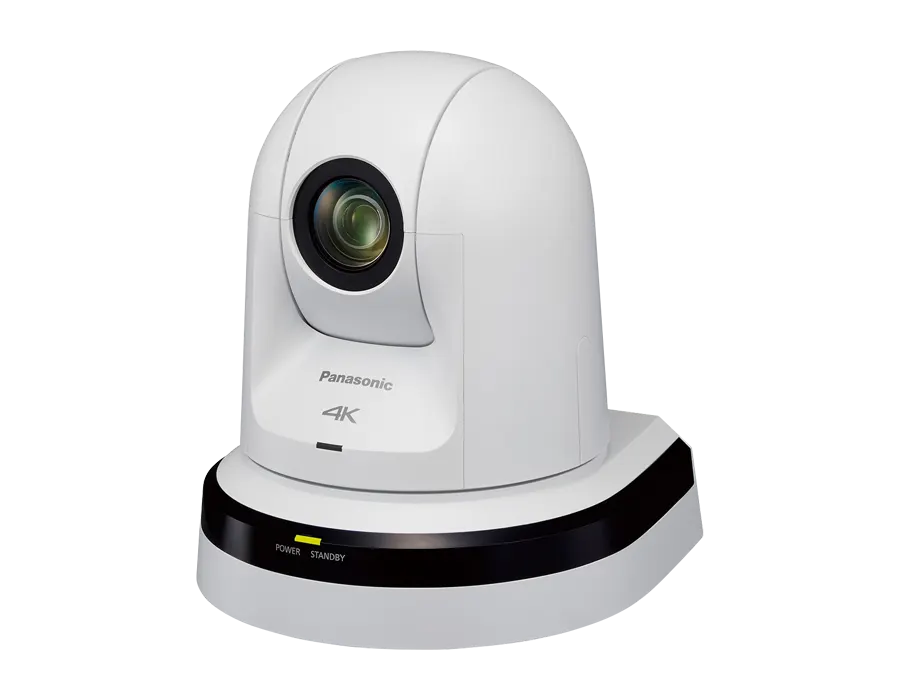
AW-UE70
Panasonic AW-UE70 4K Integrated PTZ Conference Camera
- Video
- 3840 x 2160
The Panasonic AW-UE70 is a compact pan-tilt-zoom camera that captures and outputs 4K video through HDMI, USB and IP. It pairs a 1/2.3-type MOS sensor with a 20x optical zoom lens and can be powered by its DC 12 V adaptor or PoE+. Available in pearl white or metallic black, it suits lecture theatres, boardrooms and event halls in Qatar where one operator needs flexible framing.
A compact 4K PTZ camera for rooms that need flexible framing
The Panasonic AW-UE70 is a remote pan-tilt-zoom camera measuring 160 mm x 186 mm x 179 mm, excluding protrusions, and weighing approximately 1.5 kg. It can sit on a desk or be suspended from a ceiling, and a direct ceiling mount bracket is listed as an accessory. The camera is offered in pearl white or metallic black. Panasonic lists its NDI HX1 built-in versions under separate codes, AW-UN70W and AW-UN70K, so confirm the exact model when you request a quote.
Optics and low-light figures that matter
A 1/2.3-type MOS sensor feeds an optical 20x zoom lens with an aperture of F1.8 to F3.6 and a focal length of 4.08 mm to 81.6 mm. The wide end focuses from 10 cm, which suits a presenter standing close to the lens. Horizontal resolution is rated at 1300 TV lines in 4K and 1000 TV lines in HD, measured in the centre area. Minimum illumination is 0.7 lx at 59.94 Hz without accumulation, and 0.35 lx with a 6 dB frame mix. Night mode, HDR mode and a 30x super resolution zoom add flexibility when lighting changes during a session.
Outputs and control for AV and IT teams
Video leaves the camera as 4K over HDMI, through a USB Mini-B port that presents it as a USB video and audio device, and over LAN IP. An SDI BNC output and a BBS or tri-level sync input suit studio-style setups. HDMI does not support HDCP, and VIERA Link is not supported. Control options include RS-232C, RS-422 and IP over LAN, and the camera is listed as compatible with the KAIROS IT/IP platform. Recording goes to a microSD card in MP4 format with H.264 High Profile, and a stereo mic or line input on a 3.5 mm jack handles audio.
Where the AW-UE70 fits in Qatar
- Lecture theatres in Education City: a lecturer can be framed and recorded in 4K from a fixed position, with the operator adjusting shots remotely.
- Boardrooms in West Bay: a desk-mounted camera sends the room to a video conferencing system over USB or IP, so teams abroad see the same view.
- Event and function halls in Lusail or Doha: content can be captured for weddings, conferences and funeral halls without a camera operator in the room.
Qatar summer temperatures can rise above 45 °C, so the AW-UE70 belongs in air-conditioned rooms. Its operating range is 0 °C to 40 °C at 20% to 90% humidity with no condensation. Keep it away from sun-facing windows and do not install it in outdoor or unconditioned spaces.
Planning power, cabling and mounting
Power comes from the supplied DC 12 V adaptor (1.3 A) or from PoE+ (IEEE802.3at, 42 V to 57 V, 0.5 A). Over a PoE+ hub, use category 5e cable or better up to 100 m. The AW protocol link supports cable runs up to 1000 m with category 5 or better straight cable. The infrared remote AW-RM50AG needs AA, R6 or LR6 batteries, which are not included.
Check the ceiling structure, the mounting height and the cable route before ordering. A free site survey from SmartRooms Qatar helps confirm the bracket and cable path. Schools and campuses ordering several units can send a purchase order (LPO). Quotations are usually issued within one working day, we deliver to all 8 municipalities of Qatar, and professional installation is available. The camera is covered by the manufacturer's warranty.
Send your room dimensions, mounting plan and control preferences, and request a quote for the Panasonic AW-UE70 from SmartRooms Qatar.
Highlights
- 4K output via HDMI, USB and LAN IP connection
- Optical 20x zoom, 4.08 mm to 81.6 mm focal length
- 0.7 lx minimum illumination at 59.94 Hz without accumulation
- Pan ±175°, tilt -30° to 90°, preset speed 300°/s
- PoE+ (IEEE802.3at) or DC 12 V power supply
- Pearl white or metallic black finish
Room fit
Tell us the room size and platform (Teams, Zoom or BYOD) and we confirm the right combination with your quotation.
Estimated timeline
Quotation within 1 working day · delivery timing depends on stock availability, and we confirm it with your quotation.
Specifications
General9
- Power Requirements
- DC 12 V (Supplied AC adaptor), DC 42 V to 57 V (PoE+ power supply)
- Current Consumption
- 1.3 A (Supplied AC adaptor), 0.5 A (PoE+ power supply)
- Ambient Operating Temperature
- 0 °C to 40 °C (32 °F to 104 °F)
- Storage Temperature
- -20 °C to 50 °C (-4 °F to 122 °F)
- Allowable Humidity Ranges
- 20 % to 90 % (no condensation)
- Mass
- Approx. 1.5 kg (3.30 lb)
- Dimensions (W x H x D)
- 160 mm x 186 mm x 179 mm (6-5/16 inches x 7-41/128 inches x 7-3/64 inches) (excluding protrusions, direct ceiling mount bracket)
- Finish
- AW-UE70W/AW-UN70W: Pearl white AW-UE70K/AW-UN70K: Metallic black
- Controller Supported* 1
- AW-RP50, AW-RP120G, AK-HRP200G
Camera Unit20
- Imaging Sensors
- 1/2.3-type MOS
- Lens
- Optical 20x zoom, F1.8 to F3.6 [f=4.08 mm (5/32 inches) to 81.6 mm (3-7/32 inches); 35 mm (1-3/8 inches) equivalent: 29.5 mm (1-5/32 inches) to 612.0 mm (24-3/32 inches)]
- Focus
- Switching between auto and manual
- Focus Distance
- Entire zooming range: 1.5 m (4.92 ft) Wide end: 10 cm (0.33 ft)
- Color Separation Optical System
- On-chip color filter system
- Minimum Illumination — 59.94 Hz
- 0.7 lx (50 IRE, F1.8, 48 dB,1/60 without accumulation) 0.35 lx (50 IRE, F1.8, 48 dB,1/30 with accumulation [Frame Mix 6 dB])
- Minimum Illumination — 50 Hz
- 0.7 lx (50 IRE, F1.8, 48 dB,1/50 without accumulation) 0.35 lx (50 IRE, F1.8, 48 dB,1/25 with accumulation [Frame Mix 6 dB])
- Horizontal Resolution
- 4K: 1300 TV lines Typ (Center area) HD: 1000 TV lines Typ (Center area)
- Gain Selection* 2
- Auto, 0 dB to 48 dB (3 dB step)
- Frame Mix* 3
- Auto, Off, 6 dB, 12 dB, 18 dB, 24 dB
- ND filter
- Auto* 4 , Through, 1/4, 1/16, 1/64
- Electronic Shutter Speed — During Full Auto
- 1/60 to 1/2000 (Auto Slow Shutter: Off) (59.94 Hz) 1/30 to 1/2000 (Auto Slow Shutter: On) (59.94 Hz) 1/50 to 1/2000 (Auto Slow Shutter: Off) (50 Hz) 1/25 to 1/2000 (Auto Slow Shutter: On) (50 Hz)
- Electronic Shutter Speed — During Auto
- 1/60 to 1/2000 (59.94 Hz) 1/50 to 1/2000 (50 Hz)
- Electronic Shutter Speed — During Manual
- 1/100, 1/250, 1/500, 1/1000, 1/2000, 1/4000, 1/10000 (59.94 Hz) 1/120, 1/250, 1/500, 1/1000, 1/2000, 1/4000, 1/10000 (50 Hz)
- Synchro Scan — 59.94 Hz
- 59.94 Hz to 660.09 Hz (255 steps)
- Synchro Scan — 50 Hz
- 50.00 Hz to 570.12 Hz (255 steps)
- Gamma
- Off, Normal (Low, Mid, High), Cinema
- White Balance
- ATW, AWB A, AWB B, 3200K, 5600K, VAR (2400K to 9900K)
- Chroma Amount Variability
- ±3 step
- Scene File
- Full Auto, Manual1, Manual2, Manual3
Synchronization System1
- Synchronization System
- Internal/External synchronization (BBS/Tri-level sync)
Image Stabilization1
- Image Stabilization
- Optical (FHD, 4K) /4-axis hybrid image stabilizer (FHD) for stable
Input3
- Power
- DC 12 V IN, PoE+ (IEEE802.3at standard)
- MIC/LINE Input
- Stereo mini-jack (ø3.5 mm) Input impedance: Approx. 2 kΩ (unbalanced) Mic input • Supported microphones: Stereo mic (plug-in power, on/off switching via menu) • Supplied voltage: 2.5 V ± 0.5 V • Mic input level: -60 dBV ± 3 dBV(0 dB=1 V/Pa,1 kHz) Line input • Input level: -10 dBV ± 3 dBV
- G/L IN
- BBS (Black Burst Sync) signal and tri-level sync supported (BNC x 1)
Output2
- Video Output — HDMI
- HDMI connector • HDCP is not supported. • VIERA Link is not supported.
- Video Output — 3G/HD-SDI OUT
- Compliant with the SMPTE424/SMPTE292M standards/75 Ω (BNC x 1)
Input/Output5
- Input/Output Connector — LAN
- LAN connector for IP control (RJ-45) Equipped with straight/crossover cable auto detection function
- Input/Output Connector — RS-232C
- Mini DIN 8-pin (IN), Mini DIN 8-pin (OUT)
- Input/Output Connector — RS-422
- CONTROL IN RS422A (RJ-45)
- Input/Output Connector — USB
- Mini-B port
- Input/Output Connector — SD Card
- microSD card slot
USB Connection * This may vary depending on the operating environment.9
- Video Output
- USB Video Class Ver1.0
- Video Compression Format
- Motion JPEG
- Resolution
- 3840 x 2160, 1920 x 1080, 1280 x 720, 640 x 360
- Frame Rate
- max 30 fps (59.94 Hz), max 25 fps (50 Hz)
- Audio Output
- USB Audio Class Ver1.0
- Audio Compression Format
- Linear PCM, 48 kHz, 16-bit, 2 channels
- Transfer Modes (JPEG)
- 3840 x 2160 59.94 Hz: 5fps, 50 Hz: 5fps
- Transfer Modes (JPEG)
- 1920 x 1080/1280 x 720/640 x 360 59.94 Hz: 30fps/15fps/5fps, 50 Hz: 25fps/12.5fps/5fps
- Supported Models
- Devices standardly equipped with a USB 2.0 compatible port
Pan-tilt Head Unit5
- Installation Method
- Stand-alone (Desktop) or suspended (Hanging)* 5
- Pan/tilt Operation Speed
- Maximum speed during preset: 300°/s, Maximum speed during manual: 90°/s
- Panning Range
- ±175°
- Tilting Range* 5
- -30° to 90°* 6
- Quietness
- During preset: NC40 or less, During manual: NC35 or less
Camera/Pan-tilt Head Control3
- IP Connecting Cable
- • When connecting through a PoE+ hub: LAN cable* 7 (category 5e or above), max. 100 m (328 ft) • When a PoE+ hub is not used: LAN cable* 7 (category 5 or above) max.100 m (328 ft)
- AW Protocol Connecting Cable
- LAN cable* 7 (category 5 or above, straight cable), max. 1000 m (3280 ft)
- Standard Protocol Connecting Cable
- Mini DIN 8-pin cable, male
SD Card Recording5
- SD Card Recording
- MPEG-4 AVC file standard compliant (.MP4)
- Video Compression Format
- MPEG-4 AVC/H.264 High Profile
- Audio Compression Format
- AAC-LC (48 kHz, 16 bit, 2 ch, 128 kbps)
- Recording Format / Bit Rate — 59.94 Hz
- 3840 x 2160/29.97p (Up to 72 Mbps), 1920 x 1080/59.94p (Up to 28 Mbps), 1920 x 1080/29.97p (Average 15 Mbps/Average 10 Mbps/Average 6 Mbps), 1280 x 720/59.94p (Average 15 Mbps), 1280 x 720/29.97p (Average 8 Mbps/Average 4 Mbps/Average 2 Mbps/Average 1 Mbps
- Recording Format / Bit Rate — 50 Hz
- 3840 x 2160/25p (Up to 72 Mbps), 1920 x 1080/50p (Up to 28 Mbps), 1920 x 1080/25p (Average 15 Mbps/Average 10 Mbps/Average 6 Mbps), 1280 x 720/50p (Average 15 Mbps), 1280 x 720/25p (Average 8 Mbps/Average 4 Mbps/Average 2 Mbps/Average 1 Mbps)
Network5
- Transfer Modes — JPEG
- 1920 x 1080, 1280 x 720, 640 x 360, 320 x 180, 59.94 Hz (30fps/15fps/5fps)* 8 , 50 Hz (25fps/12.5fps/5fps)* 8
- Transfer Modes — H.264
- 3840 x 2160, 1920 x 1080, 1280 x 720, 640 x 360, 320 x 180, 59.94 Hz (60fps* 9 /30fps/15fps/5fps)* 8 , 50 Hz (50fps* 9 /25fps/12.5fps/5fps)* 8
- Supported Protocol — IPv4
- TCP/IP, UDP/IP, HTTP, HTTPS, RTSP, RTP, RTP/RTCP, FTP, DHCP, DNS, NTP, IGMP, UPnP, ICMP, ARP, RTSPoverTCP, RTSPoverHTTP, SSL(TLS), MultiCast/UniCast
- Supported Protocol — IPv6
- TCP/IP, UDP/IP, HTTP, HTTPS, RTSP, RTP, RTP/RTCP, FTP, DHCPv6, DNS,NTP, ICMPv6(MLD), RTSPoverTCP, RTSPoverHTTP, SSL(TLS), MultiCast/UniCast
- i-OS, Android Support
- JPEG image display




