





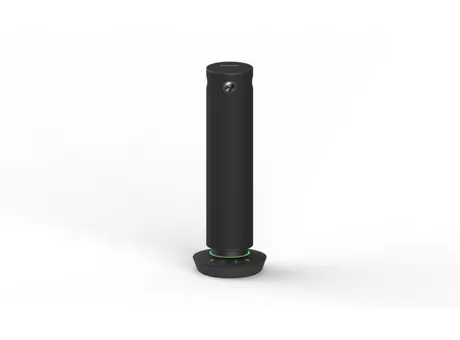
TY-CSP1
Panasonic PressIT360 TY-CSP1 360-Degree Camera Speakerphone
- Field of view
- 140 (D) / 140 (H) / 103 (V)
- Microphones
- MEMS Microphone array
- Pickup range
- Up to 5 m (16.4 ft)
- Speakers
- 1.5 W (When supplying power…
The Panasonic TY-CSP1 PressIT360 combines four cameras, a seven-microphone array and a speaker in one unit that sits on a meeting table and connects to a PC through a single USB-C cable. Its cameras cover a 360-degree horizontal view, and its microphones pick up voices up to 5 metres away. It suits meeting rooms in Doha and Lusail where people in the room join Microsoft Teams or Zoom calls with colleagues elsewhere.
A single unit for hybrid meetings
The Panasonic TY-CSP1 PressIT360 puts a camera, a microphone array and a speaker into one round unit that is placed in the middle of a table. Connect it to a PC with one USB Type-C cable and it sends video and audio into Microsoft Teams, Zoom or another conferencing application, so remote colleagues can see and hear everyone in the room without a separate camera or speakerphone.
Setup is quick: place the unit, run the cable and open the application. The operation base is 100 mm across and the body is 285 mm tall, weighing approximately 950 g, so it takes up little space on a table.
Camera and microphone performance that matters in a room
Four cameras cover a 360-degree horizontal view and 60 degrees vertically, with a 5MP CMOS sensor specification. Video is output in UVC at 1280 × 720 or 1920 × 1080 at 30 fps, so people sitting at any seat, not only those facing the camera, can be seen clearly by remote participants.
Seven MEMS microphone units in an array use beamforming to pick up voices up to 5 m (16.4 ft) away across a full 360-degree area. Echo cancellation, automatic gain control, noise reduction and keyboard noise suppression are built in, which reduces the echo and typing noise that often disrupt hybrid meetings. Performance still depends on the conferencing system, internet connection speed and bandwidth.
Choosing a video mode and display range
Five video modes let the room operator choose the layout. Single view follows one speaker. Dual view follows up to two speakers, and Multi view follows up to four, showing a green bar above the active speaker on remote screens. Surround view divides the 360-degree image into two 180-degree screens, and Stable view holds a fixed picture, useful for a whiteboard or a presenter. Buttons on the unit switch modes, adjust volume and mute the microphone.
The display range setting narrows the recognised area to 360, 270 or 180 degrees, so a presenter at the front can be framed without picking up the rest of the room. People outside the chosen angle are not recognised. This setting requires main unit software 0.0.7904.92 or later, plus the PressIT360 app 1.4.2047.56 or later on Windows or 1.4.2034.40 or later on Mac.
Where it fits in Qatar
- A boardroom in West Bay or Lusail where directors in Doha join a call with a team abroad on Teams or Zoom. The unit replaces a laptop webcam and a separate speakerphone.
- A university training room in Education City where a lecturer teaches at a whiteboard while remote students follow. Stable view with the display range narrowed to 180 degrees keeps attention on the front of the room.
- A meeting room in the Industrial Area that hosts external partners regularly, where one compact unit avoids cluttering the table with several devices.
Planning the room and the environment
The operating range is 0 to 40 °C with 20 to 80 percent humidity, non-condensing, at altitudes up to 2,800 m. Outdoor summer temperatures in Qatar can exceed 45 °C, so keep the unit inside an air-conditioned room, away from direct sunlight through glass, and confirm the site conditions with the SmartRooms Qatar team during the free site survey.
Power comes from USB Type-C (5 V/3 A) or an AC adaptor rated DC 12 V/2 A, and the unit draws 11 W while outputting video. USB-C alone gives less volume than the AC adaptor, so check which option suits the room before ordering. For a permanent position away from the desk, use the 1/4-inch tripod screw hole and a Noble Wedge lock for mounting surfaces of 11 mm or less.
Ready to equip your meeting rooms with the TY-CSP1? Request a quote from SmartRooms Qatar and we will confirm the right power option, accessories and installation for your room. Quotations are usually issued within one working day.
Highlights
- Four cameras cover a 360-degree horizontal view
- Seven-microphone array picks up voices up to 5 m
- One USB Type-C cable links camera, microphone and speaker to a PC
- Five video modes: Single, Dual, Multi, Surround and Stable
- Certified for Microsoft Teams and Zoom
- Operates at 0 to 40 °C, up to 2,800 m altitude
Room fit
Tell us the room size and platform (Teams, Zoom or BYOD) and we confirm the right combination with your quotation.
Estimated timeline
Quotation within 1 working day · delivery timing depends on stock availability, and we confirm it with your quotation.
Specifications
Camera8
- Camera sensor
- 1/2.7" 5MP CMOS
- Shooting pixels
- 2560 × 1440 ×4
- Viewing angle
- 360 (H) x 60 (V)
- Camera units
- 4
- Lens FOV (Field of view)
- 140 (D) / 140 (H) / 103 (V)
- F number of the lens
- 2.5
- Lens TTL
- 14.7 mm (0.58")
- USB video format
- UVC 1.5 1280 × 720 @ 30fps, 1920 x 1080 @ 30fps Motion JPEG
Mic7
- Microphone
- MEMS Microphone array
- MIC units
- 7
- Beam forming
- Supported
- MIC sensitivity
- -35 dBFS
- SN ratio
- 68.75 dBA
- MIC pick up distance
- Up to 5 m (16.4 ft)
- Noise canceling
- AEC/AGC/DNR/Keyboard noise suppression
Speaker2
- Speaker out
- 1.5 W (When supplying power from USB Type-C) or 3 W (When AC adaptor is connected)
- USB sound format
- UAC Revision 1.0
Terminals1
- USB
- USB Type-C (USB2.0)
General2
- TERMINALS
- DC plug
- UPC Code
- 885170391277
Electrical3
- Power
- USB Type-C (5 V/3 A) or AC adaptor DC 12 V/2 A
- Power consumption (when outputting video)
- 11 W
- Dimension (Height)
- φ 64 mm (2.52")(Operation base φ 100 mm (3.94"))
Mechanical4
- Dimension (Diameter)
- 285 mm (11.23")
- Weight
- Approx. 950 g(2.1 lbs)
- Color
- black
- Security slot
- Noble Wedge lock (with mounting surfaces of 11 mm φ or less.)
Environmental3
- Operating Environment(Temperature)
- 0 ℃ to 40 ℃ (32 °F to 104 °F)
- Operating Environment(Humidty)
- 20% to 80% (Non condensation)
- Usable altitude range
- 0 m to 2800 m / 0 ft to 9186 ft
Features3
- Video display modes (View)
- Single / Dual / Multi / Surround / Stable
- The operation of button
- Changing Mode / Adjustment of volume / Audio mute
- Application
- PressIT360 application Support OS: Microsoft Windows (Windows 10/Windows 11), / macOS




