






Barco
ClickShare Power Supply 100W
Barco ClickShare Power Supply 100W, 100-Watt Video Conferencing Accessory
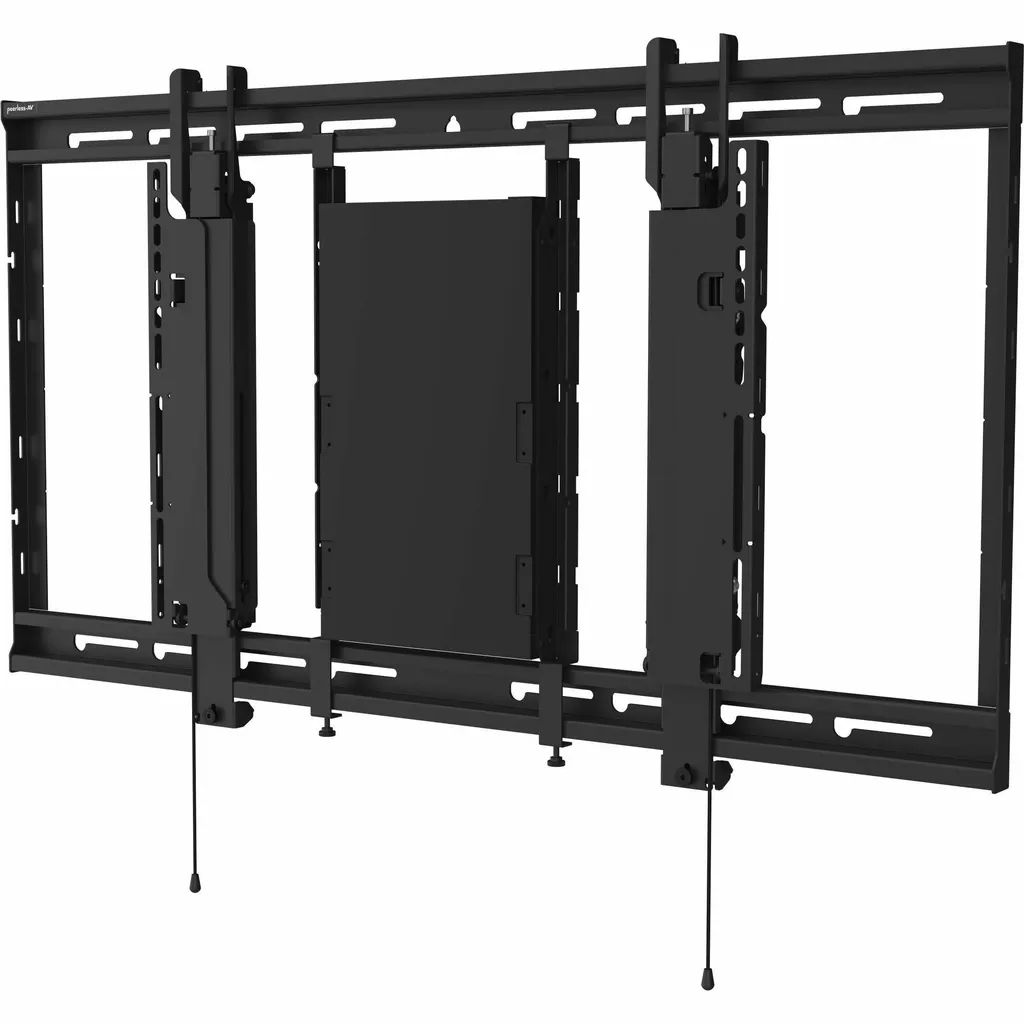
ACC-STSCCC
Peerless-AV ACC-STSCCC Black Mounting Bracket for Crestron Collab Compute
- Platforms
- STS680: SmartMount® Universal…
Priceon request
QuotationWithin 1 working day
DeliveryConfirmed with your quote, based on stock
Overview
The Peerless-AV ACC-STSCCC is a black bracket for the Crestron Collab Compute 110 and 120. It fixes to the sides of the unit so it can be hung on the STS680 wall plate, mounted inside the plate or on its outer face. The 5.44 kg (12 lb) rating and the kit of two brackets, hardware and four cable straps suit Qatar meeting rooms and boardrooms. Request a quote.
What the ACC-STSCCC bracket is for
The Peerless-AV ACC-STSCCC is a black mounting bracket designed for the Crestron Collab Compute 110 and Collab Compute 120. Instead of fixing the unit directly to a wall, the bracket attaches to the sides of the compute unit and carries it onto the Peerless-AV STS680 wall plate. That gives the unit a fixed, tidy position in the room, and the manufacturer positions the design as a way to make both installation and later servicing simpler.
The bracket is supplied as a pair, so both sides of the unit are supported by a matched set. The kit also includes mounting hardware and four cable management straps, which give power and data cables a neat route.
Specifications that matter before you order
- Load rating: AV components up to 5.44 kg (12 lb)
- Dimensions: 51.66 cm high, 2.24 cm wide, 3.18 cm deep
- Weight: approximately 816.5 g
- Finish: black, powder coated
- Mounting: inside the STS680 wall plate or attached to its outside
- Supplied: two brackets, mounting hardware and four cable management straps
- Compliance: TAA compliant; RoHS restricted substances
- Warranty: 5-year limited warranty
The bracket is designed for the STS680 wall mount, which the product data describes as a SmartMount Universal Ultra-Slim Scissor Wall Mount for 49 inch to 120+ inch displays. The data also lists two variants, STS680-1UCM3 and STS680-2UCM3, which add one or two ACC-UCM3 component mounts. Check which variant your room uses before you order.
Where it fits in Qatar
Three situations show how the bracket is used in practice.
- A ministry boardroom in Doha: a Crestron collaboration setup on an STS680 mount, where the compute unit needs a neat, fixed position and a later service visit should not mean reworking the wall.
- A university or training centre in Education City: several seminar rooms fitted with the same wall plate and bracket, so each room follows the same installation steps and looks the same.
- An energy company office in Lusail or Mesaieed: a meeting room that links staff with colleagues in other locations, where a compact, reliable mounting point keeps equipment out of the way.
Planning the installation
Assembly is required, so include the bracket in your fit-out schedule. Confirm the wall construction before you start, because the STS680 plate must be fixed securely and the bracket relies on it. Check that the compute unit you plan to mount sits within the 5.44 kg rating, and plan cable routing before the plate is fixed. The source data does not list an operating temperature range, so confirm the room environment with the SmartRooms Qatar team before installing in a space with extreme heat.
SmartRooms Qatar offers a free site survey, which is a practical step before anything is fixed to a wall, and professional installation if your team prefers not to fit it themselves. The STS680 wall plate is not listed in the package contents, so make sure it is included in your quotation. Organisations buying for several rooms can request one quotation and raise a purchase order or LPO, with payment by bank transfer, cheque or purchase order.
Request a quote
If you are fitting one room or several collaboration rooms, send us the compute model, the display size and the number of rooms. SmartRooms Qatar will return a quotation for the ACC-STSCCC and any related items you need, usually within one working day. Request a quote today.
Highlights
- Mounts Crestron Collab Compute 110 or 120 onto STS680 wall plate
- Rated for AV components up to 5.44 kg (12 lb)
- Fits inside the wall plate or attaches to its outside
- Kit includes two brackets, mounting hardware and four cable straps
- Black powder-coated finish; TAA compliant and RoHS restricted
- 5-year limited manufacturer warranty
Room fit
Tell us the room size and platform (Teams, Zoom or BYOD) and we confirm the right combination with your quotation.
Estimated timeline
Quotation within 1 working day · delivery timing depends on stock availability, and we confirm it with your quotation.
Specifications
28 specifications · Source: manufacturer · checked Oct 2026
General Information8
- Manufacturer
- Peerless Industries, Inc
- Manufacturer Part Number
- ACC-STSCCC
- Manufacturer Website Address
- http://www.peerless-av.eu.com
- Brand Name
- Peerless-AV®
- Product Model
- ACC-STSCCC
- Product Name
- Crestron Collab Compute 110/120 Mounting Bracket For The STS680
- Packaged Quantity
- 1 Unit
- Product Type
- Mounting Bracket
Product Information5
- Device Supported
- A/V Equipment; Collaboration System; Display; Wall Mount
- Maximum Load Capacity
- 5.44 kg
- Features
- Easy to Install; Hook-and-Hang Design
- Mount Function
- Wall Mount
- Mount Surface
- Wall
Physical Characteristics8
- Color Family
- Black
- Product Color
- Black
- Finishing
- Powder Coated
- Form Factor
- Wall Mountable
- Height
- 51.66 cm (20.34")
- Width
- 2.24 cm (0.88")
- Depth
- 3.18 cm (1.25")
- Weight (Approximate)
- 816.5 g
Miscellaneous6
- Package Contents
- 2x Mounting Brackets; 2x Mounting Hardware; 4x Cable Management Straps
- Application/Usage
- Drywall; Wall
- Compatibility
- STS680: SmartMount® Universal Ultra-Slim Scissor Wall Mount for 49" to 120"+ Displays; STS680-1UCM3: SmartMount® Universal Ultra-Slim Scissor Wall Mount + (1) ACC-UCM3 Component Mount; STS680-2UCM3: SmartMount® Universal Ultra-Slim Scissor Wall Mount + (2) ACC-UCM3 Component Mounts
- Assembly Required
- Yes
- TAA Compliant
- Yes
- Environmental Compliance
- Restriction of Hazardous Substances (RoHS)
Warranty1
- Limited Warranty
- 5 Year
Downloads
3 files from the manufacturerQuestions about ACC-STSCCC
What is the Peerless-AV ACC-STSCCC used for?
The ACC-STSCCC is a mounting bracket for the Crestron Collab Compute 110 and 120. It attaches to the sides of the unit so the compute can be carried onto the Peerless-AV STS680 wall plate rather than fixed directly to the wall. It suits meeting rooms and boardrooms in Qatar that run Crestron collaboration equipment and want a fixed, tidy mounting point that is simpler to service. The kit is supplied as two brackets with mounting hardware.
Which Crestron models does this bracket fit?
The data lists the bracket for the Crestron Collab Compute 110 and Collab Compute 120, and it attaches to the sides of either unit. If your room uses a different compute model, do not assume compatibility. Ask the SmartRooms Qatar team to confirm the fit before you order, especially for a multi-room project where one mismatch would affect every install.
Which wall plate does the bracket need?
The ACC-STSCCC is designed to mount the compute unit to the Peerless-AV STS680 wall plate. The STS680 is listed as a SmartMount Universal Ultra-Slim Scissor Wall Mount for 49 inch to 120+ inch displays. The data also lists the STS680-1UCM3 and STS680-2UCM3 variants, which add one or two ACC-UCM3 component mounts. Confirm which variant your room uses before issuing a purchase order.
What is the maximum load the bracket supports?
The bracket supports AV components up to 5.44 kg (12 lb). Before ordering, check the weight of the compute unit you plan to mount and confirm it falls within that rating. The manufacturer data gives the product weight as approximately 816.5 g, which should be included in your wall loading plan alongside the mounted unit.
Can the bracket be mounted inside or outside the wall plate?
Yes. The source data states that the bracket can be mounted inside the STS680 wall plate or attached to the outside of the wall plate. Choose the option that suits your wall construction and cable route. A site survey is the best time to decide, because the depth of the wall cavity and the position of the cables will determine which option is more practical in your room.
Does the bracket remove the need to drill into drywall?
The manufacturer positions the bracket as removing the need to drill into drywall for the compute unit itself. The STS680 wall plate still has to be fixed securely, and the listed application covers drywall and wall surfaces. Check the wall type on site before fixing the plate, particularly partition walls, which are common in office fit-outs across Doha and Lusail.
What is included in the box?
The package contents are two mounting brackets, two mounting hardware items and four cable management straps. The STS680 wall plate is not listed in the package contents, so confirm with SmartRooms Qatar that it is included in your quotation. Assembly is required, so allow time for it in your installation schedule.
Is the bracket TAA compliant and RoHS compliant?
Yes on both counts according to the data. The bracket is listed as TAA compliant and as conforming to the Restriction of Hazardous Substances (RoHS) directive. Government bodies in Qatar that issue tenders often need documented compliance, so ask for the relevant details to be included in your quotation.
What warranty applies to the ACC-STSCCC?
The manufacturer lists a 5-year limited warranty for the ACC-STSCCC. Products sold by SmartRooms Qatar are covered by the manufacturer's warranty. Ask for the warranty details in your quotation so the procurement team has the information it needs before raising a purchase order.
How should a ministry boardroom in Doha plan this installation?
Start with a free site survey, which checks the wall type, cable route and mounting height. Then confirm the compute model, the STS680 variant, and the power and data routes in the room. Once those details are agreed, request a quote and SmartRooms Qatar will return a quotation, usually within one working day, so the work can be scheduled around the ministry's meeting calendar.
A school in Al Rayyan or Education City is fitting several rooms. How do we order?
The same bracket and STS680 wall plate setup can be repeated in each classroom or seminar room, so every room follows the same installation steps. Send the room count and the compute model together to request one quotation for the whole project. Purchase orders and LPOs are accepted, and payment can be made by bank transfer, cheque or purchase order.
Is professional installation available for this bracket?
Assembly is required, but you do not have to fit the bracket yourself. SmartRooms Qatar offers professional installation and a free site survey before work starts. The survey is the right moment to check the wall construction, the position of the STS680 plate and whether the room has the power and cable routes the compute unit needs.



