






Barco
ClickShare Power Supply 100W
Barco ClickShare Power Supply 100W, 100-Watt Video Conferencing Accessory
ACC-STSPTZ
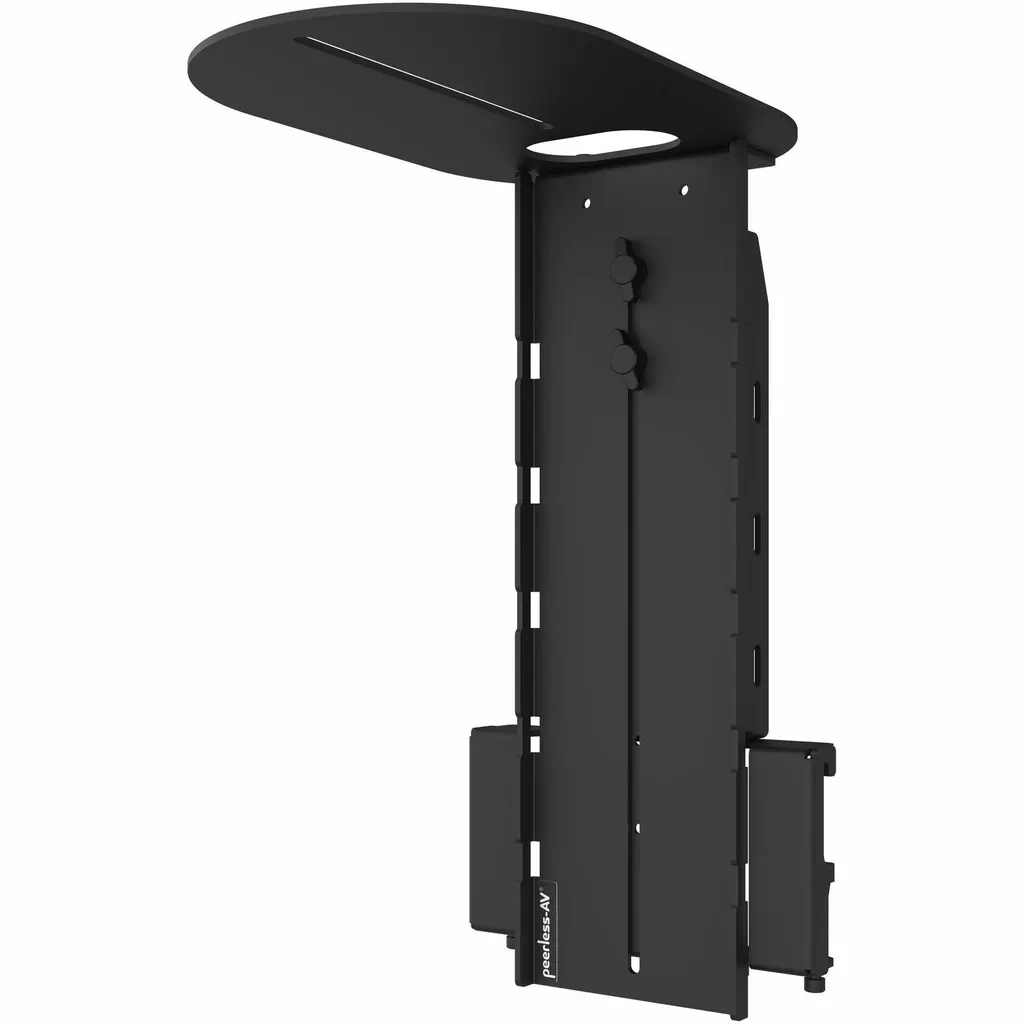
Peerless ACC-STSPTZ STS680 Universal PTZ Camera Mount for 49-115 inch Displays
- Platforms
- Yes
Priceon request
QuotationWithin 1 working day
DeliveryConfirmed with your quote, based on stock
Overview
The Peerless ACC-STSPTZ is an accessory for the STS680 wall mount, holding a PTZ camera above or below a 49 to 115-inch display. Its bracket offers a front-to-rear 1/4"-20 slot for many PTZ cameras, the telescoping design adjusts height without tools, and the rated load is 6.80 kg. Useful for meeting rooms and boardrooms in Doha and Lusail. Request a quote.
Where the ACC-STSPTZ fits in an STS680 installation
The Peerless ACC-STSPTZ is an accessory for the STS680 wall mount rather than a standalone bracket. It attaches to the STS680 wall plate and carries a PTZ camera above or below the display, so the camera sits where your video conferencing setup needs it. The mount is sized for displays from 49 to 115 inches, and the package includes the interface bracket, cable ties and installation hardware.
Because the accessory depends on the wall plate, treat the STS680 and the camera mount as one installation when you plan the room.
Load, dimensions and finish to check first
The mount has a maximum load capacity of 6.80 kg and weighs about 1.54 kg before a camera is attached. Confirm that your camera, together with any plates or cables fixed to the bracket, stays within that rating. The interface bracket has a front-to-rear 1/4"-20 slot, so the camera must use a standard 1/4"-20 mounting point.
- Maximum load: 6.80 kg
- Approximate weight: 1.54 kg
- Dimensions (H x W x D): 51.71 cm x 15.72 cm x 24.54 cm
- Finish: black fused epoxy, scratch resistant
- Compliance: TAA compliant, RoHS
- Warranty: 5-year limited manufacturer warranty
Qatar scenarios where a PTZ camera on a wall mount helps
A boardroom in West Bay usually has a wall-mounted display at the end of the table and a camera that needs to frame every seat. Placing the camera above the screen keeps it clear of presenters and gives remote participants a view of the whole room. In a university lecture theatre in Education City, the 115-inch upper limit covers the large displays used in bigger halls, letting the camera hold a consistent height for hybrid teaching. In a school refit in Al Rayyan, each classroom needs its own wall plate and mount, so quantities are set room by room.
Planning the installation and ordering
Assembly is required, but the mount can be fitted before or after the display goes up, which suits projects where the wall work is completed first. Use the free site survey from SmartRooms Qatar to check wall construction, cable routing and the clearance above or below the screen. The four Velcro cable ties help keep the camera cable tidy along the wall plate. Hot locations need care: the source data gives no operating temperature for this accessory, so confirm room conditions before ordering if the mount sits near glass in direct sun.
To request a quote, send the display model and size, the camera make and model, and the wall type to the SmartRooms Qatar team. Quotations are usually issued within one working day, and we accept purchase orders (LPOs) from organisations. Request a quote for the ACC-STSPTZ alongside your STS680 installation.
Highlights
- Carries a PTZ camera above or below a 49 to 115-inch display
- Attaches to the STS680 wall plate; assembly required
- Maximum load capacity of 6.80 kg
- Tool-free height adjustment and four Velcro cable ties
- Standard 1/4"-20 slot for PTZ camera mounting
- Black fused-epoxy finish with 5-year limited warranty
Room fit
Tell us the room size and platform (Teams, Zoom or BYOD) and we confirm the right combination with your quotation.
Estimated timeline
Quotation within 1 working day · delivery timing depends on stock availability, and we confirm it with your quotation.
Specifications
33 specifications · Source: manufacturer · checked Oct 2026
General Information8
- Manufacturer
- Peerless Industries, Inc
- Manufacturer Part Number
- ACC-STSPTZ
- Manufacturer Website Address
- http://www.peerless-av.eu.com
- Brand Name
- Peerless-AV®
- Product Model
- ACC-STSPTZ
- Product Name
- STS680 Universal PTZ Camera Mount for 49" to 115" Displays
- Packaged Quantity
- 1 Unit
- Product Type
- Camera Mount
Product Information9
- Device Supported
- Display; PTZ Camera
- Maximum Load Capacity
- 6.80 kg
- Minimum Screen Size Supported
- 49" (124.46 cm)
- Maximum Screen Size Supported
- 115" (292.10 cm)
- Features
- Cable Management; Durable; Telescoping
- Height Adjustable
- Yes
- Mount Function
- Accessory
- Mount Surface
- Wall
- Durability
- Scratch Resistant
Physical Characteristics9
- Color Family
- Black
- Product Color
- Black
- Finishing
- Fused Epoxy
- VESA Mount Compatible
- Yes
- Form Factor
- Wall Mountable
- Height
- 51.71 cm (20.36")
- Width
- 15.72 cm (6.19")
- Depth
- 24.54 cm (9.66")
- Weight (Approximate)
- 1.54 kg
Miscellaneous6
- Package Contents
- PTZ Camera Mount; 4 x Velcro Cable Ties; Installation Hardware; Installation Instructions
- Application/Usage
- Commercial; Wall
- Compatibility
- STS680: SmartMount® Universal Ultra-Slim Scissor Wall Mount for 49" to 120"+ Displays
- Assembly Required
- Yes
- TAA Compliant
- Yes
- Environmental Compliance
- Restriction of Hazardous Substances (RoHS)
Warranty1
- Limited Warranty
- 5 Year
Downloads
3 files from the manufacturerQuestions about ACC-STSPTZ
What is the Peerless ACC-STSPTZ used for?
It is an accessory that holds a PTZ camera on the STS680 wall mount system, placing the camera above or below the display instead of on a separate stand. That position matters in meeting rooms where the camera must frame participants at a consistent height. It is built for commercial video conferencing installations and ships with its interface bracket, four Velcro cable ties and installation hardware.
Which display sizes does the mount support?
The mount is specified for displays from 49 to 115 inches. Its telescoping design lets the installer set the camera position within that range, so a 55-inch screen in a small huddle room and a 98-inch panel in a larger hall both fall inside the specification. Confirm your display's exact size and weight with the SmartRooms Qatar team before ordering, because the mount attaches to the STS680 plate.
Does it work without the STS680 wall mount?
The source data lists the STS680 as the compatible wall mount, and the accessory attaches to the STS680 wall plate. It is not listed for other wall mounts, so do not assume it will fit a different bracket. If your site uses another system, ask SmartRooms Qatar to confirm compatibility before requesting a quote, so the wall plate and camera mount are specified together.
What is the maximum camera weight?
The maximum load capacity is 6.80 kg. Weigh the camera together with any plates or cables fixed to the bracket, and make sure the total stays within that figure. The mount itself weighs about 1.54 kg, which the installer should count in the wall plan. A free site survey from SmartRooms Qatar can review the total load before installation begins.
Will it fit any PTZ camera?
It suits cameras with a standard 1/4"-20 mounting point, which the interface bracket accepts through its front-to-rear slot. The source describes fit with the majority of PTZ cameras that use that standard, not every model, so check your camera's mounting specification and weight before buying. Send the make and model to SmartRooms Qatar and the team will review fit before quoting.
Can the camera sit below the display?
Yes. The mount can be positioned above or below the display, so you can choose the placement that suits your room layout, sightlines and cable route. In a Lusail meeting room where the display is set high on the wall, a lower camera position may frame attendees better. Confirm the height during a site survey so the lens sits at the level your meetings need.
Can the mount go in before the display?
Yes. The accessory can be installed before or after the display is mounted, which helps when the wall plate and camera mount go in first and the screen follows. Assembly is required, and installation hardware and instructions are included. Coordinate the order with your installer so the wall plate, cable route and display fixing line up, especially where ceiling work and painting happen first.
How are the camera cables managed?
Integrated cable management keeps camera wiring organised, and the package includes four Velcro cable ties. Run the camera cable down the wall plate to the conferencing system with enough slack for height adjustment. Tidy cabling matters most in boardrooms, where a wall-mounted display is always in view. Ask SmartRooms Qatar for a cable route plan during the site survey.
Is it suitable for a boardroom in West Bay?
Yes, provided the display falls within 49 to 115 inches and the STS680 wall mount is part of the design. A West Bay boardroom with a wall-mounted screen and a PTZ camera for remote directors benefits from placing the camera above the display, where it can show the whole table. Send the display size, camera model and wall type, and the installer will specify suitable fixings for the wall.
Does it suit a lecture theatre in Education City?
University lecture theatres often use large displays, and this mount's 115-inch upper limit covers the big end of the range. Its PTZ camera can follow a lecturer and capture the room for recorded lectures or hybrid teaching, depending on the conferencing system you run. Check the screen size, weight and wall construction with the installer before ordering.
What if I am fitting out several classrooms at a school in Al Rayyan?
Each classroom needs its own STS680 plate and camera mount, so plan quantities room by room. SmartRooms Qatar accepts purchase orders (LPOs) from schools and organisations, and we deliver to all eight municipalities of Qatar. Ask for a single quotation covering displays, mounts and cameras, and check each room's wall before the order to avoid changes later.
Can it go near a window or in a hot lobby?
The source data does not give an operating temperature for this accessory, so performance at high heat is not confirmed here. Summer temperatures in Doha can exceed 45°C, and rooms beside glass can receive direct sun. Before ordering, confirm the exact installation environment with the SmartRooms Qatar team, particularly for a lobby with a glass frontage.



