Thursday, 22 October 2026 · 11 Jumada I 1448 AH Sun – Thu · 9:00 – 18:00
+971 56 914 9477 العربية
WhatsApp

PN-ZCMS1

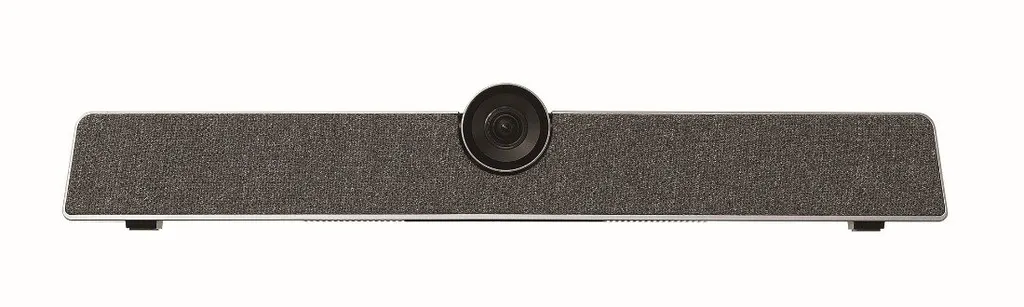
Sharp PN-ZCMS1 All-in-One Collaboration Videobar

WhatsApp
Priceon request
QuotationWithin 1 working day
DeliveryConfirmed with your quote, based on stock
PDFDownload datasheet (NEC_Datasheet_PN-ZCMS1_en.pdf)
Overview

The Sharp PN-ZCMS1 is an all-in-one collaboration videobar that combines a 12 MP camera with a 120° field of view, a 6 array microphone and a speaker. It tracks the active speaker with face detection and voice localisation, and stores two camera presets recalled from the remote. It suits hybrid meeting rooms, boardrooms and classrooms across Qatar, and mounts on top of a compatible Sharp display or on a wall.

What the PN-ZCMS1 is and why it matters

The Sharp PN-ZCMS1 is an all-in-one videobar. Camera, microphone and speaker sit in one unit, so a meeting room can take part in a video call without assembling separate components. It is aimed at hybrid meetings, where some colleagues sit around the table while others join from another office, another city or abroad. Placed above a compatible display, it gives remote participants a clear view of the room and a clear sound of the people speaking in it.

The device is supplied through a quotation from SmartRooms Qatar, which means the configuration can be matched to your room before you commit.

Camera, microphone and speaker tracking

The built-in 12 MP camera offers a 120° field of view, enough to keep everyone around a conference table in frame. A 6 array microphone picks up voices across the room and cancels echo, which keeps audio clear in larger rooms. Face detection and voice localisation work together to follow whoever is speaking and to move between presenters smoothly, so the remote audience is not left looking at an empty chair.

  • Two camera presets: save up to two positions and recall them from the remote control, so the room is ready as soon as the session begins.
  • Display compatibility: the manufacturer states compatibility with Sharp and NEC displays and lists specific Sharp MultiSync models.

Where it fits in Qatar

Three situations show how the PN-ZCMS1 is used in practice.

  • A boardroom in West Bay: directors who join calls with teams in other countries need a wide view of the table and clear audio, so people at the far end are both seen and heard.
  • A university seminar room in Education City: lecturers teaching students on campus and in partner locations can use the two presets to switch between a whiteboard view and a discussion table view.
  • A classroom in Al Wakrah: a private school fitting out new classrooms can mount the device above a display, so a teacher can run a hybrid lesson with a single unit.

Compatibility and mounting

Compatibility is the first check. The manufacturer's list includes models such as the PN-L752B, PN-L862B, PN-LC862, PN-LB863 and PN-LM551, as well as Wi-Fi variants including the PN-LB653-WIFI and PN-LB753-WIFI. Confirm your exact display code against the full list before ordering.

Mounting has two routes. Sharp Collaboration Displays ship with a bracket for placing the videobar on top of the display. For many MultiSync Large Format Displays, optional soundbar brackets SB-T01 and SB-T02 are available for the same purpose. Where there is no display to sit on, the wall mount bracket fixes the device directly to a wall.

Planning the installation

  • Check the display code against the compatibility list and note whether it is a Wi-Fi variant.
  • Decide between top-of-display and wall mounting, and confirm the wall or display can carry the bracket.
  • Position the camera so the 120° view covers every seat, not just the head of the table.
  • Book a free site survey with SmartRooms Qatar to check mounting height and camera placement before installation.

SmartRooms Qatar supplies the PN-ZCMS1 across all eight municipalities of Qatar, with professional installation. Organisations ordering several units for a school or government office can raise a purchase order (LPO) or respond to a tender, including Monaqasat. Send the display model, room size and mounting preference, and the team will return a quotation, usually within one working day.

To get a quotation for the PN-ZCMS1, request a quote from SmartRooms Qatar today and include your display model so the bracket and camera position can be confirmed.

Highlights

  • 12 MP built-in camera with 120° field of view
  • 6 array microphone with echo cancellation
  • Face detection and voice localisation track the speaker
  • Two camera presets recalled from the remote control
  • Mounts on top of compatible Sharp displays or on a wall
  • Listed compatibility with multiple Sharp MultiSync models

Room fit

Tell us the room size and platform (Teams, Zoom or BYOD) and we confirm the right combination with your quotation.

Estimated timeline

Quotation within 1 working day · delivery timing depends on stock availability, and we confirm it with your quotation.

Specifications

Source: manufacturer · checked Oct 2026
The full specification and datasheet for this model are available on request; we send them with your quotation.

Downloads

7 files from the manufacturer

Questions about PN-ZCMS1

What is the Sharp PN-ZCMS1 used for?
The PN-ZCMS1 is an all-in-one collaboration videobar that combines a 12 MP camera, a 6 array microphone and a speaker in one unit. It is built for hybrid meeting rooms, where people at the table and colleagues on a remote call need to see and hear each other clearly. It suits boardrooms, huddle spaces and classrooms that need one device to handle video calls.
How wide is the camera's field of view?
The built-in 12 MP camera has a 120° field of view, which keeps everyone around a conference table in frame. In a boardroom in West Bay with a long table, that matters because participants at the far end still appear on the remote screen. Check your room length against the camera position during a site survey before you order.
How does the videobar choose who to show?
Face detection and voice localisation work together. The device identifies faces in the room and uses the direction of the voice to follow whoever is speaking, then switches smoothly between presenters. At a briefing in a ministry meeting room in Msheireb, where several officials take turns to speak, this means remote participants follow the discussion without someone operating the camera by hand.
Can the camera settings be saved for different layouts?
Yes. The PN-ZCMS1 can save up to two camera presets, and you switch between them with the remote control. A university lecturer in Education City could store one preset that frames the whiteboard and another that frames the seminar table, so the room is ready within moments of the session starting. Pairing the presets with the room layout during planning helps set them up correctly from day one.
Which displays is the PN-ZCMS1 compatible with?
The manufacturer states compatibility with Sharp and NEC displays and lists models including the PN-L752B, PN-L862B, PN-LC862, PN-LA862, PN-LB863 and PN-LM551. It also lists Wi-Fi variants such as the PN-LB653-WIFI. Confirm your exact display code against the full list before ordering, and include it in your quotation request so SmartRooms Qatar can confirm the pairing.
How is the PN-ZCMS1 mounted?
There are two routes. Sharp Collaboration Displays ship with a bracket for placing the videobar on top of the display. For many MultiSync Large Format Displays, optional soundbar brackets SB-T01 and SB-T02 do the same job. Without a display to sit on, the wall mount bracket fixes the videobar directly to a wall, so the camera can sit at a height that suits the seating.
Do I need a site survey before installing a videobar in Qatar?
Yes, a survey is worth doing before any wall mounting. SmartRooms Qatar offers free site surveys, where the team checks the display or wall structure, the mounting height and where the camera sees the seating. For a boardroom in Lusail or The Pearl, that check avoids drilling into the wrong position and ensures the camera covers every chair.
Is the videobar suitable for a classroom in Al Wakrah?
Yes, for a classroom that runs hybrid lessons. A private school in Al Wakrah fitting out new classrooms can mount the videobar above a compatible display, so a teacher can lead the class while a remote specialist or absent pupil joins the lesson. The 6 array microphone and echo cancellation help voices carry clearly across the room. Choose the display first, because the videobar must match its model from the compatibility list.
Will it give clear audio in a larger room?
The microphone array picks up voices across the room and cancels echo, which the manufacturer ties to clear audio in larger rooms. In practice, the result also depends on room acoustics and where people sit relative to the device, so review the room layout during a site survey. For a large hall or boardroom in Doha, ask the SmartRooms Qatar team to confirm the setup with your quotation.
How do I buy a PN-ZCMS1 for a government tender or school order?
SmartRooms Qatar supplies the PN-ZCMS1 by quotation and accepts purchase orders (LPOs) and government tenders, including Monaqasat. Payment can be made by bank transfer, cheque or purchase order. Send the display model, the number of rooms and the mounting preference, and the team usually returns a quotation within one working day.
Is the PN-ZCMS1 covered by warranty?
Yes, the PN-ZCMS1 is covered by the manufacturer's warranty. The warranty period and terms are not listed on this page, so ask the SmartRooms Qatar team to confirm them in writing with your quotation before you commit to a purchase order.
How does the PN-ZCMS1 differ from using a separate webcam and speaker?
The PN-ZCMS1 combines camera, microphone and speaker in one device, so there are fewer parts to position, cable and manage. Its 120° camera, face detection and voice localisation are built into the unit, and the remote control handles the two presets. A room built around a single unit is also easier to hand over to users who need to start a call quickly.

Similar models

Biamp Parlé ABC 2500a Biamp Parlé ABC 2500a All-in-One Conferencing Audio Bar
Zoom Certified Microsoft Teams Certified
Biamp Parlé CBC 2500 CM Biamp Parlé CBC 2500 CM Ceiling-Mounted Conferencing Bar
Zoom Certified Microsoft Teams Certified
Biamp Parlé CBC 2500 PM Biamp Parlé CBC 2500 PM Pole-Mounted Conferencing Bar
Zoom Certified Microsoft Teams Certified
Biamp Parlé N 100 Biamp Parlé N 100 Network and USB Expander for Parlé Conferencing Bars
TAA Compliant
Biamp Parlé PMA 2000-DM Biamp Parlé PMA 2000-DM Display Mount Kit for Parlé 2000 Video Bars
Video bars
Email Call