






Barco
ClickShare Power Supply 100W
Barco ClickShare Power Supply 100W, 100-Watt Video Conferencing Accessory
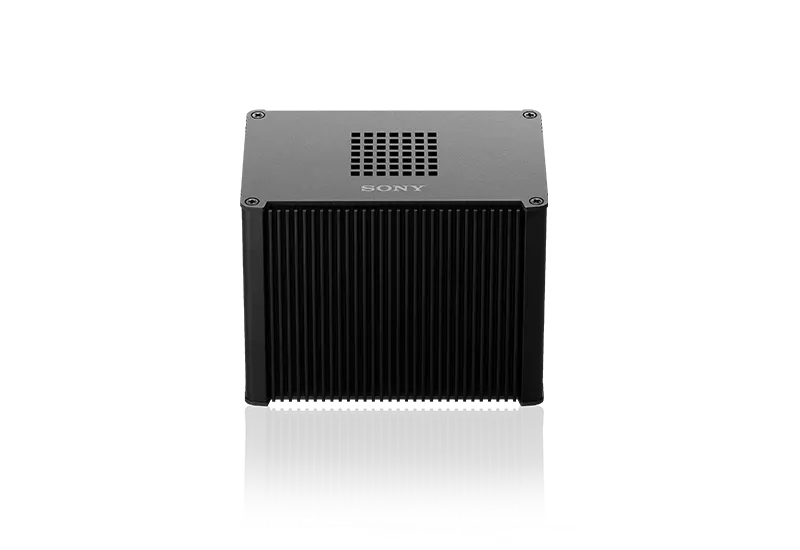
REA-C1000
Sony REA-C1000 Edge Analytics Appliance for Lecture Capture
- Microphones
- Stereo
- Connectivity
- Supports Google Chrome Ver. 70…
Priceon request
QuotationWithin 1 working day
DeliveryConfirmed with your quote, based on stock
Overview
The Sony REA-C1000 is an edge analytics appliance that works alongside compatible Sony network cameras. It tracks a presenter for PTZ framing, crops 4K footage into a Full HD output and adds overlays once the relevant licence is active. Its HDMI inputs take up to 4K30, and it streams over RTSP and RTMP. It suits lecture theatres and universities in Doha that record or stream lessons without a camera operator.
What the REA-C1000 does for the presenter
The Sony REA-C1000 sits between your network cameras and your display, recorder or streaming output. It analyses the picture while the lesson or talk runs, so the framing responds to the presenter without a camera operator in the room. The processing is built into the unit itself, which keeps the analysis on the appliance.
For a buyer, the value is practical. One box takes a 4K video source, frames the speaker, crops a second view from the same image and sends the results to two outputs. These are the points to compare against a manually operated camera set-up.
Inputs, outputs and network specifications
- HDMI IN 1: up to 4K at 30p, including 3840×2160 at 29.97p and 25p.
- HDMI IN 2: up to Full HD at 60p, including 1920×1080 at 59.94p and 50p.
- HDMI OUT 1: uses EDID to match the connected display, up to 4K at 30p.
- HDMI OUT 2: up to Full HD at 60p.
- Network: RJ-45 port at 1000BASE-T, with IPv4 and IPv6 support.
- Audio: embedded HDMI audio and a stereo 3.5 mm MIC IN.
Streaming uses RTSP and RTMP with H.264 video up to 1920 at 30p. The browser-based interface supports Google Chrome version 70 or later. Role-based access allows one administrator and nine general users, and you can restrict which computers are permitted to reach the unit.
Licences and how activation works
Each licensed function comes with a built-in 60-day trial. After the trial, a feature is activated permanently by buying its separate licence, so each room can use only the functions it needs. The codes are REA-L0100 for handwriting extraction, REA-L0200 for PTZ auto framing and tracking, REA-L0300 for close-up by gesture, REA-L0400 for chromakey-less CG overlay and REA-L0500 for focus area cropping. Fixed area cropping, which crops the static area of the full view at once, is part of the same feature set.
Where it fits in Qatar
- A university lecture theatre in Education City recording lectures for students who follow from off campus. Auto framing keeps the lecturer in shot as they move between the board and the lectern, and focus area cropping can give remote students a separate close view of the board.
- A corporate boardroom in West Bay running Q&A sessions with teams abroad. With the REA-L0300 licence, gesture close-up zooms the camera toward an audience member who stands to ask a question.
- A training centre in the Industrial Area where trainers write on a board during courses. With the REA-L0100 licence, handwriting extraction keeps written content visible to the audience even when the trainer stands directly in front of it.
Keep the unit in an air-conditioned room or cabinet. Its operating range is 5 °C to 40 °C, far below the heat outside in Qatar's summer, so avoid direct sunlight and hot spaces near windows.
Planning the installation
The unit measures 97 mm high, 141 mm wide and 91 mm deep, and weighs approximately 0.85 kg, so it is compact enough for a small equipment shelf. It runs from a 12 V 5 A DC input that needs a third-party AC adapter. Specify the adapter with your order and confirm it against Qatar's 240 V, 50 Hz supply before purchase.
Plan cabling before installation: HDMI runs from sources and displays, an RJ-45 link to your network, and a microphone line if you use MIC IN. SmartRooms Qatar offers free site surveys to check camera positions, sight lines and the licences each room needs. Universities, schools and government bodies can order by purchase order or tender, and quotations are usually issued within one working day. Request a quote covering the unit, the adapter and the licences you choose.
Highlights
- HDMI IN 1 up to 4K30; HDMI IN 2 up to Full HD 60p
- Two HDMI outputs: up to 4K30 and up to Full HD 60p
- PTZ auto framing and tracking with licence REA-L0200
- Built-in 60-day trial; each feature activated by separate licence
- RTSP and RTMP streaming, H.264 up to 1920 at 30p
- One administrator and nine general users, with computer access restriction
Room fit
Tell us the room size and platform (Teams, Zoom or BYOD) and we confirm the right combination with your quotation.
Estimated timeline
Quotation within 1 working day · delivery timing depends on stock availability, and we confirm it with your quotation.
Specifications
21 specifications · Source: manufacturer · checked Oct 2026
Specifications21
- Handwriting Extraction
- REA-L0100 license required. (60-day trial license is built-in as default)
- PTZ Auto Framing / PTZ Auto Tracking
- REA-L0200 license required. (60-day trial license is built-in as default)
- Close-up by Gesture
- REA-L0300 license required. (60-day trial license is built-in as default)
- Chromakey-less CG Overlay
- REA-L0400 license required. (60-day trial license is built-in as default)
- Focus Area Cropping
- REA-L0500 license required. (60-day trial license is built-in as default)
- Fixed Area Cropping
- Crop the static area of the whole view at once.
- Intuitive Web based User Interface
- Supports Google Chrome Ver. 70 or later.
- HDMI IN 1
- Up to 4K 30p (3840×2160 / 29.97P, 25P)
- HDMI IN 2
- Up to FHD 60p (1920×1080 / 59.94P, 50P)
- HDMI OUT 1
- [EDID] : Automatically determine and output a video image that is compatible with the connected output device. Up to 4K 30p (3840×2160 / 29.97P, 25P)
- HDMI OUT 2
- [EDID] : Up to FHD 60p (1920×1080 / 59.94P, 50P)
- Network (LAN)
- RJ-45 (1000BASE-T)
- DC power input
- 12V5A (required 3rd party AC Adapter)
- MIC IN
- Stereo, ø3.5 mm mini jack
- HDMI Embedded Audio
- Supported
- RTSP, RTMP streaming
- H.264 (Up to 1920 30P)
- IPv4, IPv6
- Internet Protocol version
- Role-based Authorization
- Access permissions of one administrator and nine general users
- Access Restrict
- Configure the security function to restrict the computers that can access the unit
- Dimension / Mass
- Height: 97mm , Width: 141mm , Depth: 91mm / Approx. 0.85kg
- Operating temperature
- 5 °C to 40 °C (41 °F to 104 °F)
Downloads
10 files from the manufacturer
PDF
Sony REA-C1000 datasheets (PDF, 553 KB)
PDF
Sony REA-C1000 manuals & guides (PDF, 6.6 MB)
PDF
Sony REA-C1000 manuals & guides (PDF, 486 KB)
PDF
Sony REA-C1000 manuals & guides (PDF, 851 KB)
PDF
Sony REA-C1000 brochures (PDF, 333 KB)
URL
Sony REA-C1000 drawings & cad (URL)
URL
Sony REA-C1000 drawings & cad (URL)
PDF
Sony REA-C1000 other documents (PDF, 88 KB)
PDF
Sony REA-C1000 other documents (PDF, 44 KB)
URL
Sony REA-C1000 other documents (URL)
Questions about REA-C1000
What is the Sony REA-C1000 used for?
The REA-C1000 is an edge analytics appliance for recording and streaming presentations. It takes video from compatible Sony network cameras and HDMI sources, tracks the presenter with PTZ auto framing and sends the result to a display, recorder or stream. It suits lecture theatres, boardrooms and training rooms where nobody is available to operate a camera during a session.
Which cameras work with the REA-C1000?
The manufacturer data states that the REA-C1000 is compatible with Sony network cameras, which connect to the appliance to capture the live presentation. Video then passes straight to the display or recording device. If you already own a Sony network camera, confirm the model with the SmartRooms Qatar team before ordering so you know it fits the framing and cropping workflow you want.
How do the 60-day trial and licences work?
Each licensed function comes with a built-in 60-day trial. After the trial, you activate a feature permanently by buying its separate licence. PTZ auto framing needs REA-L0200, while handwriting extraction needs REA-L0100. You do not need every licence, so a lecture theatre that only needs auto framing can buy one. Request a quote listing the licence codes you want, which keeps the purchase order clear for finance teams.
Does the REA-C1000 handle 4K video?
Yes, with limits. HDMI IN 1 accepts up to 4K at 30p, including 3840×2160 at 29.97p and 25p. HDMI IN 2 accepts up to Full HD at 60p. HDMI OUT 1 outputs up to 4K at 30p and matches the connected display through EDID, while HDMI OUT 2 is limited to Full HD at 60p. Check that your displays and recorders match these limits, especially if the second output feeds a second screen.
Can the REA-C1000 live stream a lecture?
It supports RTSP and RTMP streaming with H.264 video up to 1920 at 30p. For a university lecture theatre in Education City that streams sessions to students off campus, this covers the stream output. Confirm that your streaming platform accepts RTSP or RTMP before ordering, and the SmartRooms Qatar team can review the stream destination during the site survey.
Which licence is needed for automatic camera framing?
PTZ Auto Framing and Auto Tracking requires licence REA-L0200. The function is available on the built-in 60-day trial, so you can test it in your room before buying the licence. Once the trial ends, the feature stays active only with a purchased licence, so list REA-L0200 separately in your quotation if you need permanent auto framing.
How does gesture close-up work during Q&A?
Gesture close-up, licensed as REA-L0300, detects when an audience member stands up and triggers the camera to electronically zoom in on that person. In a boardroom in West Bay running Q&A sessions with teams abroad, this lets remote viewers see who is asking a question without a camera operator. It requires the licence to be active after the 60-day trial.
Can handwritten notes stay visible when the presenter stands in front of the board?
Yes, when the handwriting extraction licence REA-L0100 is active. The feature keeps words and diagrams written on a board or screen in view for the audience, even when the presenter stands in front of them. Remote viewers and anyone watching a recording see the presenter overlaid on the content, which suits training centres in the Industrial Area.
Will the REA-C1000 cope with Qatar's summer heat?
The operating temperature range is 5 °C to 40 °C, so it should be installed in an air-conditioned room or cabinet. Qatar's summer heat outside can exceed 45 °C, so do not place the unit near windows, in direct sunlight or in unventilated spaces. Ask the SmartRooms Qatar team to review the room during a free site survey before you commit to a location.
What power supply does the REA-C1000 need?
The unit takes a 12 V 5 A DC input and requires a third-party AC adapter, so the adapter must be specified separately. Before purchase, confirm that the adapter suits Qatar's 240 V, 50 Hz mains supply. Include the adapter on your purchase order so your installer has it ready on the day the unit is mounted in the equipment rack.
How many people can manage the unit, and how is access controlled?
The unit supports role-based authorisation with one administrator and nine general users. You can also configure access restriction to limit which computers can reach the unit. The web-based interface supports Google Chrome version 70 or later. Assign the administrator role to a named IT contact so that changes to licences and network settings are controlled.
How do we buy the REA-C1000 through a ministry or school purchase order?
SmartRooms Qatar accepts purchase orders and government tender documents, and quotations are usually issued within one working day. Each REA-C1000 needs its own AC adapter and any licences you select, so list them as separate lines on the purchase order. A school ordering units for several classrooms can request one quotation covering all of them.



