





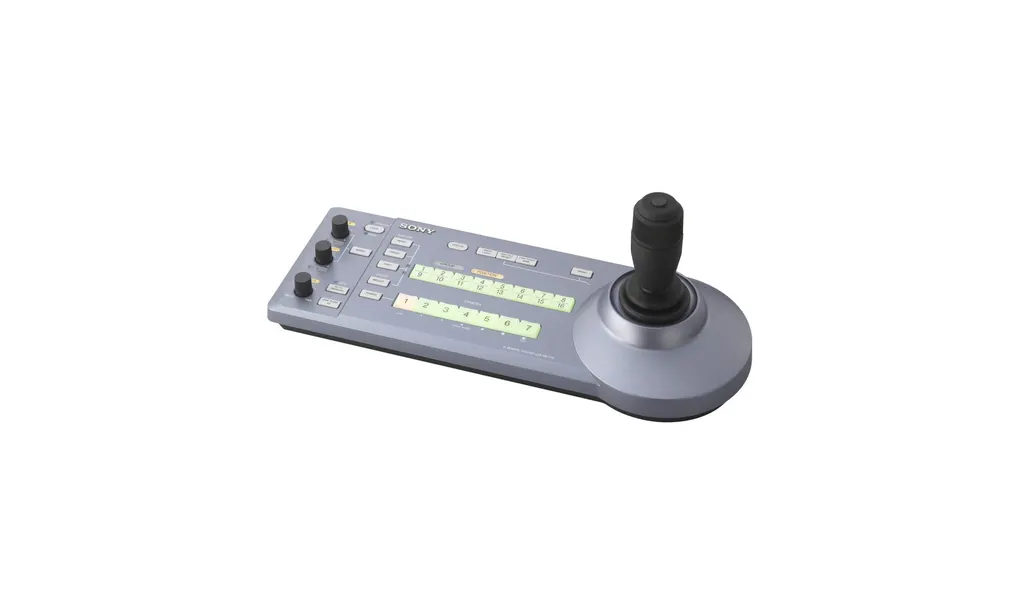
RM-IP10
Sony RM-IP10 IP Remote Control Panel for BRC Cameras
- Zoom
- Yes
The Sony RM-IP10 is an IP remote control panel for BRC PTZ cameras. It controls up to 112 cameras over an IP network, or up to 7 over a traditional VISCA network, and up to five panels can share control of one system. Its RJ-45 connection, supplied PC configuration software and simultaneous preset recall suit university lecture halls, ministry boardrooms and multi-camera conference rooms across Qatar. Request a quote from SmartRooms Qatar.
What the RM-IP10 controls
The RM-IP10 is a dedicated hardware controller for Sony BRC pan-tilt-zoom cameras. Instead of driving each camera from a computer, an operator uses the joystick, the zoom ring and the assignable functions to frame shots and recall stored positions. Its main strength is scale: over an IP network one panel manages up to 112 BRC cameras, and over a traditional VISCA network it manages up to 7.
Network, serial and power connections
The panel joins the network through a standard RJ-45 connector that detects 10BASE-T or 100BASE-TX automatically, so it can be patched into an existing Ethernet switch. For older equipment it also provides a VISCA RS-232C mini DIN 8-pin output, a VISCA RS-422 9-pin connector and a 9-pin Tally In/Contact Out port. Serial communication runs at 9,600 or 38,400 bps. The unit takes 12 V DC (10.8 to 13.2 V) and draws up to 0.3 A, or 3.6 W, through a JEITA type 4 connector. An AC power adapter and AC power cord are included.
Compatibility with older cameras
Some cameras need an add-on before they can be controlled. Control of BRC-H900 and older BRC-Z330 models requires the BRBK-IP10 camera option board. The BRC-Z700 is controlled when it is fitted with the BRBK-IP7Z option board. Check each camera model and its installed options before ordering, particularly when extending an existing system.
Where it fits in Qatar
Three realistic scenarios show how the panel is used:
- University lecture theatre in Education City: an operator at a fixed desk controls several cameras covering the stage, the whiteboard and the audience, and recalls a saved set of positions for each speaker.
- Ministry boardroom in Doha: the technical team sets up camera positions once, then the panel recalls them for every meeting. Up to five panels can share control of the system.
- Hotel conference centre in West Bay: a multi-camera setup for hybrid events, where a second operator runs the system from a separate control point on the same network.
What to plan before installation
Plan IP addresses and camera numbering before connecting the panel. The supplied PC configuration software sets the system IPs and BRC camera numbers, so the network team should reserve addresses in advance. The panel measures 391.3 mm wide, 165 mm high and 145.9 mm deep, and weighs approximately 950 g, so allow desk or control-room space close to a power socket. Its operating range is 0 to 40 °C and its storage range is -20 to 60 °C. Summer temperatures in Qatar go above 45 °C, so keep the panel in an air-conditioned control room rather than an unventilated cabinet or booth. SmartRooms Qatar offers free site surveys to confirm the layout before you order.
Request a quote from SmartRooms Qatar for the RM-IP10, with delivery to all eight municipalities of Qatar. Quotations are usually issued within one working day, and we accept purchase orders (LPOs) and government tenders, including Monaqasat.
Highlights
- Controls up to 112 BRC cameras over an IP network
- Supports up to 7 BRC cameras over traditional VISCA
- Up to five panels share control on one network
- RJ-45 connection with automatic 10BASE-T/100BASE-TX detection
- PC configuration software supplied with simultaneous preset recall
- 12 V DC input with AC power adapter included
Room fit
Tell us the room size and platform (Teams, Zoom or BYOD) and we confirm the right combination with your quotation.
Estimated timeline
Quotation within 1 working day · delivery timing depends on stock availability, and we confirm it with your quotation.
Specifications
Input/output connectors3
- Control input/output
- VISCA RS-232C OUT Connector : Mini DIN 8pin type VISCA RS-422 connector: 9-pin type LAN : RJ-45, 10BASE-T/100BASE-TX automatically detected Tally In/Contact Out: 9-pin type
- Control signal format
- 9,600 bps/38,400 bps (for RS-232C/RS-422 communication) VISCA over IP communication
- Power Connector
- JEITA type 4 (DC IN 12V)
General6
- Input voltage
- 12V DC (10.8 to 13.2V DC)
- Current consumption
- 0.3A max. (at 12V DC), 3.6W
- Operating temperature
- 0℃ to 40 ℃ (32°F to 104°F )
- Storage temperature
- -20℃ to 60 ℃ (-4°F to 140°F )
- Dimensions (W x H x D)
- 391.3 mm x 165 mm x 145.9 mm (15 ½ inches x 6 ½ inches x 5 ¾ inches)
- Mass
- Approx. 950g (2 lb 15 oz)
User Interface7
- Display
- No
- Speed Control
- No
- Zoom Seesaw Lever
- No
- Zoom Ring of Joystick
- Yes
- Zoom Control selectable
- Ring of Joystick
- ASSIGN button
- 0
- Kensington lock hole
- No
Camera Control4
- Maximum IP Connections
- 112
- Maximum Serial Connections
- 7
- Control Protocol
- VISCA over IP/VISCA RS-422/VISCA RS-232C switchable
- max Controller qty (/sys)
- 5
Direct Function of Buttons/Knobs22
- Exposure mode selection
- No
- One-push white balance auto adjustment
- No
- One-push black balance auto adjustment
- No
- Toggle color bars output on/off
- No
- Toggle backlight compensation on/off
- Yes
- Toggle flicker compensation on/off
- No
- Display the status of iris,gain,shutter speed and zoom position
- No
- R gain and B gain adjustment
- Yes *1
- R black and B black adjustment
- Yes *1
- Master black adjustment
- No
- Detail level display
- No
- Detail level adjustment
- No
- Knee point display
- No
- Knee point adjustment
- No
- AE level display
- No
- AE level adjustment
- No
- Iris setting display
- No
- Iris value adjustment
- Yes *1
- Gain setting display
- No
- Gain value adjustment
- Yes *1
- Shutter speed display
- No
- Shutter speed adjustment
- Yes *1
Supplied Accessories1
- Supplied Accessories
- Operating Instructions (1) AC Power Adapter (SONY)(1) AC power cord (1) CD-ROM (1) RS-422 connector plug (attached to the unit) (2)
Notes1
- *1
- Need multiple button/knob/DIP SW operation




