





RM-IP500
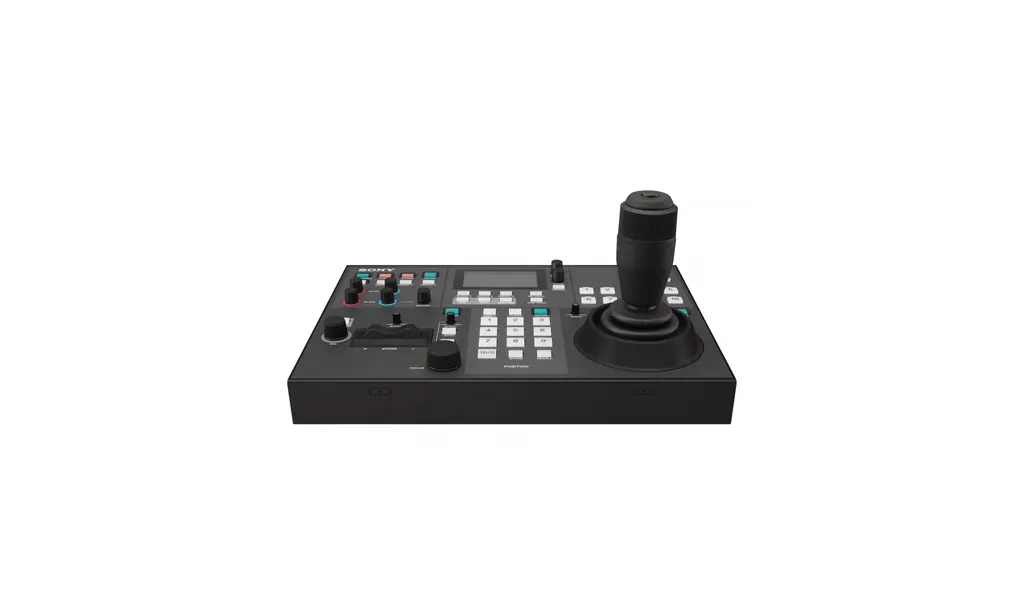
Sony RM-IP500 PTZ Camera Remote Controller
- Zoom
- Yes
The Sony RM-IP500 is a compact IP remote controller for PTZ cameras. A joystick and seesaw zoom lever allow one-handed pan, tilt and zoom, and one unit can manage up to 100 compatible BRC, SRG and ILME-FR7 cameras over a standard network. It stores up to 100 presets and recalls camera move sequences. Suits Doha production rooms and lecture halls. Request a quote.
What the RM-IP500 controls
The Sony RM-IP500 is a compact desk controller for Sony PTZ cameras that connect over an IP network. A joystick handles pan and tilt, and zoom can be driven either from the joystick ring or from a separate seesaw lever, so each operator can choose the method that suits them. Three speed dials set pan-tilt, zoom and focus speed independently, which lets a camera move slowly during a lecture or quickly enough to follow a presenter across a stage.
Dedicated knobs and buttons reach camera settings without opening menus. The controller covers exposure mode, one-push white and black balance, backlight and flicker compensation, colour bars, and adjustments for detail level, knee point, AE level, iris, gain and shutter speed. A display shows the status of iris, gain, shutter speed and zoom position.
Network capacity and set-up
A single controller can address up to 100 Sony BRC or SRG Series cameras and ILME-FR7 cameras over IP, and several models can be mixed. Up to five RM-IP500 units can share one network, so several operators can control a large camera system at the same time. If RM-IP10 units are on the same network, the combined limit across both models stays at five.
- Up to 100 IP-connected cameras across BRC, SRG and ILME-FR7 models
- Up to seven BRC or SRG cameras over RS-422 serial control
- Normal, on-air and contact tally modes
- GPI I/O on a D-Sub 15-pin connector for tally in and contact out
Most set-up is automatic. The controller assigns IP addresses to connected Sony PTZ cameras and gives each one a camera number, which saves installers from configuring every unit by hand. The LAN port detects 10BASE-T or 100BASE-TX automatically, and control can be switched between VISCA over IP and VISCA over RS-422.
Where it fits in Qatar
In a lecture theatre at Education City, a PTZ camera can be mounted at the back of the room with the RM-IP500 at the lectern. The lecturer can frame the speaker and store presets for seminars, panel discussions and recorded lectures, switching layouts quickly when the same room hosts different sessions in one day.
A corporate events team in Lusail recording a multi-camera conference can place operators at separate positions, each with an RM-IP500, to share control of the same camera group. The joystick and speed dials keep movements steady when the room is busy.
A hotel ballroom in West Bay hosting regional conferences can store stage, panel and audience shots as presets and recall them between sessions, so the room looks consistent from one event to the next.
What to plan before you order
Start with a list of your cameras, their firmware versions and the room layout. Feature availability depends on the camera model and specification, and some functions need a camera firmware update. The ILME-FR7 panel sheet is included in the carton from version 2.20, while earlier units can buy the sheet separately. Check the firmware on every camera before installation.
Power needs planning. The controller runs from 12V DC (10.8 to 13.2V DC) and draws a maximum of 7.2W with all lamps lit. Outside the US and Canada the AC power supply and cord are sold separately, so specify them with your order. We will confirm the correct supply and plug for 240 V, 50 Hz mains before installation.
The operating range is 0 to 40°C and storage is -20 to 60°C. Qatar summer temperatures can exceed 45°C outdoors, so place the controller on a desk in an air-conditioned room, not in an outdoor kiosk or beside a window in direct sun. The unit measures 306 x 159.3 x 224.1 mm, weighs approximately 2,400 g and has a Kensington lock hole.
SmartRooms Qatar offers free site surveys, so we can check cable routes and desk space before you order. Send your camera list and room plan to request a quote, and our team will reply with a quotation, usually within one working day. Purchase orders and government tenders are welcome, and the controller is covered by the manufacturer's warranty.
Highlights
- Joystick and seesaw zoom lever for one-handed camera control
- Controls up to 100 BRC, SRG and ILME-FR7 cameras over IP
- Up to five controllers on a single network
- Stores up to 100 presets and recalls camera move sequences
- Three dials for separate pan-tilt, zoom and focus speed
- 12V DC input; operating range 0 to 40°C
Room fit
Tell us the room size and platform (Teams, Zoom or BYOD) and we confirm the right combination with your quotation.
Estimated timeline
Quotation within 1 working day · delivery timing depends on stock availability, and we confirm it with your quotation.
Specifications
Input/output connectors3
- Control input/output
- VISCA RS-422 OUT connector: RJ-45 x 1 LAN : RJ-45 x 1, 10BASE-T/100BASE-TX automatically detected GPI I/O (Tally In/Contact Out): D-Sub 15-pin (female)
- Control signal format
- 9,600 bps/38,400 bps (for RS-422 communication) VISCA over IP communication
- Power Connector
- JEITA type 4 (DC IN 12V)
General6
- Input voltage
- 12V DC (10.8 to 13.2V DC)
- Current consumption
- 0.6A max. (All lamps lit), 7.2W (at 12V DC) / 0.2A typ.(2.4W)
- Operating temperature
- 0℃ to 40 ℃ (32°F to 104°F )
- Storage temperature
- -20℃ to 60 ℃ (-4°F to 140°F )
- Dimensions (W x H x D)
- 306 mm x 159.3 mm x 224.1 mm (12 1/8 x 6 3/8 inches x 8 7/8 inches) (excluding protrusions)
- Mass
- Approx. 2,400g (5 lb 4.7 oz)
User Interface7
- Display
- Yes
- Speed Control
- Yes 3 dials (PT, Zoom and Focus separately)
- Zoom Seesaw Lever
- Yes
- Zoom Ring of Joystick
- Yes
- Zoom Control selectable
- Seesaw Lever or Ring of Joystick
- ASSIGN button
- 6
- Kensington lock hole
- Yes
Camera Control4
- Maximum IP Connections
- 100
- Maximum Serial Connections
- 7
- Control Protocol
- VISCA over IP/VISCA RS-422 switchable
- max Controller qty (/system)
- 1 *1
Direct Function of Buttons/Knobs22
- Exposure mode selection
- Yes
- One-push white balance auto adjustment
- Yes
- One-push black balance auto adjustment
- Yes
- Toggle color bars output on/off
- Yes
- Toggle backlight compensation on/off
- Yes
- Toggle flicker compensation on/off
- Yes
- Display the status of iris,gain,shutter speed and zoom position
- Yes
- R gain and B gain adjustment
- Yes
- R black and B black adjustment
- Yes
- Master black adjustment
- Yes
- Detail level display
- Yes
- Detail level adjustment
- Yes
- Knee point display
- Yes
- Knee point adjustment
- Yes
- AE level display
- Yes
- AE level adjustment
- Yes
- Iris setting display
- Yes
- Iris value adjustment
- Yes
- Gain setting display
- Yes
- Gain value adjustment
- Yes
- Shutter speed display
- Yes
- Shutter speed adjustment
- Yes
Supplied Accessories1
- *
- Safety Regulations (1) Warranty (1) *2 Download Site Information (1) The Panel Sheet for ILME-FR7 (1) *3
Notes2
- *2
- Not included with models sold in China
- *3
- Available from V2.20. Prior to this version, the panel sheet can be purchased separately.




