





TRS10
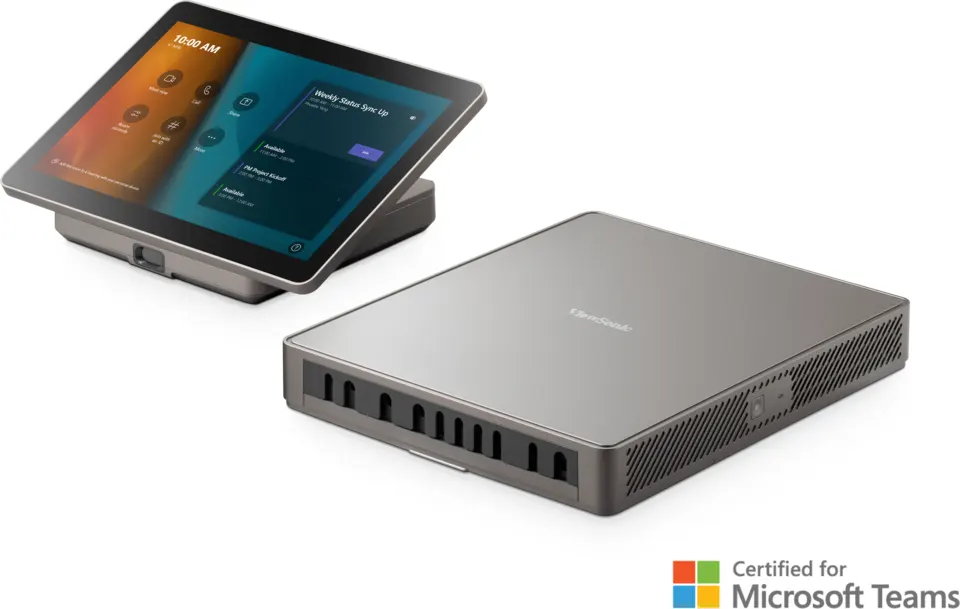
ViewSonic TeamJoin TRS10 Teams Rooms Computing Engine and Touch Console
- Video
- 1920*1200
- Connectivity
- DDR4 SODIMM
The ViewSonic TeamJoin TRS10 is a two-part Microsoft Teams Rooms bundle: a computing engine with a 12th Gen Intel Core i3 processor and Windows 11 IoT Enterprise, plus a 10.1-inch Full HD touch console for joining meetings. It suits mid-sized meeting rooms in Doha, Lusail and Education City where teams need one-touch access to Teams sessions and a simple way to share laptops through HDMI.
What the TRS10 bundle includes
The ViewSonic TeamJoin TRS10 is a room kit for Microsoft Teams Rooms made of two separate units. The MPC310-W31-TU computing engine runs the room software, while the MRC1010-TN touch console is the panel people use to start, join and control meetings. Because both arrive in one bundle, a meeting room gets its processing, controls and cabling from a single quotation.
Processing, memory and security in the engine
The engine uses a 12th Gen Intel Core i3-1220P processor with a 4.4 GHz turbo boost and Intel UHD graphics. Its 8GB of dual-channel DDR4 memory and 128GB SATA solid-state drive provide the working memory and storage for the room software, and the unit ships with Windows 11 IoT Enterprise and Microsoft Teams Rooms already installed. TPM 2.0 support, an OS recovery button and a Kensington security slot help protect the unit in a shared office.
Console specifications and room connections
The touch console carries a 10.1-inch display at 1920 x 1200 with a 60Hz refresh rate, typical brightness of 300 cd/m² and 72% NTSC colour gamut. Its capacitive touch layer supports 10 points, responds in under 25 ms, and is rated at ±1 mm accuracy in the middle of the screen and up to 2.5 mm at the edges. A PIR motion sensor keeps working when the screen is off.
- Display output: one HDMI port at up to 4K@60Hz, with CEC control to switch the main screen on and off.
- USB: four USB 3.0 Type-A ports and one USB 3.0 Type-C port with DP output at 4K@30Hz.
- Network: one RJ45 port at 10/100/1000 Mbps. There is no Wi-Fi, but Bluetooth 5.3 is built in.
- BYOD input: a direct HDMI input on the console for presenters' own laptops.
Where the TRS10 fits in Qatar
A boardroom or executive meeting room in West Bay or Msheireb, where a ministry, bank or corporate office wants every Teams meeting started from one panel with a clear video and audio setup. A staff training room at a private school in Al Rayyan or Al Wakrah, where teachers present from their own laptops through the console's HDMI input. A project office in Lusail or Ras Laffan, where engineers join calls with teams overseas and want the room to wake up as people walk in.
What to plan before ordering
- Cable routes: the box includes a 5 m Type-C cable and a 1.5 m HDMI cable, so measure the distance between the console and the engine first.
- Operating environment: the source data gives no operating temperature range. Confirm the room conditions with the SmartRooms Qatar team, especially where summer temperatures exceed 45°C.
- Power and network: the input is rated 100-240V, 50/60Hz. Plan a wired RJ45 connection because the engine has no Wi-Fi.
- Mounting: the bundle includes one VESA mounting bracket. Use a free site survey to confirm the console height and sensor position.
SmartRooms Qatar supplies the TRS10 to all eight municipalities of Qatar, with professional installation and free site surveys available. Government entities, schools and companies can order by LPO or through a tender. Request a quote and the SmartRooms Qatar team will confirm the configuration and next steps, usually within one working day.
Highlights
- 12th Gen Intel Core i3-1220P engine with 4.4 GHz turbo boost
- 8GB dual-channel DDR4 memory and 128GB SATA SSD storage
- Windows 11 IoT Enterprise with Microsoft Teams Rooms pre-installed
- 10.1-inch Full HD touch console with 10-point touch input
- Direct HDMI input for BYOD; HDMI output at 4K@60Hz
- PIR presence sensor supports automatic on and off
Room fit
Tell us the room size and platform (Teams, Zoom or BYOD) and we confirm the right combination with your quotation.
Estimated timeline
Quotation within 1 working day · delivery timing depends on stock availability, and we confirm it with your quotation.
Specifications
Computing Engine1
- Value
- MPC310-W31-TU
CPU2
- CPU
- Intel i3-1220P (1.5G) Turbo boost 4.4G
- GPU
- Intel UHD
Memory3
- Type
- Dual Channel DDR4
- Interface
- DDR4 SODIMM
- Size
- 8GB (4x2)
Storage3
- Type
- M.2 2280 SSD
- Interface
- SATA
- Size
- 128GB
Interface10
- USB type-A
- 4 x USB3.0
- USB type-C
- 1 x USB3.0 (DP out 4K@30Hz, USB3.0 upstream(In)), 12V/2A PD
- Audio
- 1 x Audio Combo Jack
- Ethernet
- 1 x RJ45 (10M/100M/1000M)
- HDMI out
- 1 x HDMI Video Out (Support Video out 4K@60Hz, CEC control - screen power on/off)
- Antenna
- Built-in (BT)
- Power button
- 1 x Power button
- Power LED
- 1 x Power LED (Power on: Blue)
- OS recovery
- 1 x OS recovery
- Kensington Security Lock
- 1 x Security slot
WIFI Expansion1
- WLAN spec
- No Wi-Fi, BT5.3
Operation System1
- Windows
- Windows 11 IoT Enterprise (x64)
Bundled Software1
- Software
- Microsoft Teams Rooms
Power7
- Supply mode
- Internal power supply module
- Input power
- AC 100-240V 50/60Hz
- Maximum power consumption
- 111.9W (19V/5.89A)
- Standby power consumption
- 1.5W
- Power Requirements
- 12V/1.5A(Via TYPE-C)
- Overall Power (Max.)
- 18W
- Standyby Power
- ≤0.5W
Accessory (inbox)3
- Quick Start Guide
- x1
- VESA mounting bracket
- x1
- Power Cord
- 1.8M x1
Physical Specifications6
- Dimension WxHxD
- 9.01 x 10.85 x 1.69 in 230 x 275.5 x 43 mm
- Dimension (package) WxHxD
- 14.53 x 11.85 x 4.76 in 369 x 301x121mm
- Net Weight
- 1.86KG (4.10lb) 0.93kg (2.05lb.)
- Gross Weight
- 3.70kg (8.16lb) 1.95kg (4.3lb.)
- Dimension LxHxD
- 9.63 x 6.3 x 3.85 (in.) 245 x 160 x 98 (mm)
- Dimension (package) LxWxH
- 14.53 x 9.65 x 4.76 (in) 369 x 245 x 121 (mm)
Touch Console1
- Value
- MRC1010-TN
Display7
- Size
- 10.1 inch
- Resolution
- 1920*1200
- Refreshing Frequency
- 60Hz
- NTSC
- 72%
- Back Light Unit
- ELED
- Brightness with glass(typ)
- 300cd/m ²
- Life Time
- 20000Hrs
Operating System1
- System Version
- Non-OS
Touch System4
- Sensing Type
- Capacitance touch recognition
- Touch Tool
- Finger
- Accuracy
- Middle:±1 mm;Edge:≤2.5mm
- Touch Point
- 10 points touch
I/O Port4
- USB 2.0
- *1
- HDMI Ingest
- *1
- Audio out
- *1, 3.5mm interface
- TYPE-C
- "1 (DP in, USB downstream(3.0: HDMI signal, 2.0: Touch signal)"
Sensor1
- Motion Sensor
- PIR *1 (Support 24/7 continuous working when screen is off)
Accessories3
- Quick Start Guide
- *1
- HDMI cable
- 1 * 1.5M
- Type-C cable
- 1* 5M




