





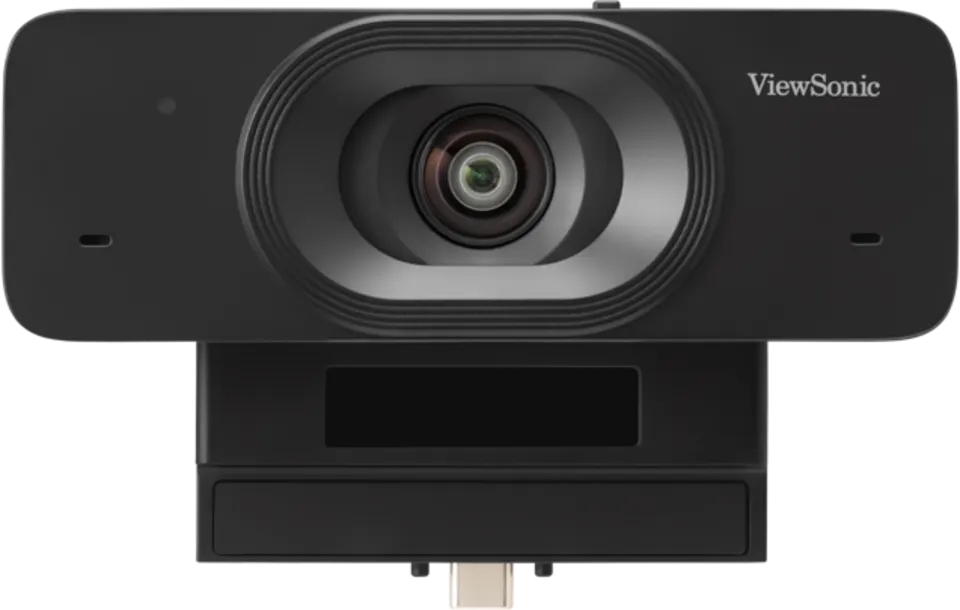
TWC101
ViewSonic TeamJoin Webcam TWC101 4K ePTZ Camera
- Field of view
- 109° / 75° / 117°
- Zoom
- 4X
- Microphones
- Built-in dual omni-directional…
- Pickup range
- up to 3m
The ViewSonic TeamJoin Webcam TWC101 is a 4K ePTZ camera built to turn compatible ViewSonic IFP51 and IFP63 Series interactive displays into video conferencing hubs. It offers a 117° diagonal field of view, 4X digital zoom, dual microphones with a 3m pickup range and a manual privacy shutter. Suited to huddle rooms, boardrooms and classrooms across Qatar that run hybrid meetings with teams abroad.
What the TWC101 adds to a compatible ViewSonic display
The TeamJoin Webcam TWC101 is a 4K ePTZ camera built for the ViewSonic IFP51 and IFP63 Series interactive displays. Rather than adding a separate conferencing system beside the screen, a room can use the display and this camera together for remote calls. Its USB-C connection is plug-and-play, which suits shared rooms where staff arrive with their own laptops and need to join a call without a lengthy setup.
Video and audio specifications that matter in a meeting room
The camera uses a 1/2.8-inch CMOS sensor with 8.29M effective pixels and outputs 4K at 30fps. Supported formats also include 1080p, 720p and two smaller sizes, all at 30fps. The diagonal field of view is 117°, with 109° horizontal and 75° vertical, which keeps participants seated around a mid-sized table in frame. Autofocus and 4X digital zoom allow closer framing, and the lens can be tilted through a 20° adjustment.
Two built-in omnidirectional microphones pick up voices up to 3 metres away. Automatic noise reduction and 2D and 3D digital noise reduction work to reduce background sound. The camera supports MJPEG, YUV2, YUY2 and H.264 video compression, and it is listed with UVC 1.0 and UAC 1.0 support.
Where it fits in Qatar
- A boardroom in West Bay or Lusail: a 4K picture and a 117° view help a senior team see every participant in a call with an overseas parent company.
- A seminar room at Education City: lecturers can hold hybrid sessions with students joining from abroad, while the interactive display carries the shared material.
- An office in the Industrial Area or Mesaieed: bilingual teams working in Arabic and English can join one call, and the manual privacy shutter covers the lens when the room is idle.
What to check before the camera goes live
Confirm that the display is in the IFP51 or IFP63 Series, because those are the compatible models listed. On the host side, the source lists Windows 7, 8.1, 10 and 11 or higher, macOS 10.10 or higher, ChromeOS, Android 11 or higher and Linux with UVC support. For memory, 2GB RAM or more is recommended for 1080p streaming and 1GB for 720p. The source gives no RAM figure for 4K, so ask the team to confirm it before you commit.
The operating temperature range is -10°C to 40°C at 20% to 95% relative humidity, non-condensing. In Qatar, outdoor and window-facing spaces can exceed that during summer, so the camera should sit in an air-conditioned room, and the temperature near windows and sun-exposed walls should be checked during the site survey. Physical size is 123 x 82 x 68 mm and net weight is 0.202 kg. The source lists a mounting bracket for the IFP51 and IFP63 Series, but the package contents list only the camera, a quick start guide and two screws, so confirm the bracket in your quotation.
Request a quote
SmartRooms Qatar supplies the TWC101 with delivery to all eight municipalities of Qatar, professional installation and a free site survey before any wall or display mounting. Quotations are usually sent within one working day. Send us your display model and room size, and we will prepare a quote for the TWC101 with the installation scope included.
Highlights
- 4K UHD video at 30fps with autofocus and 4X digital zoom
- 117° diagonal field of view with 20° tilt adjustment
- Dual omnidirectional microphones with pickup up to 3m
- USB-C plug-and-play for ViewSonic IFP51 and IFP63 Series
- Manual privacy shutter slides over the lens when idle
- Operating range -10°C to 40°C, 20% to 95% RH non-condensing
Room fit
Tell us the room size and platform (Teams, Zoom or BYOD) and we confirm the right combination with your quotation.
Estimated timeline
Quotation within 1 working day · delivery timing depends on stock availability, and we confirm it with your quotation.
Specifications
SYSTEM REQUIREMENT1
- RAM Recommended
- 2 GB RAM or more for 1080p video streaming 1 GB RAM or more for 720p video streaming
CAMERA7
- Sensor
- 1/2.8", CMOS, 8.29M Effective Pixel
- Field of View (HFOV/VFOV/DFOV)
- 109° / 75° / 117°
- White Balance
- Support
- Digital Noise Reduction
- 2D, 3D digital noise reduction
- Backlight Compensation
- Support
- Digital Zoom
- 4X
- Focus
- Autofocus
AUDIO2
- Microphone
- Built-in dual omni-directional microphone
- Pick-up Distance
- up to 3m
USB3
- Video Compression
- MJPEG / YUV2 / YUY2 / H.264
- UVC
- Support UVC 1.0
- UAC
- Support UAC 1.0
SYSTEM COMPATIBILITY2
- Operating System
- Windows 7 /8.1/10/11 or higher macOS® 10.10 or higher Google ChromebookTM Version 29.0.1547.70 or higher Android 11 or higher Linux (Required UVC Support)
- Hardware Platform
- Required Type-C port (Compatible with ViewSonic IM / IP Interactive Display Series)
GENERAL4
- USB Connectivity
- USB Type C
- Mounting
- Mounting bracket for ViewSonic Interactive Display IFP51 / IFP63 Series
- Privacy Shutter
- Support
- Cable Length
- Cableless
OPERATING CONDITIONS2
- Temperature
- -10°C ~ 40°C (14°F ~ 104°F)
- Humidity
- 20%~95% RH Non-Condensing
STORAGE CONDITIONS2
- Temperature
- -40°C ~ 60°C (-40°F ~ 140°F)
- Humidity
- 20%~95% RH
SUPPORTED VIDEO FORMAT1
- Supported Resolution
- 4k@30fps, 1080p@30fps, 720p@30fps, 960x540p@30fps, 640x360p@30fps
CONNECTIVITY1
- USB
- Type C port
COMPATIBLE MODELS1
- Value
- ViewSonic Interactive Display IFP51 / IFP63 Series
DIMENSIONS2
- Physical - Expended (W x H x D)
- 123 x 82 x 68 mm/ 4.84 x 3.23 x 2.68 inches
- Packaging - Closed (W x H x D)
- 160 x 115 x 84 mm/ 6.3 x 4.53 x 3.31 inches
WEIGHT2
- Physical (Net)
- 0.202kg/ 0.445 lb
- Packaging (Gross)
- 0.334kg/ 0.736 lb
REGULATIONS1
- Compliance Certification
- CE, FCC, LVD
PACKAGE CONTENTS1
- Value
- 1. TWC101 2. Quick start guide 3. Screw * 2




