






Barco
ClickShare Power Supply 100W
Barco ClickShare Power Supply 100W, 100-Watt Video Conferencing Accessory
AVHub
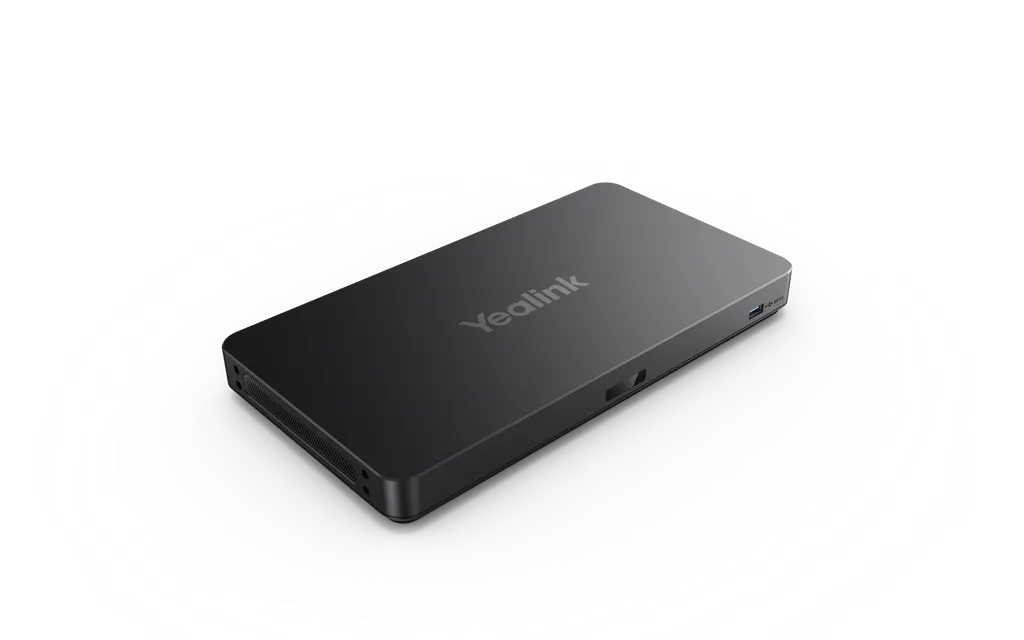
Yealink AVHub Meeting Audio & Video Processor
Priceon request
QuotationWithin 1 working day
DeliveryConfirmed with your quote, based on stock
Overview
The Yealink AVHub is an audio-video processor for large conference rooms. It handles multiple cameras, microphones and speakers, connects devices over PoE Ethernet cabling, and supports camera layouts through the Yealink plugin for Microsoft Teams Rooms. It suits boardrooms and large meeting spaces in Doha, West Bay and Lusail where several cameras must work together. Request a quote from SmartRooms Qatar.
What the Yealink AVHub does in a large meeting room
The Yealink AVHub is an audio-video processor that sits at the centre of a room system. Rather than connecting every camera, microphone and speaker straight to the PC, the AVHub takes those inputs and outputs and processes them, which leaves the computer free to run the meeting application. It is built for large and extra-large rooms where several cameras and microphones must work together, not a single webcam on a laptop.
Capacity for cameras, microphones and speakers
One AVHub supports up to nine UVC84 or UVC86 cameras, up to four CM20 or CS10 devices, up to eight VCM34, VCM35 or VCM38 array microphones and up to four MSpeaker II speakers. Several cameras can be enabled from one room at the same time, each with its own tracking mode, and remote attendees can view the feeds of every enabled camera in a customised layout. The feature list also includes multi-camera IntelliFocus, multi-stream IntelliFrame on the device and support for divisible rooms.
Cabling and power planned around PoE
The unit has seven RJ-45 VCH ports for Ethernet-connected devices with Power over Ethernet, so each camera, microphone or speaker can receive power and data over one cable rather than needing its own supply. The box includes a 7.5 m Ethernet cable and a 2.5 m USB cable. For the PC, there are two USB-A 2.0 ports and one USB-B 3.0 port, along with a codec port, an RCA in/out port and 6.3 mm line in and line out ports.
The power adapter accepts 100-240V at 50/60 Hz and outputs 48V at 2A (96.0 W). Its power cord is 2 m and the DC cable is 1.8 m, so the position of the unit and adapter must be planned so the cords reach without strain. The 100-240V input covers Qatar's 240V, 50 Hz supply.
Where it fits in Qatar
- Ministry boardroom in Msheireb: several cameras cover the presenter and the wider table, while the room links with colleagues in other cities through Microsoft Teams Rooms.
- Hall at a university or training centre in Education City: a room that can be divided into two spaces for parallel sessions, using the divisible room support in the feature list.
- Engineering review room at an energy company in Mesaieed or Ras Laffan: engineers and managers join reviews with teams abroad, and the camera layout is set in the Teams Rooms plugin before or during the meeting.
What to plan before you order
Start with a device list: count the cameras, microphones and speakers, check them against the limits above, and confirm that the room has network points for PoE connections. SmartRooms Qatar offers free site surveys, which matter in a large room where cable routes and equipment position need checking before installation. The manufacturer's data does not state an operating temperature range, so confirm the environment with our team if the processor will sit outside an air-conditioned space. Products are covered by the manufacturer's warranty. SmartRooms Qatar supplies and delivers to all eight municipalities of Qatar, provides professional installation, and accepts purchase orders (LPOs) and government tenders, including Monaqasat.
Send us your room size and device list, and our team will return a quotation, usually within one working day. Request a quote for the Yealink AVHub today.
Highlights
- Supports up to nine UVC84 or UVC86 cameras per unit
- Up to eight VCM34, VCM35 or VCM38 array microphones
- Up to four MSpeaker II speakers and four CM20 or CS10 devices
- Seven RJ-45 VCH ports for Power over Ethernet devices
- Camera layout control through the Yealink plugin for Microsoft Teams Rooms
- Power adapter input 100-240V, 50/60 Hz; output 48V 2A
Room fit
Tell us the room size and platform (Teams, Zoom or BYOD) and we confirm the right combination with your quotation.
Estimated timeline
Quotation within 1 working day · delivery timing depends on stock availability, and we confirm it with your quotation.
Specifications
10 specifications · Source: manufacturer · checked Oct 2026
AVHub Port1
- Details
- 2 x USB-A 2.0 Port 1 x USB-B 3.0 Port 1 x Codec Port 7 x VCH Port (RJ-45) 1 x RCA in/out Port 1 x 6.3 mm Line in Port 1 x 6.3 mm Line out Port 1 x Power Supply Port
Package Content1
- Details
- AVHub Power Adapter 2.5m USB Cable 7.5m Ethernet Cable Quick Start Guide
Power Supply4
- Input
- 100-240V ~ 50/60Hz 1.5A
- Output
- 48V2A 96.0W
- Power cord length
- 2 m
- DC cable length
- 1.8 m
Package Features4
- Qty/CTN
- 1 PCS
- N.W/CTN
- 2.31 kg
- G.W/CTN
- 2.62 kg
- Giftbox size
- 382 mm x 215 mm x 120 mm
Downloads
50 files from the manufacturer
PDF
Yealink AVHub datasheets (PDF, 171 KB)
PDF
Yealink AVHub manuals & guides (PDF, 457 KB)
PDF
Yealink AVHub manuals & guides (PDF, 257 KB)
PDF
Yealink AVHub manuals & guides (PDF, 452 KB)
PDF
Yealink AVHub manuals & guides (PDF, 15.3 MB)
PDF
Yealink AVHub manuals & guides (PDF, 8.1 MB)
PDF
Yealink AVHub manuals & guides (PDF, 301 KB)
PDF
Yealink AVHub manuals & guides (PDF, 333 KB)
PDF
Yealink AVHub manuals & guides (PDF, 1.1 MB)
PDF
Yealink AVHub manuals & guides (PDF, 2.7 MB)
URL
Yealink AVHub manuals & guides (URL)
URL
Yealink AVHub manuals & guides (URL)
URL
Yealink AVHub manuals & guides (URL)
URL
Yealink AVHub manuals & guides (URL)
URL
Yealink AVHub manuals & guides (URL)
DXF
Yealink AVHub drawings & cad (DXF)
STP
Yealink AVHub drawings & cad (STP)
20 -
Yealink AVHub software & firmware (20 - FIRMWARE & RELEASE NOTE)
70 -
Yealink AVHub software & firmware (70 - FIRMWARE & RELEASE NOTE)
105
Yealink AVHub software & firmware (105 - FIRMWARE & RELEASE NOTE)
145
Yealink AVHub software & firmware (145 - FIRMWARE & RELEASE NOTE)
35 -
Yealink AVHub software & firmware (35 - FIRMWARE & RELEASE NOTE)
55 -
Yealink AVHub software & firmware (55 - FIRMWARE & RELEASE NOTE)
76 -
Yealink AVHub software & firmware (76 - FIRMWARE & RELEASE NOTE)
90 (
Yealink AVHub software & firmware (90 (FOR AVONE SOLUTION ONLY) - FIRMWARE&RELEASE NOTE)
55 -
Yealink AVHub software & firmware (55 - FIRMWARE & RELEASE NOTE)
PDF
Yealink AVHub other documents (PDF, 65 KB)
PDF
Yealink AVHub other documents (PDF, 1.0 MB)
URL
Yealink AVHub other documents (URL)
URL
Yealink AVHub other documents (URL)
URL
Yealink AVHub other documents (URL)
URL
Yealink AVHub other documents (URL)
URL
Yealink AVHub other documents (URL)
URL
Yealink AVHub other documents (URL)
URL
Yealink AVHub other documents (URL)
URL
Yealink AVHub other documents (URL)
URL
Yealink AVHub other documents (URL)
URL
Yealink AVHub other documents (URL)
URL
Yealink AVHub other documents (URL)
URL
Yealink AVHub other documents (URL)
URL
Yealink AVHub other documents (URL)
URL
Yealink AVHub other documents (URL)
URL
Yealink AVHub other documents (URL)
URL
Yealink AVHub other documents (URL)
MP4
Yealink AVHub other documents (MP4)
MP4
Yealink AVHub other documents (MP4)
MP4
Yealink AVHub other documents (MP4)
MP4
Yealink AVHub other documents (MP4)
MP4
Yealink AVHub other documents (MP4)
MP4
Yealink AVHub other documents (MP4)
Questions about AVHub
What is the Yealink AVHub used for?
The Yealink AVHub is an audio-video processor for large conference rooms. It connects multiple cameras, microphones and speakers, processes their audio and video, and frees the PC to run Microsoft Teams Rooms. It suits boardrooms and large meeting spaces where a single webcam and laptop microphone cannot cover every participant, especially when people attend both in the room and online.
How many cameras, microphones and speakers can one AVHub support?
One AVHub supports up to nine UVC84 or UVC86 cameras, up to four CM20 or CS10 devices, up to eight VCM34, VCM35 or VCM38 array microphones and up to four MSpeaker II speakers. Compare your device list against these limits before ordering, and ask the SmartRooms Qatar team to confirm the right mix for your room size.
Does the AVHub work with Microsoft Teams Rooms for hybrid meetings?
Yes. The Yealink plugin for Microsoft Teams Rooms lets users adjust camera layouts before or during a meeting. Companies in Doha that hold hybrid meetings with teams abroad benefit from this, because the room operator controls how remote attendees see each enabled camera. Ask our team to confirm the software setup for your Teams Rooms environment when you request a quote.
Would the AVHub suit a hotel ballroom in Lusail?
It suits a large ballroom or conference hall that needs several cameras and microphones for events and meetings. Devices connect to the unit over Ethernet cable with Power over Ethernet, which reduces the number of separate power supplies across the room. Before installation, map cable routes and network points with the team, because hotel fit-outs often run alongside finishing and maintenance work.
What ports are available for the PC and audio equipment?
The AVHub provides two USB-A 2.0 ports, one USB-B 3.0 port, one codec port, one RCA in/out port, one 6.3 mm line in port and one 6.3 mm line out port. It also has seven RJ-45 VCH ports for Ethernet-connected devices. A 2.5 m USB cable is included. Check your existing codec and audio connections against these ports before ordering to avoid extra adapters.
Can the AVHub run on Qatar mains power?
The power adapter accepts 100-240V at 50/60 Hz, which covers the 240V, 50 Hz supply used in Qatar. It outputs 48V at 2A (96.0 W), with a 2 m power cord and a 1.8 m DC cable. The source data does not describe the adapter plug, so confirm its fitting for BS 1363 sockets with the SmartRooms Qatar team before installation.
Is the AVHub needed for a single classroom at a private school in Al Wakrah?
Usually not. The AVHub is designed for large conference rooms with several cameras, microphones and speakers, not for one small classroom with a single camera. A school fitting out a large meeting room, lecture hall or staff conference space, where multiple devices must operate together, is a better fit. Send your room plan and device count, and the team will confirm whether it meets your needs.
How would the AVHub help a government ministry boardroom in Msheireb?
It helps boardrooms where several people speak and the meeting must be seen clearly by colleagues in other locations. Multi-camera operation lets several cameras be enabled at once, each with its own tracking mode. Where meetings run in Arabic and English side by side, plan microphone coverage alongside the cameras. Ministries and authorities can request a quote for a government tender or a purchase order (LPO).
Does the AVHub suit a divisible room at a university or training centre in Education City?
The feature list includes support for divisible rooms, so the AVHub can be considered for a hall split into two meeting areas for parallel sessions. How the divided setup is configured depends on the room layout and how many cameras and microphones each part uses. Ask the SmartRooms Qatar team to confirm the right configuration before ordering.
Can an energy or industrial company in Mesaieed or Ras Laffan use the AVHub?
It suits a large conference room where engineers and managers join reviews with colleagues abroad. The feature list includes multi-camera IntelliFocus and multi-stream IntelliFrame on the device. The source data gives no operating temperature range, so if the processor would sit outside an air-conditioned space, confirm the environment with the team before installation. An air-conditioned meeting room is the simplest location to plan for.
What should we plan for a site survey and installation?
Start with a free site survey from SmartRooms Qatar to map cable routes to each camera, microphone and speaker, check PoE network points and choose a location near the adapter. The 2 m power cord and 1.8 m DC cable limit where the unit can sit. The package includes the unit, power adapter, 7.5 m Ethernet cable, 2.5 m USB cable and a quick start guide. Professional installation is available.



