






Barco
ClickShare Power Supply 100W
Barco ClickShare Power Supply 100W, 100-Watt Video Conferencing Accessory
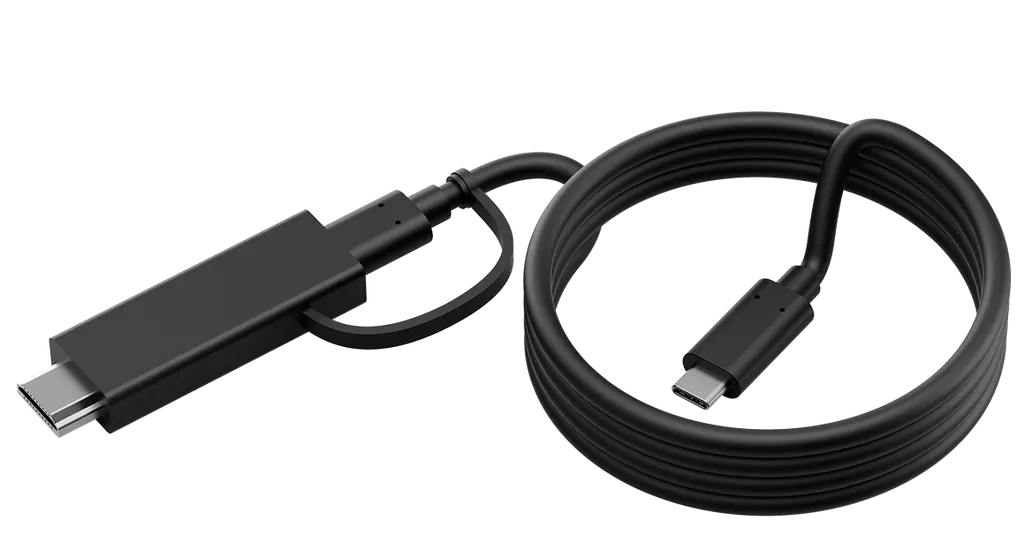
CB-MTOUCH-USBC
Yealink CB-MTOUCH-USBC USB-C Cable with HDMI Adapter
Priceon request
QuotationWithin 1 working day
DeliveryConfirmed with your quote, based on stock
Overview
The Yealink CB-MTOUCH-USBC is a 1.2 m USB-C cable with an HDMI adapter, made for the MTouch Plus and MTouch E2 touch displays. It gives a meeting room a short, tidy route for sharing content from a laptop to the screen. It suits offices, schools and boardrooms in Doha and beyond that already run, or plan to run, MTouch displays. Request a quote from SmartRooms Qatar for supply and delivery.
What this cable does in an MTouch room
The CB-MTOUCH-USBC is an accessory rather than a display. It pairs a USB-C connection with an HDMI adapter on a 1.2 m run, so a presenter can share content from a laptop or other device with an MTouch Plus or MTouch E2 without assembling a set of separate leads. In a meeting room where speakers arrive with different machines, one short, consistent cable keeps the table area tidy and the setup repeatable from one session to the next.
The specifications that matter when you order
Check three points before this cable goes into a quotation:
- Length: 1.2 m, suited to a device placed close to the display.
- Connection: USB-C with an HDMI adapter, so each presenter device needs a USB-C port.
- Compatible displays: the manufacturer lists the MTouch Plus and MTouch E2.
The manufacturer data does not give cable material, data transfer speed, maximum display resolution or an operating temperature range for this accessory. Ask the SmartRooms Qatar team to confirm these points before you specify the cable for a particular room.
Where it fits in Qatar
Three situations come up regularly:
- A university lecture room in Education City, where the lecturer moves between a personal laptop and a shared room computer.
- An international school in Al Wakrah fitting out a row of classrooms with MTouch displays and wanting one standard presenter cable per room.
- A government office in Msheireb with a boardroom used by several departments, where presenters need a neat connection they can repeat every time.
Planning the connection in your room
Confirm the MTouch model that is installed or planned, and check that the usual presenter devices have USB-C ports. Laptops that only offer HDMI or VGA outputs will need a different route, so plan an alternative before ordering. Measure the distance from the presenter position to the display: a 1.2 m cable may not reach a presenter seated at the far end of a long table. Route the cable along the table edge and away from walkways, particularly in busy classrooms.
Ordering through SmartRooms Qatar
SmartRooms Qatar supplies the CB-MTOUCH-USBC with delivery to all 8 municipalities of Qatar, and it can be added to a quotation alongside your MTouch display or mounting order. Schools and government bodies can order by purchase order (LPO) or through government tenders, including Monaqasat, and can pay by bank transfer, cheque or purchase order. Send us the display model, the number of rooms and the devices your presenters use, and request a quote so we can confirm the right quantity for your site.
Highlights
- 1.2 m cable length
- USB-C connection with HDMI adapter
- Designed for MTouch Plus and MTouch E2
- Standalone accessory for content sharing
- Covered by the manufacturer's warranty
Room fit
Tell us the room size and platform (Teams, Zoom or BYOD) and we confirm the right combination with your quotation.
Estimated timeline
Quotation within 1 working day · delivery timing depends on stock availability, and we confirm it with your quotation.
Specifications
Source: manufacturer · checked Oct 2026
The full specification and datasheet for this model are available on request; we send them with your quotation.
Downloads
0 files from the manufacturerNo downloadable files are listed for this model yet. Ask us and we will send the datasheet.
Questions about CB-MTOUCH-USBC
What is the Yealink CB-MTOUCH-USBC used for?
It is a 1.2 m USB-C cable with an HDMI adapter that carries content from a presenter's device to a Yealink MTouch display. It is an accessory, not a display, so it is planned alongside an MTouch Plus or MTouch E2. It suits meeting rooms, classrooms and boardrooms where presenters regularly connect different laptops and want a tidy, repeatable connection at the table.
Which displays is this cable designed for?
The product data lists two compatible displays: the MTouch Plus and the MTouch E2. Confirm your exact MTouch model before ordering, because the data does not list any other panels as compatible. If your room uses a different display, ask the SmartRooms Qatar team to check the connection before the cable is added to a project quotation for a school or ministry.
How long is the cable?
The cable is 1.2 m long. That length suits a presenter at a lectern beside the display, or a laptop placed at the front edge of a small meeting table. If presenters usually sit further away, such as at the far end of a long boardroom table, measure the route first, since a 1.2 m run may not reach the display.
Do presenters need a USB-C port on their laptop?
Yes. The cable uses a USB-C connection with an HDMI adapter, so the presenter device needs a USB-C port. Devices without one will need another way to connect. Before ordering, list the devices your teachers, executives or speakers use and check each one, so the cable does not sit unused on the day of handover.
How should an Education City lecture room plan for this cable?
Start by identifying which devices lecturers bring, since the cable needs a USB-C port on the presenter side. Measure the distance from the lectern to the MTouch display and mark a route that stays clear of walkways and student seating. If lecturers also use a shared room PC, decide which source is primary so the connection stays consistent between sessions.
Can one cable specification be used across every classroom in a school?
Yes, if every classroom uses the same MTouch model and teachers' devices have USB-C ports. An international school in Al Wakrah fitting out a row of rooms can use one specification for each room, then adjust for rooms with a different display model. State the number of cables per room in your quotation so every classroom receives the right quantity.
Can it be used in a hot room without air conditioning?
The product data does not give an operating temperature range for this cable, so its suitability for unconditioned or hot spaces cannot be confirmed. Summer temperatures in Doha can exceed 45°C, which matters for rooms near windows or loading areas. Confirm the room conditions with the SmartRooms Qatar team before installation, and ask for the cable's operating limits in writing.
Is this a standalone accessory or part of a display package?
It is listed in the Mounts, Cables and Accessories category as a standalone item for the MTouch Plus and MTouch E2. The product data does not describe it as bundled with a display, so treat it as an additional line item in your quotation. Our team will confirm the exact contents of the order when we prepare your quote.
Is the cable covered by warranty?
Products supplied by SmartRooms Qatar are covered by the manufacturer's warranty. The product data does not state the warranty period or terms for this cable, so we will confirm them in your quotation rather than assume them. Keep your purchase documents, including the quotation and delivery note, with your equipment records.
How can a ministry or government body order this cable?
Government bodies can order by purchase order (LPO) or through a government tender, including Monaqasat. Send the MTouch model, room count and cable quantity, and SmartRooms Qatar will prepare a quotation, usually within one working day. Payment can be made by bank transfer, cheque or purchase order, and delivery covers all 8 municipalities of Qatar.
Does SmartRooms Qatar install the cable and check the room first?
SmartRooms Qatar offers professional installation and free site surveys. For a cable like this, a survey helps confirm the presenter position, the cable route across the table, and whether the devices your staff use have USB-C ports. Book the survey before the room is wired, so the route and display position are fixed in one visit.



