Thursday, 22 October 2026 · 11 Jumada I 1448 AH Sun – Thu · 9:00 – 18:00
+971 56 914 9477 العربية
WhatsApp

CP900

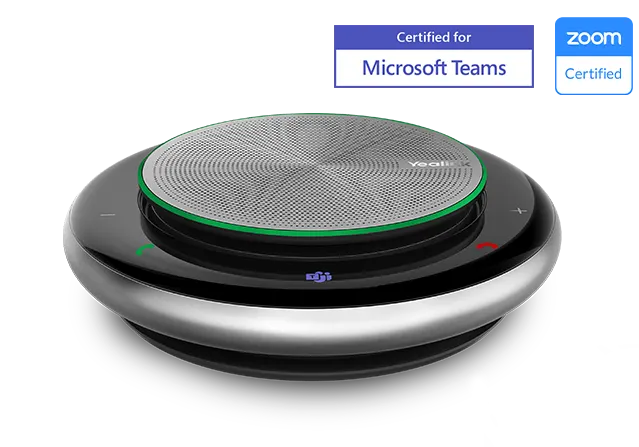
Yealink CP900 Microsoft Teams Portable Bluetooth Speakerphone

Connectivity
USB 2.0 PNP & Bluetooth
WhatsApp
Priceon request
QuotationWithin 1 working day
DeliveryConfirmed with your quote, based on stock
PDFDownload datasheet (Yealink CP900 Datasheet.pdf)
Overview

The Yealink CP900 Microsoft Teams edition is a portable USB and Bluetooth speakerphone for meetings of up to six people. Six microphones pick up speech from any direction, and the battery provides up to 12 hours of talk time. Weighing 320g and carried in its included zipper bag, it suits small meeting rooms, executive offices and staff who move between Doha and sites abroad.

A Microsoft Teams speakerphone for small rooms and mobile calls

The Yealink CP900 Microsoft Teams edition is a portable speakerphone that works with a PC, tablet or smartphone over USB or Bluetooth. It is built for meetings of up to six people, and it is the version to choose when your staff use Microsoft Teams and want a dedicated Teams button on the device itself. It suits a small room where a laptop screen alone is too far from the group to hear everyone clearly.

Six microphones that cover the whole table

Six MEMS microphones sit around the base of the CP900 and pick up speech from all 360 degrees, so participants can talk from their own seats rather than crowding the device. The rated pickup range is up to 2 meters, which covers a table for six people. Noise suppression, digital signal processing and acoustic echo cancellation keep voices clear, while full-duplex operation lets both ends speak at once without cutting each other off.

Connections, controls and the Teams button

The CP900 connects by USB 2.0 with plug-and-play setup, using a cable of about 0.9 meters, or by Bluetooth 4.2 with a wireless range of 30 meters. It supports two simultaneous connections, so a laptop and a phone can both be linked. Eight touch buttons handle call control, and the Teams button opens the Teams application. A flashing light signals an unanswered call, a voicemail or an upcoming meeting. The BT50 dongle is listed in the box contents as an optional accessory.

Battery, size and what to plan before deployment

  • Weight: 320g, diameter 132.5 mm, height 35.5 mm
  • Battery: 2450mAh capacity, up to 12 hours of talk time
  • Charging: about 3 hours on a 5V/1A USB source
  • Speaker: 7W peak output, conference frequency range 150Hz to 8kHz

Because the unit is portable, planning centres on the table layout and a nearby charging point. The source data does not give an operating temperature range. If you plan to use it in an unusually hot or dusty area, such as a space near an external door, confirm the intended environment with the SmartRooms Qatar team before ordering several units.

Where it fits in Qatar

  • A private school in Al Wakrah equipping a staff meeting room for video calls with head office.
  • A consultancy in West Bay with a small room where engineers join Teams calls with clients overseas.
  • A government office in Msheireb where four or five officials hold a Teams call with colleagues in another country.

Qatar's working week runs Sunday to Thursday, and many teams in Doha join calls with colleagues abroad. A device that charges over USB and offers up to 12 hours of talk time can move easily between meeting rooms, and a manager can carry it in the included zipper bag to meetings near Hamad International Airport.

Managing units and ordering for several sites

Yealink Connect is provided free for managing Yealink USB devices, including the CP900. It lets IT teams monitor usage, check device information, run remote diagnostics, install firmware updates and configure the BT dongle for pairing. Each carton holds 10 units, so a single LPO can cover a full set of meeting rooms. SmartRooms Qatar delivers to all eight municipalities, usually quotes within one working day, and accepts bank transfer, cheque or purchase order. Request a quote with the number of rooms and the Teams setup you use.

Highlights

  • Six microphones with 360-degree pickup up to 2 meters
  • USB 2.0 plug-and-play and Bluetooth 4.2 connectivity
  • Dedicated Microsoft Teams button and notification light
  • Up to 12 hours talk time from a 2450mAh battery
  • Weighs 320g, with a zipper bag included
  • Yealink Connect software provided free for device management

Room fit

Tell us the room size and platform (Teams, Zoom or BYOD) and we confirm the right combination with your quotation.

Estimated timeline

Quotation within 1 working day · delivery timing depends on stock availability, and we confirm it with your quotation.

Specifications

28 specifications · Source: manufacturer · checked Oct 2026
General7
Speakerphone size
(Ø) 132.5 x (h) 35.5 mm
Speakerphone weight
320g / 11.28 oz
Connectivity
USB 2.0 PNP & Bluetooth
USB cable length
3 feet / 0.9 meter
Wireless range
100 feet / 30 meters
Power
USB/Lithium Polymer Battery
Details
8 touch buttons Built-in Bluetooth 4.2
Battery5
Battery
Capacity: 2450mAh
Charging time/power
3 hours (5V/1A)
Max. charge current
1.7A
Talk time
12 hours
Standby time
Power safe after 30 minutes/Standby 400 days
Microphone4
Type
Six MEMS microphone array
Sensitivity
-42dB re. 1V/Pa
Signal to Noise Ratio (SNR)
+59 dB
Frequency range - Conference mode
USB mode & Bluetooth mode 115 Hz to 7 KHz
Speaker5
Peak output power
7W
Sensitivity
82dbSPL +/-3db SPL @1m,1W
Frequency range – Conference mode
150Hz-8kHz
Frequency range – Music mode
150Hz-16kHz
Details
- USB mode 115 Hz to 8 KHz - Bluetooth mode 115 Hz to 8 KHz - USB mode 115 Hz to 16 KHz - Bluetooth mode 115 Hz to 8 KHz
Audio1
Details
Optima HD voice Microphone pickup range up to 6.5 feet / 2 meters Full-duplex technology Noise Suppression (NS) Digital Signal Processing (DSP) Acoustic echo cancellation (AEC)
Package Features6
Qty/CTN
10 PCS
N.W/CTN
4.9 kg
G.W/CTN
5.3 kg
Giftbox size
176 mm x 155 mm x 53 mm
Carton Meas
325mm x 276 mm x 188 mm
Details
Package content: - Yealink CP900 Speakerphone - Zipper Bag - BT50 (optional) - Quick Start Guide
Downloads

37 files from the manufacturer
PDF Datasheets Yealink CP900 Datasheet.pdf 85 KB Yealink CP900 datasheets (PDF, 85 KB) URL Datasheets · Opens on manufacturer site  Download Yealink CP900 datasheets (URL) PDF Manuals & guides Yealink CP900 Quick Start Guide (EN, DE, FR, ES) V1.2.pdf 540 KB Yealink CP900 manuals & guides (PDF, 540 KB) URL Manuals & guides · Opens on manufacturer site Bind Speaker Phone to YMCS Platform Yealink CP900 manuals & guides (URL) URL Manuals & guides · Opens on manufacturer site Bluetooth & Ring Type Yealink CP900 manuals & guides (URL) URL Manuals & guides · Opens on manufacturer site CP700 & CP900 Deployment Yealink CP900 manuals & guides (URL) URL Manuals & guides · Opens on manufacturer site Call Control Yealink CP900 manuals & guides (URL) URL Manuals & guides · Opens on manufacturer site Charge CP700 & CP900 Yealink CP900 manuals & guides (URL) URL Manuals & guides · Opens on manufacturer site Connect CP700 & CP900 to Deskphone Yealink CP900 manuals & guides (URL) URL Manuals & guides · Opens on manufacturer site Connect CP700 & CP900 to Mobile Yealink CP900 manuals & guides (URL) URL Manuals & guides · Opens on manufacturer site Connect CP700 & CP900 to PC Yealink CP900 manuals & guides (URL) URL Manuals & guides · Opens on manufacturer site Connect CP700 & CP900 to Two Devices Yealink CP900 manuals & guides (URL) URL Manuals & guides · Opens on manufacturer site Disconnect Bluetooth Device Yealink CP900 manuals & guides (URL) URL Manuals & guides · Opens on manufacturer site Factory Reset Yealink CP900 manuals & guides (URL) URL Manuals & guides · Opens on manufacturer site Manually Pair CP700 & CP900 with BT50 (Optional) Yealink CP900 manuals & guides (URL) URL Manuals & guides · Opens on manufacturer site Overview Yealink CP900 manuals & guides (URL) URL Manuals & guides · Opens on manufacturer site Pause & Play Music Yealink CP900 manuals & guides (URL) URL Manuals & guides · Opens on manufacturer site Power Off CP700 & CP900 Yealink CP900 manuals & guides (URL) URL Manuals & guides · Opens on manufacturer site Power On CP700 & CP900 Yealink CP900 manuals & guides (URL) URL Manuals & guides · Opens on manufacturer site Reboot Yealink CP900 manuals & guides (URL) URL Manuals & guides · Opens on manufacturer site Reconnect to Bluetooth Device Yealink CP900 manuals & guides (URL) URL Manuals & guides · Opens on manufacturer site Recovery Mode Yealink CP900 manuals & guides (URL) URL Manuals & guides · Opens on manufacturer site Update Firmware Yealink CP900 manuals & guides (URL) URL Manuals & guides · Opens on manufacturer site Update Multiple Headsets Yealink CP900 manuals & guides (URL) PDF Certificates & compliance European Union Declaration of Conformity-CP900.pdf 361 KB Yealink CP900 certificates & compliance (PDF, 361 KB) 25 - Software & firmware · Opens on manufacturer site BT50 1.420.0.25 - Firmware & Release Note Yealink CP900 software & firmware (25 - FIRMWARE & RELEASE NOTE) 45 - Software & firmware · Opens on manufacturer site CP900(CP700) 100.420.0.45 - Firmware & Release Note Yealink CP900 software & firmware (45 - FIRMWARE & RELEASE NOTE) 55 - Software & firmware · Opens on manufacturer site CP900(CP700) 100.420.0.55 - Firmware & Release Note Yealink CP900 software & firmware (55 - FIRMWARE & RELEASE NOTE) 57 - Software & firmware · Opens on manufacturer site CP900(CP700) 100.420.0.57 - Firmware & Release Note Yealink CP900 software & firmware (57 - FIRMWARE & RELEASE NOTE) 61 - Software & firmware · Opens on manufacturer site CP900(CP700) 100.420.0.61 - Firmware & Release Note Yealink CP900 software & firmware (61 - FIRMWARE & RELEASE NOTE) MP4 Software & firmware · Opens on manufacturer site How to Update USB Speakerphone Firmware through Yealink USB Connect V1.0.mp4 Yealink CP900 software & firmware (MP4) PDF Other documents Yealink Headset Regulatory Notice V1.4.pdf 2.1 MB Yealink CP900 other documents (PDF, 2.1 MB) URL Other documents · Opens on manufacturer site CP700 & CP900 Compatibility List Yealink CP900 other documents (URL) URL Other documents · Opens on manufacturer site Glossary Yealink CP900 other documents (URL) MP4 Other documents · Opens on manufacturer site How to Connect USB Speakerphone to PC and Smartphone V1.0.mp4 Yealink CP900 other documents (MP4) MP4 Other documents · Opens on manufacturer site How to Export Log through Yealink USB Connect V1.0.mp4 Yealink CP900 other documents (MP4) MP4 Other documents · Opens on manufacturer site How to Use Pair Management BT50 and USB Speakerphone V1.0.mp4 Yealink CP900 other documents (MP4)

Questions about CP900

Who is the CP900 Microsoft Teams edition designed for?
The CP900 suits small meeting rooms, huddle spaces and executive offices where up to six people need to join Microsoft Teams calls from one device. It works with a PC, tablet or smartphone over USB or Bluetooth, so it can sit on the table of an existing room. Its 320g body also lets a manager carry it between a Doha office and meetings elsewhere.
How many people can the CP900 pick up clearly?
The CP900 is aimed at meetings of up to six people. Its six-microphone array picks up speech from all 360 degrees, with a pickup range of up to 2 meters. Participants can sit around a table and speak without leaning toward the device. Noise suppression and acoustic echo cancellation help keep voices clear when the room is busy or when the speaker is at the far end.
What connection options does the CP900 offer?
The CP900 connects over USB 2.0 with plug-and-play setup, using a cable of about 0.9 meters, and over Bluetooth 4.2 with a wireless range of up to 30 meters. It supports two simultaneous connections, so a laptop and a phone can both be linked to the same unit. This lets a user switch between a desk PC and a mobile device during a call.
How long does the battery last and how is it charged?
The battery has a capacity of 2450mAh and gives up to 12 hours of talk time. It charges over USB at 5V/1A, and a full charge takes about 3 hours. The manufacturer lists a standby time of 400 days, and the device enters a power-saving mode after 30 minutes of inactivity. Keep a USB charger at the meeting table so the unit is always ready.
What does the Teams button do?
The dedicated Teams button opens the Microsoft Teams application on the connected device, and the eight touch buttons handle common call control directly on the unit. A flashing light signals an unanswered call, a voicemail or an upcoming meeting from Teams, so staff in a shared room know when to check their messages without opening the app first.
Is the CP900 suitable for a school staff room in Al Wakrah that joins calls with head office abroad?
A private school in Al Wakrah could place one CP900 in a staff meeting room to join Teams calls with head office overseas. Six people can sit around a table within the 2-meter pickup range, and the USB connection keeps the call on a school PC. Confirm your room layout and network with the SmartRooms Qatar team before you request a quote.
Can a government office in Msheireb use it for small Teams calls?
A government office in Msheireb with a room for four or five officials can use one CP900 for Teams calls with colleagues abroad. Its 12-hour talk time covers long working sessions, and an LPO can cover several rooms in one purchase order. Request a quote and state which PCs and phones will connect, so the connection method can be confirmed before delivery.
Does the CP900 work for music as well as calls?
The speaker is rated at 7W peak output and lists a music-mode frequency range of 150Hz to 16kHz, compared with 150Hz to 8kHz in conference mode. It is aimed at meetings rather than large venues. For a hall or event space, a single desktop unit may not be enough, so describe the room size when you request a quote.
What should I check before using the CP900 in a hot or dusty area?
The source data does not give an operating temperature range, so we cannot state one for this model. Qatar summer temperatures can exceed 45°C, and dust storms can reach indoor spaces that are not well sealed. Before placing the unit near an external door or a window, confirm the intended environment with the SmartRooms Qatar team and note the location in your quotation request.
What comes in the box?
The package lists the CP900 speakerphone, a zipper bag and a quick start guide. The BT50 Bluetooth dongle is shown as an optional item rather than a standard inclusion, so confirm whether your PCs need it. The unit measures 132.5 mm in diameter and 35.5 mm high, and each carton holds 10 units. Mention the accessories you need in your quote request.
How do IT teams manage CP900 units across several rooms?
Yealink Connect is provided free for managing Yealink USB devices, including the CP900. It lets IT staff monitor usage, read device information, run remote diagnostics, perform firmware updates and configure the BT dongle for pairing. Across several meeting rooms, this helps keep firmware consistent and reduces the need to visit each room to check a unit.
How do schools and government bodies order several CP900 units?
Organisations ordering several units can raise a purchase order (LPO), or submit a government tender including Monaqasat, and pay by bank transfer, cheque or purchase order. SmartRooms Qatar delivers to all eight municipalities of Qatar, and quotations are usually sent within one working day. Include the number of rooms and your Teams setup in the request so the quotation matches your needs.

Similar models

Jabra Speak 810 Jabra Speak 810 MS (7810-109) Conference Speakerphone
Digital MEMS Regulatory Approvals: CE
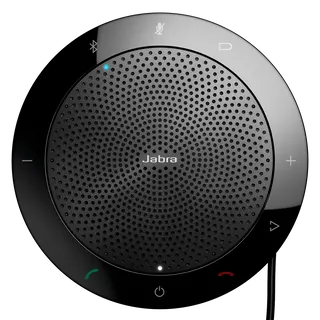
Jabra Speak 510 Jabra Speak 510 Portable USB and Bluetooth Conference Speakerphone
Omnidirectional microphone Certified for Skype for…
Dell SL525 Dell Pro Plus Wireless Speakerphone SL525 with Wireless Audio Receiver
Digital Micro-electromechanical… 2499.36 mm
Dell SP3022 Dell Pro Desktop Speakerphone SP3022 for Microsoft Teams
Stereo Apple FaceTime
Dell SP325 Dell Pro Wired Speakerphone SP325 with USB-C Connection
Digital Micro-electromechanical… 2499.36 mm
Email Call