






Barco
ClickShare Power Supply 100W
Barco ClickShare Power Supply 100W, 100-Watt Video Conferencing Accessory
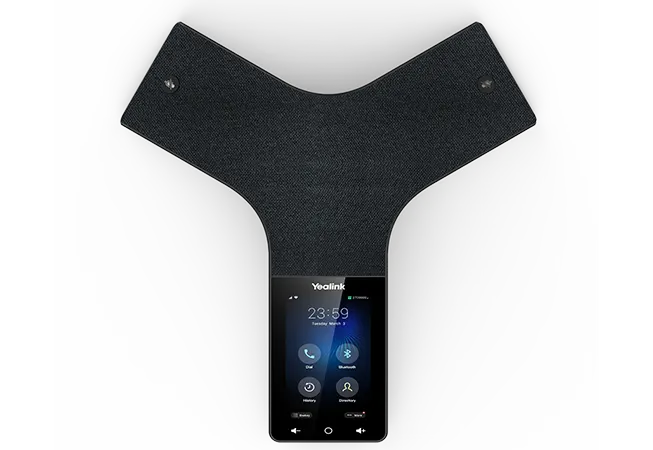
CP935W
Yealink CP935W Wireless Touch-Sensitive HD Conference Phone
Priceon request
QuotationWithin 1 working day
DeliveryConfirmed with your quote, based on stock
Overview
The Yealink CP935W is a wireless HD conference phone built for small to medium meeting rooms in Qatar. It has a built-in rechargeable battery and Wi-Fi, so it can sit on the table without a network cable. A 6-microphone array gives 360-degree pickup over a 6-metre range, and the battery is rated for up to 15 hours of talk time. It suits boardrooms, interview rooms and huddle spaces where cabling is awkward. Request a quote and we will confirm the setup.
A wireless conference phone for rooms that cannot take cabling
The Yealink CP935W is a wireless, touch-sensitive HD conference phone built for small to medium meeting rooms. Built-in Wi-Fi and a rechargeable battery mean it can sit wherever the room needs it, without a network cable running to the table. It is offered in one standard configuration, so the decision comes down to whether wireless placement and audio pickup suit your room.
Audio pickup and call handling that matter in a meeting
- Pickup: a 6-microphone array with 360-degree coverage, stated at 20 feet (6 metres).
- Speakerphone: full-duplex with acoustic echo cancellation and Yealink Noise Proof Technology.
- Speaker: 56 mm, 5 W, rated at 94 dB peak volume at 0.5 m.
- Calls: 5-way conference calls, mute, hold, do not disturb, call transfer and call recording.
A 4-inch, 480x800 capacitive touch screen, with a volume key and a home button, lets the person running the meeting handle calls directly from the phone.
Wireless operation, battery and personal devices
Wi-Fi on 2.4 GHz and 5 GHz (802.11a/b/g/n) lets the phone register its SIP account directly, with no network cable at the table. The 7800 mAh battery takes about 4 hours to charge on the included charger cradle. Under ideal conditions it is rated for up to 15 hours of talk time and up to 75 hours of standby in Wi-Fi mode. Bluetooth 4.2 and a USB 2.0 Type-C device port let staff connect their own laptop or smartphone for a hybrid UC meeting that brings SIP, mobile and PC participants into one call.
Where it fits in Qatar
A compact meeting room in West Bay. A consultancy holding regular calls with clients in Europe and Asia can place the phone on a small table with no cabling to the wall, and use the 5-way conference function for short team calls.
A staff room at a private school in Al Wakrah. Teachers and administrators can call a head office or a partner school without pulling a data cable into a room that was not designed for it. The 6-metre pickup range covers a small group seated around the table.
A temporary sales office in Lusail. A developer's sales team can take calls from overseas investors over Wi-Fi while the permanent office is still being fitted out, and the battery keeps the phone usable when the team moves around the space.
What to plan before you order
- Choose the table position with the 6-metre pickup range in mind, away from doors and air vents.
- Confirm Wi-Fi coverage at that spot, because range depends on your router.
- Keep the phone within its rated -10 to +45 degrees C operating range, indoors and out of direct sun.
- Allow space for the 288.6 mm by 285.2 mm footprint, and plan the directory and provisioning with your IT team.
SmartRooms Qatar offers a free site survey before installation, so placement and Wi-Fi coverage can be checked before any work begins. Request a quote and we will confirm the quantity, installation and configuration for your meeting rooms.
Highlights
- 4-inch 480x800 capacitive touch screen with home and volume keys
- 6-microphone array with 360-degree pickup up to 6 metres
- Built-in Wi-Fi on 2.4GHz and 5GHz, plus Bluetooth 4.2
- Built-in 7800mAh battery, up to 15 hours talk time
- 5-way conference calls and hybrid UC meeting support
- Auto-provisioning and Yealink Device Management Platform support
Room fit
Tell us the room size and platform (Teams, Zoom or BYOD) and we confirm the right combination with your quotation.
Estimated timeline
Quotation within 1 working day · delivery timing depends on stock availability, and we confirm it with your quotation.
Specifications
30 specifications · Source: manufacturer · checked Oct 2026
Audio Features5
- - Frequency
- 100-20,000 Hz
- - Volume
- 94dB at 0.5 m peak volume
- Codecs
- G722, G722.1C, G726, G.729, G.729A, G723, iLBC, PCMU(G.711µ), PCMA (G.711A), AMR
- DTMF
- In-band, Out-of-band (RFC 2833) and SIP INFO
- Details
- Optimal HD audio Yealink Noise Proof Technology Smart Noise Filtering 20-foot (6-meter) microphone pickup range Applies to a small to medium conference room Built-in 6-microphone array for voice pickup Loudspeaker 56mm diameter and 5W speaker Full-duplex speakerphone with AEC Echo cancellation tail length is up to 320ms Background noise suppression VAD, CNG, PLC, AJB, AGC
Phone features1
- Details
- 1 SIP account Call hold, mute, DND, call recording, hotline 5-way conference call Redial, call waiting, emergency call Call forward, call transfer, call return, dial plan Ringtone selection/import/delete Set the date and time manually or automatically Volume adjustment Pairing via Bluetooth Create a meeting directly Join meeting seamlessly Active Speaker
Directory2
- Call history
- dialed/received/missed/forwarded
- Details
- Local phonebook up to 1000 entries XML/LDAP remote phonebook Intelligent search method Phonebook search/import/export Block list
IP-PBX features1
- Details
- Busy Lamp Field (BLF) Multicast paging Intercom Anonymous call Anonymous call rejection Voice mail Distinctive ringtone Call pickup
Display1
- Details
- 4” 480x800 capacitive touch screen Volume key Home button
Interface1
- Details
- Built-in Wi-Fi (2.4GHz/5GHz, 802.11a/b/g/n) Built-in Bluetooth 4.2 1 x USB 2.0 Type-C device port 1 x Security slot
Network and Security2
- NAT traversal
- STUN mode
- Details
- SIP v1 (RFC2543), v2 (RFC3261) SIP server redundancy supported IPv4/IPv6 Proxy mode and peer-to-peer SIP link mode HTTP/HTTPS web server Time and date synchronization using SNTP UDP/TCP/DNS-SRV (RFC 3263) ARP, ICMP SRTP for voice encryption Transport Layer Security (TLS 1.3) HTTPS certificate manager AES encryption for configuration file (AES256) Digest authentication using MD5/MD5-sess OpenVPN, L2TP VPN WPA2 Secure boot
Management2
- Configuration
- browser/phone/auto-provision/Yealink Device Management Platform
- Details
- Auto-provision via FTP/TFTP/HTTP/HTTPS for mass deployment Auto-provision with PnP Zero-sp-touch, TR-069 Reset to factory, reboot Package tracing export, system log
Other physical features9
- Color
- Black
- PSU
- 2.2~6W
- Battery capacity
- 7800mAh
- Charging time
- 4 hours
- Dimension (W*D*H)
- 288.6mm*285.2mm*63.9mm
- Operating humidity
- 10~90%
- Operating temperature
- -10 to +45°C (+14 to 113°F)
- Storage temperature
- -30 to +70°C (-22 to +158°F)
- Details
- Wi-Fi range - Up to 300 meters, depending on the Wi-Fi router Up to 75 hours of standby time in Wi-Fi mode (in ideal conditions) Up to 15 hours of talk time (in ideal conditions)
Package Features6
- Qty/CTN
- 5 PCS
- N.W/CTN
- 7.416 kg
- G.W/CTN
- 8.420 kg
- Giftbox size
- 355 mm*349 mm*108 mm
- Carton Meas
- 567 mm*357 mm*365 mm
- Details
- Package content: - Yealink CP935W IP conference phone - Charger cradle - Yealink Power Adapter - Quick Start Guide
Downloads
234 files from the manufacturer
PDF
Yealink CP935W datasheets (PDF, 424 KB)
URL
Yealink CP935W datasheets (URL)
PDF
Yealink CP935W manuals & guides (PDF, 18 KB)
PDF
Yealink CP935W manuals & guides (PDF, 283 KB)
PDF
Yealink CP935W manuals & guides (PDF, 55 KB)
PDF
Yealink CP935W manuals & guides (PDF, 22 KB)
PDF
Yealink CP935W manuals & guides (PDF, 359 KB)
PDF
Yealink CP935W manuals & guides (PDF, 599 KB)
PDF
Yealink CP935W manuals & guides (PDF, 401 KB)
PDF
Yealink CP935W manuals & guides (PDF, 871 KB)
PDF
Yealink CP935W manuals & guides (PDF, 8.4 MB)
PDF
Yealink CP935W manuals & guides (PDF, 8.4 MB)
PDF
Yealink CP935W manuals & guides (PDF, 335 KB)
PDF
Yealink CP935W manuals & guides (PDF, 2.6 MB)
PDF
Yealink CP935W manuals & guides (PDF, 2.9 MB)
PDF
Yealink CP935W manuals & guides (PDF, 1.0 MB)
PDF
Yealink CP935W manuals & guides (PDF, 1.6 MB)
PDF
Yealink CP935W manuals & guides (PDF, 36 KB)
URL
Yealink CP935W manuals & guides (URL)
1X A
Yealink CP935W manuals & guides (1X AUTHENTICATION)
URL
Yealink CP935W manuals & guides (URL)
URL
Yealink CP935W manuals & guides (URL)
URL
Yealink CP935W manuals & guides (URL)
URL
Yealink CP935W manuals & guides (URL)
URL
Yealink CP935W manuals & guides (URL)
URL
Yealink CP935W manuals & guides (URL)
URL
Yealink CP935W manuals & guides (URL)
URL
Yealink CP935W manuals & guides (URL)
URL
Yealink CP935W manuals & guides (URL)
URL
Yealink CP935W manuals & guides (URL)
URL
Yealink CP935W manuals & guides (URL)
URL
Yealink CP935W manuals & guides (URL)
URL
Yealink CP935W manuals & guides (URL)
URL
Yealink CP935W manuals & guides (URL)
URL
Yealink CP935W manuals & guides (URL)
URL
Yealink CP935W manuals & guides (URL)
URL
Yealink CP935W manuals & guides (URL)
URL
Yealink CP935W manuals & guides (URL)
URL
Yealink CP935W manuals & guides (URL)
URL
Yealink CP935W manuals & guides (URL)
URL
Yealink CP935W manuals & guides (URL)
URL
Yealink CP935W manuals & guides (URL)
URL
Yealink CP935W manuals & guides (URL)
URL
Yealink CP935W manuals & guides (URL)
URL
Yealink CP935W manuals & guides (URL)
URL
Yealink CP935W manuals & guides (URL)
URL
Yealink CP935W manuals & guides (URL)
URL
Yealink CP935W manuals & guides (URL)
URL
Yealink CP935W manuals & guides (URL)
URL
Yealink CP935W manuals & guides (URL)
URL
Yealink CP935W manuals & guides (URL)
URL
Yealink CP935W manuals & guides (URL)
URL
Yealink CP935W manuals & guides (URL)
URL
Yealink CP935W manuals & guides (URL)
URL
Yealink CP935W manuals & guides (URL)
URL
Yealink CP935W manuals & guides (URL)
URL
Yealink CP935W manuals & guides (URL)
URL
Yealink CP935W manuals & guides (URL)
URL
Yealink CP935W manuals & guides (URL)
URL
Yealink CP935W manuals & guides (URL)
URL
Yealink CP935W manuals & guides (URL)
URL
Yealink CP935W manuals & guides (URL)
URL
Yealink CP935W manuals & guides (URL)
URL
Yealink CP935W manuals & guides (URL)
URL
Yealink CP935W manuals & guides (URL)
URL
Yealink CP935W manuals & guides (URL)
URL
Yealink CP935W manuals & guides (URL)
URL
Yealink CP935W manuals & guides (URL)
URL
Yealink CP935W manuals & guides (URL)
URL
Yealink CP935W manuals & guides (URL)
URL
Yealink CP935W manuals & guides (URL)
URL
Yealink CP935W manuals & guides (URL)
URL
Yealink CP935W manuals & guides (URL)
URL
Yealink CP935W manuals & guides (URL)
URL
Yealink CP935W manuals & guides (URL)
URL
Yealink CP935W manuals & guides (URL)
URL
Yealink CP935W manuals & guides (URL)
URL
Yealink CP935W manuals & guides (URL)
URL
Yealink CP935W manuals & guides (URL)
URL
Yealink CP935W manuals & guides (URL)
URL
Yealink CP935W manuals & guides (URL)
URL
Yealink CP935W manuals & guides (URL)
URL
Yealink CP935W manuals & guides (URL)
URL
Yealink CP935W manuals & guides (URL)
URL
Yealink CP935W manuals & guides (URL)
URL
Yealink CP935W manuals & guides (URL)
URL
Yealink CP935W manuals & guides (URL)
URL
Yealink CP935W manuals & guides (URL)
URL
Yealink CP935W manuals & guides (URL)
URL
Yealink CP935W manuals & guides (URL)
URL
Yealink CP935W manuals & guides (URL)
URL
Yealink CP935W manuals & guides (URL)
URL
Yealink CP935W manuals & guides (URL)
URL
Yealink CP935W manuals & guides (URL)
URL
Yealink CP935W manuals & guides (URL)
URL
Yealink CP935W manuals & guides (URL)
URL
Yealink CP935W manuals & guides (URL)
URL
Yealink CP935W manuals & guides (URL)
URL
Yealink CP935W manuals & guides (URL)
URL
Yealink CP935W manuals & guides (URL)
URL
Yealink CP935W manuals & guides (URL)
URL
Yealink CP935W manuals & guides (URL)
URL
Yealink CP935W manuals & guides (URL)
URL
Yealink CP935W manuals & guides (URL)
URL
Yealink CP935W manuals & guides (URL)
URL
Yealink CP935W manuals & guides (URL)
URL
Yealink CP935W manuals & guides (URL)
URL
Yealink CP935W manuals & guides (URL)
URL
Yealink CP935W manuals & guides (URL)
URL
Yealink CP935W manuals & guides (URL)
URL
Yealink CP935W manuals & guides (URL)
URL
Yealink CP935W manuals & guides (URL)
URL
Yealink CP935W manuals & guides (URL)
URL
Yealink CP935W manuals & guides (URL)
URL
Yealink CP935W manuals & guides (URL)
URL
Yealink CP935W manuals & guides (URL)
URL
Yealink CP935W manuals & guides (URL)
URL
Yealink CP935W manuals & guides (URL)
URL
Yealink CP935W manuals & guides (URL)
URL
Yealink CP935W manuals & guides (URL)
URL
Yealink CP935W manuals & guides (URL)
URL
Yealink CP935W manuals & guides (URL)
URL
Yealink CP935W manuals & guides (URL)
URL
Yealink CP935W manuals & guides (URL)
URL
Yealink CP935W manuals & guides (URL)
URL
Yealink CP935W manuals & guides (URL)
URL
Yealink CP935W manuals & guides (URL)
URL
Yealink CP935W manuals & guides (URL)
URL
Yealink CP935W manuals & guides (URL)
URL
Yealink CP935W manuals & guides (URL)
URL
Yealink CP935W manuals & guides (URL)
URL
Yealink CP935W manuals & guides (URL)
URL
Yealink CP935W manuals & guides (URL)
URL
Yealink CP935W manuals & guides (URL)
URL
Yealink CP935W manuals & guides (URL)
URL
Yealink CP935W manuals & guides (URL)
URL
Yealink CP935W manuals & guides (URL)
URL
Yealink CP935W manuals & guides (URL)
URL
Yealink CP935W manuals & guides (URL)
URL
Yealink CP935W manuals & guides (URL)
URL
Yealink CP935W manuals & guides (URL)
URL
Yealink CP935W manuals & guides (URL)
URL
Yealink CP935W manuals & guides (URL)
URL
Yealink CP935W manuals & guides (URL)
URL
Yealink CP935W manuals & guides (URL)
URL
Yealink CP935W manuals & guides (URL)
URL
Yealink CP935W manuals & guides (URL)
URL
Yealink CP935W manuals & guides (URL)
URL
Yealink CP935W manuals & guides (URL)
URL
Yealink CP935W manuals & guides (URL)
URL
Yealink CP935W manuals & guides (URL)
URL
Yealink CP935W manuals & guides (URL)
URL
Yealink CP935W manuals & guides (URL)
URL
Yealink CP935W manuals & guides (URL)
URL
Yealink CP935W manuals & guides (URL)
URL
Yealink CP935W manuals & guides (URL)
URL
Yealink CP935W manuals & guides (URL)
URL
Yealink CP935W manuals & guides (URL)
URL
Yealink CP935W manuals & guides (URL)
URL
Yealink CP935W manuals & guides (URL)
URL
Yealink CP935W manuals & guides (URL)
URL
Yealink CP935W manuals & guides (URL)
URL
Yealink CP935W manuals & guides (URL)
URL
Yealink CP935W manuals & guides (URL)
URL
Yealink CP935W manuals & guides (URL)
URL
Yealink CP935W manuals & guides (URL)
URL
Yealink CP935W manuals & guides (URL)
URL
Yealink CP935W manuals & guides (URL)
URL
Yealink CP935W manuals & guides (URL)
URL
Yealink CP935W manuals & guides (URL)
URL
Yealink CP935W manuals & guides (URL)
URL
Yealink CP935W manuals & guides (URL)
URL
Yealink CP935W manuals & guides (URL)
URL
Yealink CP935W manuals & guides (URL)
URL
Yealink CP935W manuals & guides (URL)
URL
Yealink CP935W manuals & guides (URL)
URL
Yealink CP935W manuals & guides (URL)
URL
Yealink CP935W manuals & guides (URL)
URL
Yealink CP935W manuals & guides (URL)
URL
Yealink CP935W manuals & guides (URL)
URL
Yealink CP935W manuals & guides (URL)
URL
Yealink CP935W manuals & guides (URL)
URL
Yealink CP935W manuals & guides (URL)
URL
Yealink CP935W manuals & guides (URL)
URL
Yealink CP935W manuals & guides (URL)
URL
Yealink CP935W manuals & guides (URL)
URL
Yealink CP935W manuals & guides (URL)
URL
Yealink CP935W manuals & guides (URL)
URL
Yealink CP935W manuals & guides (URL)
URL
Yealink CP935W manuals & guides (URL)
URL
Yealink CP935W manuals & guides (URL)
URL
Yealink CP935W manuals & guides (URL)
URL
Yealink CP935W manuals & guides (URL)
URL
Yealink CP935W manuals & guides (URL)
URL
Yealink CP935W manuals & guides (URL)
URL
Yealink CP935W manuals & guides (URL)
URL
Yealink CP935W manuals & guides (URL)
URL
Yealink CP935W manuals & guides (URL)
URL
Yealink CP935W manuals & guides (URL)
URL
Yealink CP935W manuals & guides (URL)
URL
Yealink CP935W manuals & guides (URL)
URL
Yealink CP935W manuals & guides (URL)
URL
Yealink CP935W manuals & guides (URL)
URL
Yealink CP935W manuals & guides (URL)
URL
Yealink CP935W manuals & guides (URL)
URL
Yealink CP935W manuals & guides (URL)
URL
Yealink CP935W manuals & guides (URL)
URL
Yealink CP935W manuals & guides (URL)
URL
Yealink CP935W manuals & guides (URL)
URL
Yealink CP935W manuals & guides (URL)
URL
Yealink CP935W manuals & guides (URL)
URL
Yealink CP935W manuals & guides (URL)
URL
Yealink CP935W manuals & guides (URL)
URL
Yealink CP935W manuals & guides (URL)
URL
Yealink CP935W manuals & guides (URL)
URL
Yealink CP935W manuals & guides (URL)
URL
Yealink CP935W manuals & guides (URL)
URL
Yealink CP935W manuals & guides (URL)
PDF
Yealink CP935W certificates & compliance (PDF, 580 KB)
15 -
Yealink CP935W software & firmware (15 - FIRMWARE & RELEASE NOTE)
40 -
Yealink CP935W software & firmware (40 - FIRMWARE & RELEASE NOTE)
PDF
Yealink CP935W other documents (PDF, 309 KB)
PDF
Yealink CP935W other documents (PDF, 2.7 MB)
PDF
Yealink CP935W other documents (PDF, 506 KB)
PDF
Yealink CP935W other documents (PDF, 682 KB)
PDF
Yealink CP935W other documents (PDF, 499 KB)
PDF
Yealink CP935W other documents (PDF, 463 KB)
PDF
Yealink CP935W other documents (PDF, 1.5 MB)
PDF
Yealink CP935W other documents (PDF, 1.2 MB)
PDF
Yealink CP935W other documents (PDF, 3.7 MB)
PDF
Yealink CP935W other documents (PDF, 1.0 MB)
URL
Yealink CP935W other documents (URL)
URL
Yealink CP935W other documents (URL)
URL
Yealink CP935W other documents (URL)
Questions about CP935W
Is the CP935W a good fit for a small meeting room in a Doha office?
Yes, for small to medium rooms that do not need a full video system. The CP935W is a wireless HD conference phone with a touch screen, a 6-microphone array and a built-in battery. In a Doha office it suits teams that hold frequent audio calls with colleagues abroad, especially where running cable across a table is impractical.
How far can its microphones pick up speech?
The 6-microphone array provides 360-degree pickup with a stated range of 20 feet, or 6 metres. That is enough to hear attendees seated around the unit without passing the phone between them. The full-duplex speakerphone uses echo cancellation with a tail length of up to 320 ms, and the speaker is rated at 94 dB peak volume at 0.5 m.
Does the CP935W need a network cable on the meeting table?
No. The phone has built-in Wi-Fi supporting the 2.4GHz and 5GHz bands under 802.11a/b/g/n, and it can register a SIP account directly over Wi-Fi. The manufacturer rates Wi-Fi range up to 300 metres, depending on the router. Your IT team should confirm coverage at the planned table position, because wall construction and router placement affect the real range inside a building.
How long does the battery last, and how is it charged?
The built-in 7800mAh battery takes about 4 hours to charge using the included charger cradle. Under ideal conditions the phone is rated for up to 15 hours of talk time and up to 75 hours of standby in Wi-Fi mode. Actual results depend on how the phone is used, so a mobile sales team in Lusail should plan its charging around its own call patterns.
Can participants connect their own laptop or smartphone?
Yes. Using Bluetooth 4.2 or the USB 2.0 Type-C device port, staff can pair a laptop or smartphone and join a hybrid UC meeting that combines SIP, mobile phone and PC participants. Before rollout, confirm that your meeting platform works with this connection method, and ask the SmartRooms Qatar team to walk through the setup during your site survey.
Will it cope with Qatar's summer heat if it sits near a window?
Summer temperatures in Qatar can exceed 45 degrees C, and the CP935W is rated for operating temperatures from -10 to +45 degrees C with 10 to 90% humidity. Place it in an air-conditioned room, away from direct sunlight through glazing. If you are unsure whether a particular spot will stay within range, ask the SmartRooms Qatar team to review the location before you request a quotation.
What security features does the CP935W include?
The phone supports TLS 1.3 for signalling, SRTP for voice encryption, HTTPS for its web interface and AES256 encryption for configuration files. It also supports WPA2 on Wi-Fi, secure boot, and OpenVPN or L2TP VPN for remote networks. Your IT team should set a strong administrator password and review the network settings with the installer before the phone goes live.
Can an IT team configure several units from one place?
Yes. The CP935W supports auto-provisioning over FTP, TFTP, HTTP or HTTPS for mass deployment, plus plug-and-play provisioning, TR-069 and the Yealink Device Management Platform. This lets an IT team configure a batch of phones centrally. Individual units can also be set up through the browser or the phone itself, and each carton holds five units.
Could a hospital administration office in Doha use the phonebook for staff contacts?
Yes, the local phonebook holds up to 1,000 entries, with intelligent search, import and export. The phone also supports XML and LDAP remote phonebooks, so a directory maintained centrally can be linked to it. A block list and a call history showing dialed, received, missed and forwarded calls help staff manage their daily calls. Your IT team should agree how contact data is imported and kept current.
Would a private school in Al Wakrah use it for staff and parent meetings?
It could suit a staff room or small meeting room where teachers call a head office or parents by phone. The 6-metre pickup range covers a small group around the table, and the 5-way conference function lets several participants join one call. Because many schools raise purchase orders for equipment, request a quotation that covers the phone, charger cradle and installation together.
Does it suit a temporary sales office in Lusail taking calls with overseas partners?
Yes, particularly where the room is not yet cabled for conferencing. The phone connects over Wi-Fi, and participants can join from SIP, mobile or PC endpoints in one hybrid meeting. Place the phone centrally, away from doors and air vents, and ask for a free site survey before installation so the Wi-Fi coverage at that spot is confirmed first.
Can we order several units under a purchase order for a government body or school?
Yes. SmartRooms Qatar supplies the CP935W, accepts purchase orders (LPOs) and government tender processes, and delivers to all eight municipalities of Qatar. Each carton holds five units, which helps schools and ministries equipping several rooms. Send your quantities and a list of rooms with your request, and we usually respond with a quotation within one working day.



