






Barco
ClickShare Power Supply 100W
Barco ClickShare Power Supply 100W, 100-Watt Video Conferencing Accessory
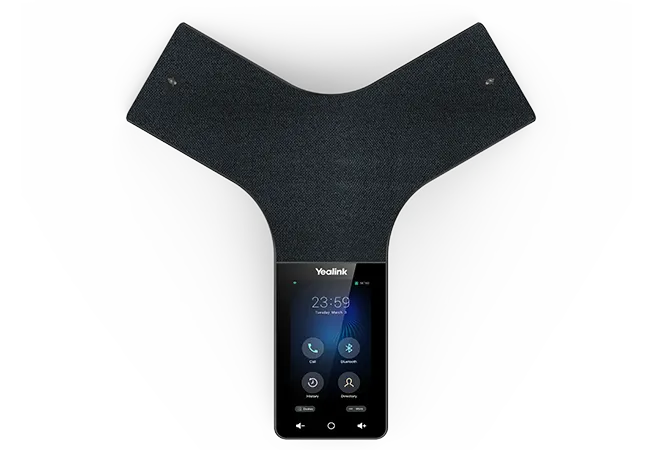
CP965
Yealink CP965 Standard Edition HD IP Conference Phone
Priceon request
QuotationWithin 1 working day
DeliveryConfirmed with your quote, based on stock
Overview
The Yealink CP965 standard edition is a full-duplex IP conference phone for medium and large meeting rooms. Its 12-microphone array picks up voices up to 6 m away across 360 degrees, and its 5-inch touchscreen handles calls and controls. It supports 10-way conference calls, hybrid UC meetings and Power over Ethernet, suiting boardrooms and training rooms across Doha and beyond.
What the CP965 standard edition is
The Yealink CP965 standard edition is a tabletop HD IP conference phone built for medium and large meeting rooms. It is the standard model rather than the Microsoft Teams or Zoom edition, so it suits organisations running a SIP-based calling platform. Its black body measures 328 × 322 × 62 mm, and a 5-inch multi-touch screen sits at the front for quick call control.
Audio pickup that reaches the far end of the table
Twelve microphones in the built-in array cover 360 degrees with a 20-foot (6-meter) pickup range, and one further microphone handles noise cancellation. The full-duplex speakerphone with acoustic echo cancellation lets people speak over each other without the line cutting out, and its echo cancellation tail length reaches up to 320 ms. Background noise suppression and Yealink Noise Proof Technology help keep voices clear. The 56 mm speaker is rated at 5 W and is listed for medium to large conference rooms.
Connectivity, calling features and expansion
The phone connects through a single RJ45 Ethernet port with Power over Ethernet, class 4, or through the optional Yealink PoE adapter. Dual-band Wi-Fi and Bluetooth are built in, and two USB 2.0 ports, one Type-A and one Type-C, let you connect a laptop or smartphone to a call. Key capabilities include:
- Hybrid UC meetings that combine PSTN, SIP and mobile phone participants
- 10-way conference calling, with cloud PSTN calls, hold, transfer and call forwarding
- Optional Yealink CPN10 for analog PSTN calls and three-way local conferencing
- Support for the CPW65 DECT wireless expansion microphone, adding a 10-meter pickup range
Security and fleet management
Security features include TLS 1.3, SRTP for voice, an HTTPS web server with certificate management, and IEEE802.1X support for network access control. Administrators can deploy units through auto-provisioning, activation codes or the Yealink Redirection and Provisioning Service, then manage them on the Yealink, Microsoft or Unify Square device management platforms. A security slot allows the phone to be fixed in place. These details matter when an IT team rolls out several phones across a campus or a group of buildings.
Where the CP965 fits in Qatar
In a boardroom in West Bay, a single CP965 at the centre of the table lets executives in Doha join a call with a partner office abroad, while the 10-way conferencing covers the whole room. At a government ministry in Msheireb where meetings run in Arabic and English, the multilingual interface suits mixed-language sessions. In a seminar room in Education City, the CPW65 wireless microphone can capture a lecturer who moves away from the table. Rooms with large west-facing windows, whether in West Bay or Lusail, should be checked before installation because summer heat can build up in them.
Planning your installation
Plan the cable route and power before delivery. The package includes a 7.5 m CAT5E Ethernet cable and a quick start guide, and power consumption over PoE is listed at 7.3-20W, so confirm that the switch port can supply Power over Ethernet at the table position. Storage is rated from -10 to 40°C with 10-90% humidity. SmartRooms Qatar offers a free site survey to check table placement and cable runs, quotations usually arrive within one working day, and we accept purchase orders (LPOs) and government tenders, including Monaqasat.
To confirm the right set-up for your room, request a quote from SmartRooms Qatar with your room size and calling platform, and we will confirm the model and accessories that fit your space.
Highlights
- 12-microphone array plus one dedicated noise-cancelling microphone
- 20-foot (6-meter) pickup range with 360-degree coverage
- 5-inch 720 x 1280 multi-touch screen
- 10-way conference calling and hybrid UC meetings
- Power over Ethernet class 4, 7.3-20W power consumption
- Dual-band Wi-Fi, Bluetooth, and USB 2.0 Type-A and Type-C ports
Room fit
Tell us the room size and platform (Teams, Zoom or BYOD) and we confirm the right combination with your quotation.
Estimated timeline
Quotation within 1 working day · delivery timing depends on stock availability, and we confirm it with your quotation.
Specifications
26 specifications · Source: manufacturer · checked Oct 2026
Audio Features2
- Audio codec
- G722, G722.1C, G726, G.729, G.729A, G723, iLBC, PCMU (G.711A), PCMA (G.711μ), SILK
- Details
- Optimal HD audio 20-foot (6-meter) microphone pickup range Apply to the medium to large conference room Built-in 12-microphone array, 360-degree voice pickup Built-in 1-microphone array, decrease noise 56mm diameter and 5w speaker Full-duplex speakerphone with AEC Echo cancellation tail length is up to 320 ms Background noise suppression
Call Handling Features1
- Details
- P2P call Cloud PSTN call Call hold/Call mute/Call transfer/Call forward Group SimRing Block calls without caller ID
Conference Features1
- Details
- One-Click Join Add a Participant to the existing meeting Conference Mute/Unmute participants Display Meeting Info Calendar access to my meetings Show acceptance status per participant Schedule Teams meeting
Presence and Contacts2
- Call history
- placed/received/missed
- Details
- Presence status synchronizes with the client, Presence status control Corporate Directory Access Show contact picture Synchronized call logs
Phone Features1
- Details
- Single sign-in Visual voicemail Change VM playback speed Phone lock Screensaver Power Saving
Display and Indicator2
- Presence status control
- available, busy, DND, be right back, off work, away
- Details
- 5” 720 x 1280 capacitive touch screen Volume key Home button Multilingual user interface Modern Teams interface, Full keyboard
Interface1
- Details
- 1 x RJ45 10/100M Ethernet port Power over Ethernet (IEEE 802.3af ), class 4 Built-in dual band Wi-Fi Built-in Bluetooth 4.2 (Pending) 1 x USB 2.0 Type-A device port 1 x USB 2.0 Type-C device port 1 x Security slot
Management2
- Configuration
- browser/phone/Auto provisioning and Device Management Platform
- Details
- Provisioning priority management Auto Provisioning via Activation Code Yealink Redirection and Provisioning Service (RPS) QoE (Monitoring Reports) Reset to factory, reboot Package tracing export, system log Screenshot via URL View license status Supports Microsoft Device Management Platform Supports Yealink Device Management Platform Supports Unify Square Device Management Platform
Network and Security2
- IP Assignment
- Static/DHCP
- Details
- SIP v1 (RFC2543), v2 (RFC3261) IPv4/IPv6 HTTP/HTTPS web server Time and date synchronization using SNTP SRTP for voice, Transport Layer Security (TLS1.3) HTTPS certificate manager IEEE802.1X
Other Physical Features6
- Color
- Black
- Power consumption (PoE)
- 7.3-20W
- Dimension (W × D × H)
- 328 × 322 × 62 mm
- Operating humidity
- 10-90%
- Storage temperature
- -10 to 40°C (+14-104°F)
- Details
- External Yealink PoE adapter (optional)
Package Features6
- Qty/CTN
- 5 PCS
- N.W/CTN
- 7.964 kg
- G.W/CTN
- 9.02 kg
- Giftbox size
- 398 × 384 × 105 mm
- Carton Meas
- 552 × 392 × 410 mm
- Details
- Package content: Yealink CP965 IP conference phone Ethernet Cable (7.5 m CAT5E UTP cable) Quick Start Guide Yealink PoE Adapter YLPOE30 (Optional)
Downloads
136 files from the manufacturer
PDF
Yealink CP965 datasheets (PDF, 157 KB)
URL
Yealink CP965 datasheets (URL)
URL
Yealink CP965 datasheets (URL)
URL
Yealink CP965 datasheets (URL)
URL
Yealink CP965 datasheets (URL)
URL
Yealink CP965 datasheets (URL)
PDF
Yealink CP965 manuals & guides (PDF, 928 KB)
PDF
Yealink CP965 manuals & guides (PDF, 100 KB)
PDF
Yealink CP965 manuals & guides (PDF, 26 KB)
PDF
Yealink CP965 manuals & guides (PDF, 1.0 MB)
PDF
Yealink CP965 manuals & guides (PDF, 1.2 MB)
PDF
Yealink CP965 manuals & guides (PDF, 3.3 MB)
PDF
Yealink CP965 manuals & guides (PDF, 5.1 MB)
1X A
Yealink CP965 manuals & guides (1X AUTHENTICATION)
URL
Yealink CP965 manuals & guides (URL)
URL
Yealink CP965 manuals & guides (URL)
URL
Yealink CP965 manuals & guides (URL)
URL
Yealink CP965 manuals & guides (URL)
URL
Yealink CP965 manuals & guides (URL)
URL
Yealink CP965 manuals & guides (URL)
URL
Yealink CP965 manuals & guides (URL)
URL
Yealink CP965 manuals & guides (URL)
URL
Yealink CP965 manuals & guides (URL)
URL
Yealink CP965 manuals & guides (URL)
URL
Yealink CP965 manuals & guides (URL)
URL
Yealink CP965 manuals & guides (URL)
URL
Yealink CP965 manuals & guides (URL)
URL
Yealink CP965 manuals & guides (URL)
URL
Yealink CP965 manuals & guides (URL)
URL
Yealink CP965 manuals & guides (URL)
URL
Yealink CP965 manuals & guides (URL)
URL
Yealink CP965 manuals & guides (URL)
URL
Yealink CP965 manuals & guides (URL)
URL
Yealink CP965 manuals & guides (URL)
URL
Yealink CP965 manuals & guides (URL)
URL
Yealink CP965 manuals & guides (URL)
URL
Yealink CP965 manuals & guides (URL)
URL
Yealink CP965 manuals & guides (URL)
URL
Yealink CP965 manuals & guides (URL)
URL
Yealink CP965 manuals & guides (URL)
URL
Yealink CP965 manuals & guides (URL)
URL
Yealink CP965 manuals & guides (URL)
URL
Yealink CP965 manuals & guides (URL)
URL
Yealink CP965 manuals & guides (URL)
URL
Yealink CP965 manuals & guides (URL)
URL
Yealink CP965 manuals & guides (URL)
URL
Yealink CP965 manuals & guides (URL)
URL
Yealink CP965 manuals & guides (URL)
URL
Yealink CP965 manuals & guides (URL)
URL
Yealink CP965 manuals & guides (URL)
URL
Yealink CP965 manuals & guides (URL)
URL
Yealink CP965 manuals & guides (URL)
URL
Yealink CP965 manuals & guides (URL)
URL
Yealink CP965 manuals & guides (URL)
URL
Yealink CP965 manuals & guides (URL)
URL
Yealink CP965 manuals & guides (URL)
URL
Yealink CP965 manuals & guides (URL)
URL
Yealink CP965 manuals & guides (URL)
URL
Yealink CP965 manuals & guides (URL)
URL
Yealink CP965 manuals & guides (URL)
URL
Yealink CP965 manuals & guides (URL)
URL
Yealink CP965 manuals & guides (URL)
URL
Yealink CP965 manuals & guides (URL)
URL
Yealink CP965 manuals & guides (URL)
URL
Yealink CP965 manuals & guides (URL)
URL
Yealink CP965 manuals & guides (URL)
URL
Yealink CP965 manuals & guides (URL)
URL
Yealink CP965 manuals & guides (URL)
URL
Yealink CP965 manuals & guides (URL)
URL
Yealink CP965 manuals & guides (URL)
URL
Yealink CP965 manuals & guides (URL)
URL
Yealink CP965 manuals & guides (URL)
URL
Yealink CP965 manuals & guides (URL)
URL
Yealink CP965 manuals & guides (URL)
URL
Yealink CP965 manuals & guides (URL)
URL
Yealink CP965 manuals & guides (URL)
URL
Yealink CP965 manuals & guides (URL)
URL
Yealink CP965 manuals & guides (URL)
URL
Yealink CP965 manuals & guides (URL)
URL
Yealink CP965 manuals & guides (URL)
URL
Yealink CP965 manuals & guides (URL)
URL
Yealink CP965 manuals & guides (URL)
URL
Yealink CP965 manuals & guides (URL)
URL
Yealink CP965 manuals & guides (URL)
URL
Yealink CP965 manuals & guides (URL)
URL
Yealink CP965 manuals & guides (URL)
URL
Yealink CP965 manuals & guides (URL)
URL
Yealink CP965 manuals & guides (URL)
URL
Yealink CP965 manuals & guides (URL)
URL
Yealink CP965 manuals & guides (URL)
URL
Yealink CP965 manuals & guides (URL)
URL
Yealink CP965 manuals & guides (URL)
URL
Yealink CP965 manuals & guides (URL)
URL
Yealink CP965 manuals & guides (URL)
URL
Yealink CP965 manuals & guides (URL)
URL
Yealink CP965 manuals & guides (URL)
URL
Yealink CP965 manuals & guides (URL)
URL
Yealink CP965 manuals & guides (URL)
URL
Yealink CP965 manuals & guides (URL)
URL
Yealink CP965 manuals & guides (URL)
URL
Yealink CP965 manuals & guides (URL)
URL
Yealink CP965 manuals & guides (URL)
URL
Yealink CP965 manuals & guides (URL)
URL
Yealink CP965 manuals & guides (URL)
URL
Yealink CP965 manuals & guides (URL)
URL
Yealink CP965 manuals & guides (URL)
URL
Yealink CP965 manuals & guides (URL)
URL
Yealink CP965 manuals & guides (URL)
URL
Yealink CP965 manuals & guides (URL)
URL
Yealink CP965 manuals & guides (URL)
URL
Yealink CP965 manuals & guides (URL)
URL
Yealink CP965 manuals & guides (URL)
URL
Yealink CP965 manuals & guides (URL)
URL
Yealink CP965 manuals & guides (URL)
URL
Yealink CP965 manuals & guides (URL)
URL
Yealink CP965 manuals & guides (URL)
URL
Yealink CP965 manuals & guides (URL)
URL
Yealink CP965 manuals & guides (URL)
URL
Yealink CP965 manuals & guides (URL)
URL
Yealink CP965 manuals & guides (URL)
URL
Yealink CP965 manuals & guides (URL)
URL
Yealink CP965 manuals & guides (URL)
URL
Yealink CP965 manuals & guides (URL)
URL
Yealink CP965 manuals & guides (URL)
URL
Yealink CP965 manuals & guides (URL)
135
Yealink CP965 software & firmware (135 - FIRMWARE & RELEASE NOTE)
138
Yealink CP965 software & firmware (138 - FIRMWARE & RELEASE NOTE)
144
Yealink CP965 software & firmware (144 - FIRMWARE & RELEASE NOTE)
27 -
Yealink CP965 software & firmware (27 - FIRMWARE & RELEASE NOTE)
54 -
Yealink CP965 software & firmware (54 - FIRMWARE & RELEASE NOTE)
68 -
Yealink CP965 software & firmware (68 - FIRMWARE & RELEASE NOTE)
74 -
Yealink CP965 software & firmware (74 - FIRMWARE & RELEASE NOTE)
PDF
Yealink CP965 other documents (PDF, 1.0 MB)
URL
Yealink CP965 other documents (URL)
ROM
Yealink CP965 other documents (ROM)
URL
Yealink CP965 other documents (URL)
Questions about CP965
What is the Yealink CP965 standard edition designed for?
The CP965 standard edition is designed for medium and large conference rooms, where one phone on the table must pick up everyone seated around it. It is a tabletop HD IP conference phone with a 12-microphone array, a 5-inch 720 x 1280 touchscreen and a full-duplex speakerphone. It suits boardrooms in West Bay, training rooms in Al Sadd and executive meeting rooms in Msheireb where several people speak in the same session.
How far can the CP965 pick up voices?
The CP965 has a 20-foot (6-meter) microphone pickup range with 360-degree voice pickup, using a built-in 12-microphone array. A separate microphone handles noise cancellation. When the phone sits in the centre of a long boardroom table, attendees at both ends can be heard clearly. If the room is longer than this range, the CPW65 wireless expansion microphone can extend coverage, and our team can review the room layout with you before ordering.
Can I extend pickup range with wireless microphones?
Yes. The CP965 supports the DECT wireless expansion microphone CPW65, which provides an extra 10-meter voice pickup range without cords. This is useful in a seminar room at Education City when a lecturer moves away from the table, or in a training room where a presenter stands beside a whiteboard. Ask SmartRooms Qatar to confirm CPW65 supply alongside your phones when you send your request.
Can the CP965 make analog PSTN calls?
It can, using the optional Yealink CPN10 accessory connected through the USB 2.0 port. The CPN10 enables analog PSTN calls and three-way local conferencing. The phone also supports cloud PSTN calls directly. This matters for organisations that still rely on a landline for certain external calls. Confirm your call routing with your telephony provider before ordering, and add the CPN10 to your request if you need it.
What does hybrid UC meeting mean on this phone?
Hybrid UC meeting means the phone can host one call that mixes participants on PSTN lines, SIP accounts and mobile phones. You can also connect a laptop or smartphone through Bluetooth, Type-C or USB 2.0 to bring it into the meeting. This suits a head office in Doha holding a call with a partner abroad while a colleague dials in from a mobile phone. Confirm your calling provider and account setup with your IT team before installation.
Does the standard edition work with Microsoft Teams or Zoom?
The standard edition is the SIP-based model and supports SIP v2 (RFC3261) with IPv4 and IPv6. Yealink also lists separate CP965 variants for Microsoft Teams and Zoom, so the right model depends on the calling platform your organisation uses. If you run Microsoft Teams, ask the SmartRooms Qatar team to check which variant matches your set-up before you request a quote.
How is the CP965 powered?
The CP965 is powered over its RJ45 Ethernet port using Power over Ethernet, class 4, with power consumption listed at 7.3-20W. The optional Yealink PoE adapter, YLPOE30, can be used if your network switch does not supply PoE. The package includes a 7.5 m CAT5E Ethernet cable and a quick start guide. Before installation, check that the switch port can supply class 4 power at the table location.
Can the CP965 be placed near a window in summer?
The source specifications list a storage temperature range of -10 to 40°C and humidity of 10-90%, but they do not give an operating temperature range. Check room conditions before placing the phone. Rooms with large west-facing windows in West Bay or Lusail can heat up on summer afternoons, when outdoor temperatures in Qatar often exceed 45°C. Our team can review the room during a free site survey and advise on placement.
What should I plan for before installing the CP965?
Plan the table space, cable route and power point. The phone measures 328 x 322 x 62 mm, so check that the table has room for it between seats and for a laptop. Identify the Ethernet point or PoE switch port, and use the security slot if the phone needs to be fixed in place. If you use the optional YLPOE30 adapter, you will also need a mains socket near the table. A free site survey helps confirm these points before ordering.
Can several CP965 phones be managed centrally?
Yes. The CP965 supports auto-provisioning through activation codes, configuration through the browser or phone, and the Yealink Redirection and Provisioning Service. Units can be managed on the Yealink, Microsoft or Unify Square device management platforms. Administrators can also review QoE monitoring reports, export system logs, view licence status and reboot or reset units. This cuts manual set-up at each site when a ministry or bank rolls out phones to several meeting rooms across Doha.
Does the CP965 have a multilingual interface?
The specifications list a multilingual user interface and a full keyboard on the phone, which helps offices in Qatar where meetings run in Arabic and English side by side. The phone also has a volume key and a home button for quick operation. Ask SmartRooms Qatar which languages are available on the software version supplied with your order, because the source data does not list them individually.
Can we order several CP965 units under one LPO?
Yes. SmartRooms Qatar supplies organisations across Qatar and accepts purchase orders (LPOs) and government tenders, including Monaqasat. A school, university or ministry fitting out several meeting rooms can request one quotation covering every unit, accessories such as the CPN10 or CPW65, and professional installation. Quotations usually arrive within one working day, and we deliver to all eight municipalities of Qatar. Send your room count and calling platform with the request.



