Sennheiser
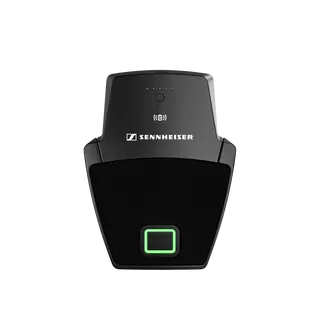
SL Boundary 114-S DW-3 B
Sennheiser SL Boundary 114-S DW-3 B Wireless Table Boundary Microphone
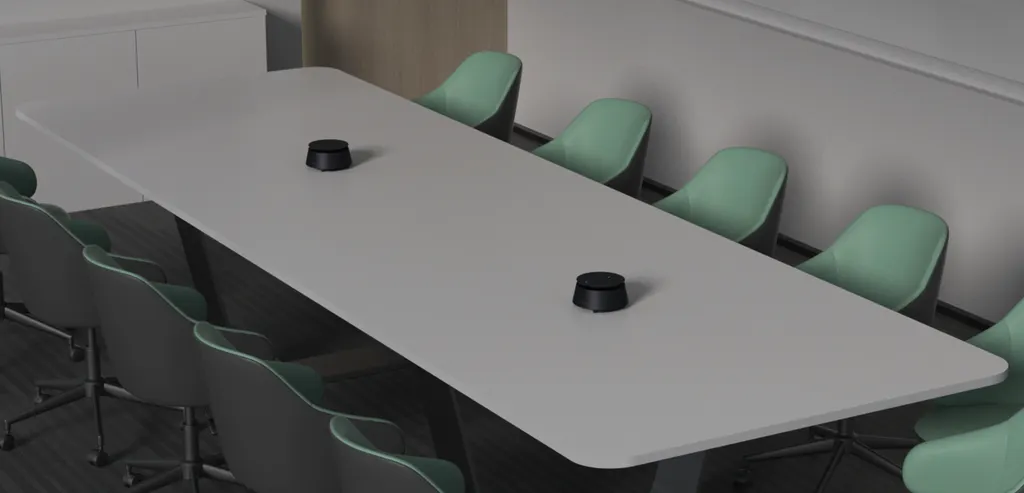
CPE40
Yealink CPE40 Conference Omnidirectional Microphone
- Pickup range
- 6m
Priceon request
QuotationWithin 1 working day
DeliveryConfirmed with your quote, based on stock
Overview
The Yealink CPE40 is a conference omnidirectional microphone with an 8-element array, 360° pickup and a 6 m range. It pairs AI noise, echo and reverberation cancellation with full-duplex audio and a built-in 4 W speaker. Up to eight units can be daisy-chained through a CP50, making it a fit for medium and large meeting rooms, from boardrooms in West Bay to training rooms in Education City.
An 8-microphone array for room-wide pickup
The Yealink CPE40 is a conference omnidirectional microphone that uses an 8-element array to capture voices from 360 degrees, with a pickup distance of 6 metres. Its microphone response runs from 100 Hz to 12 kHz, sampled at 48 kHz with 16-bit depth, and it is rated at a signal-to-noise ratio of 71.8 dB. It is built for video conferencing, where every participant needs to be heard at a steady level without leaning toward a device.
A built-in 4 W speaker covers 100 Hz to 20 kHz with a 120° emission angle at 2 kHz, so remote callers can be heard clearly across the room as well as picked up from it.
Audio processing that works on the room itself
Second-generation AI audio processing targets the problems that spoil conference calls: background noise, echo and reverberation. The manufacturer lists air conditioning vibration and keyboard typing among the noises the unit is designed to remove, which is useful in Qatar, where air conditioning runs for much of the year. Full-duplex operation lets both sides speak at the same time, and automatic gain control keeps softer voices audible.
Three physical buttons for mute, volume up and volume down sync with the meeting software, so the host can mute the room from the table. The mute LED shows solid red when muted, while other LED states indicate an incoming call, an active call, a restart or an upgrade in progress.
Daisy-chaining one room or several on a single cable
When paired with the Yealink CP50, the CPE40 connects over a single PoE network cable, and up to eight units can be daisy-chained to cover long tables and divided rooms. Units link through their codec and audio ports. The manufacturer notes that a 48V 2A power adapter is also required once four or more CPE40 units are chained to one CP50. Each unit has an average power consumption of 6 W.
Where the CPE40 fits in Qatar
- A ministry boardroom in West Bay: a long table where a single central unit covers the seats within 6 metres, with a second unit chained for the far end.
- A training room in Education City: a university seminar room where lecturers and visiting speakers need consistent pickup and clear two-way audio for hybrid sessions with colleagues abroad.
- A school hall in Al Wakrah: a multi-room fit-out where several chained units cover a large space while the cabling stays neat and organised.
What to plan before you order
- Check the room climate. The operating range is 0 to 40°C with 10 to 95% humidity, non-condensing. Keep units in air-conditioned rooms, away from direct sun and window glare, because summer temperatures in Qatar can exceed 45°C.
- Measure the table layout. Each unit measures 151.8 × 151.8 × 75.3 mm, and the package includes a 3 m Ethernet cable, so confirm the cable run from the CP50 to the furthest position.
- Check the Zoom Rooms and Microsoft Teams Rooms accessory compatibility lists against your platform and version before ordering.
- Budget for the 48V 2A power adapter when chaining four or more units.
- Note that the Type-C port is for internal debugging only and has no external function at present.
Products are covered by the manufacturer's warranty. SmartRooms Qatar offers free site surveys, professional installation and delivery to all eight municipalities of Qatar. Request a quote and we will confirm the cabling, power and chaining plan for your room.
Highlights
- 8-element omnidirectional array with 360° pickup
- 6 m pickup distance for medium to large rooms
- Full-duplex audio with AI noise, echo and reverberation cancellation
- Daisy-chain up to 8 units over PoE with a CP50
- Built-in 4 W speaker covering 100 Hz to 20 kHz
- Mute, volume up and volume down buttons sync with meeting software
Room fit
Tell us the room size and platform (Teams, Zoom or BYOD) and we confirm the right combination with your quotation.
Estimated timeline
Quotation within 1 working day · delivery timing depends on stock availability, and we confirm it with your quotation.
Specifications
36 specifications · Source: manufacturer · checked Oct 2026
Power Supply3
- Average power consumption
- 6W
- - USB power supply
- Not supported
- Details
- Power input: - Powered by CP50 when connected Power output:
Microphone8
- Pickup distance
- 6m
- Signal-to-noise ratio
- 71.8dB SPL @1kHz, A-wighted
- Maximum sound pressure level
- 122dB SPL @1KHz, THD
- Sensitivity
- -38dB±1dB @ 1KHz (0dB = 1V/Pa)
- Frequency response
- 100Hz~12KHz
- Sampling rate
- 48KHz
- Bit depth
- 16-bit
- Details
- Built-in 8-microphone array
Speaker9
- Frequency Response
- 100-20kHz
- Sensitivity
- 100dB SPL ± 3dB @0.1m, 1W
- Maximum Power
- 6W
- Rated Power
- 4W
- Sampling Rate
- 48kHz
- Sound Emission Angle (-6dB Attenuation)
- 120° @2kHz
- Total Harmonic Distortion (THD)
- THD at 1W, 1kHz < 1%
- Rated Impedance
- 4ohms
- Details
- Built-in 1 x 4W speaker
Audio Technology1
- Details
- 360° omnidirectional pickup Full-duplex technology Automatic gain control Second-generation AI intelligent audio technology: - Intelligent noise cancellation - Intelligent echo cancellation - Intelligent reverberation cancellation
Hardware Interfaces3
- 1×Codec port
- Connect to the previous omnidirectional microphone
- 1×Audio port
- Connect to the next CPE40 omnidirectional microphone
- 1×Type-C port
- Connect to a PC (for internal debugging purposes, unavailable for external functionalities currently)
Environmental3
- Operating humidity
- 10~95%, non-condensing
- Operating temperature
- 0~40°C
- Storage temperature
- -30℃~70℃
Package Features7
- Quantity
- 4
- N.W/CTN
- 4.1 kg
- G.W/CTN
- 4.8 kg
- Dimensions
- 151.8 × 151.8 × 75.3 mm
- Giftbox Size
- 241 × 216 × 162 mm
- Carton Size
- 665 × 221 × 252 mm
- Details
- Package includes: - CPE40 - 3m Ethernet cable - Cable ties × 1 - Cable cover × 1;Screw × 1 - Quick Start Guide
LED Status1
- Details
- Description
Mute1
- Details
- Off - Non-call status Solid red - Muted Flashing red - Upgrade abnormality Solid green - Call status/Call status Flashing green - Incoming call status Solid orange - Restart/Abnormality Flashing orange - Upgrading
Downloads
8 files from the manufacturer
PDF
Yealink CPE40 datasheets (PDF, 1.2 MB)
PDF
Yealink CPE40 manuals & guides (PDF, 164 KB)
PDF
Yealink CPE40 manuals & guides (PDF, 2.3 MB)
DXF
Yealink CPE40 drawings & cad (DXF)
STP
Yealink CPE40 drawings & cad (STP)
PDF
Yealink CPE40 other documents (PDF, 1.0 MB)
URL
Yealink CPE40 other documents (URL)
URL
Yealink CPE40 other documents (URL)
Questions about CPE40
Which meeting rooms in Qatar suit the Yealink CPE40?
The CPE40 suits medium and large rooms, such as a long boardroom table in West Bay or a training room at a university in Education City. Its 6 m pickup range and 360° array cover a full table, and daisy-chaining extends coverage when a single unit cannot reach every seat in the room.
How far can the CPE40 pick up voices in a meeting room?
The CPE40 has a stated pickup distance of 6 m, with 360° pickup from its eight-element array. In a Doha ministry boardroom, place the unit centrally on the table so the farthest seat sits within that range. If some seats fall outside 6 m, add a second unit through daisy-chaining rather than moving the microphone further away.
Will the CPE40 filter out air-conditioning noise in a Doha meeting room?
The manufacturer lists air conditioning vibration, keyboard typing, echo and reverberation among the noises its AI audio processing removes. Results still depend on the room's acoustics, such as hard glass walls or a bare floor, so review the room layout before committing to a placement.
Does the CPE40 support full-duplex conversation?
Yes. The CPE40 supports full-duplex, so people at both ends can speak at the same time during a call. Automatic gain control adjusts levels so quieter voices remain audible, which helps when a call links a Doha meeting room with colleagues in other countries.
How many CPE40 units can be daisy-chained, and what do they connect to?
Up to eight CPE40 units can be daisy-chained through a single PoE network cable when paired with the Yealink CP50. Units link through their codec and audio ports. For four or more CPE40 units on one CP50, a 48V 2A power adapter is also required, so plan for it in a large room in Lusail or Msheireb.
Can the CPE40 be powered over USB?
No. The source data states that USB power is not supported. A CPE40 receives power from the CP50 when connected and has an average power consumption of 6 W. Plan the cabling and the CP50 location before installation, because the daisy-chain depends on that connection.
What do the buttons on the CPE40 do?
The CPE40 has mute, volume up and volume down buttons that synchronise with the meeting software status, so the controls follow the call. The mute LED shows solid red when the microphone is muted, and the LED colours also indicate call status, incoming calls and upgrade activity, which helps staff read the state at a glance.
Can the CPE40 be used in a summer-heated room in Al Rayyan or near a window?
The operating temperature is 0 to 40°C, with 10 to 95% humidity, non-condensing. Qatar summers can exceed 45°C, so keep the unit in an air-conditioned meeting room and away from direct sun and window glare. If a room runs hot in the afternoons, confirm the conditions before installation.
Is the CPE40 compatible with Zoom Rooms and Microsoft Teams Rooms?
The manufacturer points to its official Zoom Rooms and Teams Rooms accessories compatibility lists for full details. Check the list for your platform and software version before ordering, and confirm that your room system and controller match the listed configuration.
What comes in the box with a CPE40?
Each package includes the CPE40, a 3 m Ethernet cable, cable ties, a cable cover, a screw and a quick start guide. The carton is listed with a quantity of four and weighs 4.8 kg gross, so allow for storage space and handling when planning multi-unit deliveries to a site.
Can the Type-C port connect the CPE40 to a laptop for USB audio?
No. The Type-C port connects to a PC for internal debugging only and is currently unavailable for external functions. For meeting audio, use the Ethernet connection through the CP50 together with the codec and audio ports for daisy-chaining.
How do schools and government offices order several CPE40 units in Qatar?
Send your LPO or tender reference, such as a Monaqasat listing, together with a room-by-room list. SmartRooms Qatar supplies all eight municipalities, usually issues quotations within one working day, and accepts bank transfer, cheque or purchase order. Products are covered by the manufacturer's warranty.
Similar models
Sennheiser
SL Boundary 114-S DW-4 B
Sennheiser SL Boundary 114-S DW-4 B Wireless Table Boundary Microphone