






Biamp
Evoko Kleeo Desk Manager 6-pack + 1yr license
Biamp Evoko Kleeo Desk Manager 6-Pack (910-01972) Desk Booking Display
CT200
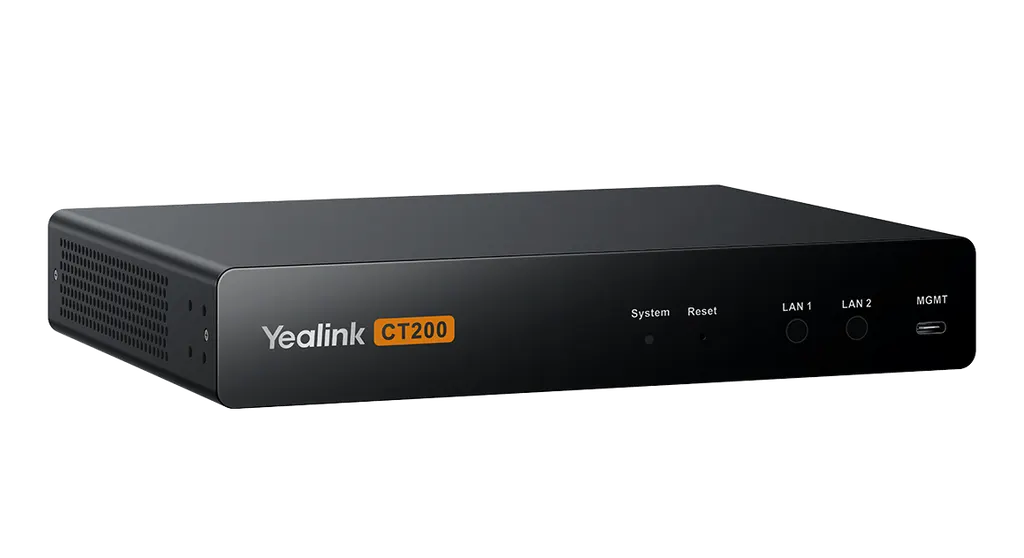
Yealink CT200 Room Device Navigator
Priceon request
QuotationWithin 1 working day
DeliveryConfirmed with your quote, based on stock
Overview
The Yealink CT200 is a Room Device Navigator for AV-over-IP rooms. It routes AV signals and manages room devices from one controller. Local and cloud management covers all Yealink devices, and Open API support brings third-party equipment in. Two network ports keep management traffic separate from device control. It suits boardrooms and training rooms in West Bay and Lusail that need one controller.
What the CT200 controls in a room
The Yealink CT200 is a Room Device Navigator, a controller that sits between a room's touch panel and the equipment behind it. It routes AV signals in AV-over-IP systems and manages displays, cameras, audio units and other room devices from one point. Local and cloud management covers all Yealink devices, so an IT team can review and adjust the room without walking into it.
Control logic is set through the unit's configuration rather than written as custom code. Based on that setup, the CT200 generates HTML5 control screens automatically, so a facilities team can change what the touch panel shows and does without commissioning a new programming project for each change.
Two network ports keep management separate
The hardware lists an RJ45 port, a dedicated MGMT port, a PoE port and a 12V/2A power input. The manufacturer presents the dual network ports as a way to split management traffic from device control, which supports efficient, secure traffic and better system performance. For network planners, the control path can be designed as its own segment with a clear port allocation on the switch.
Third-party devices and the Open API
Beyond Yealink equipment, the CT200 supports control of third-party devices, and its Open API lets integrators connect that equipment to the room interface. This suits organisations that already run mixed AV hardware and do not want to replace working displays or cameras. Before ordering, confirm the exact third-party models with the SmartRooms Qatar team, because control depth depends on what each device exposes through its interface.
Installation, power and Qatar conditions
The CT200 installs flat or in a rack, and the mounting kit includes mounting ears, a rack connection piece and screws for wall, flat surface or rack use. At 216 × 160 × 36 mm and 1.46 kg, the unit should be planned against the shelf or rack space available. Power draw is 2 W average, 3.5 W peak and 1.7 W standby. Power can come from 802.3af PoE through a suitable switch or from the supplied 12V/2A adapter.
Operating temperature is -10 to +45 °C at 10 to 95% humidity. Qatar summers can exceed 45 °C, so keep the unit in an air-conditioned room or a ventilated, cooled cabinet, not an unventilated cupboard. Storage tolerates -30 to 70 °C.
Where it fits in Qatar and what to plan
A corporate boardroom in West Bay with a display, camera and conferencing audio can use the CT200 to switch the room between presentations and video calls from one controller. A training room in Education City with several sources and a wall display benefits from one interface that staff can operate without learning each device. A hotel conference suite in Lusail that hosts different event layouts can recall its routing setups for each booking.
- Confirm the number of rooms and the device types to be controlled.
- Reserve a switch port for the RJ45 connection and another for MGMT.
- Choose PoE or the 12V/2A adapter for each location.
- Keep the install location within the -10 to +45 °C operating range.
Ask SmartRooms Qatar for a free site survey before installation. Quotations are usually issued within one working day, and we accept purchase orders and government tenders. Request a quote for the Yealink CT200 and we will confirm the configuration for your rooms.
Highlights
- Dual network ports separate management traffic from device control
- Controls Yealink devices locally and through cloud management
- Open API supports integration of third-party devices
- PoE 802.3af port or 12V/2A adapter power
- Rack or flat installation with mounting kit included
- Operating range -10 to +45 °C, 10 to 95% humidity
Room fit
Tell us the room size and platform (Teams, Zoom or BYOD) and we confirm the right combination with your quotation.
Estimated timeline
Quotation within 1 working day · delivery timing depends on stock availability, and we confirm it with your quotation.
Specifications
19 specifications · Source: manufacturer · checked Oct 2026
Installation Method1
- Details
- Rack installation Flat installation
Hardware Interface1
- Details
- 1 × PoE port 1 × RJ45 port 1 × MGMT port 1 × 12V/2A power supply port
Package Contents1
- Details
- 1 × CT200 1 × 3 m Cat5e cable 1 × 1.0 m USB 3.0 Type-C to Type-A Cable (for management port) 1 × Power adapter (12V / 2A) 1 × Mounting Kit (for wall, flat surface, or rack installation). Includes mounting ears, rack connection piece, and screws. 1 × Quick start guide
Environmental Factors3
- Operating humidity
- 10 ~ 95 %
- Operating temperature
- -10 ~ +45 °C
- Storage temperature
- -30 ~ 70 °C
Power Supply6
- Average
- 2 W
- Peak
- 3.5 W
- Standby
- 1.7 W
- Power Adapter
- DC 12V/2A
- PoE
- 802.3af
- Details
- Power consumption: Power Supply:
Dimensions and Weight (W × D × H)7
- Giftbox size
- 259 × 193 × 124 mm
- Carton size
- 635 × 265 × 209 mm
- Dimensions
- 216 × 160 × 36 mm
- G.W/CTN
- 9.252 kg
- N.W/CTN
- 8.530 kg
- Weight
- 1.46 kg
- Quantity/carton
- 5 pcs
Downloads
19 files from the manufacturer
PDF
Yealink CT200 datasheets (PDF, 197 KB)
PDF
Yealink CT200 manuals & guides (PDF, 1.3 MB)
PDF
Yealink CT200 manuals & guides (PDF, 1.8 MB)
URL
Yealink CT200 manuals & guides (URL)
URL
Yealink CT200 manuals & guides (URL)
URL
Yealink CT200 manuals & guides (URL)
URL
Yealink CT200 manuals & guides (URL)
URL
Yealink CT200 manuals & guides (URL)
URL
Yealink CT200 manuals & guides (URL)
DXF
Yealink CT200 drawings & cad (DXF)
STP
Yealink CT200 drawings & cad (STP)
20 -
Yealink CT200 software & firmware (20 - FIRMWARE & RELEASE NOTE)
25 -
Yealink CT200 software & firmware (25 - FIRMWARE & RELEASE NOTE)
PDF
Yealink CT200 other documents (PDF, 1.0 MB)
URL
Yealink CT200 other documents (URL)
URL
Yealink CT200 other documents (URL)
MP4
Yealink CT200 other documents (MP4)
URL
Yealink CT200 other documents (URL)
URL
Yealink CT200 other documents (URL)
Questions about CT200
What does the Yealink CT200 do in a meeting room?
The CT200 is a Room Device Navigator that sits at the centre of an AV-over-IP room. It routes AV signals between sources and displays, manages display power, and gives staff one control point for cameras, audio and other room devices. It does not capture video itself; it works alongside the camera, microphones and display already in the room.
Who is the CT200 best suited to in Qatar?
It suits IT and facilities teams running rooms with several connected devices, such as a ministry boardroom in Doha where the display, camera and audio should start from one screen, or a corporate training centre in Al Sadd with several linked rooms. A room with a single display rarely needs a dedicated navigator, so ask the SmartRooms Qatar team to confirm the device count before ordering.
How many network ports does the CT200 have, and why does it matter?
The CT200 has two network ports. Its hardware lists an RJ45 port and a dedicated MGMT port. The manufacturer separates management traffic from device control traffic, which keeps control messages apart from the rest of the network. Your IT team should reserve a switch port for each connection during the design stage.
Can the CT200 control devices from other manufacturers?
Yes. The product data states that the CT200 supports control of both Yealink and third-party devices, and its Open API lets integrators bring non-Yealink equipment into the same room interface. Confirm the specific third-party models with SmartRooms Qatar before purchase, because the level of control depends on what each device exposes through its interface.
How is the CT200 powered?
The hardware includes a PoE port that supports 802.3af and a 12V/2A power input, and the box includes a 12V/2A power adapter. Typical consumption is 2 W average, 3.5 W peak and 1.7 W standby. Choose PoE if your switch supplies 802.3af power at the install location, or use the adapter where no suitable PoE switch is available.
Can the CT200 go in a hot equipment cabinet during a Doha summer?
The operating temperature range is -10 to +45 °C, with 10 to 95% humidity. Qatar summer temperatures can exceed 45 °C, so the unit should sit in an air-conditioned room or a ventilated, cooled rack, not an unventilated cupboard. Storage tolerates -30 to 70 °C. Ask SmartRooms Qatar to review the cabinet location during the free site survey.
Can the CT200 be wall-mounted or fitted in a rack?
Yes. The CT200 supports rack and flat installation, and the mounting kit includes mounting ears, a rack connection piece and screws for wall, flat surface or rack use. The unit measures 216 × 160 × 36 mm and weighs 1.46 kg. Measure the rack space or shelf depth before ordering, and plan the route for the 3 m Cat5e cable included in the box.
What is included in the CT200 box?
Each CT200 ships with a 3 m Cat5e cable, a 1.0 m USB 3.0 Type-C to Type-A cable for the management port, a 12V/2A power adapter, a mounting kit and a quick start guide. The mounting kit covers wall, flat surface and rack installation. Check the contents against your installation plan before the site visit so that cable lengths and mounting hardware match the room layout.
If our rooms are in West Bay and Lusail, can the CT200 be managed from one place?
The manufacturer describes unified local and cloud management covering all Yealink devices. For an organisation with meeting rooms in West Bay and Lusail, that means one view of the device estate rather than separate consoles for each site. The product data does not cover cloud account requirements, so confirm the service details with the SmartRooms Qatar team before deployment.
Can a university seminar room in Education City use the CT200 with its existing equipment?
A seminar room with a camera, microphones and a display can use the CT200 to switch AV routes and start the room from one interface, so staff do not have to learn each device separately. Compatibility with existing hardware depends on each device's control options, so share the equipment list with SmartRooms Qatar. The team can then plan cable routes during a free site survey.
Can SmartRooms Qatar supply the CT200 under a purchase order for a government tender?
Yes. SmartRooms Qatar accepts purchase orders and government tenders, including those published on Monaqasat, and usually issues quotations within one working day. Send the quantity, the delivery location in Qatar and any tender reference. The team will confirm stock availability and the expected lead time with the quotation, and the product is covered by the manufacturer's warranty.
What should a hotel conference suite in Lusail plan before installing the CT200?
Plan a position in the AV cupboard beside the room's network switch to keep cable runs short. Reserve a switch port for the RJ45 connection and another for MGMT, and decide between PoE and the 12V/2A adapter. Confirm the cupboard stays within the -10 to +45 °C operating range. A free site survey from SmartRooms Qatar can confirm the layout before installation.
Similar models



Biamp
Evoko Liso Freestand Mount - Boltable
Biamp Evoko Liso Freestand Mount (Boltable) 910-01935 Floor Stand
