






Biamp
Evoko Kleeo Desk Manager 6-pack + 1yr license
Biamp Evoko Kleeo Desk Manager 6-Pack (910-01972) Desk Booking Display
CT300
Yealink CT300 Advanced Room Device Navigator
Priceon request
QuotationWithin 1 working day
DeliveryConfirmed with your quote, based on stock
Overview
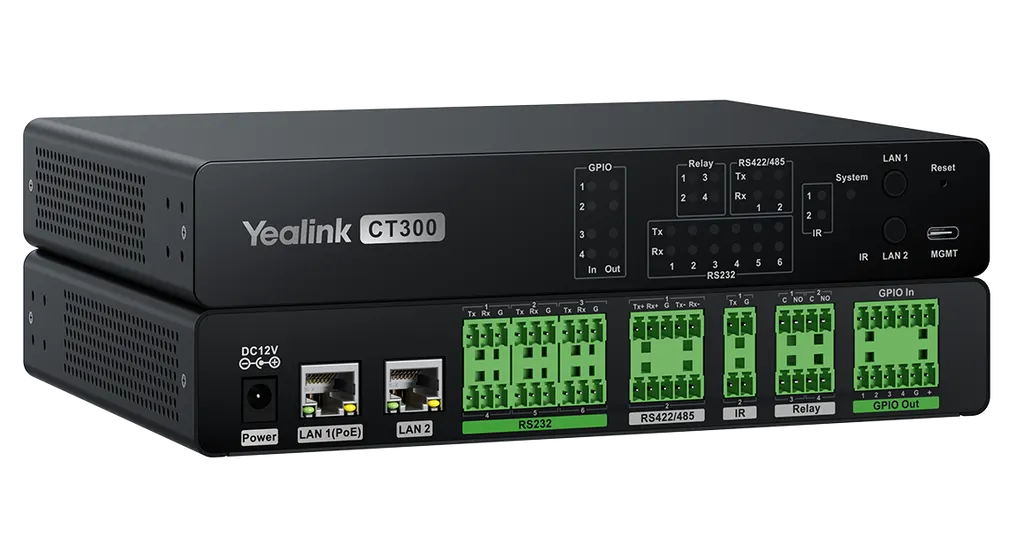
A room device navigator for AV-over-IP and smart room systems, the Yealink CT300 brings serial, relay, GPIO and infrared control into one unit. It offers two network ports, RS232 and RS422/485 serial interfaces, four relays and an open API for third-party integration. It suits boardrooms, training rooms and control rooms across Qatar where several devices need one controller. Request a quote from SmartRooms Qatar to confirm the interfaces and mounting for your room.
What the CT300 does inside a room
The CT300 is a room device navigator, a controller that sits within an AV system and sends commands to the equipment around it. Instead of fitting a separate controller for each function, one CT300 can handle serial commands, relay closures, digital inputs and infrared signals. That is useful in a room with a display, a conferencing codec, a projector screen and lighting, where every item needs to respond to a single control point.
Two network ports and separate management
The unit provides two network ports, one PoE and one RJ45. Keeping management traffic apart from device control traffic helps integrators protect control commands from configuration work, and it gives IT teams a clearer view of what is connected to each network. A dedicated MGMT port is also fitted, and a 1.0 m USB 3.0 Type-C to Type-A cable is supplied for that connection.
Control interfaces for mixed equipment
- Serial: RS232 and RS422/485 ports, with rates from 300 to 11520 baud
- Relays: four normally open relays rated 30VDC, 2A
- GPIO: four in/out channels that can serve as analog inputs (12-bit, 0 to 24VDC), digital inputs or digital outputs at 3.3 V, 3.3 mA
- Infrared: two IR outputs with a 34 to 42 kHz carrier, plus an IR learning port that captures codes below 4 m from the front panel
- Open API: for third-party integration and customised control logic
Where it fits in Qatar
In a boardroom in West Bay or Lusail, a CT300 mounted near the table can switch the display and the screen, trigger a lighting scene through a relay, and send infrared commands to an older projector. For a private school in Al Wakrah fitting out new classrooms, one unit per room keeps the controls consistent across the building. In a university control room in Education City, a rack-mounted CT300 can bring several serial-controlled switchers and AV devices under one management point.
Planning the installation
The CT300 measures 216 × 160 × 36.7 mm and weighs 1.07 kg. It installs on a rack or a flat surface, and the mounting kit includes mounting ears, a rack connection piece and screws. The rated operating range is -10°C to +45°C at 10% to 95% humidity. Summer temperatures outside buildings in Qatar can exceed 45°C, so place the unit in an air-conditioned room or a ventilated cabinet, and confirm the enclosure with the SmartRooms Qatar team before work starts. Power draw is 2.5 W average, 3.3 W peak and 1.7 W standby, supplied by the 12V 2A adapter in the box. Map the serial, relay and IR cable runs on the room layout before pulling cable.
Request a quote from SmartRooms Qatar with your room layout and the list of devices you need to control. Our team will confirm the interfaces, cabling and mounting you need. Quotations are usually provided within one working day, and we deliver to all eight municipalities of Qatar.
Highlights
- Two network ports plus a dedicated management port
- RS232 and RS422/485 serial control, 300 to 11520 baud
- Four normally open relays rated 30VDC, 2A
- Four GPIO channels with 0 to 24VDC input range
- Two IR outputs and an IR learning port
- Operating range -10°C to +45°C; rack or flat mounting
Room fit
Tell us the room size and platform (Teams, Zoom or BYOD) and we confirm the right combination with your quotation.
Estimated timeline
Quotation within 1 working day · delivery timing depends on stock availability, and we confirm it with your quotation.
Specifications
39 specifications · Source: manufacturer · checked Oct 2026
Hardware Overview1
- Details
- 1 × PoE port 1 × RJ45 port 6 × RS232 port 2 × RS422/485 port 2 × IR out port 4 × Relay port 4 × GPIO in/out 1 × IR Learning port 1 × MGMT port 1× 12V/2A power supply port
RS2323
- Baud Rate
- 300~11520 baud
- Pin configurations
- Pin1=Tx, Pin2=Rx, Pin3=Gnd
- Details
- 2 bidirectional RS232 ports
RS422/4853
- Baud Rate
- 300~11520 baud
- Pin configurations
- RS422: Pin1=Tx+, Pin2=Rx+, Pin3=Gnd, Pin4=Tx-, Pin5=Rx- RS485: Pins 1 and 2 (tied together)=data+, pin3=Gnd, pins 4 and 5 (tied together)=data-
- Details
- 2 bidirectional RS422/485 port
IR Out3
- Carrier Frequency
- 34kHz to 42 kHz
- Pin configurations
- Pin1=Tx, Pin2=Gnd
- Details
- 2 IR output port
Relay3
- Rated
- 30VDC, 2A
- Pin configurations
- Pin1=Common, Pin2=No
- Details
- 4 normally open relays
GPIO9
- Input voltage range
- 0 to 24VDC
- Input impedance
- 29k ohms
- Programmable pullup
- 1k ohms to +5VDC
- Threshold low to high
- Programmable range: 0~24VDC, default=2.8V
- Threshold high to low
- Programmable range: 0~24VDC, default=2V
- Analog Inputs
- 12bit A/D, 0 to 24VDC
- Digital Outputs
- 3.3 V, 3.3 mA
- Pin Configurations
- Pin1,2,3,4=GPIO In/Out, Pin5=Gnd, Pin6=12VDC
- Details
- 4 analog input or digital input/digital output Digital Inputs:
IR Learning2
- Carrier Frequency
- Below 38kHz
- Capture Distance
- Below 4m from the front panel
Power Consumption3
- Average
- 2.5 W
- Peak
- 3.3 W
- Standby
- 1.7 W
Installation Method1
- Details
- Rack installation Flat installation
Package Contents1
- Details
- 1 × CT300 1 × 3 m Cat5 cable 1 × 1.0 m USB 3.0 Type-C to Type-A Cable (for management port) 1 × Power adapter (12V / 2A) 2 × Infrared Emitter (for IR output control) Male phoenix connectors for control connection 1 × Mounting Kit (for wall, flat surface, or rack installation). Includes mounting ears, rack connection piece, and screws 1 × Quick start guide
Environmental Factors3
- Operating humidity
- 10% ~ 95%
- Operating temperature
- -10°C ~ +45°C
- Storage temperature
- -30°C ~ 70°C
Dimensions and Weight (W × D × H)7
- Giftbox size
- 259 × 193 × 124 mm
- Carton size
- 635 × 265 × 209 mm
- Dimensions
- 216 × 160 × 36.7 mm
- G.W/CTN
- 9.133 kg
- N.W/CTN
- 8.485 kg
- Weight
- 1.07 kg
- Quantity/carton
- 5 pcs
Downloads
19 files from the manufacturer
PDF
Yealink CT300 datasheets (PDF, 2.8 MB)
PDF
Yealink CT300 manuals & guides (PDF, 1.3 MB)
PDF
Yealink CT300 manuals & guides (PDF, 2.8 MB)
URL
Yealink CT300 manuals & guides (URL)
URL
Yealink CT300 manuals & guides (URL)
URL
Yealink CT300 manuals & guides (URL)
URL
Yealink CT300 manuals & guides (URL)
URL
Yealink CT300 manuals & guides (URL)
URL
Yealink CT300 manuals & guides (URL)
DXF
Yealink CT300 drawings & cad (DXF)
STP
Yealink CT300 drawings & cad (STP)
20 -
Yealink CT300 software & firmware (20 - FIRMWARE & RELEASE NOTE)
25 -
Yealink CT300 software & firmware (25 - FIRMWARE & RELEASE NOTE)
PDF
Yealink CT300 other documents (PDF, 1.0 MB)
URL
Yealink CT300 other documents (URL)
URL
Yealink CT300 other documents (URL)
MP4
Yealink CT300 other documents (MP4)
URL
Yealink CT300 other documents (URL)
URL
Yealink CT300 other documents (URL)
Questions about CT300
What is the Yealink CT300 used for?
The CT300 is a room device navigator that acts as the control point for equipment in a room. It sends serial commands, switches relays, reads GPIO inputs and transmits infrared codes, so one unit can coordinate a display, a conferencing system and other devices. It is designed for AV-over-IP and smart room deployments in boardrooms, training rooms and control rooms.
Who is the CT300 suited to in Qatar?
It suits AV integrators, IT managers and facilities teams setting up meeting rooms, control rooms or lecture halls where several devices must respond to one controller. A boardroom in West Bay or Lusail with a display, a screen and a projector is a typical match. Confirm your device list with SmartRooms Qatar so the interfaces you need are matched before you order.
How many network ports does the CT300 have?
The unit has two network ports, one PoE port and one RJ45 port, which lets management and device control traffic be kept apart. A separate MGMT port is also fitted for management, and a 1.0 m USB 3.0 Type-C to Type-A cable is included for that connection. A 3 m Cat5 cable is supplied in the box as well.
Which serial interfaces does it support, and at what speeds?
The CT300 supports RS232 and RS422/485 serial control at baud rates from 300 to 11520. The source data lists two bidirectional RS232 ports and two bidirectional RS422/485 ports. On RS232, pin 1 is Tx, pin 2 is Rx and pin 3 is ground. For RS485, the data lines are tied in pairs, so wiring should follow the pin configuration in the documentation.
Can the CT300 switch other equipment through its relays?
Yes. It has four normally open relays rated 30VDC at 2A, which suits switching low-voltage DC loads such as the control input of a motorised screen or a lighting controller. Check each load against the rating before wiring. Do not switch mains voltage directly through these contacts; use a separate contactor or relay for that job.
Can it control older equipment that only has an infrared remote?
Yes. It has two IR outputs with a 34 to 42 kHz carrier, and two infrared emitters are included in the box. Its IR learning port captures codes from an existing remote at distances below 4 m from the front panel. In a university lecture hall in Education City with an older projector, staff can use one touch controller while the projector still responds to infrared commands.
Does it integrate with control systems from other manufacturers?
The CT300 offers an open API for third-party integration and customised control logic, so integrators can build project-specific sequences. The source data does not list the individual API commands, so confirm the documentation with SmartRooms Qatar before the project starts. Where a device has no network control, the GPIO inputs and relays provide a hardware route instead.
Can the CT300 be installed in hot or outdoor locations in Qatar?
Its rated operating range is -10°C to +45°C at 10% to 95% humidity, and its storage range is -30°C to 70°C. Summer temperatures outside buildings in Qatar can exceed 45°C, so keep the unit in an air-conditioned room or a ventilated cabinet. Avoid open-air or dust-exposed mounting, and confirm the enclosure with SmartRooms Qatar before installation.
How is it mounted, and what is in the box?
It installs on a rack or a flat surface, and the mounting kit is also listed for wall mounting. The kit includes mounting ears, a rack connection piece and screws. The box holds the unit, a 3 m Cat5 cable, a 1.0 m USB 3.0 Type-C to Type-A cable, a 12V 2A power adapter, two infrared emitters, male phoenix connectors and a quick start guide. The unit measures 216 × 160 × 36.7 mm and weighs 1.07 kg.
How much power does the CT300 use?
The CT300 draws 2.5 W on average, 3.3 W at peak and 1.7 W in standby, and it is powered by the 12V 2A adapter supplied. Qatar mains supply is 240 V at 50 Hz, so check the adapter's input rating against that supply before connecting it. Your electrical contractor should confirm the socket and plug arrangement on site.
What should a school plan for when fitting out several classrooms?
Plan one controller per classroom and map the serial, relay and IR cable runs on a room layout before any cable is pulled. SmartRooms Qatar offers a free site survey to confirm rack or wall positions and cable routes. Quotations are usually issued within one working day. Schools can order by LPO, and we deliver to all eight municipalities of Qatar once the device list is agreed.
What is the part number, and is this model current?
The part number is 1303169, and the model is listed as current within the CT series under room system accessories. When requesting a quote, quote the full name CT300 (Standard) so the quotation matches your device list exactly. The manufacturer's warranty applies to the unit, and the team can confirm its details with your quotation.
Similar models



Biamp
Evoko Liso Freestand Mount - Boltable
Biamp Evoko Liso Freestand Mount (Boltable) 910-01935 Floor Stand
