






Biamp
Evoko Kleeo Desk Manager 6-pack + 1yr license
Biamp Evoko Kleeo Desk Manager 6-Pack (910-01972) Desk Booking Display
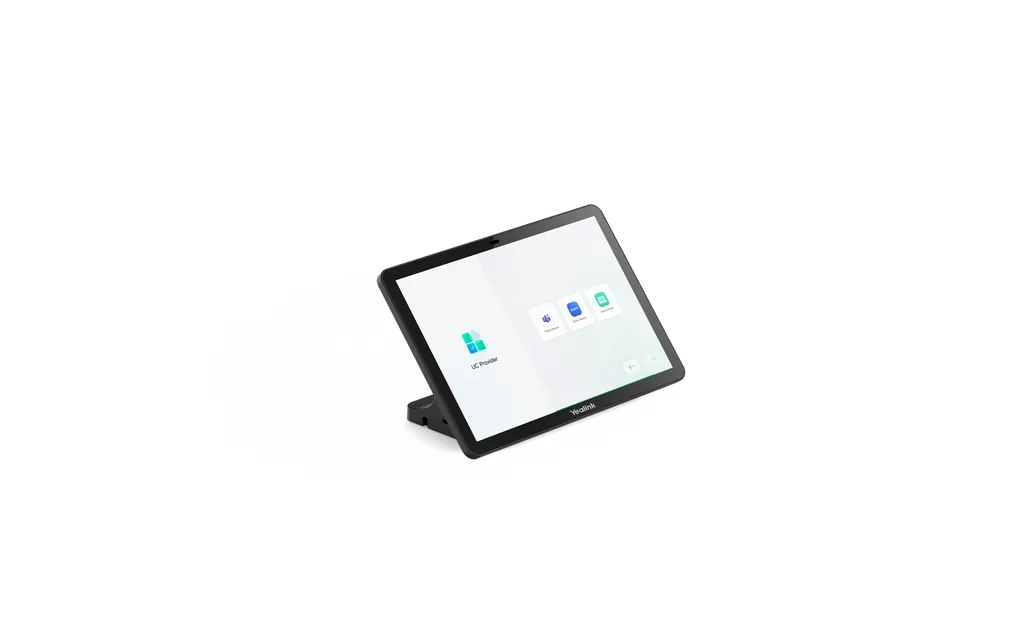
CTP25
Yealink CTP25 10.1-Inch Touch Console for Meeting Control
- Video
- 1280 x 800
Priceon request
QuotationWithin 1 working day
DeliveryConfirmed with your quote, based on stock
Overview
The Yealink CTP25 is a 10.1-inch touch console for running video meetings from a table or wall-mounted point. Its 1280 x 800 IPS panel has an anti-glare, anti-fingerprint surface, and one USB-C cable carries 4K content sharing, wired BYOD and up to 45W laptop charging. It is powered over Ethernet and suits meeting rooms, boardrooms and classrooms in Qatar.
A 10.1-inch console for starting and running meetings
The Yealink CTP25 is a touch console built for the person who runs a meeting rather than attends it. Joining a call, adjusting the camera, changing participant layouts and starting a recording all happen on one touchscreen, so the host does not need a separate remote or the room PC. The console runs Android 13.0, supports MDEP and can be administered through the Yealink Web Portal, the Yealink Device Management Platform, Teams Admin Center or Zoom Device Management.
Display, touch and sensing
The 10.1-inch IPS panel has a 1280 x 800 resolution, a contrast ratio of 1000:1 and a typical brightness of 350 cd/m², with viewing angles of 178° horizontally and vertically. The surface is anti-glare and anti-fingerprint, and multi-point capacitive touch supports several touch points at once. The spec sheet also lists a built-in ultrasound unit, a motion sensor, Wi-Fi 6 (802.11a/b/g/n/ac/ax) and Bluetooth 5.0.
One cable for power, network and laptop sharing
When the console is connected to a bar, a single Cat5e Ethernet cable provides both power and network connectivity, which removes the need for a separate power cable at the table. The RJ45 port is PoE 802.3af compliant. A single USB-C cable links the CTP25 to a PC for 4K content sharing and wired BYOD, and it can deliver up to 45W PD 2.0 to charge a laptop. Replacing the supplied adapter raises the maximum output to 60W. The source material describes pairing the console with the Yealink MeetingBar A40, where signing in on one device covers both.
Where it fits in Qatar and what to plan
A 10.1-inch console suits a compact boardroom in Msheireb or West Bay where one table needs a dedicated control point, or a seminar room at a university in Education City where the lecturer shares laptop content from the lectern. A private school in Al Rayyan fitting out several classrooms can standardise on the same console across rooms and issue one purchase order for the set.
Plan the mounting before ordering. The console can sit on the table, be mounted on the table with the high stand, which rotates 90 degrees left and right, or be wall-mounted with an optional wall mount. Its operating range is -10 to +45°C, so it should be installed in air-conditioned rooms. Check the cable route between the bar and the table, the length of the 7.5m Ethernet cable and the cable management cover before installation.
The package includes the CTP25, a 7.5m Ethernet cable, a 1.8m USB-C cable, a 65W PD power adapter, a high stand, a cable management cover, M3 screws, cable ties, a screwdriver and a quick start guide. Each unit is covered by the manufacturer's warranty. Request a quote from SmartRooms Qatar with your room count, bar model and preferred mounting, and we will usually return a quotation within one working day.
Highlights
- 10.1-inch IPS display at 1280 x 800 resolution
- Multi-point capacitive touch with anti-glare, anti-fingerprint surface
- Single USB-C cable for 4K sharing, wired BYOD and up to 45W PD
- PoE 802.3af Ethernet port for one-cable deployment
- Android 13.0 with MDEP support and Teams and Zoom management
- Operating range -10 to +45°C; table or wall mounting
Room fit
Tell us the room size and platform (Teams, Zoom or BYOD) and we confirm the right combination with your quotation.
Estimated timeline
Quotation within 1 working day · delivery timing depends on stock availability, and we confirm it with your quotation.
Specifications
33 specifications · Source: manufacturer · checked Oct 2026
OS1
- Details
- Android 13.0
Display8
- Screen
- 10.1 inch
- Display Type
- IPS
- Resolution
- 1280 x 800
- Contrast ratio
- 1000:1
- Brightness
- 350 cd/㎡ (typical)
- Viewing angle (horizontal/vertical)
- 178°(H)/178°(V)
- Touchpoints
- Multi-points capacitive touch support
- Details
- Anti-glare Anti-fingerprint
Audio1
- Details
- Built-in Ultrasound Unit
Wireless1
- Details
- Wi-Fi 6 802.11a/b/g/n/ac/ax Bluetooth 5.0
Network1
- Details
- VLAN, 802.1P/Q, and Diffserv 802.1X and LLDP-MED HTTPS
Device Management1
- Details
- Yealink Web Portal Yealink Device Management Platform Teams Admin Center Zoom Device Management
Physical Interface1
- Details
- 1 x USB-A port 2 x USB-C port 1 x RJ45 port (PoE 802.3af compaint) 1 x Reset hole Motion Sensor
Installation1
- Details
- Place on the Table Mount on the Table Mount on the Wall
Package1
- Details
- CTP25 7.5m Ethernet Cable 1.8m USB-C Cable PD Power Adapter (65W) Screwdriver High Stand Cable Management Cover M3 Screws × 10 Cable Ties × 5 Quick Start Guide
Mounting Bracket3
- Standard
- High Stand
- - Rotatable desktop mount with rotation angle
- 90° left and right.
- Details
- Optional: - Wall mount
Environment2
- Operating Temperature
- -10 to +45°C
- Storage Temperature
- -30 to +70°C
Power6
- - Standby
- 5 W
- - Average
- 7.3 W
- - Peak
- 15.2 W
- Power Adapter
- 65W PD
- PoE
- IEEE 802.3af and above
- Details
- Power Consumption:
Dimensions &Weight6
- - Dimension
- 286 × 198 × 140 mm; 725 × 410 × 300 mm; 242.95 × 27.50 × 161.95 mm
- - N.W/CTN
- 1.578 kg; 18.478 kg
- - G.W/CTN
- 1.846 kg; 19.798 kg
- - Quantity
- 10 pieces
- - Weight
- 0.683 kg
- Details
- Box: Carton: CTP25:
Downloads
29 files from the manufacturer
PDF
Yealink CTP25 datasheets (PDF, 395 KB)
PDF
Yealink CTP25 manuals & guides (PDF, 2.2 MB)
PDF
Yealink CTP25 manuals & guides (PDF, 5.6 MB)
PDF
Yealink CTP25 manuals & guides (PDF, 5.7 MB)
PDF
Yealink CTP25 manuals & guides (PDF, 3.5 MB)
PDF
Yealink CTP25 manuals & guides (PDF, 606 KB)
PDF
Yealink CTP25 manuals & guides (PDF, 5.1 MB)
URL
Yealink CTP25 manuals & guides (URL)
DXF
Yealink CTP25 drawings & cad (DXF)
STP
Yealink CTP25 drawings & cad (STP)
PDF
Yealink CTP25 certificates & compliance (PDF, 416 KB)
105
Yealink CTP25 software & firmware (105 - FIRMWARE & RELEASE NOTE(FOR MEETINGBAR A25))
112
Yealink CTP25 software & firmware (112 - FIRMWARE & RELEASE NOTE)
114
Yealink CTP25 software & firmware (114 - FIRMWARE & RELEASE NOTE)
25 -
Yealink CTP25 software & firmware (25 - FIRMWARE & RELEASE NOTE (FOR MEETINGBAR A40))
34 -
Yealink CTP25 software & firmware (34 - FIRMWARE & RELEASE NOTE (FOR MEETINGBAR A40))
55 -
Yealink CTP25 software & firmware (55 - FIRMWARE & RELEASE NOTE (FOR MEETINGBAR A40))
55 -
Yealink CTP25 software & firmware (55 - FIRMWARE & RELEASE NOTE (FOR MEETINGBOARD PRO))
76 -
Yealink CTP25 software & firmware (76 - FIRMWARE & RELEASE NOTE (FOR MEETINGBAR A40))
82 -
Yealink CTP25 software & firmware (82 - FIRMWARE & RELEASE NOTE (FOR MEETINGBAR A40))
85 -
Yealink CTP25 software & firmware (85 - FIRMWARE & RELEASE NOTE (FOR MEETINGBAR A50))
91 -
Yealink CTP25 software & firmware (91 - FIRMWARE & RELEASE NOTE(FOR MEETINGBAR A25))
URL
Yealink CTP25 software & firmware (URL)
URL
Yealink CTP25 software & firmware (URL)
PDF
Yealink CTP25 other documents (PDF, 65 KB)
PDF
Yealink CTP25 other documents (PDF, 1.0 MB)
URL
Yealink CTP25 other documents (URL)
URL
Yealink CTP25 other documents (URL)
MP4
Yealink CTP25 other documents (MP4)
Questions about CTP25
What is the Yealink CTP25 used for?
The Yealink CTP25 is a 10.1-inch touch console for controlling a video meeting from a table or a wall-mounted point. Users start or join meetings, adjust the camera, change participant layouts and start recordings from the touchscreen. It suits meeting rooms, boardrooms and seminar rooms in Qatar where the host needs a dedicated control panel instead of a remote.
Who should choose the CTP25 instead of a larger display?
The CTP25 suits organisations that need a control point rather than a display. If a room already has a screen and camera, the console gives the host one place to manage the call. Facilities managers in Doha offices and IT teams in schools running several small rooms can add it to each room without changing the room's main display.
What are the screen resolution and brightness?
The panel is a 10.1-inch IPS display at 1280 x 800 resolution, with a 1000:1 contrast ratio, typical brightness of 350 cd/m² and 178° horizontal and vertical viewing angles. The anti-glare surface reduces reflections, and the anti-fingerprint finish limits smudges from frequent touching, which matters in rooms used several times a day.
Does the CTP25 support 4K?
The touch panel itself has a 1280 x 800 display. The 4K figure applies to content sharing over the USB-C cable, where a connected laptop or PC can send 4K content to the room system. Confirm the room's video conferencing setup with the SmartRooms Qatar team when requesting a quote so the sharing workflow matches your bar and camera.
Can the CTP25 be powered by PoE?
Yes. The RJ45 port is PoE 802.3af compliant, so a single Ethernet cable from a compatible bar can supply power and network connectivity. The package also includes a 65W PD power adapter for installations where PoE is not the chosen power route. Check the power requirements of your bar before ordering the set.
How does the USB-C connection work for visitors' laptops?
A single USB-C cable from the CTP25 to a laptop enables 4K content sharing, wired BYOD and charging of up to 45W PD 2.0. Replacing the supplied adapter raises the maximum output to 60W, which helps with higher-power laptops. This lets a presenter connect and charge with one cable instead of managing a separate charger on the table.
Is it suitable for a boardroom in West Bay where executives bring their own laptops?
Yes. The wired BYOD function lets an executive connect a personal laptop with one USB-C cable for 4K content sharing and charging, which keeps the table tidy during a board session. Ask the SmartRooms Qatar team to confirm the bar and camera pairing when you request a quote, so the boardroom setup is verified before delivery.
Can a school in Al Rayyan order several units under one purchase order?
Yes. Schools and government offices can issue a purchase order (LPO) for multiple CTP25 units, and the quotation will list each unit and its mounting option. Tell the SmartRooms Qatar team the room count, whether each room has a compatible bar, and whether each console will sit on the table or on a wall, so the quotation matches the rooms.
Can the CTP25 be wall-mounted in a meeting room in Msheireb?
Yes. The console can be placed on a table, mounted on a table with the high stand that rotates 90 degrees left and right, or wall-mounted with an optional wall mount. Before fixing a wall mount, arrange a free site survey so the wall, the cable route to the bar and the height of the control point can be checked.
Can I install the CTP25 in a room without air conditioning?
No. The operating temperature range is -10 to +45°C, and summer temperatures in Qatar can exceed 45°C. Install the console in air-conditioned rooms, including the rooms in a lobby or a meeting space near a window. If the location is unusual, ask the SmartRooms Qatar team to confirm the environment before ordering.
How is the CTP25 managed across several rooms?
IT administrators can manage the CTP25 through the Yealink Web Portal, the Yealink Device Management Platform, Teams Admin Center or Zoom Device Management. The device runs Android 13.0 and supports MDEP, which helps IT teams with deployment and updates across a group of rooms.
What is included in the box?
The package includes the CTP25, a 7.5m Ethernet cable, a 1.8m USB-C cable, a 65W PD power adapter, a high stand, a cable management cover, ten M3 screws, five cable ties, a screwdriver and a quick start guide. Each unit is covered by the manufacturer's warranty. Request a quote if you need a mounting option or extra cabling for your room layout.
Similar models



Biamp
Evoko Liso Freestand Mount - Boltable
Biamp Evoko Liso Freestand Mount (Boltable) 910-01935 Floor Stand
