






Barco
ClickShare Power Supply 100W
Barco ClickShare Power Supply 100W, 100-Watt Video Conferencing Accessory
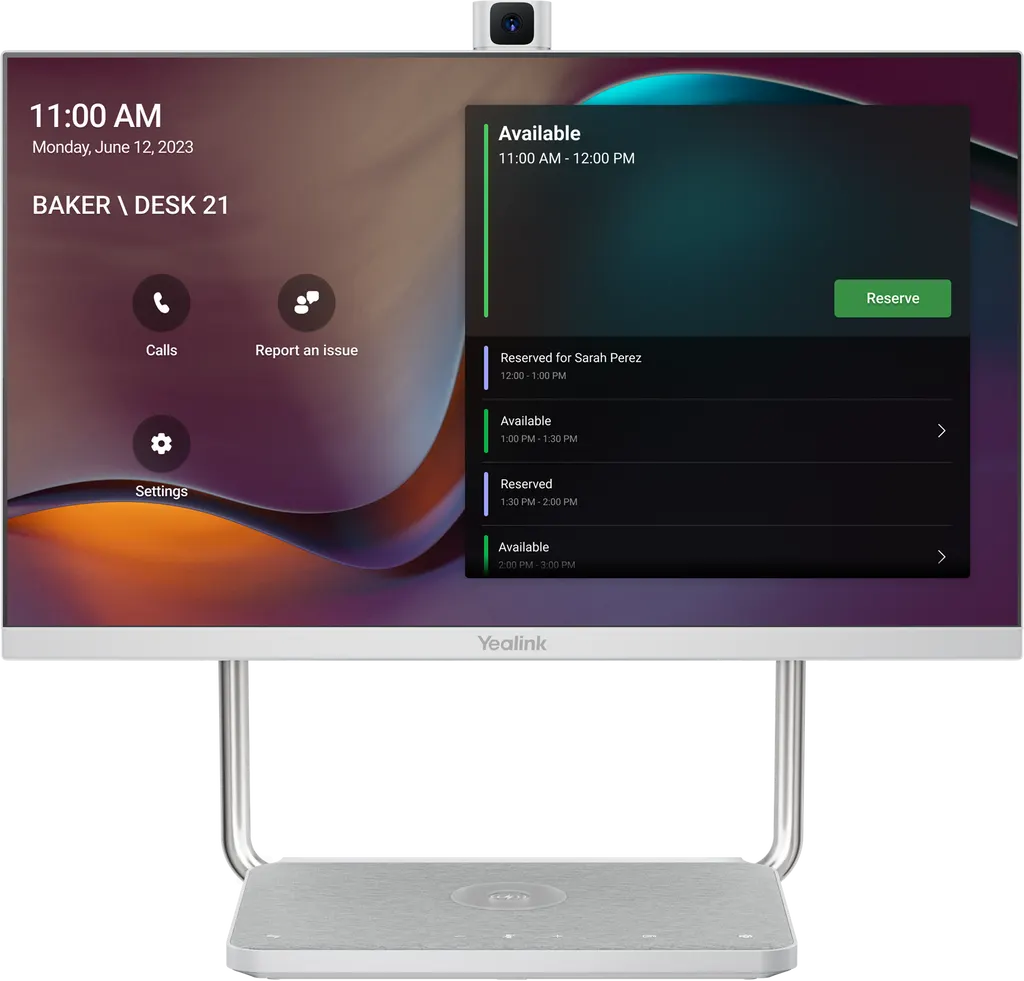
DeskVision A24
Yealink DeskVision A24 23.8-inch All-in-One Desktop Collaboration Display
- Video
- 1920 x 1080
- Field of view
- 83°
- Microphones
- Built-in Dual Microphones
- Connectivity
- provide PD up to 45 w
Priceon request
QuotationWithin 1 working day
DeliveryConfirmed with your quote, based on stock
Overview
Yealink DeskVision A24 combines a 23.8-inch Full-HD touch monitor with a camera, dual microphones, stereo speakers and a single USB-C cable that charges and docks a laptop. It runs as an independent video conferencing endpoint for Microsoft Teams Rooms on Android or Zoom Rooms, or as a plain PC monitor. Built for executive offices and phone rooms across Qatar where desk space is limited.
One desk, two roles: a monitor and a conferencing endpoint
The Yealink DeskVision A24 is an all-in-one desktop collaboration display. It puts a 23.8-inch touch monitor, a camera, dual microphones and stereo speakers into one chassis, so a desk no longer needs a separate webcam, speakerphone and monitor. It runs in two modes. In UC Workstation mode it serves as a secondary monitor for a laptop. In meeting mode it runs its own conferencing software, and that system can keep running in the background while the display is used as a monitor, so an incoming call can be answered without closing your work. It is sold as a Microsoft Teams Rooms on Android edition and as a Zoom Rooms Appliance edition.
Specifications that matter for the purchase
- Display: 23.8-inch panel at 1920 x 1080 with a 60 Hz refresh rate, 8-bit colour depth, 1000:1 contrast ratio and 178° viewing angles. Ten-point multi-touch.
- Camera: 83° field of view with video calls up to 1080p30, and a privacy cover that lifts automatically or by manual control.
- Audio: dual built-in microphones with 48 kHz sampling, built-in stereo speakers rated at 3 W, and intelligent noise cancellation.
- Ports: one USB-C 3.0 upstream port with Power Delivery up to 45 W, one HDMI input, one USB-C 3.0 downstream port, two USB-A 3.0 ports, one USB-A 2.0 headphone port, one RJ-45 network port and one DC 19 V input.
- Wireless: dual-band 2.4G/5G Wi-Fi, Bluetooth 4.2 and a Qi wireless charging pad on the device.
Where it fits in Qatar
An executive office in West Bay or Msheireb can use the A24 as the main desk for a senior manager who holds daily calls with head office abroad. The laptop connects through one USB-C cable, the desk stays tidy, and the screen remains useful between meetings for spreadsheets and documents. In Lusail, a project team that shares a small phone room can use the unit as a single meeting point for hybrid calls, and the Teams edition offers calendar-based one-click join. A government authority in Doha that is standardising senior management desks can order several units on one LPO, using the same edition across the floor.
What to plan before you order
At 540 x 219 x 478 mm and 7.904 kg net, the unit sits on the desk, so check desk depth, the position of power and network outlets, and the sightline from each seat. The manufacturer lists an operating temperature of 0 to 40°C and humidity of 10 to 95%. Qatar summer temperatures regularly exceed 45°C outdoors, so place the unit in an air-conditioned room and keep it away from direct sun through windows. Power consumption is 19 W. SmartRooms Qatar offers free site surveys and professional installation, so desk layout and cable routes can be confirmed before delivery.
Quotations are usually issued within one working day. Send us your room list, the number of units, the edition you need and the delivery location, and we will prepare a quotation that matches your purchase order or tender requirements. Request a quote today.
Highlights
- 23.8-inch Full-HD touch display at 1920 x 1080 with 10-point multi-touch
- Camera with 83° field of view and video calls up to 1080p30
- Dual microphones with intelligent noise cancellation and stereo speakers
- USB-C 3.0 upstream port with Power Delivery up to 45 W for laptops
- Qi wireless charging pad and dual-band 2.4G/5G Wi-Fi
- Available as Microsoft Teams Rooms on Android or Zoom Rooms edition
Room fit
Tell us the room size and platform (Teams, Zoom or BYOD) and we confirm the right combination with your quotation.
Estimated timeline
Quotation within 1 working day · delivery timing depends on stock availability, and we confirm it with your quotation.
Specifications
39 specifications · Source: manufacturer · checked Oct 2026
Display Features1
- Details
- Call controls - Call hold/Call mute/Call transfer/Call forward - Visual voicemail - Synchronized call logs Meeting call controls - Mute/unmute, hold/resume - Hang up - Add/remove participant Display lock/unlock Emergency calls Hot desking Leave a note Teams chat Files & One drive files Boss/Admin function Accessibility
Meeting Features1
- Details
- Calendar One-click join Meeting collaboration - Content sharing - Whiteboard Meeting control - Add participates - Hold/Resume - Camera On/Off - Mute/Unmute - Volume Up/Down - Hang up
Screen9
- Dimensions
- 23.8 inch
- Resolution
- 1920 x 1080
- Refresh Rate
- 60 Hz
- Color Depth
- 8 bit
- Contrast Ratio
- 1000:1
- - Horizontal
- 178°
- - Pitch
- 178°
- Multi-touch
- 10 points
- Details
- Viewing Angle:
Camera4
- Camera FOV
- 83°
- Video Specifications
- Up to 1080p30 Video Call
- Privacy Protection
- Automatically lifted or manually controlled lift
- Details
- 4K Camera
Audio9
- Microphone Type
- Built-in Dual Microphones
- - Frequency Response
- 100MHz-16kHz
- - Sensitivity
- 80±3 dB SPL@1m, 1W
- - Sampling Rate
- 48kHz
- - Rated Power
- 3W
- - THD (Total Harmonic Distortion)
- at 3W 1kHZ <3%
- - Rated Impedance
- 4 ohms
- - Maximum Power
- 3W
- Details
- Intelligent Noise Cancellation Technology Speaker: - Built-in Stereo Speaker
Application Mode2
- Android System
- Android 10.0
- Details
- Dual Mode: - Built-in Android - UC Workstation mode
Wireless capability2
- Wi-Fi
- supports 2.4G / 5G dual-mode Wi-Fi
- Bluetooth
- Support Bluetooth 4.2
Physical interface3
- 1 x USB-C 3.0 upstream DP-IN port
- provide PD up to 45 w
- Buttons
- Power, Volume, Mute, Camera on/off, Switch Mode, Teams Button
- Details
- 1 x HDMI in port 1 x USB-C 3.0 downstream port, connect to peripherals. Only applicable for PCs connected to the USB-C upstream port. 2 x USB-A 3.0 downstream port, connect to peripherals. 1x USB-A 2.0 downstream port, connect to headphones. 1 x DC 19V port 1 x Internet (RJ-45) port Qi Wireless Charging
Other Physical Features8
- N.W/CTN
- 7.904 kg
- G.W/CTN
- 9.346 kg
- Carton Meas (mm)
- 622 x 375 x 197
- Dimension (W.D.H)(mm)
- 540 x 219 x 478
- Power consumption
- 19w
- Operating temperature
- 0 - 40℃
- Operating humidity
- 10 - 95%
- Storage temperature
- -30 - 70℃
Downloads
14 files from the manufacturer
PDF
Yealink DeskVision A24 datasheets (PDF, 412 KB)
URL
Yealink DeskVision A24 datasheets (URL)
URL
Yealink DeskVision A24 datasheets (URL)
PDF
Yealink DeskVision A24 datasheets (PDF)
PDF
Yealink DeskVision A24 manuals & guides (PDF, 3.2 MB)
DXF
Yealink DeskVision A24 drawings & cad (DXF)
STP
Yealink DeskVision A24 drawings & cad (STP)
24 -
Yealink DeskVision A24 software & firmware (24 - FIRMWARE & RELEASE NOTE)
32 -
Yealink DeskVision A24 software & firmware (32 - FIRMWARE & RELEASE NOTE)
45 -
Yealink DeskVision A24 software & firmware (45 - FIRMWARE & RELEASE NOTE)
55 -
Yealink DeskVision A24 software & firmware (55 - FIRMWARE & RELEASE NOTE)
PDF
Yealink DeskVision A24 other documents (PDF, 1.0 MB)
MP4
Yealink DeskVision A24 other documents (MP4)
MP4
Yealink DeskVision A24 other documents (MP4)
Questions about DeskVision A24
What is the Yealink DeskVision A24 designed for?
It is an all-in-one desktop collaboration display for one person or a small group at a desk. It combines a 23.8-inch touch monitor with a camera, microphones and speakers, and it can act as a conferencing endpoint or as a plain PC monitor. Organisations in Qatar typically deploy it in executive offices, hybrid work spaces and phone rooms where a full meeting room is not needed.
What is the difference between the Microsoft Teams Rooms and Zoom Rooms editions?
The model is sold in two editions. The Microsoft Teams Rooms on Android edition is Teams Room Android certified, while the Zoom Rooms Appliance edition is built for Zoom meetings. Both share the same 23.8-inch display, camera, audio and ports. Choose the edition that matches the meeting platform your organisation already uses in Qatar.
Can I use it as a normal monitor when I am not in a call?
Yes. In UC Workstation mode the display works as a secondary monitor for a laptop, with a 1920 x 1080 resolution and a 60 Hz refresh rate. The conferencing system can keep running in the background, so incoming calls and notifications appear without closing your work. You switch between the two modes with the dedicated Switch Mode button on the device.
How many cables does a laptop need to connect?
One. The upstream USB-C 3.0 port carries the display signal, provides Power Delivery up to 45 W to the laptop, and connects the camera, microphones and speakers. The unit also has an HDMI input, USB-A and USB-C downstream ports, and an RJ-45 network port for wired connections. Confirm that your laptop supports USB-C Power Delivery before ordering.
Can the DeskVision A24 be installed in a summer office in Doha?
Yes, provided the room is air-conditioned. The rated operating temperature is 0 to 40°C with humidity from 10 to 95%, while outdoor summer temperatures in Qatar often exceed 45°C. Keep the unit away from windows and direct sunlight, and check that the room's cooling can hold the working range before installation.
What video quality does the camera deliver?
The camera has an 83° field of view and supports video calls up to 1080p30. The privacy cover lifts automatically or can be controlled manually. With that field of view, people seated at the desk are framed clearly, but larger groups in a meeting room need a room-scale camera system instead.
Is it suitable for a senior manager's office in West Bay?
Yes. A manager who holds daily calls with head office abroad gets a 23.8-inch screen for video, dual microphones with intelligent noise cancellation and 3 W stereo speakers for clear audio. The laptop charges through the same USB-C cable, which keeps the desk free of extra wiring. Request a quote for the edition that matches your calendar platform.
How would a hybrid team in Lusail use it?
A project team in Lusail that shares a small phone room can place the unit on a shared desk and join meetings from the Teams or Zoom edition. The dual microphones and noise cancellation help when participants sit at different distances from the unit. Dual-band Wi-Fi and an RJ-45 port let the IT team choose between wired and wireless network connection.
Can a government authority order several units for senior management floors?
Yes. SmartRooms Qatar supplies purchase orders (LPOs) and government tenders, including Monaqasat, so a ministry or authority can order several DeskVision A24 units on one LPO. Standardising on one edition across a floor simplifies IT support, and a site survey of each desk confirms depth and socket positions before delivery.
What are the physical dimensions and weight?
The unit measures 540 x 219 x 478 mm and weighs 7.904 kg net. The carton measures 622 x 375 x 197 mm with a gross weight of 9.346 kg. Check desk depth and cable routes before ordering. The listed power consumption is 19 W.
Does it need a separate power cable?
The manufacturer states that at least one power cord is required, and in most cases only one power cable is needed to get started. The device has a DC 19 V input, while its USB-C upstream port supplies Power Delivery up to 45 W to the connected laptop. This keeps the number of cables on the desk lower than in a traditional setup with a monitor, webcam and speakerphone.
How do I request a quote for this model?
Send SmartRooms Qatar the number of units, the edition you need and the delivery location, and the team usually issues a quotation within one working day. Payment can be made by bank transfer, cheque or purchase order. The product is covered by the manufacturer's warranty, and the quotation confirms lead time and the next steps.



