






Barco
ClickShare Power Supply 100W
Barco ClickShare Power Supply 100W, 100-Watt Video Conferencing Accessory
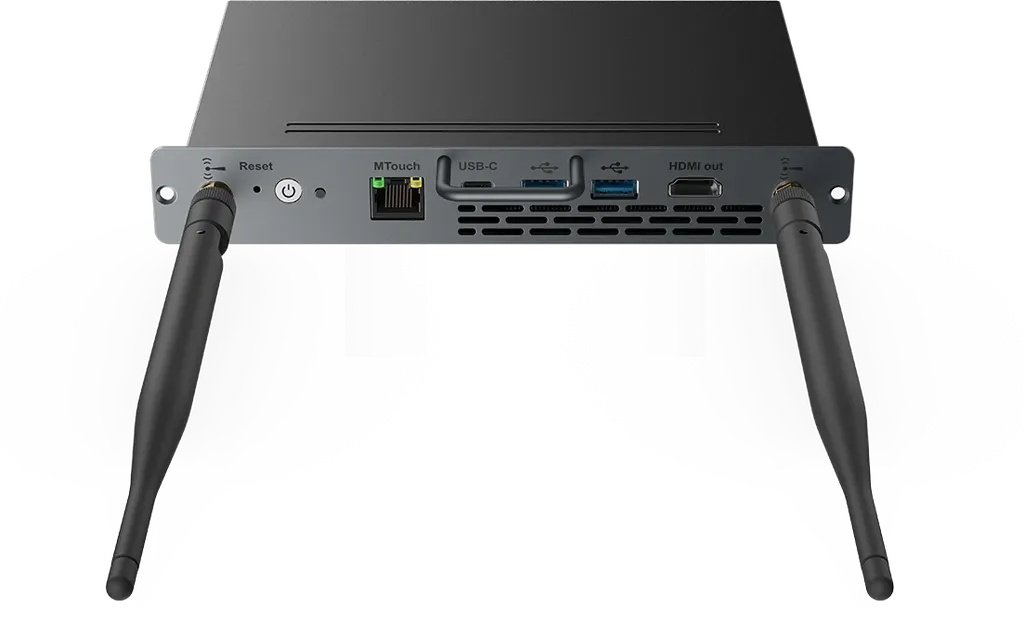
MCore-OPS-T
Yealink MCore-OPS-T Modular Compute Module for MeetingBoard
Priceon request
QuotationWithin 1 working day
DeliveryConfirmed with your quote, based on stock
Overview
The Yealink MCore-OPS-T is a pluggable Windows computing module with a built-in customised Teams Rooms image. It connects to the OPS interface of Yealink MB65 and MB86 MeetingBoard interactive whiteboards and runs as a secondary system. It supports TPM 2.0 and CEC. It suits Qatari boardrooms, meeting rooms and classrooms that already use, or plan to use, a MeetingBoard.
What the MCore-OPS-T is and how it attaches
The Yealink MCore-OPS-T is a pluggable computing module built for Yealink MeetingBoard interactive whiteboards. It connects to the OPS interface on the MB65 and MB86 models and runs as a secondary system beside the board. Because the computing sits in the board's OPS slot, the room does not need a separate desktop PC placed elsewhere to run the meeting environment.
Built-in Teams Rooms image and the secondary role
The module includes a customised Teams Rooms image, so the Windows environment on the unit is already prepared for Teams Rooms. The MeetingBoard stays the main display while the module provides the Windows computing side. Before ordering, confirm the Microsoft accounts and licences your organisation needs for the platform. SmartRooms Qatar can review those requirements with you as part of the quotation.
Security and connectivity facts that matter
- TPM 2.0 support: gives IT teams a hardware security standard to build device policies around for shared room computers.
- CEC support: allows compatible connected devices to be controlled through the HDMI link.
- Secondary system role: works as an add-on through the OPS interface rather than as a standalone board.
- Pluggable Windows module: a computing unit that is installed into the board rather than mounted as a separate box.
Where it fits in Qatar
Three situations suit this module well. A private school in Al Wakrah fitting out classrooms around MeetingBoard displays, where teachers want Teams Rooms available on the board without a desktop computer beside it. A government ministry boardroom in Msheireb that needs a standard Windows room environment and a single, consistent setup across meeting rooms. A company in Lusail or The Pearl running hybrid meetings that link its Doha team with colleagues abroad.
What to plan before ordering
Confirm that your MeetingBoard is an MB65 or MB86 with an OPS interface, because the module is designed for those models. Request a free site survey so SmartRooms Qatar can check the room layout, power points and cable routes before installation. Summer temperatures above 45 degrees Celsius and dust storms are common in Qatar, so confirm the installation environment with the SmartRooms Qatar team before placing the board near windows or in a lobby. Quotations are usually issued within one working day, and organisations buying through a purchase order (LPO) or a government tender can send that paperwork with the request.
Request a quote from SmartRooms Qatar for the Yealink MCore-OPS-T and tell us which MeetingBoard model you run, so we can match the module to your room.
Highlights
- Pluggable Windows computing module for MeetingBoard displays
- Built-in customised Teams Rooms image
- Connects to the OPS interface of MB65 and MB86
- Works as a secondary system alongside the board
- Supports TPM 2.0 and CEC
Room fit
Tell us the room size and platform (Teams, Zoom or BYOD) and we confirm the right combination with your quotation.
Estimated timeline
Quotation within 1 working day · delivery timing depends on stock availability, and we confirm it with your quotation.
Specifications
Source: manufacturer · checked Oct 2026
The full specification and datasheet for this model are available on request; we send them with your quotation.
Downloads
11 files from the manufacturer
URL
Yealink MCore-OPS-T datasheets (URL)
URL
Yealink MCore-OPS-T datasheets (URL)
PDF
Yealink MCore-OPS-T manuals & guides (PDF)
PDF
Yealink MCore-OPS-T manuals & guides (PDF)
MP4
Yealink MCore-OPS-T manuals & guides (MP4)
DXF
Yealink MCore-OPS-T drawings & cad (DXF)
STP
Yealink MCore-OPS-T drawings & cad (STP)
PDF
Yealink MCore-OPS-T other documents (PDF, 1.0 MB)
URL
Yealink MCore-OPS-T other documents (URL)
URL
Yealink MCore-OPS-T other documents (URL)
URL
Yealink MCore-OPS-T other documents (URL)
Questions about MCore-OPS-T
What is the Yealink MCore-OPS-T?
The Yealink MCore-OPS-T is a pluggable Windows computing module made for Yealink MeetingBoard interactive whiteboards. It connects to the OPS interface of the MB65 and MB86 and runs as a secondary system beside the board. It includes a built-in customised Teams Rooms image, so the Windows environment on the module is already prepared for Teams Rooms. Request a quote if your IT or facilities team is planning a room upgrade.
Which MeetingBoard models is it designed for?
The module is designed for the OPS interface on Yealink MB65 and MB86 MeetingBoard models. Before ordering, confirm that your board has an OPS slot and is one of these two models, because the module is not described for other displays. SmartRooms Qatar can check the model on your existing board or the one you plan to buy, then issue a quotation, usually within one working day.
Does it come with Teams Rooms?
Yes, the MCore-OPS-T has a built-in customised Teams Rooms image, so the Windows environment is already set up for Teams Rooms use. Your organisation still needs its own Microsoft accounts and licences for the platform. Ask the SmartRooms Qatar team to confirm what your IT department should prepare before the module arrives, so the room can be commissioned without delay.
What does working as a secondary system mean?
In this setup the MeetingBoard remains the main display, and the MCore-OPS-T provides the Windows computing side as a secondary system. The module plugs into the OPS interface of an MB65 or MB86, so computing and display are paired in one room installation. For a classroom or boardroom, this keeps the computing close to the board instead of in a separate desktop unit that needs its own space and cabling.
Does it support TPM 2.0 and CEC, and why does that matter?
Yes, the module supports TPM 2.0 and CEC. TPM 2.0 is a hardware security chip standard that IT teams use when setting security policies for shared room computers. CEC is an HDMI control feature that lets compatible connected devices be controlled through the HDMI link. Confirm with SmartRooms Qatar which devices in your room use CEC before you finalise the room layout.
Is it a good fit for a private school in Al Wakrah?
The module suits classrooms where the MeetingBoard is the main teaching display. A private school in Al Wakrah fitting out several rooms could use it so teachers get Windows-based Teams Rooms on the board without a desktop computer beside it. Check that each classroom board is an MB65 or MB86 with an OPS slot, then request a free site survey so cable routes and power points are confirmed for every room.
Would it work in a government ministry boardroom in Msheireb?
A ministry boardroom in Msheireb that needs a standard Windows room environment is a good match, provided its board is an MB65 or MB86. The built-in Teams Rooms image gives the IT team one consistent starting point across meeting rooms. If the purchase is made through a government tender, SmartRooms Qatar can work with the tender paperwork and carry out a site survey before installation is planned.
Can it support a hybrid meeting that links Doha with teams abroad?
A company in Lusail or The Pearl running hybrid meetings is a realistic scenario. Teams Rooms on the module lets staff in Doha join calls with colleagues abroad from the MeetingBoard itself. Confirm your camera, microphone and speaker needs separately, because the source data for this module describes the computing unit only and does not list audio or camera hardware.
Do I need a site survey before installing it?
A free site survey is worth requesting before installing this module in any room. SmartRooms Qatar can check the MeetingBoard position, access to the OPS slot, power points and cable routes. The survey also confirms where the display will be mounted or placed, so the layout is agreed before a purchase order is issued. This is especially useful when several rooms are being fitted out in one project.
What operating conditions does it need?
The manufacturer data available for this module does not state an operating temperature range, so the installation environment should be confirmed with the SmartRooms Qatar team. Summer temperatures above 45 degrees Celsius and dust storms are common in Qatar. Keep the board away from windows, lobbies and unconditioned areas unless the team has confirmed the environment first.
Is the MCore-OPS-T covered by a warranty?
Products supplied by SmartRooms Qatar are covered by the manufacturer's warranty. The warranty length and terms are set by Yealink and are not listed in the source data for this page, so ask the team for the current terms when you request a quote. Keep your purchase order and delivery paperwork together so any future warranty claim can be handled quickly.
Can we buy it through an LPO or a government tender?
Yes, organisations in Qatar can order through a purchase order (LPO) or a government tender, including Monaqasat. Include the exact MB65 or MB86 board model in your request so the quotation matches your hardware. SmartRooms Qatar accepts payment by bank transfer, cheque or purchase order, and quotations are usually issued within one working day.



