






Barco
ClickShare Power Supply 100W
Barco ClickShare Power Supply 100W, 100-Watt Video Conferencing Accessory
MCore-WallMount-01
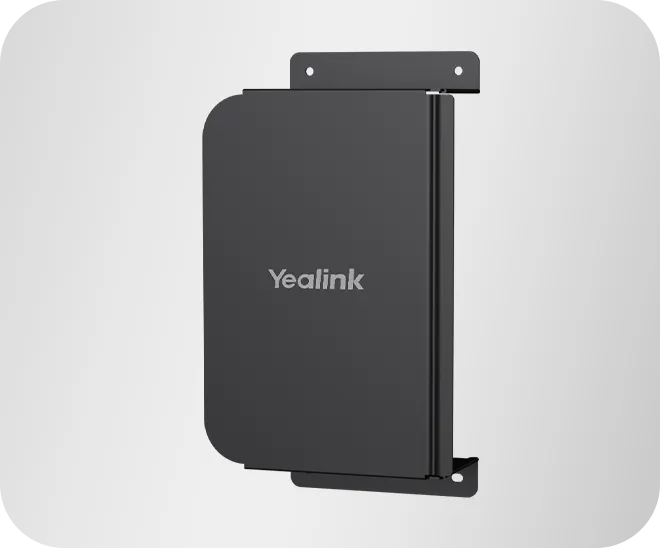
Yealink MCore-WallMount-01 Mini Wall Mount for MCore Series
Priceon request
QuotationWithin 1 working day
DeliveryConfirmed with your quote, based on stock
Overview
The MCore-WallMount-01 is a mini wall mount for Yealink MCore and MCore Pro video conferencing units. It can be taken apart for easier fitting, which helps in rooms where access to the wall is limited. Its listed size of 120 x 209 x 59 mm suits compact huddle rooms in Doha, Lusail and Education City. Request a quote before ordering.
What the MCore-WallMount-01 does in a meeting room
The MCore-WallMount-01 is a mini wall mount for the Yealink MCore and MCore Pro video conferencing units. It lets you fix the device to a wall rather than setting it on a desk or shelf, which keeps tables clear and gives a meeting room a tidier layout. It is an optional accessory, so it is planned alongside the unit it will hold.
The figures that matter for planning
- Part number: 3311068
- Mount dimensions (W x D x H): 120 x 209 x 59 mm
- Carton size: 390 x 299 x 270 mm
- Carton weight: 5.598 kg net, 6.192 kg gross
The mount dimensions describe the hardware you will fix to the wall. The carton figures describe the shipping package, which helps with storage and handling on site. Because the carton weight covers the package rather than one mount, ask for the per-unit weight before choosing fixings.
Disassembly and easier installation
The mount can be separated into parts. An installer can carry those parts through a narrow doorway, a corridor or a stairwell and assemble them at the wall. That is useful in older Doha buildings, where access routes are often tight, and in fit-outs where materials must be moved floor by floor.
Where it fits in Qatar
- A boardroom in a West Bay office, where the MCore unit sits on the wall so the executive table stays clear.
- A private school in Lusail equipping a staff meeting room, where wall-mounted hardware keeps the floor free for moving furniture.
- A clinic in Al Sadd setting up a consultation room that needs a neat, fixed installation.
Planning the installation
Confirm which MCore or MCore Pro model you are mounting, then check the wall before ordering. SmartRooms Qatar provides free site surveys, which cover wall construction, mounting height, cable routing and power access. Ask for one if your walls are plasterboard, glass-backed or of unknown construction.
The source data does not give an operating temperature range for this mount. Qatar summers can exceed 45°C, so keep the mount in an air-conditioned indoor room and away from direct sun through windows, and confirm the conditions with the SmartRooms Qatar team before you order.
Professional installation can be arranged, and the mount is covered by the manufacturer's warranty. Government tenders, including Monaqasat, purchase orders (LPOs), and payment by bank transfer, cheque or purchase order are all accepted, and quotations are usually issued within one working day.
Ask for a quotation
Send the MCore model, the number of mounts and the room type with your request, and we will prepare a quotation that matches your setup. Delivery is available to all eight municipalities of Qatar. Request a quote today and our team will confirm compatibility and the next steps.
Highlights
- Mini wall mount for Yealink MCore and MCore Pro units
- Part number 3311068
- Mount dimensions 120 x 209 x 59 mm
- Can be disassembled into parts for flexible installation
- Carton size 390 x 299 x 270 mm
- Carton weight 5.598 kg net, 6.192 kg gross
Room fit
Tell us the room size and platform (Teams, Zoom or BYOD) and we confirm the right combination with your quotation.
Estimated timeline
Quotation within 1 working day · delivery timing depends on stock availability, and we confirm it with your quotation.
Specifications
4 specifications · Source: manufacturer · checked Oct 2026
Physical Feature4
- Dimension (W x D x H)
- 120 x 209 x 59mm
- Carton Meas
- 390 x 299 x 270mm
- N.W/CTN
- 5.598kg
- G.W/CTN
- 6.192kg
Downloads
5 files from the manufacturerQuestions about MCore-WallMount-01
What is the MCore-WallMount-01?
The MCore-WallMount-01 is an optional mini wall mount for Yealink MCore and MCore Pro video conferencing units, listed under part number 3311068. It lets you fix the unit to a wall instead of placing it on a desk or shelf. This keeps table surfaces clear in meeting rooms where space is limited. Request a quote to confirm the right mount for your room.
Which Yealink devices is this mount compatible with?
The source data lists the mount as an optional accessory for MCore and MCore Pro. It is not listed for other Yealink models, so do not order it for a different device without checking. If your meeting room in Doha uses another Yealink unit, send the model number with your quote request and the SmartRooms Qatar team will confirm compatibility before you buy.
What size is the mount and how much wall space does it need?
The mount measures 120 x 209 x 59 mm (W x D x H) according to the manufacturer's listing. That footprint is small, which suits compact huddle rooms in Msheireb or Al Sadd. Allow clearance for cables when marking fixing points, and check the layout with an installer during the site survey.
How much does the mount weigh?
The manufacturer lists a carton net weight of 5.598 kg and a gross weight of 6.192 kg, with a carton size of 390 x 299 x 270 mm. These figures describe the shipping carton, not one mount, so a single-unit weight is not given in the data. Ask the SmartRooms Qatar team for the per-unit weight before choosing wall fixings for a fit-out in a new Lusail building.
What does flexible disassembly mean for installation?
The mount can be separated into parts, so an installer can carry it through a narrow door, a corridor or a stairwell and assemble it at the wall. This is useful in older Doha buildings where access routes are tight. Assembly should still be checked against your wall type and mounting height before any fixings are drilled.
Can I install it in a warm room or near a window in Qatar?
The source data does not give an operating temperature range for this mount, so no heat rating can be stated. Summer temperatures in Qatar can exceed 45°C, so keep the mount in an air-conditioned indoor meeting room and away from direct sun through windows. Confirm the room conditions with the SmartRooms Qatar team before you order.
Which MCore model should I name in a quote request?
Name the exact MCore or MCore Pro model in your quote request so the mount is matched to the right unit. The mount is listed within the MCore Series accessories, and a missing model name leads to mismatched orders, especially for boardrooms or training rooms. Include the number of rooms and the room type as well.
Do I need a site survey before mounting it on a wall?
Yes, a survey is recommended. SmartRooms Qatar provides free site surveys, which check wall construction, mounting height, cable routing and power access before drilling. This matters for a clinic in Al Sadd or an office in West Bay, where walls may be solid block, plasterboard or glass-backed partitions.
Which types of Qatar organisations would use this mount?
It suits organisations that hold video meetings from a fixed wall position, such as a government office in West Bay, a private school in Lusail setting up a staff meeting room, or a hotel meeting room in The Pearl. In each case the mount frees table space. If you are standardising several rooms, request one quotation covering all of them.
Can we order this mount through an LPO or a government tender?
Yes. SmartRooms Qatar accepts purchase orders (LPOs) and government tenders, including Monaqasat, and payment can be made by bank transfer, cheque or purchase order. A school ordering several MCore units with mounts can cover them in one quotation and one purchase order, which keeps paperwork simple.
Is the mount covered by a warranty?
Yes, products supplied by SmartRooms Qatar are covered by the manufacturer's warranty. The source data does not state the warranty duration or terms for this mount, so please ask for the warranty details in writing with your quotation. This helps procurement teams record cover in the asset register.



