





Thursday, 22 October 2026 · 11 Jumada I 1448 AH Sun – Thu · 9:00 – 18:00
+971 56 914 9477 العربية
WhatsApp

MCoreKit-C5-ZR (Base-kit)

Yealink MCoreKit-C5-ZR (Base-kit) Zoom Rooms Video Conferencing Kit

WhatsApp
Priceon request
QuotationWithin 1 working day
DeliveryConfirmed with your quote, based on stock
PDFDownload datasheet (MCoreKit-C5 ZR Datasheet.pdf)
Overview

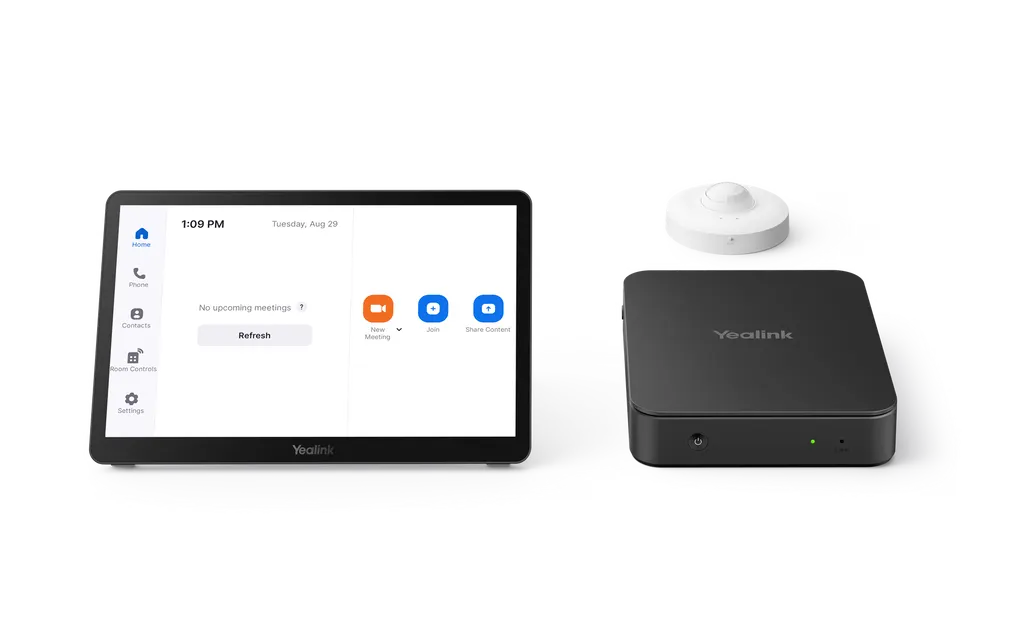
The Yealink MCoreKit-C5-ZR Base-kit pairs an MCore 4 mini-PC (16GB memory, 256GB SSD) with an 11.6-inch MTouch Plus touch console and a RoomSensor for Zoom Rooms. Three HDMI outputs drive up to three displays, and one CAT5e cable carries data and power between the mini-PC and touch panel. It suits meeting rooms in Doha, Lusail and Education City. Request a quote.

What the MCoreKit-C5-ZR Base-kit is

The Yealink MCoreKit-C5-ZR Base-kit is a room conferencing bundle built around Zoom Rooms. It combines an MCore 4 mini-PC, an MTouch Plus touch console and a RoomSensor occupancy sensor, so a meeting room can start and control Zoom sessions from one touch panel. The camera and microphone are chosen separately, which lets the kit match rooms of different sizes and seating layouts.

Processing, display and touch panel specifications

The MCore 4 mini-PC runs an Intel Ultra5 125H processor with 16GB (2 x 8GB) DDR5 memory and a 256GB SSD. It ships with Windows 11 IoT Enterprise, the Zoom Rooms App and Yealink RoomConnect preloaded. Its three HDMI outputs, one HDMI-Out 2.1 and two HDMI-Out 2.0, support CEC and EDID, so the system can drive up to three displays with automated display control and matched resolutions.

The MTouch Plus has an 11.6-inch narrow-bezel IPS display at 1920 x 1080. The screen can sit between 30 and 70 degrees to the desktop, and its support frame adjusts from 50 to 180 degrees. It accepts HDMI or USB-C video input and can be placed on a desk, fixed to a table or wall-mounted.

Connectivity, content sharing and room sensing

The mini-PC provides four USB 3.0 Type-A ports, an HDMI-In port, a 10/100/1000 Gigabit Ethernet port, a separate LAN port for the AV network, a 3.5mm headphone port and an RJ-45 MTouch port that links it to the touch panel. Wi-Fi supports IEEE 802.11 a/b/g/n/ac/ax and Bluetooth is BT 5.2. One CAT5e cable carries both data and power between the mini-PC and MTouch Plus, so no separate power cable is needed at the panel.

Wireless content sharing requires the optional WPP30 accessory, and the manufacturer states that no extra software or drivers are needed. Wired sharing runs through the HDMI or USB-C input on the touch panel. The RoomSensor uses Bluetooth BLE 5.2 on the 2.4 GHz band, with a reach of 30 m (100 ft) and up to four simultaneous connections. It detects occupancy, temperature, humidity and light across a 120-degree detection angle, adjustable by plus or minus 20 degrees, and its rated operating range is 0-40°C with 10-95% humidity.

Where it fits in Qatar

  • Boardroom in West Bay or Msheireb: one touch console starts Zoom Rooms meetings with a single tap, and the RoomSensor shows occupancy on the panel, which helps facilities teams see how the room is used.
  • Training room at a university or training centre in Education City: the three HDMI outputs can feed a main screen and extra displays, while a camera chosen for the room's length keeps remote trainers and external participants in view.
  • Meeting room at a government authority linking Doha with teams abroad: a fixed, managed room system reduces setup time before each call, and the kit can be monitored remotely by the IT team.

What to plan before ordering

Confirm the room size and the camera and microphone you need, because these are not part of the Base-kit package. Choose the MTouch Plus mounting position early: a desk, a table or a wall changes the viewing angle and the cable route. Check the room conditions as well. The RoomSensor's rated range is 0-40°C, so ask the SmartRooms Qatar team to confirm the environment for any space that is not air-conditioned or that receives direct sun. SmartRooms Qatar offers free site surveys before wall-mounting, delivery to all eight municipalities of Qatar and professional installation. The Yealink Device Management Platform or Cloud Service supports remote management, monitoring, configuration, updates and diagnostics of the connected devices.

Request a quote from SmartRooms Qatar for the MCoreKit-C5-ZR Base-kit, tell us your room size and camera choice, and we will prepare your quotation, usually within one working day. Purchase orders (LPOs) and government tenders are welcome.

Highlights

  • Intel Ultra5 125H, 16GB DDR5 and 256GB SSD in MCore 4
  • 11.6-inch IPS touch panel at 1920 x 1080 resolution
  • Three HDMI outputs with CEC and EDID support
  • One CAT5e cable carries data and power to the touch panel
  • RoomSensor detects occupancy, temperature, humidity and light
  • Zoom Rooms App and Windows 11 IoT Enterprise preloaded

Room fit

Tell us the room size and platform (Teams, Zoom or BYOD) and we confirm the right combination with your quotation.

Estimated timeline

Quotation within 1 working day · delivery timing depends on stock availability, and we confirm it with your quotation.

Specifications

13 specifications · Source: manufacturer · checked Oct 2026
Package Content1
Details
MCore 4,Gen-4 Mini-PC MTouch Plus, Gen-3 touch panel RoomSensor
Preload1
Details
Windows 11 IoT Enterprise X64 Windows 11 IoT Enterprise License Zoom Rooms App Yealink RoomConnect
MCore 4,Gen-4 Mini-PC6
Processor
Intel Ultra5 125H
Memory
16GB(2*8GB) DDR5
Storage
256GB SSD
WiFi
IEEE 802.11 a/b/g/n/ac/ax
Bluetooth
BT 5.2
Details
BIOS feature: 3x HDMI video output -CEC -EDID TPM2.0 Kernel DMA Interfaces: 1 x HDMI-Out 2.1 port 2 x HDMI-Out 2.0 port 1 x HDMI-In port 4 x USB3.0 Type-A Port 1 x MTouch Port (RJ-45) 1 x LAN port for AV network 1 x 10/100/1000 Gigabit Ethernet Port 1 x Power Supply Port 1 x 3.5mm headphone Port 1 x reset port 1 x Security Slot
MTouch Plus1
Details
Physical Features: 11.6-inch narrow bezel IPS display Angle between screen and desktop (30° ~ 70°) Adjustable angle of support frame (50° ~ 180°) Function Features: 1920 x 1080 video resolution Support wired and wireless (with WPP30) content sharing Support external PD power supply to power the sharing device Support HDMI/USB-C video input Support desktop placement, desktop fixed, and wall-mounted deployment
RoomSensor4
Detection angle
120°
Adjustable detection angle
±20°
Operating temperature
0-40℃
Operating humidity
10-95%

Downloads

100 files from the manufacturer
PDF Datasheets MCoreKit-C5 ZR Datasheet.pdf 312 KB Yealink MCoreKit-C5-ZR (Base-kit) datasheets (PDF, 312 KB) PDF Datasheets Yealink MCoreKit-C5U Datasheet.pdf 218 KB Yealink MCoreKit-C5-ZR (Base-kit) datasheets (PDF, 218 KB) PDF Manuals & guides Controller Quick User Guide for Zoom.pdf 314 KB Yealink MCoreKit-C5-ZR (Base-kit) manuals & guides (PDF, 314 KB) PDF Manuals & guides Controller Quick User Guide for Zoom.pdf 314 KB Yealink MCoreKit-C5-ZR (Base-kit) manuals & guides (PDF, 314 KB) PDF Manuals & guides Quick Setup.pdf 527 KB Yealink MCoreKit-C5-ZR (Base-kit) manuals & guides (PDF, 527 KB) PDF Manuals & guides Setup Checklist.pdf 41 KB Yealink MCoreKit-C5-ZR (Base-kit) manuals & guides (PDF, 41 KB) PDF Manuals & guides Yealink MCoreKit-C5U-ZR Quick Start Guide (EN, DE, FR, ES) V1.0 .pdf 589 KB Yealink MCoreKit-C5-ZR (Base-kit) manuals & guides (PDF, 589 KB) 1X Manuals & guides · Opens on manufacturer site 802.1x Yealink MCoreKit-C5-ZR (Base-kit) manuals & guides (1X) 1X Manuals & guides · Opens on manufacturer site 802.1x Yealink MCoreKit-C5-ZR (Base-kit) manuals & guides (1X) URL Manuals & guides · Opens on manufacturer site Audio Capture Yealink MCoreKit-C5-ZR (Base-kit) manuals & guides (URL) URL Manuals & guides · Opens on manufacturer site Audio Capture Yealink MCoreKit-C5-ZR (Base-kit) manuals & guides (URL) URL Manuals & guides · Opens on manufacturer site Audio Diagnostics Yealink MCoreKit-C5-ZR (Base-kit) manuals & guides (URL) URL Manuals & guides · Opens on manufacturer site Audio Diagnostics Yealink MCoreKit-C5-ZR (Base-kit) manuals & guides (URL) URL Manuals & guides · Opens on manufacturer site BYOD Mode Yealink MCoreKit-C5-ZR (Base-kit) manuals & guides (URL) URL Manuals & guides · Opens on manufacturer site BYOD Mode Yealink MCoreKit-C5-ZR (Base-kit) manuals & guides (URL) URL Manuals & guides · Opens on manufacturer site CEC Yealink MCoreKit-C5-ZR (Base-kit) manuals & guides (URL) URL Manuals & guides · Opens on manufacturer site CEC Yealink MCoreKit-C5-ZR (Base-kit) manuals & guides (URL) URL Manuals & guides · Opens on manufacturer site Camera Control Hovering Ball Yealink MCoreKit-C5-ZR (Base-kit) manuals & guides (URL) URL Manuals & guides · Opens on manufacturer site Camera Control Hovering Ball Yealink MCoreKit-C5-ZR (Base-kit) manuals & guides (URL) URL Manuals & guides · Opens on manufacturer site Change Administrator Password Yealink MCoreKit-C5-ZR (Base-kit) manuals & guides (URL) URL Manuals & guides · Opens on manufacturer site Change Administrator Password Yealink MCoreKit-C5-ZR (Base-kit) manuals & guides (URL) URL Manuals & guides · Opens on manufacturer site Change Device Password Yealink MCoreKit-C5-ZR (Base-kit) manuals & guides (URL) URL Manuals & guides · Opens on manufacturer site Change Device Password Yealink MCoreKit-C5-ZR (Base-kit) manuals & guides (URL) URL Manuals & guides · Opens on manufacturer site Connect Device to YDMP or YMCS Yealink MCoreKit-C5-ZR (Base-kit) manuals & guides (URL) URL Manuals & guides · Opens on manufacturer site Connect Device to YDMP or YMCS Yealink MCoreKit-C5-ZR (Base-kit) manuals & guides (URL) URL Manuals & guides · Opens on manufacturer site Connect YRC to YDMP or YMCS Yealink MCoreKit-C5-ZR (Base-kit) manuals & guides (URL) URL Manuals & guides · Opens on manufacturer site Connect YRC to YDMP or YMCS Yealink MCoreKit-C5-ZR (Base-kit) manuals & guides (URL) URL Manuals & guides · Opens on manufacturer site Device Firmware Update Yealink MCoreKit-C5-ZR (Base-kit) manuals & guides (URL) URL Manuals & guides · Opens on manufacturer site Export Log Yealink MCoreKit-C5-ZR (Base-kit) manuals & guides (URL) URL Manuals & guides · Opens on manufacturer site Export Log Yealink MCoreKit-C5-ZR (Base-kit) manuals & guides (URL) URL Manuals & guides · Opens on manufacturer site Feedback Yealink MCoreKit-C5-ZR (Base-kit) manuals & guides (URL) URL Manuals & guides · Opens on manufacturer site Feedback Yealink MCoreKit-C5-ZR (Base-kit) manuals & guides (URL) URL Manuals & guides · Opens on manufacturer site Install & Update Yealink MCoreKit-C5-ZR (Base-kit) manuals & guides (URL) URL Manuals & guides · Opens on manufacturer site Install & Update Yealink MCoreKit-C5-ZR (Base-kit) manuals & guides (URL) URL Manuals & guides · Opens on manufacturer site Instant Meeting Yealink MCoreKit-C5-ZR (Base-kit) manuals & guides (URL) URL Manuals & guides · Opens on manufacturer site Instant Meeting Yealink MCoreKit-C5-ZR (Base-kit) manuals & guides (URL) URL Manuals & guides · Opens on manufacturer site Join Meeting Yealink MCoreKit-C5-ZR (Base-kit) manuals & guides (URL) URL Manuals & guides · Opens on manufacturer site Join Meeting Yealink MCoreKit-C5-ZR (Base-kit) manuals & guides (URL) URL Manuals & guides · Opens on manufacturer site LLDP Yealink MCoreKit-C5-ZR (Base-kit) manuals & guides (URL) URL Manuals & guides · Opens on manufacturer site LLDP Yealink MCoreKit-C5-ZR (Base-kit) manuals & guides (URL) URL Manuals & guides · Opens on manufacturer site Language Yealink MCoreKit-C5-ZR (Base-kit) manuals & guides (URL) URL Manuals & guides · Opens on manufacturer site Language Yealink MCoreKit-C5-ZR (Base-kit) manuals & guides (URL) URL Manuals & guides · Opens on manufacturer site Local Camera Yealink MCoreKit-C5-ZR (Base-kit) manuals & guides (URL) URL Manuals & guides · Opens on manufacturer site Local Camera Yealink MCoreKit-C5-ZR (Base-kit) manuals & guides (URL) URL Manuals & guides · Opens on manufacturer site Local Microphone Yealink MCoreKit-C5-ZR (Base-kit) manuals & guides (URL) URL Manuals & guides · Opens on manufacturer site Local Microphone Yealink MCoreKit-C5-ZR (Base-kit) manuals & guides (URL) URL Manuals & guides · Opens on manufacturer site Local Speaker Yealink MCoreKit-C5-ZR (Base-kit) manuals & guides (URL) URL Manuals & guides · Opens on manufacturer site Local Speaker Yealink MCoreKit-C5-ZR (Base-kit) manuals & guides (URL) URL Manuals & guides · Opens on manufacturer site Log In Yealink MCoreKit-C5-ZR (Base-kit) manuals & guides (URL) URL Manuals & guides · Opens on manufacturer site Log In Yealink MCoreKit-C5-ZR (Base-kit) manuals & guides (URL) URL Manuals & guides · Opens on manufacturer site Manage Participants Yealink MCoreKit-C5-ZR (Base-kit) manuals & guides (URL) URL Manuals & guides · Opens on manufacturer site Manage Participants Yealink MCoreKit-C5-ZR (Base-kit) manuals & guides (URL) URL Manuals & guides · Opens on manufacturer site Meeting Layout Yealink MCoreKit-C5-ZR (Base-kit) manuals & guides (URL) URL Manuals & guides · Opens on manufacturer site Meeting Layout Yealink MCoreKit-C5-ZR (Base-kit) manuals & guides (URL) URL Manuals & guides · Opens on manufacturer site Multiple Monitors Mode Yealink MCoreKit-C5-ZR (Base-kit) manuals & guides (URL) URL Manuals & guides · Opens on manufacturer site Multiple Monitors Mode Yealink MCoreKit-C5-ZR (Base-kit) manuals & guides (URL) URL Manuals & guides · Opens on manufacturer site Plugin Permission Management Yealink MCoreKit-C5-ZR (Base-kit) manuals & guides (URL) URL Manuals & guides · Opens on manufacturer site Plugin Permission Management Yealink MCoreKit-C5-ZR (Base-kit) manuals & guides (URL) URL Manuals & guides · Opens on manufacturer site Proxy Server Yealink MCoreKit-C5-ZR (Base-kit) manuals & guides (URL) URL Manuals & guides · Opens on manufacturer site Proxy Server Yealink MCoreKit-C5-ZR (Base-kit) manuals & guides (URL) URL Manuals & guides · Opens on manufacturer site Recovery Mode Yealink MCoreKit-C5-ZR (Base-kit) manuals & guides (URL) URL Manuals & guides · Opens on manufacturer site Recovery Mode Yealink MCoreKit-C5-ZR (Base-kit) manuals & guides (URL) URL Manuals & guides · Opens on manufacturer site Remote Management Yealink MCoreKit-C5-ZR (Base-kit) manuals & guides (URL) URL Manuals & guides · Opens on manufacturer site Remote Management Yealink MCoreKit-C5-ZR (Base-kit) manuals & guides (URL) URL Manuals & guides · Opens on manufacturer site Screen and Energy Saver Yealink MCoreKit-C5-ZR (Base-kit) manuals & guides (URL) URL Manuals & guides · Opens on manufacturer site Screen and Energy Saver Yealink MCoreKit-C5-ZR (Base-kit) manuals & guides (URL) URL Manuals & guides · Opens on manufacturer site Switch Account Yealink MCoreKit-C5-ZR (Base-kit) manuals & guides (URL) URL Manuals & guides · Opens on manufacturer site Switch Account Yealink MCoreKit-C5-ZR (Base-kit) manuals & guides (URL) URL Manuals & guides · Opens on manufacturer site Time and Date Yealink MCoreKit-C5-ZR (Base-kit) manuals & guides (URL) URL Manuals & guides · Opens on manufacturer site Time and Date Yealink MCoreKit-C5-ZR (Base-kit) manuals & guides (URL) URL Manuals & guides · Opens on manufacturer site Troubleshoot Yealink MCoreKit-C5-ZR (Base-kit) manuals & guides (URL) URL Manuals & guides · Opens on manufacturer site Troubleshoot Yealink MCoreKit-C5-ZR (Base-kit) manuals & guides (URL) URL Manuals & guides · Opens on manufacturer site Use Yealink RoomConnect Yealink MCoreKit-C5-ZR (Base-kit) manuals & guides (URL) URL Manuals & guides · Opens on manufacturer site Use Yealink RoomConnect Yealink MCoreKit-C5-ZR (Base-kit) manuals & guides (URL) URL Manuals & guides · Opens on manufacturer site VLAN Yealink MCoreKit-C5-ZR (Base-kit) manuals & guides (URL) URL Manuals & guides · Opens on manufacturer site VLAN Yealink MCoreKit-C5-ZR (Base-kit) manuals & guides (URL) URL Manuals & guides · Opens on manufacturer site Video Diagnostics Yealink MCoreKit-C5-ZR (Base-kit) manuals & guides (URL) URL Manuals & guides · Opens on manufacturer site Video Diagnostics Yealink MCoreKit-C5-ZR (Base-kit) manuals & guides (URL) URL Manuals & guides · Opens on manufacturer site Windows Update Yealink MCoreKit-C5-ZR (Base-kit) manuals & guides (URL) URL Manuals & guides · Opens on manufacturer site Wired Network Yealink MCoreKit-C5-ZR (Base-kit) manuals & guides (URL) URL Manuals & guides · Opens on manufacturer site Wired Network Yealink MCoreKit-C5-ZR (Base-kit) manuals & guides (URL) URL Manuals & guides · Opens on manufacturer site Wireless Network Yealink MCoreKit-C5-ZR (Base-kit) manuals & guides (URL) URL Manuals & guides · Opens on manufacturer site Wireless Network Yealink MCoreKit-C5-ZR (Base-kit) manuals & guides (URL) URL Manuals & guides · Opens on manufacturer site Yealink RoomConnect Update Yealink MCoreKit-C5-ZR (Base-kit) manuals & guides (URL) URL Manuals & guides · Opens on manufacturer site Zoom Rooms App Update Yealink MCoreKit-C5-ZR (Base-kit) manuals & guides (URL) PDF Other documents Yealink Regulatory Notice V1.2.pdf 1.0 MB Yealink MCoreKit-C5-ZR (Base-kit) other documents (PDF, 1.0 MB) URL Other documents · Opens on manufacturer site Audio Input and Output Compatibility Lists Yealink MCoreKit-C5-ZR (Base-kit) other documents (URL) URL Other documents · Opens on manufacturer site Audio Input and Output Compatibility Lists Yealink MCoreKit-C5-ZR (Base-kit) other documents (URL) URL Other documents · Opens on manufacturer site HTTPS API Yealink MCoreKit-C5-ZR (Base-kit) other documents (URL) URL Other documents · Opens on manufacturer site HTTPS API Yealink MCoreKit-C5-ZR (Base-kit) other documents (URL) MP4 Other documents · Opens on manufacturer site How to Share Content with USB Cable V1.0.mp4 Yealink MCoreKit-C5-ZR (Base-kit) other documents (MP4) MP4 Other documents · Opens on manufacturer site How to Share Content with WPP30 V1.0.mp4 Yealink MCoreKit-C5-ZR (Base-kit) other documents (MP4) URL Other documents · Opens on manufacturer site Rooms Accessories Compatibility Lists Yealink MCoreKit-C5-ZR (Base-kit) other documents (URL) URL Other documents · Opens on manufacturer site Rooms Accessories Compatibility Lists Yealink MCoreKit-C5-ZR (Base-kit) other documents (URL) URL Other documents · Opens on manufacturer site Rooms Product Family Yealink MCoreKit-C5-ZR (Base-kit) other documents (URL) URL Other documents · Opens on manufacturer site Rooms Product Family Yealink MCoreKit-C5-ZR (Base-kit) other documents (URL) URL Other documents · Opens on manufacturer site Rooms Supported Features List Yealink MCoreKit-C5-ZR (Base-kit) other documents (URL) URL Other documents · Opens on manufacturer site Rooms Supported Features List Yealink MCoreKit-C5-ZR (Base-kit) other documents (URL) URL Other documents · Opens on manufacturer site Socket API Yealink MCoreKit-C5-ZR (Base-kit) other documents (URL) URL Other documents · Opens on manufacturer site Socket API Yealink MCoreKit-C5-ZR (Base-kit) other documents (URL)

Questions about MCoreKit-C5-ZR (Base-kit)

What is the MCoreKit-C5-ZR Base-kit used for?
It is a room conferencing kit built to run Zoom Rooms meetings from a single touch console in a camera-equipped room. The bundle combines an MCore 4 mini-PC, an 11.6-inch MTouch Plus panel and a RoomSensor, with the Zoom Rooms App preloaded. It suits meeting rooms, boardrooms and training rooms in Qatar where staff want one-tap meeting start and a ready-to-use room system instead of assembling separate parts.
What is included in the box?
The Base-kit package lists three items: the MCore 4 Gen-4 mini-PC, the MTouch Plus Gen-3 touch panel and a RoomSensor. The mini-PC carries an Intel Ultra5 125H processor, 16GB DDR5 memory and a 256GB SSD. A camera and microphone are not in the package content, so they are selected separately. Ask for a quotation that lists every component your room needs.
Which cameras and microphones work with this kit?
The manufacturer lists compatible cameras including the UVC34 and UVC40 all-in-one 4K USB video bars, the UVC84 4K USB PTZ camera and the UVC86 4K dual-eye intelligent tracking camera. Audio options named in the source include the VCM35 wired microphone, the VCM36-W and CPW65 wireless microphones, the VCM38 ceiling microphone and the MSpeaker II soundbar. Choose based on room length and seating, and confirm the combination on your quotation.
How many displays can the MCore 4 mini-PC drive?
The mini-PC has three HDMI video outputs: one HDMI-Out 2.1 port and two HDMI-Out 2.0 ports, with CEC and EDID support. CEC allows connected displays to follow power commands from the system, and EDID helps the mini-PC match the resolution each screen supports. This suits a room with a main display and extra screens, such as a training room where participants need to see both slides and the remote feed.
Can the MTouch Plus be wall-mounted or placed on a table?
Yes. The MTouch Plus supports desktop placement, desktop fixed and wall-mounted deployment, and its support frame adjusts from 50 to 180 degrees. The screen angle to the desktop ranges from 30 to 70 degrees. Before a wall mount in a Doha office or a Lusail meeting room, SmartRooms Qatar offers a free site survey to confirm height, wall construction and the cable route from the mini-PC.
How does the RoomSensor work and what is its range?
The RoomSensor detects occupancy, temperature, humidity and light, and connects using Bluetooth BLE 5.2 on the 2.4 GHz band. Its reach is 30 m (100 ft), and it supports up to four simultaneous connections in a BLE mesh. Its detection angle is 120 degrees, adjustable by plus or minus 20 degrees. The rated operating range is 0-40°C and 10-95% humidity, so check the room conditions before placing it.
Is wireless screen sharing included?
Wireless sharing uses the WPP30, which the manufacturer lists as an optional accessory. The source states that no additional software or drivers are needed once you plug it into your device. Wired sharing works through the HDMI or USB-C video input on the MTouch Plus. If participants in your room need wireless sharing, state this in your quotation request so the WPP30 is included in the quote.
Does the kit come with a Zoom Rooms subscription?
The Zoom Rooms App and Windows 11 IoT Enterprise are preloaded on the mini-PC, along with Yealink RoomConnect. The product data does not state whether a Zoom subscription is bundled, so do not assume one is included. Ask for the Zoom licensing position to be confirmed on the quotation, so your IT team can check it against existing Zoom accounts before purchase.
How can IT teams manage the kit remotely across several rooms?
The devices support the Yealink Device Management Platform and Cloud Service. The platform allows remote management, monitoring, configuration, updates and diagnostics of all connected devices. For an organisation with several rooms fitted with the same kit, IT staff can keep settings and updates aligned without visiting each room. Ask whether this platform fits your estate when you request a quote.
We are fitting out several classrooms at a private school in Al Wakrah. How should we order?
Each classroom or staff meeting room needs its own mini-PC, touch panel and RoomSensor, plus a camera and microphone chosen for the room size. Multiple kits can be ordered under one purchase order (LPO). Send your room list to SmartRooms Qatar and we will return a quotation, usually within one working day, with delivery to all eight municipalities of Qatar.
Can the kit go in a room with a window facing the sun in Doha summers?
Summer temperatures in Doha can exceed 45°C, and the RoomSensor's rated operating range is 0-40°C. The source does not give an operating range for the mini-PC or the touch panel. Ask SmartRooms Qatar to confirm suitability before placing the kit in a room with direct sun or an unconditioned space. A free site survey can check window exposure and the position of the touch panel.
What should we plan for before a wall-mounted installation?
Plan the MTouch Plus height and viewing angle first, because the panel supports a 30 to 70 degree screen angle to the desktop and a 50 to 180 degree support frame adjustment. Then confirm the cable route for the single CAT5e link between the mini-PC and the panel. SmartRooms Qatar offers a free site survey and professional installation, so the wall, cable path and camera position can be agreed before the work starts.

Similar models

Yealink MVC S60 Yealink MVC S60 Microsoft Teams Rooms System with 360° Camera
360°
Biamp Evoko Liso Wall Mount Kit Biamp Evoko Liso Wall Mount Kit (910-01930) for Room Scheduling Displays
TAA Compliant
Email Call




