






Barco
ClickShare Power Supply 100W
Barco ClickShare Power Supply 100W, 100-Watt Video Conferencing Accessory
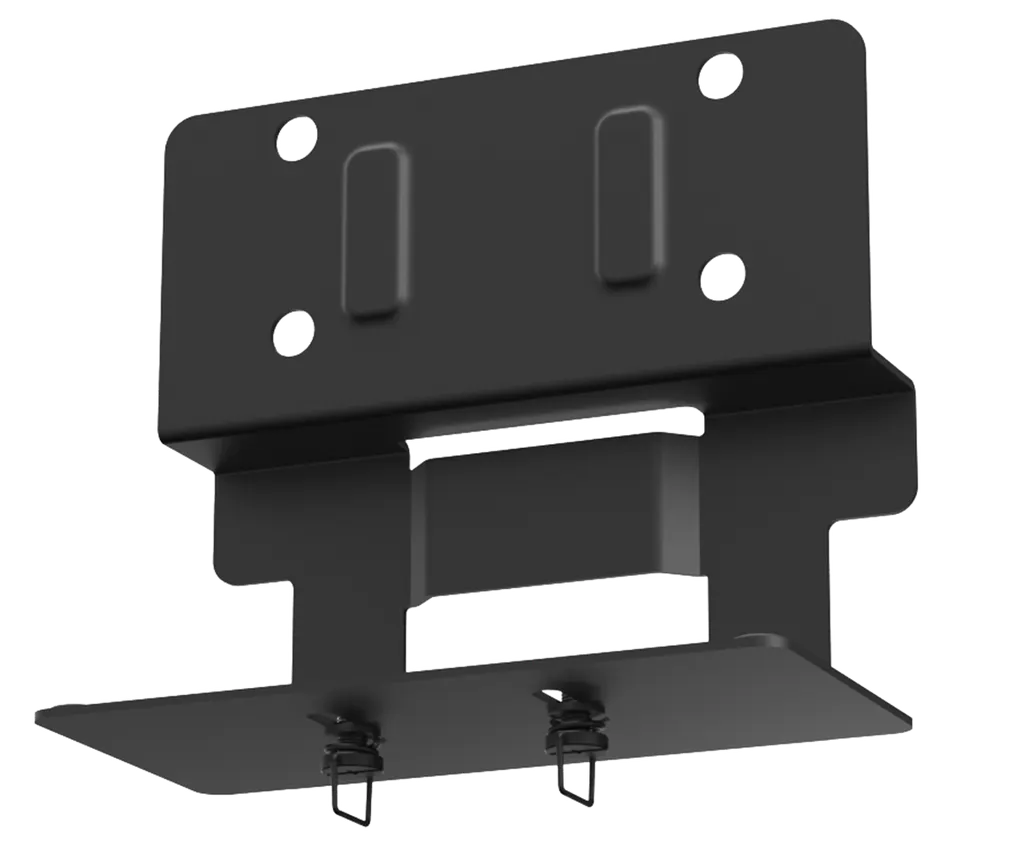
MD-AVBracket-S
Yealink MD-AVBracket-S Mounting Kit for MeetingBar and SmartVision
Priceon request
QuotationWithin 1 working day
DeliveryConfirmed with your quote, based on stock
Overview
The Yealink MD-AVBracket-S is a mounting kit that attaches a MeetingBar A25, MeetingBar A40 or SmartVision 40 to a MeetingDisplay, so the video bar and panel install as one unit without drilling the wall. Part number 3311110, net weight 0.676 kg, hole spacing 100 mm × 45 mm. Suited to Doha meeting rooms and classrooms that already use a Yealink MeetingDisplay.
What the MD-AVBracket-S is for
The Yealink MD-AVBracket-S is a dedicated mounting kit that joins a Yealink video bar to a Yealink MeetingDisplay. The manufacturer lists it for the MeetingBar A25, MeetingBar A40 and SmartVision 40. Instead of fixing a bar and a display to a wall as two separate jobs, the bracket lets both be hung and secured together, which keeps the set-up tidy and reduces the number of separate fixings on the wall.
The kit is catalogued under part number 3311110 and sits within the room mount kits and cables range of Yealink's video conferencing line.
Dimensions and mounting points
The bracket measures 165 mm × 84.5 mm × 149 mm (width, depth and height) and weighs 0.676 kg net. Its carton measures 200 mm × 120 mm × 190 mm and weighs 0.812 kg gross. The mounting hole spacing is 100 mm × 45 mm (width and height). Use these figures when you plan the wall position, and check them against the display and bar you will mount before you order.
Installation without drilling into the wall
The design is a screw-and-hang arrangement. The manufacturer describes the fitting as tool-friendly, and the bracket itself does not require any wall drilling. Power and cable routing for the room remain separate tasks that should be planned in advance.
- Attachment: the bar is secured to the MeetingDisplay through the bracket.
- Tooling: the fitting is designed to be completed with simple hand tools.
- Wall work: no wall drilling is needed for the bracket.
Where it fits in Qatar
In a company meeting room in West Bay or Msheireb, a display is often fixed to one wall and a camera bar must sit with it. This bracket suits a team that wants the bar mounted at the display rather than on a separate shelf or a second wall plate, which keeps the front of the room clean for remote participants joining from abroad.
In a classroom or seminar room in Education City or Lusail, a university department can mount the bar beneath a MeetingDisplay in a tidy arrangement. In a hotel meeting room in The Pearl, the same pairing gives a neat front-of-room look for hybrid events.
What to plan before ordering
- Confirm the exact bar model: the listing title refers to A40/S40, while the product page lists MeetingBar A25, MeetingBar A40 and SmartVision 40.
- Measure the wall, the MeetingDisplay mounting points and the 100 mm × 45 mm hole spacing before fitting.
- Confirm the room environment with the SmartRooms Qatar team, as the source data gives no operating temperature range for this bracket.
SmartRooms Qatar offers a free site survey, which is useful before fitting a display and bar on a wall in a busy Qatari office, school or hall. Quotations are usually issued within one working day. Request a quote with your bar, display and room details, and we will confirm compatibility and supply terms for your order.
Highlights
- Mounts MeetingBar A25, MeetingBar A40 or SmartVision 40 to a MeetingDisplay
- No wall drilling required for the bracket itself
- Screw-and-hang, tool-friendly installation
- Hole spacing 100 mm × 45 mm
- Net weight 0.676 kg; carton 200 × 120 × 190 mm
- Part number 3311110
Room fit
Tell us the room size and platform (Teams, Zoom or BYOD) and we confirm the right combination with your quotation.
Estimated timeline
Quotation within 1 working day · delivery timing depends on stock availability, and we confirm it with your quotation.
Specifications
5 specifications · Source: manufacturer · checked Oct 2026
Dimension (W.D.H)2
- Dimension
- 165 mm × 84.5 mm × 149 mm
- Carton Meas
- 200 mm × 120 mm × 190 mm
Hole Spacing Dimension (W.H)1
- Details
- 100 mm × 45 mm
Weight2
- N.W/CTN
- 0.676 kg (1.49 lbs)
- G.W/CTN
- 0.812 kg (1.79 lbs)
Downloads
6 files from the manufacturer
PDF
Yealink MD-AVBracket-S datasheets (PDF, 78 KB)
PDF
Yealink MD-AVBracket-S manuals & guides (PDF, 1.6 MB)
DXF
Yealink MD-AVBracket-S drawings & cad (DXF)
STP
Yealink MD-AVBracket-S drawings & cad (STP)
PDF
Yealink MD-AVBracket-S other documents (PDF, 65 KB)
PDF
Yealink MD-AVBracket-S other documents (PDF, 1.0 MB)
Questions about MD-AVBracket-S
What does the MD-AVBracket-S do?
The MD-AVBracket-S is a mounting kit that attaches a Yealink video bar to a Yealink MeetingDisplay. The manufacturer lists it for the MeetingBar A25, MeetingBar A40 and SmartVision 40. Rather than fixing the bar and the display to the wall separately, you hang and secure them together. This suits meeting rooms in Doha where a neat front-of-room layout matters for hybrid meetings.
Which devices is it compatible with?
The product page lists the MeetingBar A25, MeetingBar A40 and SmartVision 40. The listing title, however, refers to A40/S40, which does not match the page. Before you order, send your exact bar model and MeetingDisplay to the SmartRooms Qatar team, who will confirm compatibility in the quotation. Do not assume an S40 fit from the title alone.
Does installing the bracket require drilling into the wall?
No. The manufacturer states that no wall drilling is required for the bracket, and describes the installation as screw-and-hang and tool-friendly. You still need to plan power and cable routing for the room. A free site survey from SmartRooms Qatar can confirm the wall position and suitable fixings for your wall type before any work starts.
What are the bracket's dimensions and weight?
The bracket measures 165 mm × 84.5 mm × 149 mm and weighs 0.676 kg net. Its carton measures 200 mm × 120 mm × 190 mm and weighs 0.812 kg gross. These figures help you plan the wall space above or beside a display. Confirm the final fit against your display dimensions before ordering, especially for a boardroom wall with limited clearance.
What hole spacing does the bracket use?
The mounting hole spacing is 100 mm × 45 mm, measured as width by height. Check this against the MeetingDisplay and the bar's mounting points during your site survey so the holes line up. If an installer finds a mismatch, send the exact model numbers to SmartRooms Qatar for review rather than adapting the bracket on site.
Is this kit suitable for a meeting room in an office tower in West Bay?
It can suit a West Bay boardroom where a MeetingDisplay is already planned and a Yealink bar must sit with it. The source data gives no operating temperature range for this bracket, so confirm the room is indoor and air-conditioned. Send the room layout and display model with your quote request, and the SmartRooms Qatar team will confirm the set-up.
Can a private school in Al Wakrah use it in classrooms?
Yes, if the classroom uses a Yealink MeetingDisplay and one of the listed bars. A private school fitting out a new classroom or hall in Al Wakrah can use the screw-and-hang design to keep the bar and display together, without drilling the wall for the bracket. Request a quote that lists each room separately, so the order matches the bar model in each classroom.
Could a hotel meeting room in Lusail use it for hybrid conferences?
A hotel meeting room in Lusail that hosts hybrid conferences with teams abroad can pair the bar with a display using this bracket. Because the source gives no operating temperature for the bracket, confirm room conditions before fitting, particularly if the room has large windows that receive strong afternoon sun. A site survey helps plan the layout before installation.
Can a government ministry in Msheireb buy it through a tender or LPO?
Yes. SmartRooms Qatar supplies government and public bodies and works with purchase orders (LPOs) and government tenders, including Monaqasat. Payment is by bank transfer, cheque or purchase order. Include the bar and MeetingDisplay models, the quantities and the room locations in your request, so the quotation matches your procurement file.
Does the kit include the MeetingBar or the MeetingDisplay?
The source data describes the MD-AVBracket-S as a mounting kit for the bar and display, and it does not list the bar or the panel as included items. Confirm the package contents when you request your quotation, so you know exactly which items are supplied and which must be ordered separately.
Is the bracket covered by warranty?
SmartRooms Qatar supplies products covered by the manufacturer's warranty. The source data does not state a warranty duration or terms for this bracket, so ask the quotation team for the applicable warranty terms before ordering. Your quotation will identify the product and part number 3311110 covered by the order.
Can I fit it without a professional installer?
The manufacturer describes the fitting as tool-friendly and screw-and-hang, so a competent technician can complete it with simple tools. For a wall in a busy Doha office or school, check the bracket against the display and bar before fitting, and make sure the mounting holes line up with the fixings suited to your wall type.



