Thursday, 22 October 2026 · 11 Jumada I 1448 AH Sun – Thu · 9:00 – 18:00
+971 56 914 9477 العربية
WhatsApp

MeetingBar A50

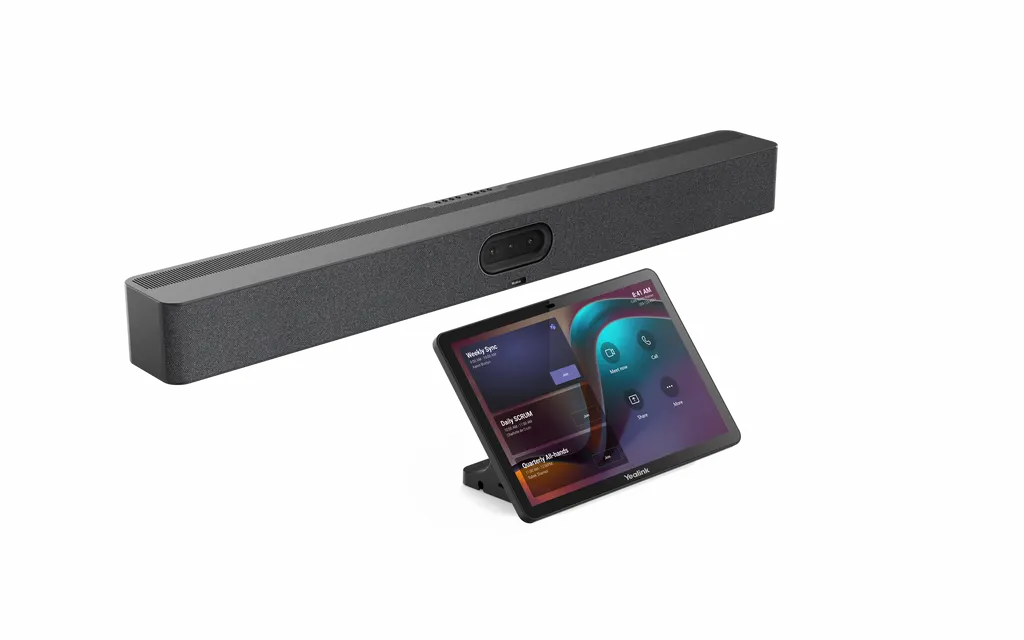
Yealink MeetingBar A50 All-in-One Video Bar

Video
3840*2160
Zoom
Up to 1080p30fps
Pickup range
22-108dBSPL
Platforms
1080p30fps in meeting
WhatsApp
Priceon request
QuotationWithin 1 working day
DeliveryConfirmed with your quote, based on stock
PDFDownload datasheet (Yealink MeetingBar A50 Datasheet.pdf)
Overview

The Yealink MeetingBar A50 is an all-in-one video bar for medium to large meeting rooms, with a Qualcomm 8550 processor, three 50MP cameras (one wide-angle, two telephoto), a 16-microphone array with a 10 m pickup range and four built-in speakers. It suits boardrooms and conference rooms for 7 to 15 people in Doha, Lusail and West Bay, and comes in Microsoft Teams Rooms on Android and Zoom Rooms editions.

A video bar for rooms seating 7 to 15 people

The Yealink MeetingBar A50 combines the camera, microphone array, speakers and processing in one unit, so a medium or large meeting room can run on one main device instead of separate cameras and ceiling microphones. The manufacturer recommends it for 7 to 15 people. A Qualcomm 8550 processor runs on-device features such as IntelliFocus, Video Fence, Auto Framing, Speaker Tracking and People Counting.

Three 50MP cameras and a physical privacy shutter

The bar has one wide-angle camera and two telephoto cameras, each rated at 50MP. The wide lens covers a 98° horizontal field of view, and the telephoto lenses narrow to 41.6°, giving closer detail of people seated further away. Video output reaches 4K at 30 fps or 1080p at 60 fps, with 8x digital zoom. An electric lens cap closes automatically when the meeting ends, and minimum illumination is 0.5 lux in daytime and 0.1 lux at night.

Audio, ports and cabling

A 16-element MEMS microphone array gives a 10-metre pickup range. Full-duplex audio, acoustic echo cancellation, automatic gain control and AI-enhanced noise suppression reduce background noise and echo during calls. Four built-in speakers rated at 5W each cover the room, and three expansion microphones can be added for larger tables.

  • Two HDMI outputs for a display and a second monitor
  • Ethernet at 10/100/1000 Mbps, plus Wi-Fi 6 and Bluetooth 5.0
  • USB 3.0 Type-A and Type-B ports, and a USB 2.0 Type-C dongle port
  • Dimensions 910 × 102 × 88 mm, net weight 8.5 kg

Package A50-031 adds the CTP25 touch console. One Cat5e cable from the bar to the console carries power and network, and one USB-C cable from the console to a PC handles 4K sharing and charging.

Where it fits in Qatar and how to plan it

A consultancy in West Bay running client workshops for 10 to 12 people can join calls with colleagues in other cities without a separate camera rig. A school in Al Rayyan fitting out a staff meeting room can use the same setup for hybrid briefings, and a hotel in Lusail hosting corporate clients can manage its conference rooms remotely.

Qatar summers can push outdoor temperatures above 45°C, but the bar's operating range is 0 to 40°C, so it belongs in an air-conditioned room. The manufacturer lists 38 BTU/hr at idle and 58 BTU/hr during meetings, which should be included in the room's cooling calculation. A wall mount is included and a table mount is available. Because the bar weighs 8.5 kg, a free site survey from SmartRooms Qatar helps confirm mounting positions before installation.

The 2-year limited hardware warranty is included. To request a quote, send your room size, the platform edition (Microsoft Teams Rooms on Android or Zoom Rooms) and the package code, and SmartRooms Qatar will reply with a quotation usually within one working day.

Highlights

  • Qualcomm 8550 processor with three 50MP cameras
  • 16-microphone array with 10 m voice pickup range
  • Video output up to 4K at 30 fps, 8x digital zoom
  • Automatic electric lens cap for camera privacy
  • Two HDMI outputs and BYOD support for third-party apps
  • Wall mount included; 2-year limited hardware warranty

Room fit

Tell us the room size and platform (Teams, Zoom or BYOD) and we confirm the right combination with your quotation.

Estimated timeline

Quotation within 1 working day · delivery timing depends on stock availability, and we confirm it with your quotation.

Specifications

79 specifications · Source: manufacturer · checked Oct 2026
Operating System1
Details
Android 13 Based on the Microsoft Device Ecosystem Platform (MDEP)
Camera15
Number of cameras
3
Number of preset positions
9
1x Wide Camera
DFOV 110, HFOV 98°, VFOV 81°
2x Tele Camera
DFOV 51°, HFOV 41.6°, VFOV 31.8°
Maximum pixels
3x 50MP pixel
Depth of field
0.7-8 meters
Maximum resolution
3840*2160
Video output resolution
4k (2160p) 30fps, 1080p60fps
Effective focal length
8.29 mm (Tele camera), 3.5mm (Wide camera)
Aperture
F/2.0-F/2.4
White balance
ATW/auto/manual
Shutter speed
10ms-33ms
Minimum illumination
0.5 lux (daytime), 0.1 lux (nighttime)
Privacy cover
Electric lens cap
Details
Electronic gimbal Lens FOV 8 x digital zoom Supports wide dynamic range Supports auto exposure Lens calibration Intelligence Features IntelliFocus (4 portraits) Auto Framing Speaker Tracking People Counting Picture in Picture Smart Gallery (Zoom only)
Speaker9
Rated Power
4 x 5W
Maximum Power
4 x 10W
Maximum sound pressure level
97 dBSPL @ 10 W @ 1 m
Frequency response
80-20kHz
Sensitivity
104±3dB 1W/0.1m
Sampling rate
48khz
Sound emission angle
0-180°
Rated impedance
4ohms
Details
Built-in 4 x 5W speakers
Microphone11
Signal-to-noise ratio
72dB@1kHz
Maximum sound pressure level
130dBSPL (whole device), 100dBSPL (individual microphone)
Dynamic range
22-108dBSPL
Sensitivity
-38dBv/pa
Frequency response
100-20kHz
Sampling rate
48kHz
Bit depth
32-bit
Audio processing
Full duplex, AEC (Acoustic Echo Cancellation), AGC (Automatic Gain Control)
Noise suppression
AI-enhanced noise suppression
Expansion mics
Supports 3 expansion microphones
Details
Built-in 16 MEMS microphone array, 10-meter pickup distance
Resolution2
Lens resolution
Up to 4k30fps
Bandwidth requirement
10Mbps or more
Content sharing5
Teams
1080p30fps in meeting, 4k30fps in local sharing
Zoom
Up to 1080p30fps
General mode (BYOM)
Up to 4k30fps
RingCentral
1080p30fps
H.323/SIP
1080p30fps
Video Codec1
Details
H.264 High profile, H.264 SVC, H.264
Audio Codec6
ARES
24kHz bandwidth
G.722.1C
16kHz bandwidth
G.722.1
8kHz bandwidth
G.722
8kHz bandwidth
G.711 (PCMA/PCMU)
4kHz bandwidth
G.729
8kHz bandwidth
Security5
Full disk encryption
AES-128, AES-256
Data encryption
symmetric keys, PKI
Device Identity
Protected by device attestation
Device Access
Authenticated using API
Key Protection
Arm TrustZone, RPMP
Communication standard protocol4
Dual stream protocol
H.239 (H.323) / BFCP (SIP)
FECC
H.224/H.281
H.323 protocol suit
H.245, H.225, H.235, H.241
Details
H.323/SIP in General Mode (BYOM) Gatekeeper account and SIP account
Network Protocol1
Details
Wi-Fi 6 2.4G & 5G dual-band, 802.11a/b/g/n/ac/ax 2x2 MIMO Bluetooth 5.0 TCP/IP (IPv4/IPv6), DHCP/static IP HTTPS secure web access
Configuration Management1
Details
Automatic configuration via web page/display/autoP Firmware upgrade, factory reset Configuration import and export System log export
Device Management1
Details
Yealink Https Web Portal Yealink Device Management Platform Yealink Management Cloud Service Microsoft Device Management Platform (Microsoft Teams Admin Center/Intune) Zoom Device Management RingCentral Admin Center
Installation3
Wall Mount (Provided with the product
VB-WallMount-02)
TV Mount (Addition
Purchase VB-TVMount-01, in roadmap)
Table Mount (Addition
Purchase VB-TabletopMount-02)
Ports2
1x Ethernet port
10/100/1000Mbps
Details
1x USB3.0 Type-A port 1x USB3.0 Type-B port Video output supports formats up to maximum 4k30fps, including 1080p60fps 1x USB2.0 Type-C port (for dongle pairing) 2x Yealink VCH port (RJ-45) 1x 3.5mm Line-in & Line-out port 1x Power port 1x Security lock slot 1x Reset slot 2x HDMI-out Video output supports formats up to maximum 4k30fps, including 1080p60fps Supports HDMI CEC
Package3
A50-010
A50+VCR11
A50-031
A50+CTP25 Package (CTP25, 2m/6.56ft 65W PD power adapter, 7.5m/24.6ft Network cable, 1.2m/3.94ft USB C to C cable, High stand, Cable management cover)
Details
MeetingBar A50 Power adapter, 3.5m/11.48ft HDMI 2.0 cable x2,1.8m/5.91ft Network cable x1, 3m/9.84ft USB3.0 A-B cable x1, 2.5m/8.20ft Wall mount (VB-WallMount-02) Table mount (TabletopMount-02) Cable Cover MeetingBar A50 Quick Start Guide Optional package
Environmental Factor4
Operating humidity
10 - 95%
Operating temperature
0 - 40 ℃
Storage temperature
-30℃~70℃
BTU/hr
38 in idle, 58 in meeting
Dimensions and weight (W × D × H)3
MeetingBar A50
910 × 102 × 88mm
N.W/CTN
8.5kg
G.W/CTN
9.5kg
Warranty2
Standard
2-year limited hardware warranty included
Extended
Additional extended warranties are available at the time of hardware purchase. Contact your reseller.

Downloads

122 files from the manufacturer
PDF Datasheets Yealink MeetingBar A50 Datasheet.pdf 453 KB Yealink MeetingBar A50 datasheets (PDF, 453 KB) PDF Datasheets Yealink MeetingBar Specification Comparison List.pdf 106 KB Yealink MeetingBar A50 datasheets (PDF, 106 KB) PDF Manuals & guides Controller Quick User Guide for Zoom.pdf 400 KB Yealink MeetingBar A50 manuals & guides (PDF, 400 KB) PDF Manuals & guides Quick User Guide for General Mode (BYOM).pdf 2.9 MB Yealink MeetingBar A50 manuals & guides (PDF, 2.9 MB) PDF Manuals & guides Quick User Guide for Microsoft Teams.pdf 4.2 MB Yealink MeetingBar A50 manuals & guides (PDF, 4.2 MB) PDF Manuals & guides Set Up a Yealink MeetingBar.pdf 15.0 MB Yealink MeetingBar A50 manuals & guides (PDF, 15.0 MB) PDF Manuals & guides Setup Checklist.pdf 37 KB Yealink MeetingBar A50 manuals & guides (PDF, 37 KB) PDF Manuals & guides Yealink MeetingBar A50 Quick Start Guide (EN, DE, FR, ES, NL) V1.2.pdf 18.4 MB Yealink MeetingBar A50 manuals & guides (PDF, 18.4 MB) URL Manuals & guides · Opens on manufacturer site About Device Yealink MeetingBar A50 manuals & guides (URL) URL Manuals & guides · Opens on manufacturer site Accessibility Yealink MeetingBar A50 manuals & guides (URL) URL Manuals & guides · Opens on manufacturer site Accessibility Yealink MeetingBar A50 manuals & guides (URL) URL Manuals & guides · Opens on manufacturer site Administrator Password Yealink MeetingBar A50 manuals & guides (URL) URL Manuals & guides · Opens on manufacturer site Advanced Network Yealink MeetingBar A50 manuals & guides (URL) URL Manuals & guides · Opens on manufacturer site AirPlay Content Sharing Yealink MeetingBar A50 manuals & guides (URL) URL Manuals & guides · Opens on manufacturer site Allow App Customization on Home Screen for General Mode (BYOM) Yealink MeetingBar A50 manuals & guides (URL) URL Manuals & guides · Opens on manufacturer site Audio Settings Yealink MeetingBar A50 manuals & guides (URL) URL Manuals & guides · Opens on manufacturer site Auto Framing Yealink MeetingBar A50 manuals & guides (URL) URL Manuals & guides · Opens on manufacturer site BYOD Yealink MeetingBar A50 manuals & guides (URL) URL Manuals & guides · Opens on manufacturer site Backup and Reset Yealink MeetingBar A50 manuals & guides (URL) URL Manuals & guides · Opens on manufacturer site Basic Settings Yealink MeetingBar A50 manuals & guides (URL) URL Manuals & guides · Opens on manufacturer site Bluetooth Yealink MeetingBar A50 manuals & guides (URL) URL Manuals & guides · Opens on manufacturer site Call Features Yealink MeetingBar A50 manuals & guides (URL) URL Manuals & guides · Opens on manufacturer site Camera Preset Yealink MeetingBar A50 manuals & guides (URL) URL Manuals & guides · Opens on manufacturer site Camera Settings Yealink MeetingBar A50 manuals & guides (URL) URL Manuals & guides · Opens on manufacturer site Certificate Yealink MeetingBar A50 manuals & guides (URL) URL Manuals & guides · Opens on manufacturer site Codec Yealink MeetingBar A50 manuals & guides (URL) URL Manuals & guides · Opens on manufacturer site Contact Yealink MeetingBar A50 manuals & guides (URL) URL Manuals & guides · Opens on manufacturer site Content Sharing Methods Yealink MeetingBar A50 manuals & guides (URL) URL Manuals & guides · Opens on manufacturer site Create Account Yealink MeetingBar A50 manuals & guides (URL) URL Manuals & guides · Opens on manufacturer site DHCP Option Yealink MeetingBar A50 manuals & guides (URL) URL Manuals & guides · Opens on manufacturer site Dial Yealink MeetingBar A50 manuals & guides (URL) URL Manuals & guides · Opens on manufacturer site Digital Signage for Zoom Yealink MeetingBar A50 manuals & guides (URL) URL Manuals & guides · Opens on manufacturer site Direct Sharing in Zoom Rooms Yealink MeetingBar A50 manuals & guides (URL) URL Manuals & guides · Opens on manufacturer site Display Settings Yealink MeetingBar A50 manuals & guides (URL) URL Manuals & guides · Opens on manufacturer site Electric Privacy Shutter Yealink MeetingBar A50 manuals & guides (URL) URL Manuals & guides · Opens on manufacturer site Firmware Update Yealink MeetingBar A50 manuals & guides (URL) URL Manuals & guides · Opens on manufacturer site General Settings Yealink MeetingBar A50 manuals & guides (URL) 323 Manuals & guides · Opens on manufacturer site H.323 Yealink MeetingBar A50 manuals & guides (323) URL Manuals & guides · Opens on manufacturer site Instant Meeting Yealink MeetingBar A50 manuals & guides (URL) URL Manuals & guides · Opens on manufacturer site IntelliFocus Yealink MeetingBar A50 manuals & guides (URL) URL Manuals & guides · Opens on manufacturer site Invite Participants Yealink MeetingBar A50 manuals & guides (URL) URL Manuals & guides · Opens on manufacturer site Join Meeting Yealink MeetingBar A50 manuals & guides (URL) URL Manuals & guides · Opens on manufacturer site LDAP Yealink MeetingBar A50 manuals & guides (URL) URL Manuals & guides · Opens on manufacturer site Language Yealink MeetingBar A50 manuals & guides (URL) URL Manuals & guides · Opens on manufacturer site Layout Yealink MeetingBar A50 manuals & guides (URL) URL Manuals & guides · Opens on manufacturer site Layout Settings Yealink MeetingBar A50 manuals & guides (URL) URL Manuals & guides · Opens on manufacturer site License Yealink MeetingBar A50 manuals & guides (URL) URL Manuals & guides · Opens on manufacturer site Log In and Out Teams Account Yealink MeetingBar A50 manuals & guides (URL) URL Manuals & guides · Opens on manufacturer site Log In and Out Zoom Account Yealink MeetingBar A50 manuals & guides (URL) URL Manuals & guides · Opens on manufacturer site Manage Audio Yealink MeetingBar A50 manuals & guides (URL) URL Manuals & guides · Opens on manufacturer site Manage Participants for Microsoft Teams Yealink MeetingBar A50 manuals & guides (URL) URL Manuals & guides · Opens on manufacturer site Manage Participants for Zoom Yealink MeetingBar A50 manuals & guides (URL) URL Manuals & guides · Opens on manufacturer site Manage Video Yealink MeetingBar A50 manuals & guides (URL) URL Manuals & guides · Opens on manufacturer site Manual Controls Yealink MeetingBar A50 manuals & guides (URL) URL Manuals & guides · Opens on manufacturer site Meeting Control for Microsoft Teams Yealink MeetingBar A50 manuals & guides (URL) URL Manuals & guides · Opens on manufacturer site Meeting Control for Zoom Yealink MeetingBar A50 manuals & guides (URL) URL Manuals & guides · Opens on manufacturer site Meeting Layout for Microsoft Teams Yealink MeetingBar A50 manuals & guides (URL) URL Manuals & guides · Opens on manufacturer site Meeting Layout for Zoom Yealink MeetingBar A50 manuals & guides (URL) URL Manuals & guides · Opens on manufacturer site Meeting Settings Yealink MeetingBar A50 manuals & guides (URL) URL Manuals & guides · Opens on manufacturer site Microsoft Teams Admin Center Yealink MeetingBar A50 manuals & guides (URL) URL Manuals & guides · Opens on manufacturer site Miracast Content Sharing Yealink MeetingBar A50 manuals & guides (URL) URL Manuals & guides · Opens on manufacturer site Multi-Stream (Smart Gallery) for Zoom Yealink MeetingBar A50 manuals & guides (URL) URL Manuals & guides · Opens on manufacturer site Network Diagnostics Yealink MeetingBar A50 manuals & guides (URL) URL Manuals & guides · Opens on manufacturer site Notifications Yealink MeetingBar A50 manuals & guides (URL) URL Manuals & guides · Opens on manufacturer site Peripherals Yealink MeetingBar A50 manuals & guides (URL) URL Manuals & guides · Opens on manufacturer site Picture-in-Picture (PIP) Mode Yealink MeetingBar A50 manuals & guides (URL) URL Manuals & guides · Opens on manufacturer site Proxy Server Yealink MeetingBar A50 manuals & guides (URL) URL Manuals & guides · Opens on manufacturer site Quick Call Widget Yealink MeetingBar A50 manuals & guides (URL) URL Manuals & guides · Opens on manufacturer site Reboot Yealink MeetingBar A50 manuals & guides (URL) URL Manuals & guides · Opens on manufacturer site Reboot Device Yealink MeetingBar A50 manuals & guides (URL) URL Manuals & guides · Opens on manufacturer site Register Account Yealink MeetingBar A50 manuals & guides (URL) URL Manuals & guides · Opens on manufacturer site Remote Control Yealink MeetingBar A50 manuals & guides (URL) URL Manuals & guides · Opens on manufacturer site SIP Account Yealink MeetingBar A50 manuals & guides (URL) URL Manuals & guides · Opens on manufacturer site SIP IP Direct Dial Yealink MeetingBar A50 manuals & guides (URL) URL Manuals & guides · Opens on manufacturer site Screen Cast Yealink MeetingBar A50 manuals & guides (URL) URL Manuals & guides · Opens on manufacturer site Screen Lock Settings Yealink MeetingBar A50 manuals & guides (URL) URL Manuals & guides · Opens on manufacturer site Screenshot Yealink MeetingBar A50 manuals & guides (URL) URL Manuals & guides · Opens on manufacturer site Share Content via Zoom APP Yealink MeetingBar A50 manuals & guides (URL) URL Manuals & guides · Opens on manufacturer site Shut Down Yealink MeetingBar A50 manuals & guides (URL) URL Manuals & guides · Opens on manufacturer site Single and Dual Displays Yealink MeetingBar A50 manuals & guides (URL) URL Manuals & guides · Opens on manufacturer site Sleep Yealink MeetingBar A50 manuals & guides (URL) URL Manuals & guides · Opens on manufacturer site Speaker Tracking Yealink MeetingBar A50 manuals & guides (URL) URL Manuals & guides · Opens on manufacturer site System Diagnostic Yealink MeetingBar A50 manuals & guides (URL) URL Manuals & guides · Opens on manufacturer site Time and Date Yealink MeetingBar A50 manuals & guides (URL) URL Manuals & guides · Opens on manufacturer site Touch Panel Configuration Yealink MeetingBar A50 manuals & guides (URL) URL Manuals & guides · Opens on manufacturer site Video Fence Yealink MeetingBar A50 manuals & guides (URL) URL Manuals & guides · Opens on manufacturer site Virtual Meeting Room (VMR) Yealink MeetingBar A50 manuals & guides (URL) URL Manuals & guides · Opens on manufacturer site Web Remote Preview Yealink MeetingBar A50 manuals & guides (URL) URL Manuals & guides · Opens on manufacturer site Wired BYOD Mode Yealink MeetingBar A50 manuals & guides (URL) URL Manuals & guides · Opens on manufacturer site Wired Content Sharing (CTP25) Yealink MeetingBar A50 manuals & guides (URL) URL Manuals & guides · Opens on manufacturer site Wired Content Sharing (VCH51 & VCH51 Pro) Yealink MeetingBar A50 manuals & guides (URL) URL Manuals & guides · Opens on manufacturer site Wired Network Yealink MeetingBar A50 manuals & guides (URL) URL Manuals & guides · Opens on manufacturer site Wireless Content Sharing Yealink MeetingBar A50 manuals & guides (URL) URL Manuals & guides · Opens on manufacturer site Wireless IP BYOD Yealink MeetingBar A50 manuals & guides (URL) URL Manuals & guides · Opens on manufacturer site Wireless Network Yealink MeetingBar A50 manuals & guides (URL) URL Manuals & guides · Opens on manufacturer site Wireless Service Mode Yealink MeetingBar A50 manuals & guides (URL) URL Manuals & guides · Opens on manufacturer site XML Contacts Yealink MeetingBar A50 manuals & guides (URL) URL Manuals & guides · Opens on manufacturer site YMCS Platform Yealink MeetingBar A50 manuals & guides (URL) URL Manuals & guides · Opens on manufacturer site YeaCast Content Sharing for General Mode (BYOM) Yealink MeetingBar A50 manuals & guides (URL) MP4 Manuals & guides · Opens on manufacturer site Yealink MP, MB, AX0 Audio Log Export Guide V1.0.mp4 Yealink MeetingBar A50 manuals & guides (MP4) MP4 Manuals & guides · Opens on manufacturer site Yealink MP, MB, AX0 Log Export Guide V1.0.mp4 Yealink MeetingBar A50 manuals & guides (MP4) URL Manuals & guides · Opens on manufacturer site Yealink Microsoft Teams Rooms on Android Setup Guide with Microsoft Configuration Platforms Yealink MeetingBar A50 manuals & guides (URL) URL Manuals & guides · Opens on manufacturer site Zoom Admin Management Yealink MeetingBar A50 manuals & guides (URL) DXF Drawings & CAD · Opens on manufacturer site MeetingBar A50 CAD Drawings.dxf Yealink MeetingBar A50 drawings & cad (DXF) STP Drawings & CAD · Opens on manufacturer site MeetingBar A50 CAD Drawings.stp Yealink MeetingBar A50 drawings & cad (STP) 45 - Software & firmware · Opens on manufacturer site MeetingBarA50 323.320.0.45 - Firmware & Release Note Yealink MeetingBar A50 software & firmware (45 - FIRMWARE & RELEASE NOTE) 54 - Software & firmware · Opens on manufacturer site MeetingBarA50 323.320.0.54 - Firmware & Release Note Yealink MeetingBar A50 software & firmware (54 - FIRMWARE & RELEASE NOTE) 66 - Software & firmware · Opens on manufacturer site MeetingBarA50 323.320.0.66 - Firmware & Release Note Yealink MeetingBar A50 software & firmware (66 - FIRMWARE & RELEASE NOTE) 71 - Software & firmware · Opens on manufacturer site MeetingBarA50 323.320.0.71 - Firmware & Release Note Yealink MeetingBar A50 software & firmware (71 - FIRMWARE & RELEASE NOTE) PDF Other documents Mounts Bracket Compatibility Lists.pdf 65 KB Yealink MeetingBar A50 other documents (PDF, 65 KB) PDF Other documents Yealink Regulatory Notice V1.2.pdf 1.0 MB Yealink MeetingBar A50 other documents (PDF, 1.0 MB) URL Other documents · Opens on manufacturer site Audio Input and Output Compatibility Lists Yealink MeetingBar A50 other documents (URL) URL Other documents · Opens on manufacturer site HTTPS API Yealink MeetingBar A50 other documents (URL) URL Other documents · Opens on manufacturer site Required Ports Yealink MeetingBar A50 other documents (URL) URL Other documents · Opens on manufacturer site Rooms Accessories Compatibility Lists Yealink MeetingBar A50 other documents (URL) URL Other documents · Opens on manufacturer site Rooms Product Family Yealink MeetingBar A50 other documents (URL) URL Other documents · Opens on manufacturer site Rooms Supported Features List Yealink MeetingBar A50 other documents (URL) URL Other documents · Opens on manufacturer site Socket API Yealink MeetingBar A50 other documents (URL) MP4 Other documents · Opens on manufacturer site Yealink IntelliFocus Update Features V1.0.mp4 Yealink MeetingBar A50 other documents (MP4) MP4 Other documents · Opens on manufacturer site Yealink MeetingBar A50 Unboxing (For MTR-W) V1.1.mp4 Yealink MeetingBar A50 other documents (MP4) MP4 Other documents · Opens on manufacturer site Yealink MeetingBar A50 Unboxing V1.2.mp4 Yealink MeetingBar A50 other documents (MP4) URL Other documents · Opens on manufacturer site Yealink MeetingBar Security White Paper Yealink MeetingBar A50 other documents (URL)

Questions about MeetingBar A50

What room size is the MeetingBar A50 designed for?
The manufacturer's guidance places the MeetingBar A50 in medium to large meeting rooms for 7 to 15 people. Its 10 m pickup range and three-camera system are suited to a boardroom table rather than a small focus room. In Qatar this could be a conference room in a ministry office in West Bay or a training room in Education City. Confirm your seating plan and wall layout with SmartRooms Qatar before ordering.
Is there a separate edition for Zoom Rooms and Microsoft Teams Rooms?
Yes. The MeetingBar A50 is offered as a Microsoft Teams Rooms on Android edition and as a Zoom Rooms appliance edition, so choose your platform before ordering. Package codes A50-010 (bar with VCR11) and A50-031 (bar with CTP25 touch console) also differ in what is in the box. State the platform and package when you request a quote so the order matches your licensing and meeting setup.
How does the camera frame speakers during a meeting?
Auto Framing and Speaker Tracking adjust the view as people speak, and IntelliFocus shows real-time close-up shots of recent speakers using on-device processing. Video Fence sets a virtual boundary so remote colleagues only see and hear what is inside it. People Counting and Picture in Picture are also included. These features help a remote team follow discussion in a room where several people speak in turn.
Can the camera be physically covered when no meeting is running?
Yes. The MeetingBar A50 has an electric lens cap that the manufacturer says closes automatically when the meeting ends, so the lenses are physically blocked when the camera is not in use. This suits offices where staff work near meeting rooms outside booked sessions, and government or school buildings with strict privacy expectations. The cap is a hardware shutter, not a software setting.
Can it join meetings on third-party apps such as Cisco Webex?
Yes, through BYOD mode. Connect a laptop to the bar, open the third-party app and select the A50 as the audio and video device. The bar also supports a wired general mode for third-party meetings. This is useful when a team in Doha joins a client's Webex call from the same room. Check the Yealink compatibility guidance for your app version before rolling out.
Will it pick up people at the far end of a long table?
The microphone array has a 10-metre pickup range, and the bar supports three expansion microphones. For a boardroom table with seats spread out, the built-in array covers the main table and expansion microphones can extend coverage to the far end. The bar also includes AI-enhanced noise suppression, acoustic echo cancellation and automatic gain control. Measure the table length and ask SmartRooms Qatar whether expansion microphones are needed before you request a quote.
Is a wall mount included, and how big is the bar?
A wall mount (VB-WallMount-02) is included in the package, and a table mount is available for desk placement. The bar measures 910 × 102 × 88 mm and weighs 8.5 kg net, with 9.5 kg gross for the carton. Check the wall construction and the display position before mounting. SmartRooms Qatar offers a free site survey to confirm the bar sits level with the display and that cables reach the power and network points.
Can it be installed in a room without air conditioning in summer?
No. The MeetingBar A50 has an operating temperature range of 0 to 40°C and an operating humidity range of 10 to 95%. Qatar summers can push outdoor temperatures above 45°C, so the bar should sit in an air-conditioned meeting room. Storage is rated from -30°C to 70°C. Confirm the room's cooling and any sunlit wall or window position with SmartRooms Qatar before installation.
How much heat does the bar add to a meeting room?
The manufacturer lists 38 BTU/hr at idle and 58 BTU/hr during meetings. Include this figure in the room's total heat load alongside the display, lighting and occupants when your facilities team or HVAC contractor checks cooling for a boardroom in a Doha office tower or a lecture room on a university campus. The figures refer to the bar only, so the full calculation must cover every heat source in the room.
What network connection does the MeetingBar A50 need?
The bar has a 10/100/1000 Mbps Ethernet port and supports Wi-Fi 6 on dual band (2.4G and 5G) with Bluetooth 5.0. The manufacturer lists a bandwidth requirement of 10 Mbps or more. Where a wired connection is preferred, the Ethernet port is the simplest choice. With the CTP25 touch console, one Cat5e cable from the bar to the console provides both power and network.
How are several MeetingBar A50 units in different rooms managed?
Units report to a device management platform for remote configuration and upgrades. The source names Microsoft Teams Admin Center, Zoom Device Management, Yealink Management Cloud Service and the Microsoft Teams Rooms portal management platform. Bulk firmware updates, alarms for poor call quality and firmware upgrade failure, and scheduled tasks outside office hours are available. For a school or ministry with several rooms, ask SmartRooms Qatar how each room will be enrolled.
Can a school or ministry order several units on a purchase order (LPO)?
Yes. SmartRooms Qatar accepts purchase orders (LPOs) and government tenders, including Monaqasat, and payment by bank transfer, cheque or purchase order. Delivery covers all eight municipalities of Qatar, and quotations are usually issued within one working day. For multiple rooms, send the room list, platform edition and package code (A50-010 or A50-031) so the quotation is consistent. Products are covered by the manufacturer's 2-year limited hardware warranty.

Similar models

Biamp Parlé ABC 2500a Biamp Parlé ABC 2500a All-in-One Conferencing Audio Bar
Zoom Certified Microsoft Teams Certified
Biamp Parlé CBC 2500 CM Biamp Parlé CBC 2500 CM Ceiling-Mounted Conferencing Bar
Zoom Certified Microsoft Teams Certified
Biamp Parlé CBC 2500 PM Biamp Parlé CBC 2500 PM Pole-Mounted Conferencing Bar
Zoom Certified Microsoft Teams Certified
Biamp Parlé N 100 Biamp Parlé N 100 Network and USB Expander for Parlé Conferencing Bars
TAA Compliant
Biamp Parlé PMA 2000-DM Biamp Parlé PMA 2000-DM Display Mount Kit for Parlé 2000 Video Bars
Video bars
Email Call