






Barco
ClickShare Power Supply 100W
Barco ClickShare Power Supply 100W, 100-Watt Video Conferencing Accessory
MeetingDisplay
Yealink MeetingDisplay 55-86 inch Display for MTR Meeting Rooms
- Video
- 3840 × 2160
- Speakers
- 12W × 2
Priceon request
QuotationWithin 1 working day
DeliveryConfirmed with your quote, based on stock
Overview
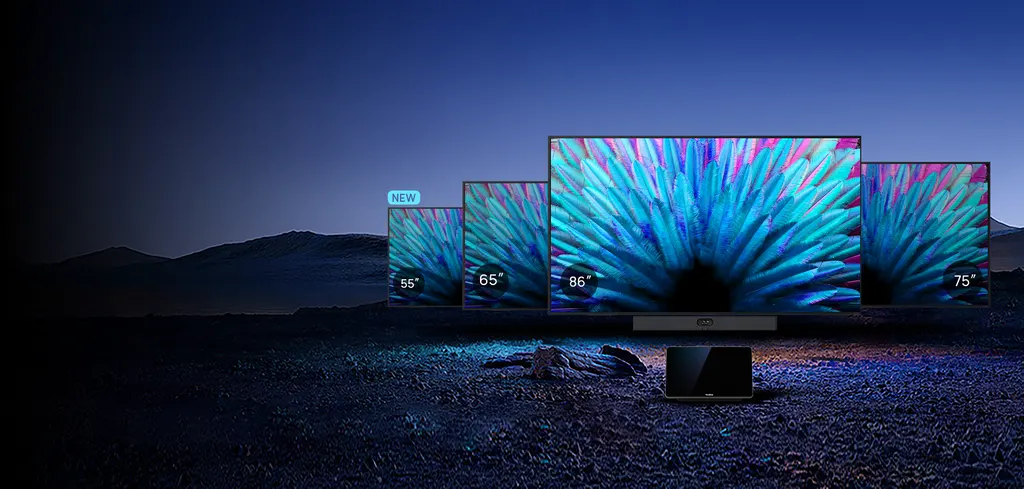
The Yealink MeetingDisplay is a 4K IPS display built for Yealink MTR meeting rooms, available in 55, 65, 75 and 86-inch sizes. Its 500 cd/m² anti-glare panel, built-in mounting for MTR devices and automatic switching to incoming Teams calls suit meeting rooms, lecture halls and lobbies across Doha. Choose your size, then request a quote from SmartRooms Qatar.
Four panel sizes for small to large MTR rooms
The MeetingDisplay is built for Yealink MTR meeting rooms and comes in 55-inch, 65-inch, 75-inch and 86-inch versions. Each size uses a 3840 × 2160 IPS panel with an anti-glare coating, 500 cd/m² brightness and a 1,200:1 contrast ratio. The anti-glare surface and brightness suit rooms with overhead lighting or large windows. Pick the size that matches your seating distance, and share the room dimensions when you request a quote.
Two 12W speakers are fitted on every size, and the panel supports 10-bit colour depth with a 60 Hz refresh rate, so it handles both presentations and video calls.
Mounting MTR devices to the back of the panel
The rear of the MeetingDisplay includes a built-in mounting structure. A Yealink MeetingBar, UVC camera or MCore unit can be slotted into it, so the room's meeting hardware does not require separate wall drilling. The manufacturer quotes under five minutes per device for this step. The panel also provides network connectivity to attached MeetingBar and MCore units through its dual Ethernet design, which helps where wall data points are scarce.
Keeping the panel and MTR devices in step
When paired with an MTR system, the panel follows the room's activity. If a Microsoft Teams call arrives while another source is on screen, the display switches to Teams automatically. Sleep, wake and power on/off functions are synchronised across the devices, and one touch console handles MTR settings and the panel's input, brightness, contrast and volume without a TV remote.
- Three HDMI 2.1 inputs for laptops, room PCs and cameras
- Two USB-A 2.0 ports and one USB-B 2.0 port
- Wireless sharing through AirPlay, Miracast and Yeacast
- Wi-Fi 6, Bluetooth 5.1 and IR remote control
- RS232 and IP control over LAN for room control systems
Where it fits in Qatar
A corporate office in Lusail with a 65-inch room can hold a Doha meeting with a team in another city, and the panel switches inputs automatically when a call arrives, so the team does not have to change sources by hand. A private school in Al Wakrah fitting out a lecture hall would likely choose the 86-inch model, so that students in the back rows can read slides from a distance. A hotel lobby in The Pearl or a clinic waiting area in Al Sadd can use the 55-inch model for digital signage, since it is rated for 24-hour operation, provided the space stays within its temperature range.
Planning the installation and power supply
- The MD-WallMount bracket is needed for wall mounting and is purchased separately; in-wall depth is 94 mm for 55 to 75-inch and 97 mm for 86-inch.
- A floor stand is supported with the MB-FS-VESA stand, which suits all four sizes.
- Net weight runs from 15.6 kg for the 55-inch to 45.2 kg for the 86-inch, so book a site survey before fixing the 86-inch model.
- The adapter accepts 100 to 240 V at 50/60 Hz, which covers Qatar's 240 V, 50 Hz supply.
- Maximum draw is 138 W to 323 W and typical draw is 82 W to 268 W, depending on size.
- Operating range is 0 to 40°C, so keep the panel in air-conditioned rooms away from direct sun, because Qatar summers can exceed 45°C.
The box includes a 3 m AC power cable, a 3 m CAT5E network cable, an IR remote with two AAA batteries and an MCore bracket for MCore 4, which is sold separately. Send the room size, the MTR devices you plan to pair and your preferred mounting method to SmartRooms Qatar and request a quote. We supply and deliver to all eight municipalities of Qatar, offer professional installation and free site surveys, and usually issue quotations within one working day. Purchase orders are accepted, and the product carries a 3-year manufacturer warranty.
Highlights
- Four sizes: 55, 65, 75 and 86-inch IPS panels
- 3840 × 2160 resolution, 500 cd/m² brightness, anti-glare coating
- Built-in mounting for MTR devices without wall drilling
- Automatic input switching for incoming Teams calls
- Three HDMI 2.1 inputs and dual gigabit Ethernet ports
- 3-year manufacturer warranty and 0 to 40°C operating range
Room fit
Tell us the room size and platform (Teams, Zoom or BYOD) and we confirm the right combination with your quotation.
Estimated timeline
Quotation within 1 working day · delivery timing depends on stock availability, and we confirm it with your quotation.
Specifications
57 specifications · Source: manufacturer · checked Oct 2026
Display16
- MeetingDisplay 55
- 55 inch; 7*24 h
- MeetingDisplay 65
- 65 inch; 7*18 h
- MeetingDisplay 75
- 75 inch; 7*18 h
- MeetingDisplay 86
- 86 inch; 7*18 h
- Display Type
- IPS
- Surface Treatment
- Anti-glare Coating
- Refresh Rate
- 60 Hz
- Grayscale Response Time
- 8ms
- Color Gamut
- 72% NTSC
- Colour Depth
- 1.07G (10-bit)
- Viewing Angle
- 178°(H)/178°(V)
- Contrast Ratio
- 1200: 1
- Resolution
- 3840 × 2160
- Brightness
- 500 cd/㎡
- Haze
- 25%
- Details
- Screen Size Operation Time:
Audio1
- Speaker
- 12W × 2
Content sharing1
- Details
- Wired screen sharing: HDMI In Wireless screen sharing: AirPlay Miracast Wireless Presentation Pod (unavailable in the United States)
Hardware Interfaces6
- Video
- HDMI In 2.1 × 3
- Audio
- 3.5mm Stereo Mini Jack (Output)
- USB
- USB-A 2.0 × 2, USB-B 2.0 × 1
- LAN
- 2 × RJ45 10/100/1000M network ports
- Control
- RS232 × 1, IP Control(Via LAN)
- Others
- Reset × 1
Wireless4
- WiFi
- Wi-Fi 6
- Bluetooth
- Bluetooth 5.1
- IR
- Supported
- Details
- 2.4G & 5G dual-band, 802.11a/b/g/n/ac/ax
Installation Methods1
- Details
- Wall-mounted Installation Floor-stand Installation
Packaging1
- Details
- 1 × MeetingDisplay 1 × Cable Pack 1 × 3m AC power cable 1 × 3m CAT5E network cable 1 × Quick Start Guide Cable ties 1 × Remote Controller (IR) 2 × AAA Batteries 1 × MCore bracket (Compatible with MCore 4, MCore 4 is sold separately)
Optional Accessories6
- When you purchase MeetingDisplay 55 and select MB-FS-VESA
- The cart cannot be used to mount MeetingDisplay 55 + MCore 4;Please use the 8 mm washers from the MeetingDisplay 55 accessory kit to secure the rear VESA mounting holes to the cart's vertical brackets.
- Motorized Mobile Stand
- MB-FS-Lift
- MD-AVBracket- S
- Compatible with MeetingBar A25, MeetingBar A40, SmartVision 40, MSpeaker Pro
- MD-AVBracket- L
- Compatible with MeetingBar A50
- MD-PTZBracket
- Compatible with UVC86
- Details
- Mounting Accessories for MeetingDisplay: Wall Mount Bracket MD-WallMount (Suitable for 55", 65", 75", and 86" MeetingDisplay) Wall Stand Bracket MB-WallStand-650W (Suitable for 55" and 65" MeetingDisplay) MB-WallStand-860W (Suitable for 75" and 65" MeetingDisplay) Floor Stand MB-FS-VESA (Suitable for 55", 65", 75", and 86" MeetingDisplay) Mounting Accessories for MVC Series & MeetingBar: Mounting Bracket: Casting Accessories: Wireless Presentation Pod (unavailable in the United States)
System Overview4
- Operating System
- Android 13
- Memory
- 4 G
- Flash
- 32 G
- Details
- Storage
Power5
- Power Adapter
- 100-240 V~50/60 Hz
- Max
- 138 W; 210 W; 215 W; 323 W
- Typical
- 82 W; 183 W; 186 W; 268 W
- Off mode
- less than 0.5 W; less than 0.5 W; less than 0.5 W; less than 0.5 W
- Details
- Power Consumption MeetingDisplay 55 MeetingDisplay 65 MeetingDisplay 75 MeetingDisplay 86
Environmental Factors3
- Operating Temperature
- 0~40°C
- Storage Temperature
- -20~60°C
- Operating Humidity
- 10~95%
Warranty1
- Details
- 3-year
Content1
- Details
- Optional Bracket
MeetingDisplay 55 + MeetingBar A251
- Details
- Wall-mounted Installation MD-WallMount MD-AVBracket-S Mobile Stand Installation MB-FS-Lift / MB-FS-VESA MD-AVBracket-S
MeetingDisplay 55/65/75 + MeetingBar A401
- Details
- Wall-mounted Installation MD-WallMount MD-AVBracket-S Mobile Stand Installation MB-FS-Lift / MB-FS-VESA MD-AVBracket-S
MeetingDisplay 55/65/75 + MVC S401
- Details
- Wall-mounted Installation MD-WallMount MD-AVBracket-S MCore bracket (Included in the package) Mobile Stand Installation MB-FS-Lift / MB-FS-VESA[1] MD-AVBracket-S MCore bracket (Included in the package) [1] MB-FS-VESA is not suitable for MeetingDisplay 55 + MVC S40.
MeetingDisplay 75/86 + MeetingBar A501
- Details
- Wall-mounted Installation MD-WallMount MD-AVBracket-L Mobile Stand Installation MB-FS-Lift / MB-FS-VESA MD-AVBracket-L
MeetingDisplay 75/86 + MVC S501
- Details
- Wall-mounted Installation MD-WallMount MD-AVBracket-L MCore bracket ( Included in the package) Mobile Stand Installation MB-FS-Lift / MB-FS-VESA MD-AVBracket-L MCore bracket ( Included in the package)
MeetingDisplay 86 + MVC S80/MVC 8601
- Details
- Wall-mounted Installation MD-WallMount MD-PTZBracket MCore bracket ( Included in the package) Mobile Stand Installation MB-FS-Lift / MB-FS-VESA MD-PTZBracket MCore bracket ( Included in the package)
MeetingDisplay 86 + MVC S80/MVC 860 + MSpeaker Pro1
- Details
- Wall-mounted Installation MD-WallMount MD-PTZBracket or MD-AVBracket-S (MeetingDisplay is compatible with only one bracket ) MCore bracket ( Included in the package) Mobile Stand Installation MB-FS-Lift / MB-FS-VESA MD-PTZBracket or MD-AVBracket-S (MeetingDisplay is compatible with only one bracket ) MCore bracket ( Included in the package)
Downloads
71 files from the manufacturer
PDF
Yealink MeetingDisplay datasheets (PDF, 1.1 MB)
PDF
Yealink MeetingDisplay manuals & guides (PDF, 108 KB)
PDF
Yealink MeetingDisplay manuals & guides (PDF, 6.9 MB)
PDF
Yealink MeetingDisplay manuals & guides (PDF, 960 KB)
PDF
Yealink MeetingDisplay manuals & guides (PDF, 951 KB)
PDF
Yealink MeetingDisplay manuals & guides (PDF, 843 KB)
PDF
Yealink MeetingDisplay manuals & guides (PDF, 911 KB)
PDF
Yealink MeetingDisplay manuals & guides (PDF, 1.1 MB)
PDF
Yealink MeetingDisplay manuals & guides (PDF, 1010 KB)
PDF
Yealink MeetingDisplay manuals & guides (PDF, 2.0 MB)
PDF
Yealink MeetingDisplay manuals & guides (PDF, 1.2 MB)
PDF
Yealink MeetingDisplay manuals & guides (PDF, 1.5 MB)
PDF
Yealink MeetingDisplay manuals & guides (PDF, 5.5 MB)
URL
Yealink MeetingDisplay manuals & guides (URL)
URL
Yealink MeetingDisplay manuals & guides (URL)
URL
Yealink MeetingDisplay manuals & guides (URL)
URL
Yealink MeetingDisplay manuals & guides (URL)
URL
Yealink MeetingDisplay manuals & guides (URL)
URL
Yealink MeetingDisplay manuals & guides (URL)
URL
Yealink MeetingDisplay manuals & guides (URL)
URL
Yealink MeetingDisplay manuals & guides (URL)
URL
Yealink MeetingDisplay manuals & guides (URL)
URL
Yealink MeetingDisplay manuals & guides (URL)
URL
Yealink MeetingDisplay manuals & guides (URL)
URL
Yealink MeetingDisplay manuals & guides (URL)
URL
Yealink MeetingDisplay manuals & guides (URL)
URL
Yealink MeetingDisplay manuals & guides (URL)
URL
Yealink MeetingDisplay manuals & guides (URL)
URL
Yealink MeetingDisplay manuals & guides (URL)
URL
Yealink MeetingDisplay manuals & guides (URL)
URL
Yealink MeetingDisplay manuals & guides (URL)
URL
Yealink MeetingDisplay manuals & guides (URL)
URL
Yealink MeetingDisplay manuals & guides (URL)
URL
Yealink MeetingDisplay manuals & guides (URL)
URL
Yealink MeetingDisplay manuals & guides (URL)
URL
Yealink MeetingDisplay manuals & guides (URL)
URL
Yealink MeetingDisplay manuals & guides (URL)
URL
Yealink MeetingDisplay manuals & guides (URL)
URL
Yealink MeetingDisplay manuals & guides (URL)
URL
Yealink MeetingDisplay manuals & guides (URL)
URL
Yealink MeetingDisplay manuals & guides (URL)
URL
Yealink MeetingDisplay manuals & guides (URL)
URL
Yealink MeetingDisplay manuals & guides (URL)
URL
Yealink MeetingDisplay manuals & guides (URL)
URL
Yealink MeetingDisplay manuals & guides (URL)
URL
Yealink MeetingDisplay manuals & guides (URL)
URL
Yealink MeetingDisplay manuals & guides (URL)
URL
Yealink MeetingDisplay manuals & guides (URL)
URL
Yealink MeetingDisplay manuals & guides (URL)
MP4
Yealink MeetingDisplay manuals & guides (MP4)
MP4
Yealink MeetingDisplay manuals & guides (MP4)
DXF
Yealink MeetingDisplay drawings & cad (DXF)
STP
Yealink MeetingDisplay drawings & cad (STP)
DXF
Yealink MeetingDisplay drawings & cad (DXF)
STP
Yealink MeetingDisplay drawings & cad (STP)
DXF
Yealink MeetingDisplay drawings & cad (DXF)
STP
Yealink MeetingDisplay drawings & cad (STP)
DXF
Yealink MeetingDisplay drawings & cad (DXF)
STP
Yealink MeetingDisplay drawings & cad (STP)
15 -
Yealink MeetingDisplay software & firmware (15 - FIRMWARE & RELEASE NOTE)
16 -
Yealink MeetingDisplay software & firmware (16 - FIRMWARE & RELEASE NOTE)
26 -
Yealink MeetingDisplay software & firmware (26 - FIRMWARE & RELEASE NOTE)
PDF
Yealink MeetingDisplay other documents (PDF, 1.0 MB)
MP4
Yealink MeetingDisplay other documents (MP4)
URL
Yealink MeetingDisplay other documents (URL)
URL
Yealink MeetingDisplay other documents (URL)
URL
Yealink MeetingDisplay other documents (URL)
URL
Yealink MeetingDisplay other documents (URL)
URL
Yealink MeetingDisplay other documents (URL)
URL
Yealink MeetingDisplay other documents (URL)
MP4
Yealink MeetingDisplay other documents (MP4)
Questions about MeetingDisplay
What sizes does the Yealink MeetingDisplay come in?
The MeetingDisplay is available in 55-inch, 65-inch, 75-inch and 86-inch sizes. A 55-inch panel suits a small huddle room, 65-inch and 75-inch panels fit medium meeting rooms, and the 86-inch model suits boardrooms and lecture halls where the furthest seat is a long way from the screen. Share your room length and seating layout with the SmartRooms Qatar team when you request a quote, and we will confirm the right size.
Is the MeetingDisplay meant to work with Yealink MTR devices?
Yes. The panel is designed for Yealink MTR meeting room systems and can be paired with MeetingBar, UVC camera and MCore devices. It runs Android 13 with 4 GB of memory and 32 GB of storage. Its main value comes from coordinated behaviour with the MTR devices in the same room, so specify the devices you already own or plan to add when you request a quote.
What picture quality does the panel deliver?
Each size has a 3840 × 2160 IPS panel with 178° horizontal and vertical viewing angles, a 1,200:1 contrast ratio, 10-bit colour depth and a 60 Hz refresh rate. The anti-glare coating and 500 cd/m² brightness help in rooms with overhead lights or large windows. The panel also lists 72% NTSC colour gamut and an 8 ms grayscale response time, which suit presentations and video calls.
How is the panel wall-mounted, and is a bracket included?
Wall mounting needs the MD-WallMount bracket, which is purchased separately and suits all four sizes. The in-wall depth with that bracket is 94 mm for the 55, 65 and 75-inch models and 97 mm for the 86-inch. A floor stand option is also available using the MB-FS-VESA stand. The VESA pattern is 400 × 400 mm for 55 and 65-inch models and 600 × 400 mm for 75 and 86-inch models.
How heavy is each model and does the wall need a survey?
Net weights are 15.6 kg for the 55-inch, 19.9 kg for the 65-inch, 28.4 kg for the 75-inch and 45.2 kg for the 86-inch. Confirm that the wall or structure can carry the load, and use the correct VESA pattern and screw size. SmartRooms Qatar offers free site surveys across Qatar, which we recommend before fixing an 86-inch panel in a boardroom or lecture hall.
What power does the MeetingDisplay need?
The power adapter accepts 100 to 240 V at 50/60 Hz, which covers Qatar's 240 V, 50 Hz mains supply. Maximum consumption is 138 W for the 55-inch, 210 W for the 65-inch, 215 W for the 75-inch and 323 W for the 86-inch. Typical use is 82 W, 183 W, 186 W and 268 W, and off mode draws less than 0.5 W. Use these figures when planning circuits and backup power capacity.
Can it be installed in a hot, sunny or outdoor area in Qatar?
No. The operating temperature range is 0 to 40°C with 10 to 95% humidity, so the panel is intended for indoor, air-conditioned rooms. Summer temperatures in Qatar can exceed 45°C, so keep the panel away from direct sun, glazed facades and any space without reliable cooling. For an outdoor or semi-open site, ask the SmartRooms Qatar team before you request a quote.
Which mounting brackets are needed for MeetingBar, UVC or MCore?
The brackets depend on the device. MD-AVBracket-S is listed for MeetingBar A25 and A40, SmartVision 40 and MSpeaker Pro. MD-AVBracket-L suits MeetingBar A50 and S50, and MD-PTZBracket suits UVC86 and SmartVision 80. The MCore bracket for MCore 4 is included in the box, but MCore 4 itself is sold separately, so confirm your combination when you request a quote.
How does the panel respond when a Teams call arrives?
The panel automatically switches to Teams when an incoming Teams call arrives, even if the room is showing another source such as a laptop or a wireless input. Sleep, wake and power functions are synchronised with the MTR devices too. For a corporate office in Lusail where staff join calls with colleagues in Doha and abroad, this means the room is ready without someone changing inputs by hand.
How can IT teams manage several rooms with this display?
Yealink Management Cloud Service (YMCS) or YDMP lets IT staff manage the MeetingDisplay and MTR devices from one platform, with device status synchronised to it. A single touch console also handles MTR and panel settings inside the room. For a school in Al Wakrah rolling out several rooms, this means one consistent set of settings to maintain. Schools and offices can order several units against a purchase order (LPO).
Can the 55-inch model run digital signage in a lobby?
Yes. The 55-inch model is rated for 7 x 24 hour working hours, while the 65, 75 and 86-inch models are rated for 7 x 18 hours. Digital signage switching is supported when the panel is paired with MTR devices. A hotel lobby in The Pearl or a clinic waiting area in Al Sadd could use it for schedules and announcements, provided the space stays within the 0 to 40°C operating range.
What warranty and purchase options apply?
The MeetingDisplay comes with a 3-year manufacturer warranty. SmartRooms Qatar supplies it by quotation, and we accept payment by bank transfer, cheque or purchase order, including LPOs and government tenders such as Monaqasat. Quotations are usually issued within one working day, and we deliver to all eight municipalities of Qatar with professional installation available.



