





Thursday, 22 October 2026 · 11 Jumada I 1448 AH Sun – Thu · 9:00 – 18:00
+971 56 914 9477 العربية
WhatsApp

MeetingEye 500

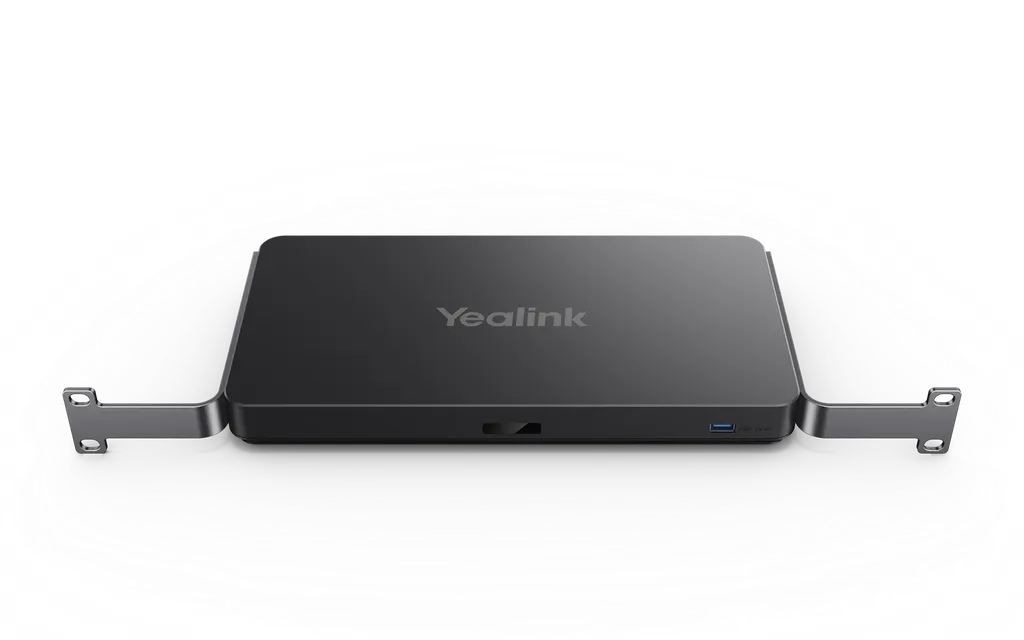
Yealink MeetingEye 500 Mini-PC for Zoom Rooms Multi-Camera Systems

WhatsApp
Priceon request
QuotationWithin 1 working day
DeliveryConfirmed with your quote, based on stock
Overview

The Yealink MeetingEye 500 is a Mini-PC for multi-camera Zoom Rooms systems on Android. It has two HDMI outputs supporting 4K display, handles 4Kp30 UHD video and content sharing, and connects through one network cable carrying data, control and power. It works with the Yealink 36x hybrid zoom 4K UHD PTZ camera or third-party cameras, suiting AV teams in Qatar upgrading meeting rooms. Request a quote.

A multi-camera mini-PC for Zoom Rooms on Android

The Yealink MeetingEye 500 is a Mini-PC that runs the Zoom Rooms system on Android and coordinates several cameras, displays and microphones within one meeting space. It acts as the processing hub of the room, keeping the meeting experience native to the Zoom Rooms platform. The manufacturer intends it for business customers, and it is sold through authorised B2B partners such as SmartRooms Qatar.

Two 4K outputs for dual-screen collaboration

The unit has two HDMI outputs, and both support 4K display. Participants can present different content on two screens at once and choose the display layout they prefer. This helps when one screen shows a remote team while the other shows a slide deck, drawing or spreadsheet. Video runs at 4Kp30 UHD, and content sharing is supported. The manufacturer's overview also mentions three screens, so confirm your planned screen count with the SmartRooms Qatar team before ordering.

Camera and microphone pairing

The MeetingEye 500 works with the Yealink 36x hybrid zoom 4K UHD PTZ camera and with third-party cameras, so you can build the room around equipment you already own or around a new Yealink camera. Combined with the microphone array, each microphone reaches 10 ft (3 m) with a 360° voice pickup range, which suits a round table where people sit at different distances from the centre. The unit is also compatible with third-party professional audio, useful where a room already has a sound system that must stay in place.

Mounting and cabling choices

The detachable design gives you four placements: hanging on a wall, sitting on a table, under a table or on a cabinet. A wall position keeps desks clear in a crowded training room, while an under-table or cabinet position suits a boardroom where equipment should stay out of sight.

The VCH interface carries data transmission, signal control and power through one multi-function network cable, which simplifies room cable management. The manufacturer also says this reduces deployment costs. In USB mode, the unit acts as PC audio and video peripherals, which is useful when a laptop is used alongside the room system.

Planning an installation in Qatar

A government authority in Doha upgrading a boardroom in West Bay might pair this unit with a 4K display and a PTZ camera, so that delegations abroad see the same material as the people in the room. A university training centre in Education City could equip several seminar rooms with the same configuration, so staff learn one system. A private school in Al Wakrah fitting out a staff meeting room in a new building could choose the under-table option to keep the desk clear.

  • Confirm the room size, camera model, number of screens and microphone layout.
  • Check the operating environment. The source data gives no operating temperature range, and Qatar summers can exceed 45°C, so confirm placement before installing.
  • Plan the network cable route from the room position to the unit.

SmartRooms Qatar offers a free site survey before any wall mounting, and quotations usually arrive within one working day. Institutions ordering several units can use a purchase order (LPO) or a government tender. Request a quote and our team will help you plan the right configuration for your room.

Highlights

  • Mini-PC for Zoom Rooms on Android with multi-camera support
  • Two HDMI outputs, both supporting 4K display
  • 4Kp30 UHD video and content sharing
  • Works with Yealink 36x hybrid zoom 4K UHD PTZ camera or third-party cameras
  • One multi-function network cable for data, control and power

Room fit

Tell us the room size and platform (Teams, Zoom or BYOD) and we confirm the right combination with your quotation.

Estimated timeline

Quotation within 1 working day · delivery timing depends on stock availability, and we confirm it with your quotation.

Specifications

2 specifications · Source: manufacturer · checked Oct 2026
OverView2
Keywords
Smart Experience * Three Screens, Efficient Meeting Separate Design, Minimalist Deployment Compatible with Third-party Pro audio USB Mode, Act as PC Audio & Video Peripherals
Introduction
As the new generation video conferencing system, Yealink MeetingEye 500 is suitable for various types of meeting rooms. It supports 4Kp30 UHD video and content sharing . You can present different 4K video and content on three screens and select the display layout as you like. *MeetingEye 500 can work with the Yealink 36x hybrid zoom 4K UHD PTZ camera or third-party cameras, regarding as the ideal solution for small and medium meeting rooms. When MeetingEye 500 combines with the microphone array, each microphone can reach 10ft (3m) and 360° voice pickup range.


Downloads

0 files from the manufacturer
No downloadable files are listed for this model yet. Ask us and we will send the datasheet.

Questions about MeetingEye 500

What is the Yealink MeetingEye 500 and who is it for?
The MeetingEye 500 is a Mini-PC that runs the Zoom Rooms system on Android and connects several cameras, displays and microphones in one meeting room. It suits organisations that use Zoom Rooms and want a multi-camera setup, such as a government authority in Doha equipping a boardroom or a university in Education City fitting out a seminar room. It is intended for business customers and is sold through authorised B2B channels, which SmartRooms Qatar supplies. Request a quote to confirm it fits your room.
Does the MeetingEye 500 support 4K video and content sharing?
Yes. The MeetingEye 500 supports 4Kp30 UHD video and content sharing, and both of its HDMI outputs support 4K display. For a boardroom presenting floor plans, engineering drawings or financial tables to remote delegates, this means fine detail on large screens. Before ordering, confirm that the displays you plan to install support 4K so the outputs are used to their full potential.
How many screens can the MeetingEye 500 drive?
The product page lists two HDMI outputs, both supporting 4K display, while the manufacturer's overview describes presenting different content on three screens. Because these two statements differ, SmartRooms Qatar recommends confirming your intended screen count and layout before ordering. For a room with one main display and one content screen, the two outputs cover the common arrangement. Send us your room plan and request a quote so we can check the configuration against it.
Which cameras can I use with the MeetingEye 500?
The MeetingEye 500 can work with the Yealink 36x hybrid zoom 4K UHD PTZ camera or with third-party cameras. This flexibility helps when a camera is already installed in the room, so the multi-camera design does not have to be built around one brand. Before buying a third-party camera, confirm that it is compatible with Zoom Rooms on Android. The SmartRooms Qatar team can discuss your camera with you when you request a quote.
How does the microphone pickup work with this unit?
When the MeetingEye 500 is combined with the microphone array, each microphone can reach 10 ft (3 m) and picks up voices across a 360 degree range. This suits a round table where participants sit at different distances from the centre. Actual pickup depends on room layout and the number of participants, so a site survey helps confirm microphone placement. The unit is also compatible with third-party professional audio if your room already has a sound system to keep.
Can the MeetingEye 500 be wall mounted or placed under a table?
Yes. The detachable design supports hanging on a wall, placing on a table, fitting under a table or sitting on a cabinet. Wall mounting is useful in a crowded training room where desk space is limited, while an under-table position suits a boardroom. SmartRooms Qatar offers a free site survey before wall mounting, to confirm mounting positions, cable routes and the location of the display before any work starts.
How is the MeetingEye 500 cabled?
The VCH interface carries data transmission, signal control and power over one multi-function network cable. This reduces the number of separate cables that must be routed to the unit and simplifies cable management in the room. The manufacturer also says it reduces deployment costs. Plan the route from the equipment position to the room network, and check that the cable run suits your ceiling void or cable tray before installation.
Can the MeetingEye 500 work as a USB peripheral for a laptop?
Yes. The MeetingEye 500 has a USB mode in which it acts as PC audio and video peripherals. This lets a laptop use the room's camera and audio, which is useful for teams that combine a laptop-based presentation with the room system. Tell the SmartRooms Qatar team how you plan to use USB mode in your room, so the setup covers both the laptop workflow and the Zoom Rooms workflow from day one.
Is the MeetingEye 500 suitable for Qatar's summer heat?
The source data does not state an operating temperature range for the MeetingEye 500, so SmartRooms Qatar cannot confirm one here. Summer temperatures in Qatar can exceed 45°C, so check the installation environment before placing the unit, particularly if it sits near a window, inside an unventilated cabinet or in a space that is not climate-controlled. Request a quote and we will advise on a suitable position.
What should a school or university plan before ordering several units?
Start with a list of rooms, the camera and display planned for each room, and the proposed mounting position for every unit. Organisations ordering several units can issue a purchase order (LPO), or quote a tender reference for government projects, and SmartRooms Qatar can quote for the full set. Ask for a site survey to plan cable routes and mounting positions. Quotations usually come within one working day.
Is the MeetingEye 500 a current model I can order now?
Yes. The MeetingEye 500 is listed as a current model, so you can request a quote for it directly. If you are comparing it with other Yealink room systems, send SmartRooms Qatar your room size, camera plan and number of displays, and the team will advise which configuration suits the room. Any lead time is confirmed with the quotation, based on stock at the time.
Does the MeetingEye 500 come with a warranty?
Products supplied by SmartRooms Qatar are covered by the manufacturer's warranty. The source data for the MeetingEye 500 does not list a warranty duration or specific terms, so SmartRooms Qatar will not state them here. Ask for the warranty details in writing with your quotation, and include them in your purchase order or tender file so your procurement team has the terms on record.

Similar models

Yealink MVC S60 Yealink MVC S60 Microsoft Teams Rooms System with 360° Camera
360°
Biamp Evoko Liso Wall Mount Kit Biamp Evoko Liso Wall Mount Kit (910-01930) for Room Scheduling Displays
TAA Compliant
Email Call


